eBay tools are software features — either built into an automation platform or added separately — that handle repetitive selling tasks like pricing, customer messages, inventory syncing, and listing design automatically, rather than requiring a seller to do them by hand.
As eBay’s marketplace has scaled, so has the expectation that top-rated sellers respond quickly, price competitively, and keep listings accurate around the clock — exactly the workload these tools are built to handle.
Below, we walk through the 7 tools that make the biggest difference for eBay sellers in 2026, including which parts of AutoDS are handled natively.
7 Essential eBay Tools Every Seller Should Have in 2026: Key Takeaways
eBay tools fall into a few core categories: pricing automation, buyer messaging, customer support/case management, listing design, inventory syncing, and bulk organization.
AutoDS handles pricing, messaging, tracking, inventory, and customer support natively — sellers don’t need to bolt on a separate platform for most of this in 2026.
eBay’s Best Offer feature isn’t something AutoDS automates, and AutoDS explicitly recommends against relying on it for a dropshipping model, since supplier-side price monitoring and manual offer negotiation work against each other.
AI-assisted tools (title and description generation) are now part of the standard toolkit, not an add-on — something a 2022-era list of “essential” tools wouldn’t have included.
Bulk actions, tagging, and filtering save sellers the most time when running high-volume stores with hundreds or thousands of listings.
eBay’s marketplace rewards sellers who can move fast — competitive pricing, quick replies, and consistently accurate listings all factor into a seller’s standing and search visibility. Early on, keeping up with all of that meant hiring more people as the store grew, which added labor costs and slowed growth. Today, automation tools handle most of that workload, letting a single seller (or a small team) run a store that would have required a much larger staff a decade ago.
Top 7 Time-Saving, Sales-Boosting eBay Tools
1. Automated Price Optimization (Instead Of Manual Offer Negotiation)
eBay’s Best Offer feature lets buyers negotiate directly on Buy It Now listings — you can accept, decline, or counter. It’s a popular feature, but it’s worth knowing upfront: AutoDS doesn’t automate Best Offer, and actively recommends against relying on it for a dropshipping business.
The reasoning is straightforward — dropshipping pricing already depends on continuously monitoring your supplier’s pricing, and manually negotiating offers on top of that creates a second, conflicting pricing process that can undercut your margins without you noticing.
The tool that actually solves the underlying problem — staying price-competitive without constant manual work — is AutoDS’s Automatic Price Optimization. Instead of negotiating individual offers, you set rules once: raise prices on listings that are selling well, and lower prices on ones that have gone stale for a set number of days. It’s a systematic way to stay competitive across your entire catalog, rather than case-by-case negotiations for individual listings.
💡Pro Tip: If you do choose to enable Best Offer on some listings despite the tradeoffs, keep it limited to non-dropshipped or manually-managed items where you’re not also relying on supplier price monitoring.
2. Automated Buyer Messages & Tracking Updates
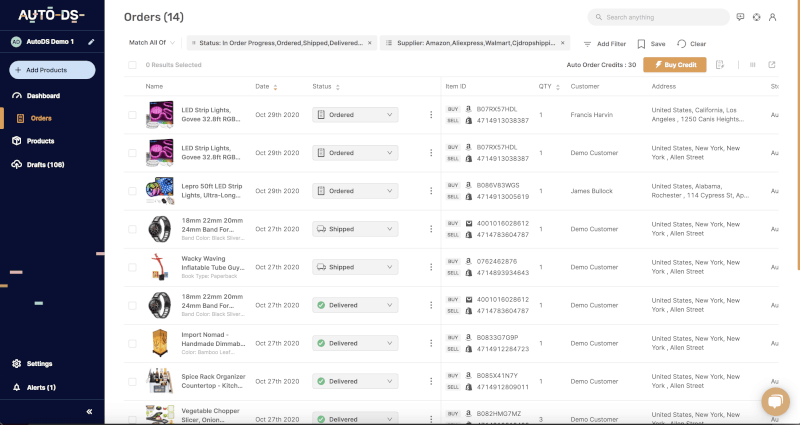
Buyers expect confirmation messages and delivery updates as a matter of course. AutoDS handles this natively: once an order is placed and processed, AutoDS automatically sends buyers a set of messages with dynamic order details (tracking number, order ID) filled in, rather than requiring you to draft and send each one manually. Combined with automatic tracking number updates once your supplier ships an item, this covers the bulk of what used to require a separate messaging or email tool.
3. eBay Customer Support Management
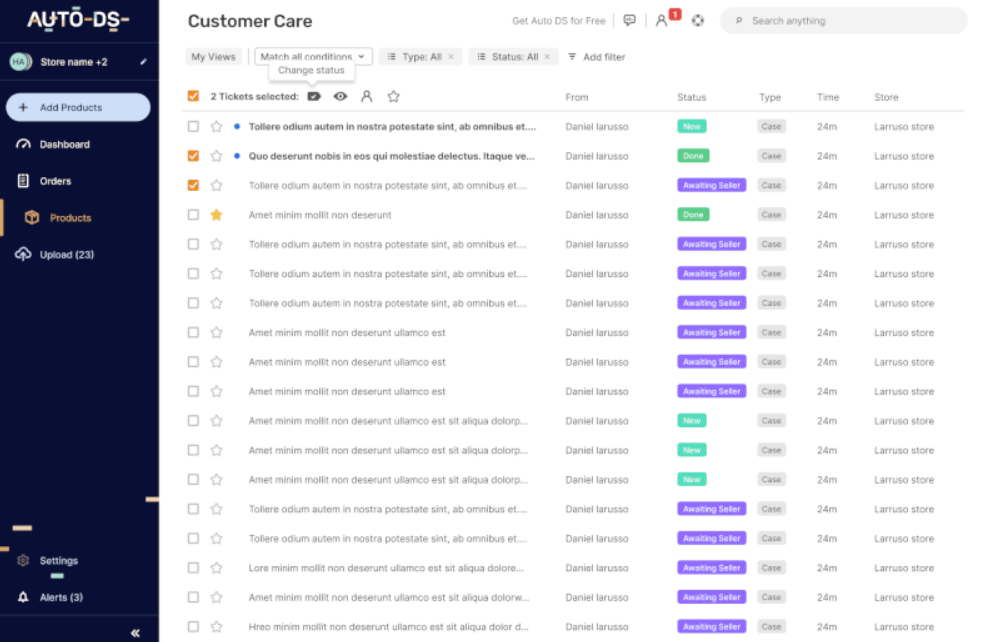
Great customer support is a genuine differentiator on a marketplace as competitive as eBay’s — and how fast and consistently you respond matters as much as what you say. Rather than reaching for a separate CRM or helpdesk platform, AutoDS consolidates all your eBay messages and cases into a single screen, so you don’t have to switch between eBay’s native interface and a third-party dashboard. From there, you can view order details alongside each message, take action on orders (like issuing a refund) without leaving the conversation, and use saved reply templates and chat snippets for the questions that come up again and again.
4. AI Product Title & Description Generator
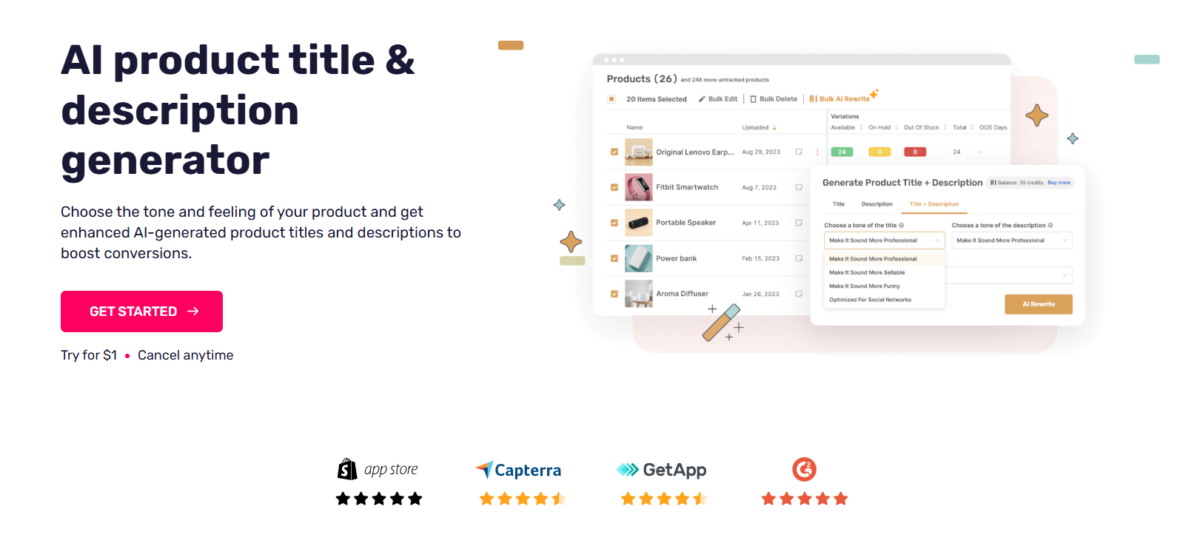
This is the one tool on this list that a seller’s list from 2022 wouldn’t have included — and by 2026, it’s standard. Writing a strong, keyword-rich title and a clear, complete description for every listing takes real time when done manually, and it’s one of the first things to get neglected as a catalog grows. AutoDS’s AI Product Title & Description Generator handles this automatically, producing titles and descriptions that follow a logical structure (brand, model, key feature, size/color, condition) rather than the vague, keyword-stuffed titles that were common. A clear description also does double duty: it reduces the volume of basic customer service questions, since buyers get their questions about size, materials, or compatibility answered up front.
5. eBay Listing Designer
Listing design tools let you add visual structure, brand colors, and cross-promotion elements to your product descriptions — sometimes called “eBay templates.” A well-designed listing does two things: it makes your store more memorable to repeat buyers, and it can cross-promote your other listings to shoppers already browsing your store, adding extra visibility without extra ad spend. If you’re just starting out, this is one of the lower-priority tools on this list — worth adding once your catalog and traffic have grown enough for visual branding to reach a meaningful number of buyers.
💡Pro Tip: The first time eBay rolls out a policy change that affects your category, don’t panic-edit listings one at a time while you figure out the new rule. Take 10 minutes to tag the affected listings first, then fix them all in a single bulk action; it’s the difference between an afternoon of work and 5 minutes.
6. Sync, Link, and Hide eBay Inventories
Keeping inventory synchronized across your store and suppliers prevents two expensive mistakes: selling something that’s actually out of stock and manually rechecking stock levels one listing at a time.
Sync: AutoDS automatically syncs your eBay listings with your supplier’s live stock and pricing, so changes on the supplier’s end are reflected in your store without manual intervention.
Link: SKU linking lets you connect multiple listings (a bundle, a variant, or an alternate version of the same product) so they share inventory logic and don’t drift out of sync.
Hide: eBay’s search algorithm tends to favor listings that show lower available quantities — buyers respond to scarcity signals, and eBay’s ranking reflects that. Deliberately hiding your true (larger) inventory count is a common tactic to work with that dynamic rather than exposing your full stock number, which can also help you stay under eBay’s selling limits as a newer account.
7. eBay Tags, Filters, and Bulk Actions
Once you’re managing more than a handful of listings, item organization tools become less of a convenience and more of a necessity.
Tags: Short internal notes attached to listings — supplier name, warehouse location, assigned team member, or a custom category — that make filtering fast later on.
Filters: The ability to narrow your listings by quantity, price, SKU, category, site, or date range, so you’re working with the right subset instead of scrolling through your entire catalog.
Bulk Actions: The ability to apply a change (a price adjustment, a promotion, a policy update) across hundreds of listings at once, instead of opening each one individually — which matters most when eBay updates a category policy and expects sellers to bring existing listings into compliance quickly.
Frequently Asked Questions
Do I need separate tools for pricing, messaging, and customer support, or does one platform cover all of it?
As of 2026, a platform like AutoDS covers pricing automation, buyer messaging, tracking updates, and customer support management natively, within one dashboard — sellers generally don’t need to combine several separate third-party tools to get this coverage anymore.
Does AutoDS support eBay’s Best Offer feature?
No. AutoDS doesn’t automate or monitor Best Offer negotiations, and recommends against relying on it for a dropshipping model, since it can conflict with supplier-side price monitoring. AutoDS’s Automatic Price Optimization is the tool built to solve the same underlying goal — staying price-competitive — without that conflict.
Are AI-generated titles and descriptions actually reliable enough to use as-is?
They’re a strong starting point, but it’s still worth a quick manual check, especially for details like exact measurements, compatibility, or warranty terms that directly affect buyer questions and returns.
Why would I want to hide my actual inventory count on eBay?
eBay’s search ranking tends to favor listings that show scarcity (lower visible quantities), and buyers respond to it too. Hiding your true stock count is a common practice to work with that dynamic, and it can also help newer accounts avoid running into eBay’s selling limits.
Final Thoughts On Why eBay Tools Are Important For Growth
At the end of the day, none of these tools is about working harder — they’re about getting the repetitive stuff off your plate so you actually have time for the parts of the business that need a human touch: picking better products, building your brand, and figuring out what makes your store different. If you’re just starting out, automated messaging and customer support are worth setting up first, since they shape whether a buyer trusts you enough to come back. As your store grows, pricing automation, inventory syncing, and bulk actions are what let that growth happen without your workload growing right along with it.
The good news is you don’t need to stitch together five different tools to get there. AutoDS covers pricing automation, buyer messaging, tracking updates, customer support management, AI-generated titles and descriptions, and inventory syncing in one place — so setting this up is a lot less overwhelming than it might sound.
Ready to see it in action?Try AutoDS for $1 and start automating the parts of your eBay store that are eating up your time.
Lola has focused on crafting high-impact content for B2B SaaS companies in the e-commerce and dropshipping space since 2019. With a strong background in digital marketing, she creates strategic content that helps dropshippers and business owners thrive at every stage of the funnel—from generating awareness to driving conversions. She translates complex software features into clear, actionable insights, helping online retail brands connect with their audience and stand out in competitive markets.