WooCommerce remains one of the most flexible and powerful platforms for building a dropshipping business, even in a market often dominated by Shopify. Learning how to dropship effectively in 2026 is a surefire way to earn solid extra income. As an open-source solution built on WordPress, WooCommerce dropshipping gives sellers full control over their store, costs, and customization. This makes it a strong choice for both new and experienced entrepreneurs.
This guide is designed for beginners who want to learn how to dropship on WooCommerce from scratch, as well as advanced sellers looking to optimize, automate, or scale their existing stores. You’ll learn step by step how to set up WooCommerce for dropshipping, choose the right suppliers, import and price products, automate order fulfillment, and grow a profitable WooCommerce dropshipping business in 2026.
WooCommerce is still a top dropshipping platform in 2026, offering full ownership, flexibility, and strong SEO advantages.
Automation is essential, as manual WooCommerce dropshipping no longer scales without errors or lost profits.
Startup costs are flexible, allowing beginners to start lean and scale expenses alongside revenue growth.
Performance and reliability matter, making good hosting, a clean plugin setup, and quality suppliers critical.
Using automation tools like AutoDS gives WooCommerce sellers a competitive edge through end-to-end dropshipping automation.
What Is WooCommerce Dropshipping?
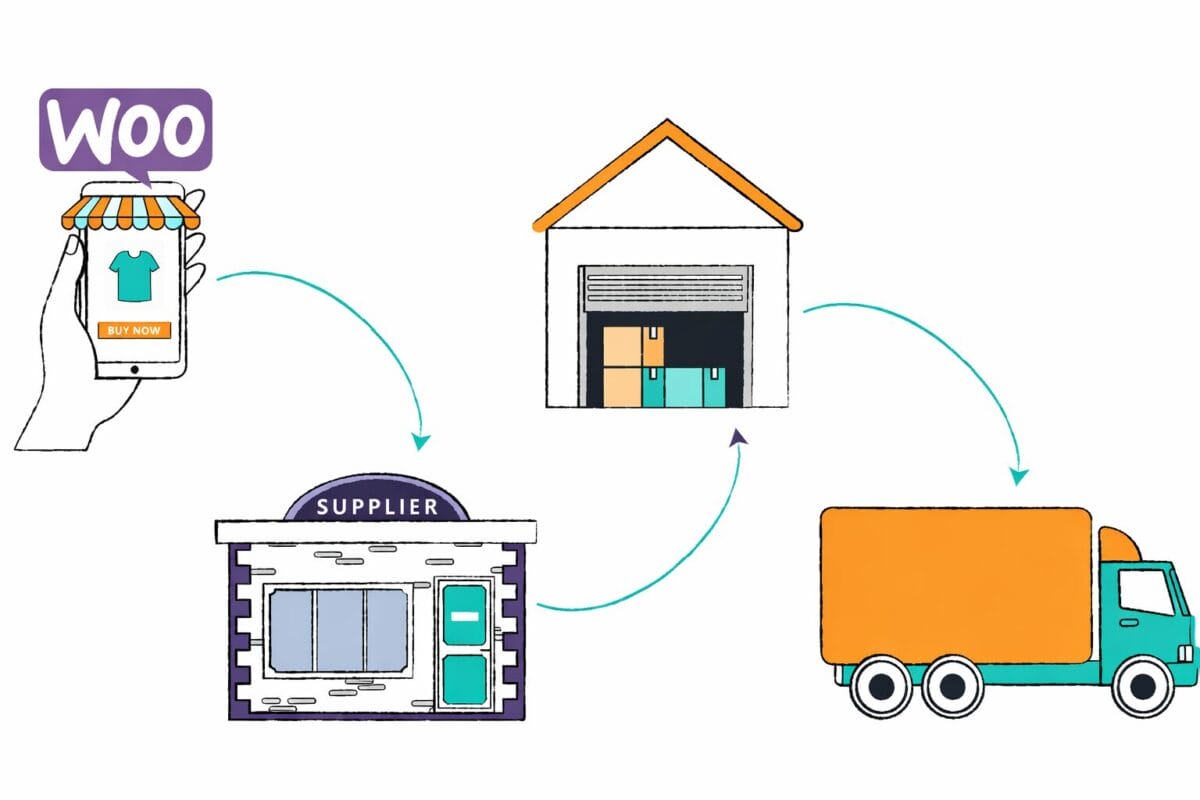
WooCommerce dropshipping is a business model where you sell products through a WooCommerce-powered online store without holding inventory yourself. Instead of stocking products, you list items from third-party dropshipping suppliers, and when a customer places an order, the supplier handles storage, packing, and shipping directly to the buyer. Unlike hosted eCommerce platforms (such as Shopify or Wix), WooCommerce is self-hosted and runs on WordPress. This means you fully own your store, data, and infrastructure. With WooCommerce, you can customize everything from checkout flows and SEO settings to advanced automation and integrations.
The dropshipping model on WooCommerce works through a simple but powerful flow:
You build a WooCommerce store, connect it to dropshipping suppliers, import and price products, and promote them using organic traffic, paid ads, or social media. At its core, successful WooCommerce dropshipping relies on four key components: a conversion-optimized online store, reliable suppliers, smart automation tools for product importing, pricing, and order fulfillment, and consistent traffic sources that drive targeted shoppers to your products. When these elements work together, WooCommerce becomes a scalable and cost-efficient platform for building a long-term dropshipping business.
Stop doing dropshipping the hard way 😮💨 Automate EVERYTHING with AutoDS ⚙️🚀 Start for just $1
How Much Does It Cost to Start WooCommerce Dropshipping?
One of WooCommerce’s biggest advantages is flexibility. You can start with a minimal budget and gradually invest more as your store grows. Below is a realistic breakdown of one-time costs, monthly expenses, and what beginners should expect when scaling.
One-Time Costs
- Domain: Your domain name is your store’s online address and typically costs $10–$20 per year. This is a required expense for any professional WooCommerce dropshipping store.
- Hosting (Initial Setup): While hosting is a recurring cost, many providers require an upfront payment for the first year. Entry-level WooCommerce hosting usually starts at $60–$120 per year, depending on performance and support.
- Premium Themes (Optional): WooCommerce offers free themes, but many sellers choose premium WooCommerce themes for better design, speed, and conversion optimization. These usually range from $40–$100 as a one-time purchase.
Monthly Costs
- Hosting: Ongoing WooCommerce hosting costs typically range from $10–$30 per month for beginners and can increase as traffic and order volume grow.
- Automation Tools: To run WooCommerce dropshipping efficiently, most sellers use automation tools like AutoDS for product importing, pricing updates, and order fulfillment. These tools usually cost $20–$60 per month, depending on features and scale.
- Apps & Plugins: Additional WooCommerce plugins like SEO, caching, security, or email marketing can add $0–$50 per month, depending on whether you use free or premium solutions.
- Marketing Budget: Traffic is essential for sales. Beginners often start with $100–$300 per month for paid ads, influencer marketing, or content promotion, and scale this budget as they validate winning products.
Realistic Startup Budget (Beginner → Scaling)
For most beginners, a realistic WooCommerce dropshipping startup budget falls between $150–$300 upfront, with $100–$300 in monthly costs during the early stages. As you move into scaling mode—adding better hosting, advanced automation, and higher ad spend—monthly expenses can grow to $500–$1,000+, aligned with revenue growth.
The key advantage of WooCommerce dropshipping is that costs scale with your business, allowing you to start small, validate demand, and reinvest profits as you grow.
Is WooCommerce Good for Dropshipping in 2026?
Yes, WooCommerce is still a strong platform for dropshipping in 2026, especially for sellers who want full control, flexibility, and long-term growth. However, it’s not a one-size-fits-all solution. Below is a clear breakdown of the advantages and disadvantages of WooCommerce dropshipping, so you can decide if it fits your business goals.
Advantages of WooCommerce for Dropshipping
- Full Ownership & Control
- No Platform Transaction Fees
- Flexibility With Plugins & Custom Workflows
- SEO Advantages for Long-Term Growth
With WooCommerce dropshipping, you fully own your website, data, and customer relationships. There are no platform restrictions, forced upgrades, or sudden policy changes that can impact your store. Unlike hosted platforms, WooCommerce does not charge transaction fees on sales. You only pay standard payment processor fees, which helps improve profit margins.
WooCommerce’s ecosystem allows near-unlimited customization. You can build custom dropshipping workflows using plugins for sourcing, pricing rules, fulfillment automation, subscriptions, or multi-supplier setups. Because WooCommerce runs on WordPress, it offers powerful SEO capabilities. Advanced content marketing, blog-driven traffic, internal linking, and technical SEO provide WooCommerce dropshipping stores with a significant advantage for organic growth and AI-driven search visibility in 2026.
Disadvantages of WooCommerce for Dropshipping
- Requires Hosting & Maintenance
- Higher Technical Responsibility
- Automation Is Not Native
- Can Become Complex Without the Right Tools
With full ownership comes responsibility. You must manage hosting, updates, security, and performance, or choose a managed hosting provider to handle it for you. Compared to fully hosted platforms, WooCommerce dropshipping requires a higher learning curve. Store owners are responsible for plugin compatibility, backups, and troubleshooting.
WooCommerce does not include built-in dropshipping automation. Product importing, order fulfillment, and inventory syncing require third-party automation tools. As your store scales, managing suppliers, pricing rules, and fulfillment manually can become overwhelming. Without proper automation and systemized workflows, WooCommerce dropshipping can quickly feel complex.
WooCommerce Dropshipping vs Other Platforms (2026 Comparison)
| Feature | WooCommerce | Shopify | Wix | BigCommerce |
|---|---|---|---|---|
| Monthly Cost | Low–Flexible (hosting + tools, no platform fees) | Medium–High (monthly plan + apps) | Low–Medium (plans + limited apps) | Medium–High (higher base plans) |
| SEO Control | Very High (full WordPress SEO access) | Medium (good but restricted) | Low–Medium (limited technical SEO) | High (strong technical SEO tools) |
| Setup Difficulty | Medium–High (self-hosted setup, plugins required) | Low (fully hosted, beginner-friendly) | Low (drag-and-drop builder) | Medium (more technical than Shopify/Wix) |
| Best Use Case | Long-term dropshipping brands, SEO-driven growth, advanced workflows | Beginners who want fast setup and simplicity | Small stores, hobby sellers, simple catalogs | High-volume sellers, enterprise-level scaling |
| Automation Level | High (via third-party dropshipping tools) | Very High (native + app ecosystem) | Low–Medium (limited dropshipping automation) | High (strong built-in features, fewer tools) |
| Scalability | Very High (full control, customizable infrastructure) | High (easy scaling, platform limits exist) | Low–Medium (best for small stores) | Very High (built for large catalogs) |
What You Need to Start WooCommerce Dropshipping
Starting WooCommerce dropshipping requires a mix of technical setup and business foundations. The good news is that once these basics are in place, you can automate most of the daily operations and focus on growth.
Technical Requirements
- Domain & Hosting
- WordPress Installation
- WooCommerce Plugin
You’ll need a custom domain name and reliable WooCommerce-compatible hosting. Your hosting should support fast load times, SSL security, and scalability as traffic grows. WooCommerce runs on WordPress, so installing WordPress is a required step. Most hosting providers offer one-click WordPress installation, making setup beginner-friendly even with no technical background.
The WooCommerce plugin turns your WordPress site into a fully functional eCommerce store. It handles product pages, carts, checkout, and order management, forming the core of your WooCommerce dropshipping store.
Business Requirements
- Payment Gateways
- Tax & Legal Basics
- Customer Support Setup
To accept payments, you’ll need to connect payment gateways such as credit cards, digital wallets, or local payment methods. Choosing reliable gateways ensures smooth checkout and higher conversion rates. Every dropshipping business must address tax collection, invoicing, and basic legal requirements. This includes sales tax or VAT setup, refund policies, and required legal pages like privacy policy and terms of service.
Even with automation, customer experience matters. Setting up customer support channels like email support, contact forms, or live chat helps you manage inquiries, refunds, and post-purchase communication professionally.
Step-by-Step: How to Start WooCommerce Dropshipping in 2026
Now that we’ve learned what WooCommerce is and why it’s profitable, it’s time to learn how to start dropshipping with WooCommerce. Comparatively, starting to dropship with WooCommerce can get a bit more technical. But, as we follow this guide, we’ll have no problem setting everything up properly.
With that said, there are a few steps we need to follow:
1. Find Winning Products To Dropship On WooCommerce
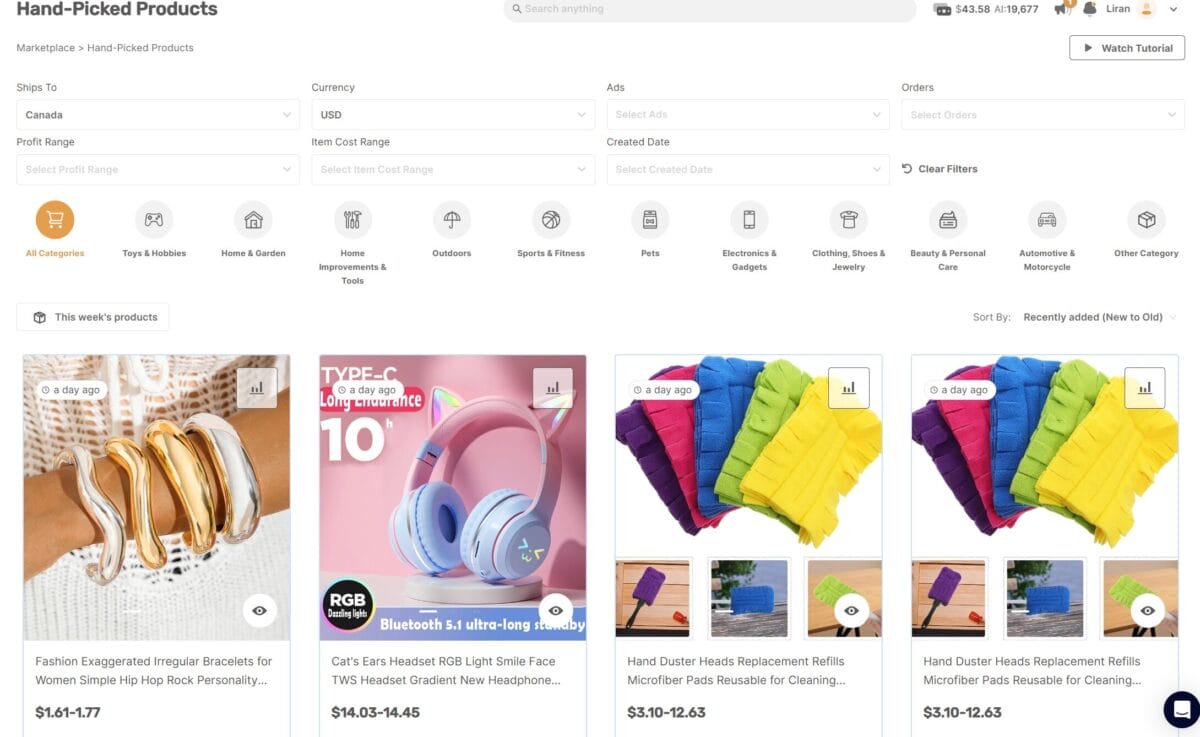
First and foremost, we need to find trending products to dropship on WooCommerce. Importantly, it’s beneficial for us to do product research before opening our store because we can customize our store based on our product catalog & niche. Consequently, we can create our domain and choose our themes based on the type of products we offer.
Plus, product research is crucial when dropshipping since it’s the key driver for sales and profits. As a result, we need to find winning items with high demand. And, to do that, we can utilize different product research methods and tools:
- AutoDS Hand-picked Products Hub
- AutoDS Best-Sellers YouTube Playlist
- AutoDS Product Finding Blog
- Supplier Best Seller Sections
- Spy On The Competition
- Keep Track Of Social Media Trends
- Ads Spy Tool
Most notably, we can automate our product research with a dropshipping automation tool like AutoDS. Uniquely, AutoDS’ Hand-picked Products Hub helps us find proven best-sellers in minutes which we can automatically import in a click. You should also check out the AutoDS best-sellers YouTube playlist and product finding blog for a curated list of proven items that wil gurantee you sales.
To note, AutoDS has a new Marketplace feature that enables us to see relevant dropshipping ads and complete product analysis. Plus, it makes it easier to find products by category and a number of different filters.
Additionally, we can keep track of social media trends on platforms like Instagram and TikTok by analyzing trending hashtags. Some examples include #TikTokMadeMeBuyIt or #InstaGood. Moreover, we can keep an eye out on our supplier’s best seller sections to see what’s in-demand.
Lastly, by using the AutoDS ads spy tool you can spy on our competitors and gain insights on what products are selling well. To do so, we can track Facebook ads, TikTok ads and Instagram ads to see how popular a product ad is, then we can import the same one to our stores.
After collecting a solid list of in-demand items, we can use the AutoDS product research spreadsheet. To explain, the spreadsheet covers specific questions and dives into product research in an organized fashion. Thus, ensuring that we build a killer product catalog when looking for items.
2. Select A Reliable Dropshipping Supplier

Great, we have our best-sellers! Now, we need to find reliable and trustworthy suppliers to source from.
With that said, we need to find a dropshipping supplier that checks all of the following boxes:
- International warehouses
- Wide & affordable product range
- Practical shipping, return, and payment policies
- Positive reviews
- Excellent customer service
We should note that it’s best to work with multiple suppliers. As such, we can compare prices and shipping times. Plus, if one supplier is out of stock, we can quickly fall back on another.
Furthermore, it’s best to source from AutoDS-supported suppliers. This allows us to automate everything from sourcing to order fulfillment and more. Therefore, enabling us to run our business efficiently.
3. Set Up Your WooCommerce Dropshipping Store
After finding our supplier, we need to set up our WooCommerce dropshipping store properly. Interestingly, there are two ways we can set up our WooCommerce store. The first one is directly through WordPress. On the other hand, with the second method, we will purchase a unique domain on GoDaddy and connect it to a hosting service.
For the first method, we need to first sign up for WordPress, which is free. To clarify, WordPress allows us to host and build websites. After signing up, we get a generic domain and generic hosting.
However, with WordPress, we can’t choose a unique domain. Additionally, the WordPress hosting service is relatively slow, with limited bandwidth. But, it’s enough to get started before moving on to more advanced steps.
Then, we need to purchase the ‘Business Plan’ on WordPress to gain access to download and install the WooCommerce plugin. Up until now, everything was free; however, now we need to pay $25 a month for our WooCommerce plugin.
Some benefits of the Business Plan include more hosting space, access to numerous plugins, advanced search engine optimization (SEO), and more. After that, we should register our domain which costs about $20 a year. We can do this directly through WordPress. However, doing everything separately is recommended (more on that below).
Now, the second method will give us more bang for the buck. Since we won’t be creating our accounts directly through WordPress, the process can get a little technical, but it’s not complicated.
With that in mind, to set everything up with the second method, we need to follow these steps:
- Sign Up To A Hosting Service
- Register & Connect A Domain
- Create The WooCommerce Store
- Add A WooCommerce Blog Page
- Set Up Policy, Legal, Contact Pages
Sign Up To A Hosting Service
First, we must sign up for a hosting service. To clarify, a hosting service offers the facilities required for us to create and maintain a site. In addition, it makes our website accessible on the World Wide Web.
We need to ensure that the service provides both WordPress (WP) and the WooCommerce (WC) plugin in its subscription. We can use hosting services like BlueHost, Siteground, and Hostinger, which are more cost-effective than going directly through WordPress. Plus, these services provide us with the WordPress and WooCommerce plugins.
Then, we need to register a domain. We recommend using GoDaddy for this. As such, we can have more control over the name of our domain. For example, we can add our unique name, like ‘www.yourstorename.com.’ Then, we can connect it through a hosting service like Siteground.
Register & Connect A Domain

Now, to have a functional store on the internet, we need to register a domain and connect it to our hosting service. Notably, it’s better to separate our domain and hosting service from our WooCommerce platform to have more control over it.
Then, we should use a separate hosting platform like SiteGround to register our unique and custom domains. In our example, we registered a domain called ‘productchasers.com‘ from GoDaddy. Now, we want to connect it to SiteGround so that we can install WordPress and WooCommerce on our hosting service to start building our store.
To do this, we need to go into the ‘My Products’ section on the GoDaddy dropdown menu and find our purchased domain. After that, we can choose the DNS button to connect our domain to our hosting service, SiteGround.

Next, scroll down and find the section for ‘Nameservers.’ Now, we need to copy the server names from Siteground and add them here. To elaborate, this tells GoDaddy which domain servers to use from our hosting service. In other words, it connects our domain name to our hosting service, so we can begin working under our new domain.

Next, we need to go to Siteground and add our domain from GoDaddy. To demonstrate, we click on ‘New Website’ and add our custom URL from GoDaddy.

We need to select that we’re adding an existing domain and paste the URL in the section below. After this, we are given options from which we choose ‘Start A New Website’.
And, in the end, we need to go on WordPress and add our unique site address and WordPress address with the domain URL from GoDaddy. We simply log in to our WordPress dashboard and go to ‘Settings’ and then ‘General.’
Here, we can change our WordPress site URLs in the ‘WordPress Address’ and ‘Site Address’ boxes. However, domain transfers can take a few hours to complete, so be patient while the gnomes in the background do their work.

After setting everything up, we can access WordPress and WooCommerce through Siteground. To clarify, we need to go to ‘Site Tools’ on Siteground and install our WordPress+WooCommerce plugins.

From the ‘Pinned Tools’ selection on Siteground, we have various tools we can install to get started. Click on ‘Install & Manage WordPress.’ Then, choose the WordPress+WooCommerce plugin.
It’s important to note that connecting a domain is not an absolute must at this stage if we’re still determining what domain to choose or which niche to sell. However, it is recommended that we begin with product research first to understand better in what way to customize our WooCommerce dropshipping store.
Create The WooCommerce Store
Finally; we get to the good stuff! Now we can start building our very own WooCommerce dropshipping store. In the WooCommerce onboarding process, we’ll get a step-by-step guide to creating our store.
If we don’t get the onboarding process, we can access themes by clicking on Appearance & Themes on the left menu.

To start off, we get an assortment of eCommerce website templates. Interestingly, the templates are optimized for various types of businesses. So, we can choose whichever one best fits our dropshipping store.
As such, for this example, we can choose the ‘Clothing Store’ template and get started. We are choosing this template because our store example will sell in the clothing niche. So, the ‘Clothing Store’ template is perfectly set up to optimize our store and encourage conversions.
Because of this, our store name is ‘Cool Cloth,’ and our domain is ‘productchasers’ for those looking for the coolest and latest clothing. Alternatively, we can choose the default storefront and work with a blank canvas. However, it’s always best to customize our store according to our niche.

Now, we need to access the WooCommerce plugin on the left side of the WordPress panel.
Here we can start setting up our store. To begin, we need to set up our store details like country, address, postal code, and city, as shown in the above image.

Next, we need to add products to our WooCommerce dropshipping store. The best way to do this is by connecting our store to AutoDS first. As a result, we won’t have to import products manually; instead, we can automate the process with AutoDS Product Importing. With this tool, we can import thousands of products with a click of a button.
Automating this process saves us time and effort since we won’t have to copy & paste each product detail one by one to create a listing. But, don’t worry, both of these processes (connecting to AutoDS and AutoDS Importing) are explained later on in the article.

Now, let’s set up our payment options. Notably, the WooCommerce platform has a few options we can choose from. So, we can use one or all of the following methods: direct bank transfer, check payments, and cash on delivery.
In this section, we can provide a description and instructions on how to proceed to ensure our customers don’t struggle or get confused.

Now we need to add our tax rates. And, through WooCommerce, we can have real-time sales tax calculations. By installing Jetpack, our taxes will be calculated and added automatically to every order.

What’s more, in our setup process, we have the step to ‘Get More Sales.’ To clarify, WooCommerce gives us various marketing options to boost traffic and conversions. For example, we have Google Ads, Mailchimp, TikTok, and many other options. As such, we can manage our marketing through WooCommerce.

Lastly, we get the chance to personalize our store. First, we must create a logo for our store to help us become recognizable and build a brand. This is where we can get creative with the help of a logo maker like Canva. After adding a logo and setting a store notice, we can set up our homepage and more.
Here we can change the background, the images, the text, the placement of the elements, and much more. For example, we can add a background image and change the text on our homepage. Plus, we can decide if we want to add a button or not.
Additionally, we can add certain effects and simply personalize them to the fullest. As a matter of fact, when we edit our pages, we can fully customize them to fit our brand.

As mentioned before, we can brand our store, add our logo and provide our own personal touch. We recommend using the Elementor plugin (paid tool), a premium or block editor that comes free with WordPress.

Interestingly, when personalizing our store, we can change the placement of the site elements to our desired structure. For instance, we can set up featured products, testimonials, and more sections.
In addition, we can change the color and font to match our chosen brand identity. On top of that, we can add our logo to complete the branded makeover of our website.
After tidying everything up, we can stand out from the competition, attract customers and become recognizable.
Add A WooCommerce Blog Page

A blog page is an incremental part of our WooCommerce setup because it can help us generate organic traffic. But first, we need to clarify that a blog page is a page that displays valuable content about our product or service while elegantly marketing it.
As we mentioned, WooCommerce does not have organic traffic. So, having a blog page helps us increase the perceived value. In our store example, we can find the blog page in the ‘News’ section. Plus, when creating this blog page, we must pay attention to our search engine optimization (SEO).
The key factors of SEO include relevant keywords, phrases, and structure so that we can rank better on search pages. As a result, we can generate organic traffic and market our store for free. We’ll go over how to improve our SEO with Yoast SEO in the plugins section further below.
Ultimately, our WooCommerce blog pages will generate free traffic that can help us boost recognition. Consequently, we can use that recognition and traffic to increase sales.
Set Up Policy & Legal Pages

Lastly, we need to set up our policy and legal pages. These pages are most important for running our business smoothly and according to relevant laws and regulations. Plus, we can protect ourselves by informing our customers about our policies beforehand.
Regarding the legal pages, we need to create terms & conditions and policy pages. Additionally, we can create a cookie permission page or even an age verification page if needed. However, most importantly, we need to set clear policies and conditions.
This way we let our shoppers know what to expect regarding shipping times, return policies, privacy, terms and conditions, etc. Thus, we can reduce the amount of returns & order cancellations that we as sellers have to put up with because of uninformed consumers.
WordPress has a plugin that generates these pages for us. It sets up a standard terms & conditions page. In addition, it helps us set up our policy pages. In the policy pages, we need to include our shipping, payment, and returns policies to be transparent with our customers. Additionally, we can set up a privacy policy page as well.
Alternatively, we can create the pages ourselves instead of using the plugin. We can do this by opening a blank page and filling it with the right content about any policies or legalities.
To specify, our shipping policy page should be placed both in the header and footer. Furthermore, our privacy and refund policies should be placed in our footer. This kind of distribution is optimal because it’s intuitive for our customers.
Set Up ‘Frequently Asked Questions’ Page

Notably, we should include a ‘Frequently Asked Questions’ (FAQ) section on our website. As a result, this offers concise and immediate information to our customers.
Moreover, the ideal place to place the FAQ is in the footer. From there, our customers will be redirected to the page. Plus, we can also optimize this page with SEO as an additional outlet for organic traffic.
Set Up Contact Pages

Lastly, we should include contact pages to make it easier for our customers to reach us. Actually, we can create a Contact Us page. This will make it easier for our customers to reach us with any questions or concerns they may have. Additionally, they can bring up any issues with our products or services. As a result, we can build credibility and trust with our customers.
If our WooCommerce store lacks these pages, it will diminish the customer’s shopping experience. In fact, customers may be reluctant to make a purchase if there is no way to reach us with any potential issues or questions.
Ultimately, to build an optimal and fully functional WooCommerce dropshipping store, we need this page. And, we should add them to our store header or footer for legibility and convenience.
In our store example, we don’t only have a contact form for customers, but we also provide social media platforms. As a result, we can add more credibility around our store and build a brand that becomes recognizable. In addition, this helps us reach a more extensive customer base and grow our business.
Finally! We’ve done it! We have created Cool Cloth, our WooCommerce dropshipping apparel store. Now we can get started on selling our products and reaching our customers.
4. Connect Your WooCommerce Store To AutoDS
Besides the high-profit potential, an excellent aspect of dropshipping is that we can automate our processes. So, we won’t have to spend much time and effort manually doing everything ourselves. On that note, the best dropshipping automation tool we can utilize is AutoDS.
So, we can connect our WooCommerce store to our AutoDS automation software and let the system do all the work for us. Plus, by automating our dropshipping operations, we can optimize our business and reduce errors.
To demonstrate, first, we need to navigate to the AutoDS platform and register. Then, for us to connect our WooCommerce store to AutoDS, we need to select ‘Add Store.’ We can find this in the store selection section in the left menu bar.
Then, we need to select what type of store we are adding. And, in our case, we will choose a WooCommerce store.
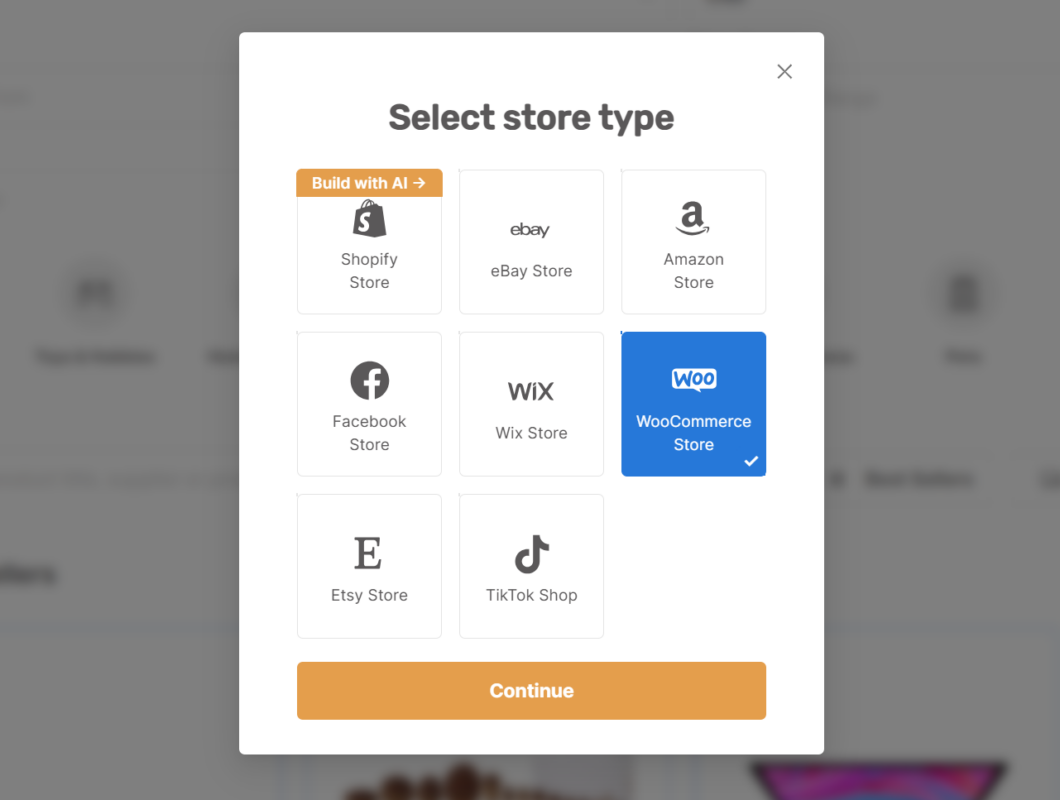
Now, we need to ensure our store is already connected to WordPress. After this step, we just need to add our WooCommerce dropshipping store URL, and we’ll be good to go.

Finally, we connected our store to AutoDS. Now, we can start optimizing our WooCommerce dropshipping business and save a bunch of time and effort by automating it. In fact, we can use a multitude of amazing dropshipping automation tools:
- Quick & Easy Product Imports
- Complete Order Fulfillment
- Price & Stock Monitoring
- Inventory Management
- Automatic Price Optimization
…and more!
5. Import Your First Product To WooCommerce
Now, we’ve come to the point in the process where we need to import products to our WooCommerce store. And, since we know the benefits of dropshipping automation, we can also automate this process.
With that said, AutoDS has 4 different product importing options we can use:
- One-Click Importer
- Single Product Importer
- Multiple Product Importer
- Bulk Upload With CSV file
To illustrate, let’s import one of our bestsellers into our store with the AutoDS automated single product importing tool. To begin, we can click the ‘Add Products’ button on the AutoDS dashboard and choose the ‘Single Product’ option.
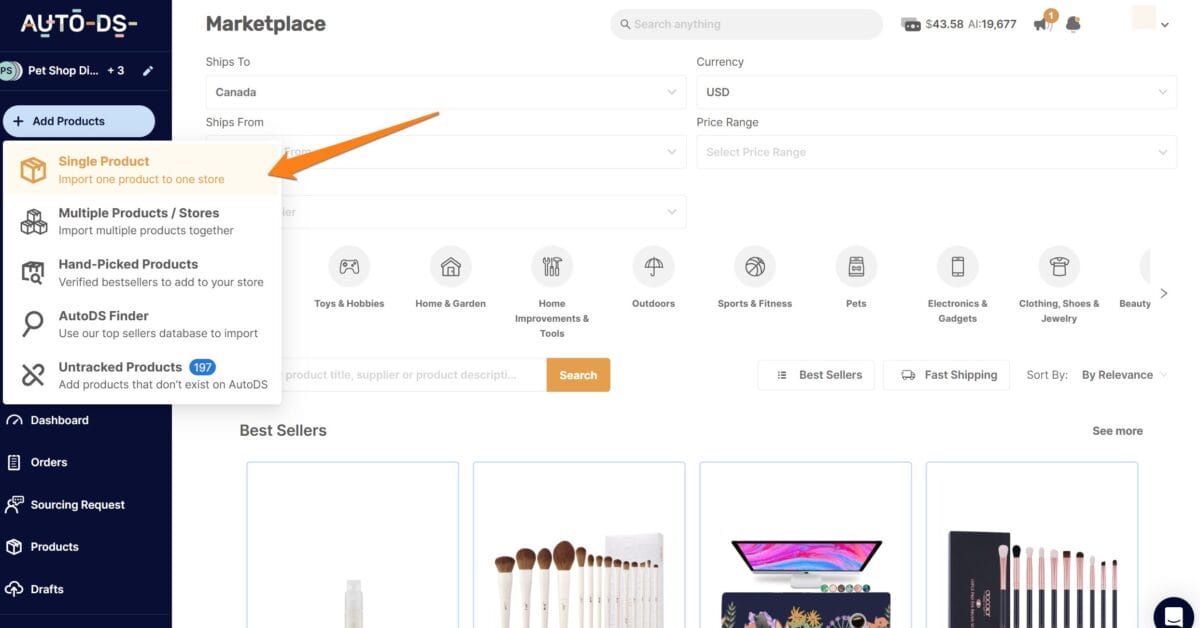
Then, we can go to our supplier’s website and copy the URL or product ID of the product we want to import. Next, we’ll paste the URL into the product importer, and it will import the product and all of its details to our store.
Lastly, we can publish it directly to our store or edit the listing. In reality, it’s always a good idea to edit the product listing to optimize it.
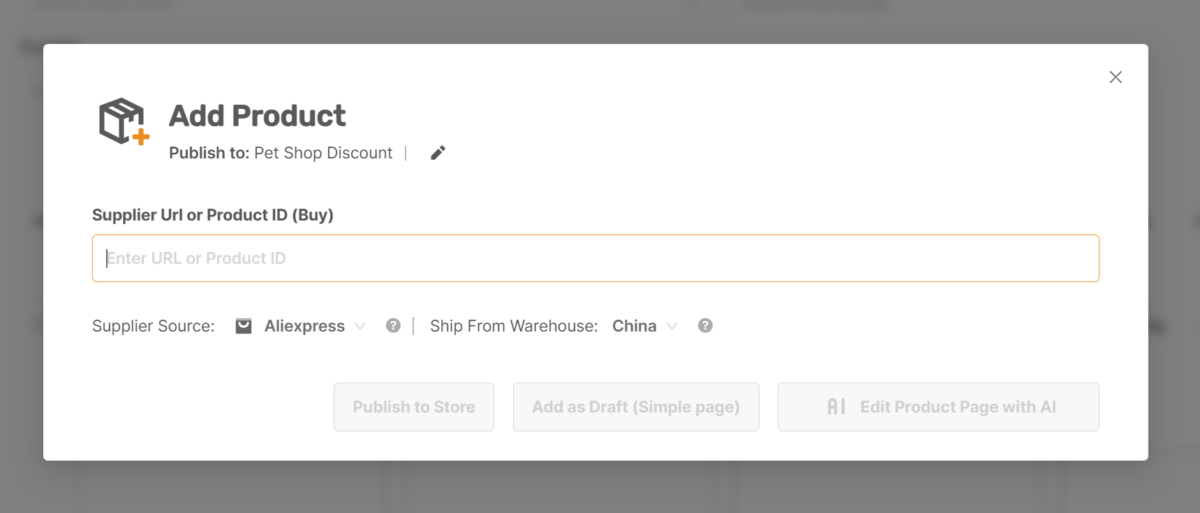
Alternatively, if we import products manually, we have to copy & paste every individual product detail one by one to create our listing. All in all, when importing hundreds of products, it takes up an incredible amount of time when done manually. So, by automating the process, we are optimizing our business.
Beginner’s Tip: Add multiple variations of winning products quickly with the AutoDS product importer.
6. Market Your WooCommerce Dropshipping Store

As we know, with a WooCommerce store, we won’t have any organic traffic, so we have to rely on marketing. With that said, good marketing translates into sales.
Plus, we must navigate the competition and do our best to stand out. Also, marketing helps us build a brand and become recognizable. With this in mind, getting the right message in front of our target audience at the perfect time is key.
Now, let’s take a look at the best marketing strategies for WooCommerce dropshipping:
- PPC Ads (e.g., Facebook Ads)
- Influencer Marketing
- Content Marketing (blog page for organic traffic)
- Viral Social Media Posts
- Email Marketing
To emphasize, our best bet to boost traffic is through pay-per-click ads (PPC). Essentially, with PPC, we can adjust our targeting parameters and reach our ideal customers. You can also tap into a specialized market with existing interest and demand through influencer marketing. Find niche influencers that fit your product niche and use them to reach an audience with existing interest.
As a result, we can boost sales by appealing to our target market that is most likely to convert. Some examples of PPC ads are Google ads, Facebook ads, and Instagram ads.
Tip: To help us target the ideal audience for our ads, we can use the AutoDS Audience Research Spreadsheet. Generate an optimal audience and receive a profitable return on investment.
7. Fulfill Customer Orders On WooCommerce
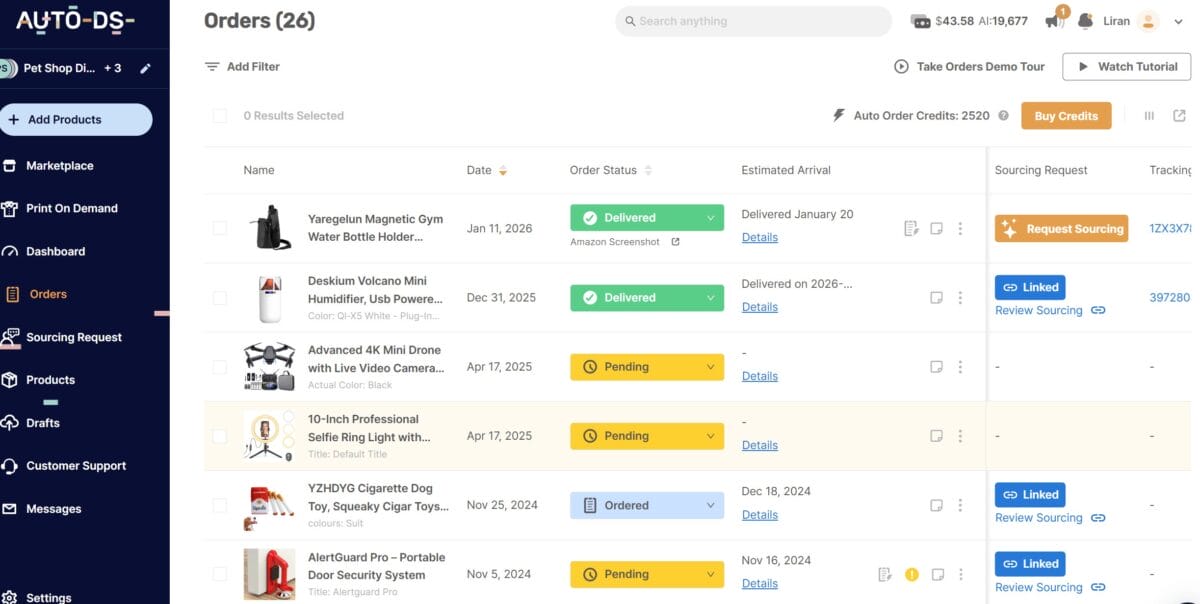
In order to ensure customer satisfaction, we must fulfill orders immediately. With manual fulfillment, we have to manually fill in every detail of our customer’s shipping information. As such, we go on our supplier’s website and fill in our customer’s addresses, shipping information, and product specification one by one.
However, automation tools allow for a significantly more optimized process while reducing errors. With AutoDS Automatic Orders, we can automate this process entirely. The whole process from getting to shipping an order and everything in between is fully automated, saving us time and reducing errors.
Additionally, we can use Fulfilled by AutoDS. This tool protects our personal buyer accounts using AutoDS accounts when sourcing our items. Plus, Fulfilled By AutoDS automates the entire fulfillment process. And we can also use the one-click returns to make things easier.
Notably, both AutoDS Automatic Orders and Fulfilled By AutoDS have automatic tracking updates. Thus, we can easily keep our customers up to date on the entire delivery process.
8. Stay In Touch: Provide Customer Service

Without a doubt, one of our biggest responsibilities is ensuring our customers have a pleasant shopping experience. Thus, offering excellent customer service helps us gain credibility and grow customer loyalty. Ultimately, this enables us to stand out from the competition.
With that said, there are a few different ways in which we can offer excellent customer service. For example, we can have a live chat option in our eCommerce dropshipping store. This will allow for speedy responses and customer queries to get resolved timely.
Plus, we can offer support when someone reaches out through our Contact Us page or our linked social media channels. If we’re offering these services, then we must ensure to reply to our customers as soon as possible. As such, we’ll attain customer satisfaction.
Another option is through email. However, if we opt for this, we must respond quickly to avoid customer dissatisfaction.
Additionally, a less direct strategy is to create a Frequently Asked Questions (FAQ) page. With that said, we can provide answers to commonly asked questions and enhance the user experience on our WooCommerce store.
Wow! We did it! We have covered everything to start and run a successful WooCommerce dropshipping business.
Best Dropshipping Suppliers for WooCommerce
Importantly, we need to find the most reliable and trustworthy suppliers for our WooCommerce dropshipping store. It is essential that we find multiple supplies with domestic and international warehouses.
As a result, we can reach a larger customer base and make more sales. Additionally, by working with multiple high-quality suppliers we can sell more products across more categories. And, if one supplier runs out of stock or has shipping delays, we can always rely on others.
With that said, let’s take a look at the top WooCommerce dropshipping suppliers:
Supplier Wholesale/Retail Key Features
Walmart Retail Price match policy
Free & fast shipping
Savings and deals
AliExpress Retail AliExpress Dropship Center
Extensive product selection
Low prices
CJDropshipping Wholesale Quality control
White-label products
Print-on-demand products
Overstock Retail Good return policy
Club 0 program
Price match guarantee
Banggood Retail Certified dropshipper website
Dropship center
Low costs
AutoDS
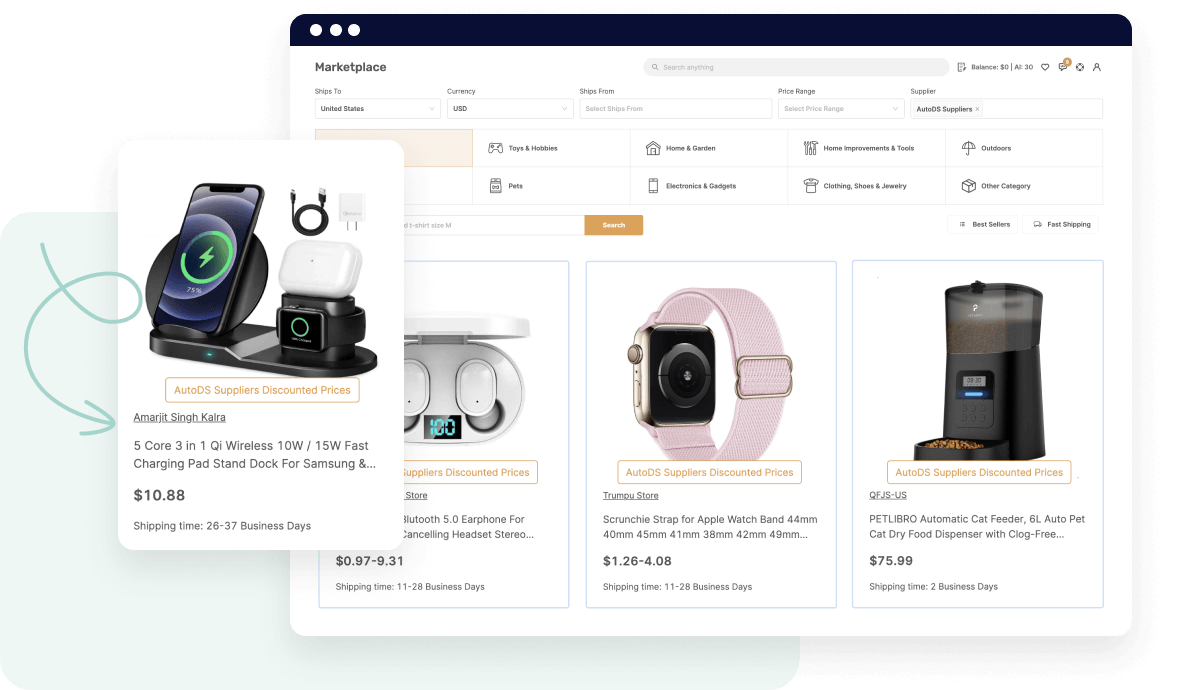
AutoDS is a great place to source from since they can offer unique products and prices because of their supplier network. Plus, they’ve proven to be reliable as well as have unique aspects like:
- Private supplier network
- Fast processing & shipping
- Automation advantage
AutoDS as a supplier offers a streamlined and dependable way for dropshippers to source products without the uncertainty that often comes with third-party marketplaces. Through its private supplier network, sellers gain access to curated, high-quality items, faster processing times, and more consistent shipping, which improves customer satisfaction and reduces disputes.
AutoDS also manages key fulfillment touchpoints, allowing sellers to avoid common issues like unreliable stock or delayed handling. Plus, it offers full automation from sourcing, to importing, listing optimization, and fulfillment. For both new and scaling eCommerce businesses, sourcing directly from AutoDS means greater control, stronger reliability, and a more professional buying experience for customers.
Walmart

First up, Walmart. Primarily used to source products for the American consumer, it offers a wide range of products and next-day delivery.
However, it has other key aspects worth noting:
- Price match policy
- Free & fast shipping
- Savings and deals
Uniquely, Walmart has a great price match policy. To clarify, if a product goes on sale within the return period, by reaching out to customer support, we can get a refund of the price difference. In addition, with the big sales and daily deals, we can earn a higher profit by offering competitive prices to our customers.
Additionally, we can offer next-day delivery and free shipping with Walmart as our supplier. However, as mentioned above, those options only apply to our US consumers.
AliExpress

Undeniably, AliExpress is one of the most famous WooCommerce dropshipping suppliers. Their warehouses all around the world make them a great supplier for our WooCommerce store.
Here are some great features when working with AliExpress:
- AliExpress Dropship Center
- Extensive product selection
- Low prices
First and foremost, AliExpress has a Dropship Center making it dropshipper-friendly. Ultimately, this helps us improve our store catalog since the dropshipping center helps with product research. Especially when considering AliExpress’ huge product selection, this can come in handy when finding our best-sellers.
Moreover, since AliExpress is a Chinese supplier, its product pricing is low. As such, this enables us to increase our profit margin and remain competitive.
CJDropshipping

Next, we have CJDropshipping. With eight international warehouses enabling fast shipping, CJDropshipping is a great supplier for WooCommerce. Moreover, their product range is so extensive that we can definitely find winning products.
Additionally, CJDropshipping offers the following key features:
- Quality control
- White-label products
- Print-on-demand products
Most importantly, CJDropshipping does product quality control, ensuring that we sell good quality products. As a result, we can guarantee high-quality items to our customers without compromising our integrity.
Uniquely, CJDropshipping offers a white-label solution. To clarify, CJDropshipping’s white-label solution is great for branding our products. We can also provide custom products by utilizing their print-on-demand option. To break it down, print-on-demand is a process where we can customize our phone cases and list one-of-a-kind products.
Overstock

Overstock is a great American WooCommerce supplier. Notably, Overstock offers high-quality products in the home niche. Additionally, this supplier has reliable shipping, good prices, and daily deals.
On top of that, it has great features like:
- Good return policy
- Club 0 program
- Price match guarantee
One of Overstock’s most attractive aspects is its outstanding price match guarantee. How this works is when we find a product with a lower price from another supplier, Overstock will refund us the difference.
And, we can also take advantage of their great 30-day return policy. Finally, for their loyalty program, Overstock’s ‘Club 0’ program offers attractive benefits like 5% cashback on all purchases. Moreover, with the program, we can also take advantage of free shipping.
Banggood

Finally, we have Banggood, a major Chinese supplier. Banggood has a vast range of products for us to source from. On top of offering huge product varieties, it’s a great international supplier. To clarify, it covers locations globally like Asia, Europe, the US, and Australia.
Additionally, Banggood has several advantages to consider:
- Certified dropshipper website
- Dropship center
- Low costs
Uniquely, Bangood provides dropshipping contracts and support for dropshippers because it’s a certified dropshipper website. What’s more, we can enjoy personalized product recommendations, cashback sites, and a credit point accumulation system from its dropship center.
Furthermore, Banggood is characterized by low prices because it’s a Chinese supplier. Actually, this is common with most Chinese suppliers, like AliExpress. As a result, Banggood is a great supplier to source from.
Undeniably, it’s crucial to work with reliable WooCommerce dropshipping suppliers. As such, we can utilize AutoDS-supported suppliers to find the best fit for us.
Automate Your WooCommerce Business With AutoDS
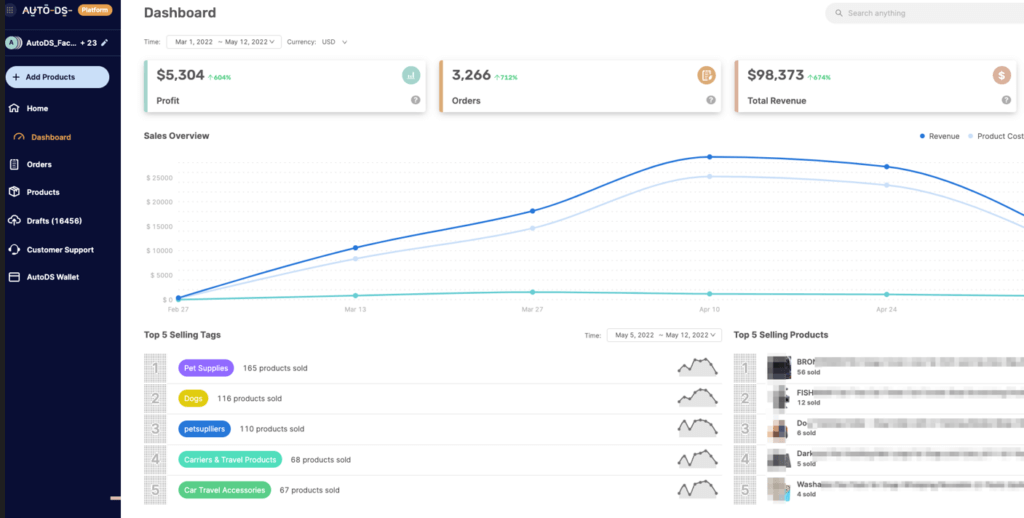
Running WooCommerce dropshipping manually might work at the very beginning, but it quickly breaks down as soon as you start getting consistent orders. In 2026, manual processes mean slow fulfillment, pricing errors, overselling, and poor customer experience. Manually importing products, updating prices, checking stock, and placing orders creates bottlenecks that cost time and money. One supplier price change or stock outage can instantly turn profitable orders into losses.
Core Automation Needs for WooCommerce Dropshipping
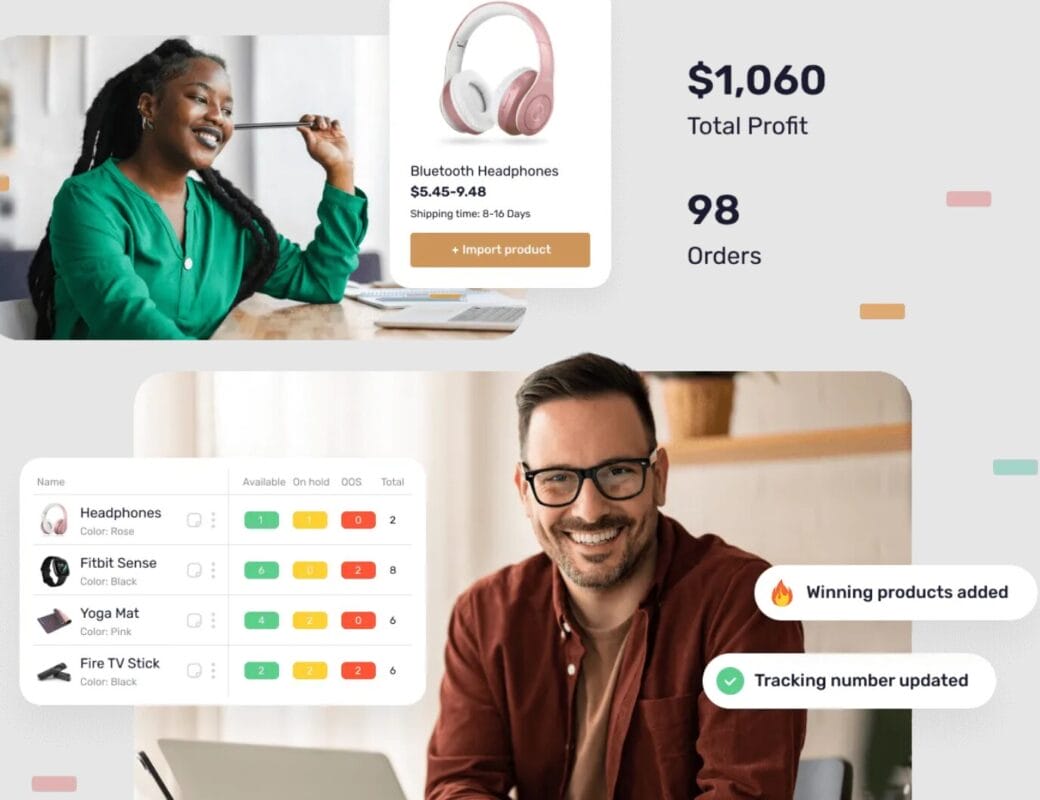
To run a profitable operation, your WooCommerce store needs automation across every critical step with an all-in-one dropshipping tool like AutoDS. AutoDS integrates directly with WooCommerce, allowing you to manage your entire dropshipping operation from a single dashboard. Once connected, you can automate absolutely everything from A to Z without switching between tools.
“The great thing about AutoDS is that it triples as a product research, order fulfillment, and automation tool. This is going to reduce your overall expenses and the amount of work that you need to do.” – AC Hampton
- Product importing – Automatically and instantly import products with optimized titles, images, and descriptions with just 1 click.
- Price & stock monitoring – Automatically adjust prices and pause out-of-stock products in real time.
- Order fulfillment – Send orders to suppliers automatically as soon as a customer checks out
- Tracking updates – Sync tracking numbers back to WooCommerce and notify customers automatically
- Auto-cancellations – Cancel risky or unavailable orders before they become support issues or losses
These automations protect margins, reduce errors, and save hours of manual work every day.
In 2026, successful WooCommerce dropshipping businesses compete on speed, accuracy, and efficiency. Automation allows you to test more products, handle more orders, reduce human error, and focus on traffic, branding, and optimization.
Stores that rely on automation tools like AutoDS can scale faster, protect profits, and deliver a better customer experience. This makes automation a true competitive advantage, not just a convenience.
📢 Marketing Tip: Before scaling ads, use automation to test and validate performance. Track price changes and stock to ensure your ads are getting you the results you want.
Common WooCommerce Dropshipping Mistakes to Avoid
Even though WooCommerce dropshipping offers flexibility and control, many stores fail due to avoidable setup and strategy mistakes. Understanding these pitfalls early can save you time, money, and lost sales:
- Using Too Many Plugins
- No Automation
- Poor Hosting
- Slow Stores
- Choosing Suppliers Based Only on Price
One of the most common WooCommerce mistakes is installing too many plugins. While plugins add functionality, excessive or poorly optimized plugins can cause conflicts, security issues, and slow page speed. Additionally, running WooCommerce dropshipping without automation leads to manual order processing, pricing errors, and stock issues. Without automation for importing, fulfillment, and monitoring, stores struggle to scale and often lose money due to human error.
Cheap or unreliable hosting is a silent killer for WooCommerce stores. Poor hosting results in downtime, slow load times, and checkout failures. Speed directly impacts revenue. Slow WooCommerce stores increase bounce rates and lower search rankings. Large images, heavy themes, and unoptimized plugins can quickly drag down performance, making speed optimization non-negotiable. Lastly, supplier reliability, shipping speed, and product quality matter more than price alone. Focusing only on low costs often leads to refunds, chargebacks, and negative reviews that damage your brand.
Avoiding these WooCommerce dropshipping mistakes helps you build a store that’s faster, more reliable, and easier to scale—setting the foundation for long-term success in 2026.
Frequently Asked Questions
Is WooCommerce free for dropshipping?
Yes, WooCommerce is free to use, but running a WooCommerce dropshipping business still involves costs such as hosting, a domain, automation tools, and marketing. There are no platform transaction fees.
Can you still make money with WooCommerce dropshipping in 2026?
Absolutely. WooCommerce dropshipping in 2026 is still profitable when combined with automation, reliable suppliers, and strong traffic strategies like SEO, paid ads, or social commerce.
Do I need coding skills to dropship with WooCommerce?
No. Most WooCommerce dropshipping stores can be built and managed without coding by using themes, plugins, and automation tools.
Is WooCommerce better than Shopify for SEO?
Yes. Because WooCommerce runs on WordPress, it offers greater SEO control, advanced content optimization, and better flexibility for long-term organic growth compared to Shopify.
Can I dropship worldwide with WooCommerce?
Yes. WooCommerce supports global dropshipping, multiple currencies, international shipping rules, and worldwide suppliers, making it suitable for selling to customers around the world.
What’s the best automation tool for WooCommerce?
One of the most popular options is AutoDS, which provides product importing, price and stock monitoring, order fulfillment, tracking updates, and auto-cancellations in one system.
How long does it take to become profitable when using WooCommerce dropshipping?
Most beginners see results within 1–3 months if they choose the right products, automate operations, and invest consistently in traffic. Profitability depends on product selection, marketing strategy, and execution speed.
Start Your Dropshipping Journey with AutoDS
WooCommerce remains a powerful and scalable option for dropshipping in 2026, especially for sellers who value control, flexibility, and long-term growth. With the right foundation like solid hosting, a clean plugin setup, reliable suppliers, and full automation powered by AutoDS, WooCommerce can scale from a simple store into a profitable eCommerce brand. By avoiding common mistakes and using automation tools like AutoDS to streamline operations, you can focus on what truly drives success: traffic, optimization, and customer experience.
To learn more about dropshipping, check out these helpful articles:
- What Is WooCommerce Dropshipping?
- How Much Does It Cost To Start?
- Is WooCommerce Good For Dropshipping?
- WooCommerce VS Other Platforms
- What You Need To Start
- How To Start WooCommerce Dropshipping
- Top WooCommerce Dropshipping Suppliers
- Automate Your Business With AutoDS
- Common Dropshipping Mistakes To Avoid
- FAQ
- Conclusion