Managing a dropshipping store means juggling lots of moving parts. Think products, suppliers, prices, stock levels, and variants. And, sometimes, you have to do this not for one, but for multiple stores across different platforms.
Without a system, things can get messy. The good news? That’s where smart solutions come in. AutoDS keeps everything organized, searchable, and fully under your control to make all things dropshipping easier with a centralized inventory management system.
In this article, we’ll break down how this feature works and why it’s essential for keeping your store clean, efficient, and profitable.
Centralized control saves time and chaos. AutoDS brings all your stores, suppliers, and products into one clean dashboard. No tab overload, no duplicate work. Just smooth, organized management across every platform.
Automation keeps your listings accurate and profitable. With real-time stock and price monitoring, bulk editing, and custom pricing rules, AutoDS eliminates manual updates and protects your margins automatically.
Data-driven tools help you scale smart. From smart filters to real-time performance data, AutoDS gives you actionable insights to spot bestsellers, remove underperformers, and grow strategically.
What Is Inventory Management In Dropshipping?
In simple terms, inventory management is how you keep track of what’s in stock, what’s selling, and what needs a quick update. All of this before chaos hits and shoppers start buying things that are out of stock. It’s your behind-the-scenes system that makes sure you’re not selling items that don’t exist or missing out on ones that are in high demand.
In dropshipping, you don’t actually hold inventory yourself. Your suppliers do. That means your job is not really stacking boxes and counting how many items you’ve got.
Instead, your job is to make sure your online listings match what’s happening in your supplier’s warehouses. Prices, quantities, and product variations change all the time. And if your store doesn’t keep up, you’ll be losing money, cancelling orders, and managing refunds.
All in all, good inventory management keeps your store organized and profitable. It prevents:
- Selling an out-of-stock product.
- Overpricing by accident.
- Selling something below your supplier’s prices, losing your own profits.
- Realizing your bestseller hasn’t actually sold in a month.
The right system will help you have visibility of everything. You’ll see what’s working and what’s not. This allows you to make quick, smart decisions without having to do an in-depth analysis every single week.
Experience effortless inventory management, real-time syncing, and full control across your stores with AutoDS—all from one dashboard 👉 Start your $1 trial today!
All About AutoDS’s Inventory Management

If your dropshipping business feels like a juggling act of multiple tools, suppliers, and selling channels, AutoDS simplifies the entire equation with one single dashboard that handles it all.
AutoDS’s Inventory Management feature is basically your central hub for your entire operation. In one single place, you can manage and monitor products, suppliers, stores, and orders.
“This dashboard shows you everything you need to be successful with the product that you’re selling. It’s going to break down your cost of goods, your revenue, your analytics, your best-performing products, and so much more. You can actually connect more than just a Shopify store; you can connect eBay, Facebook, Wix, and so much more.” – AC Hampton, dropshipping expert.
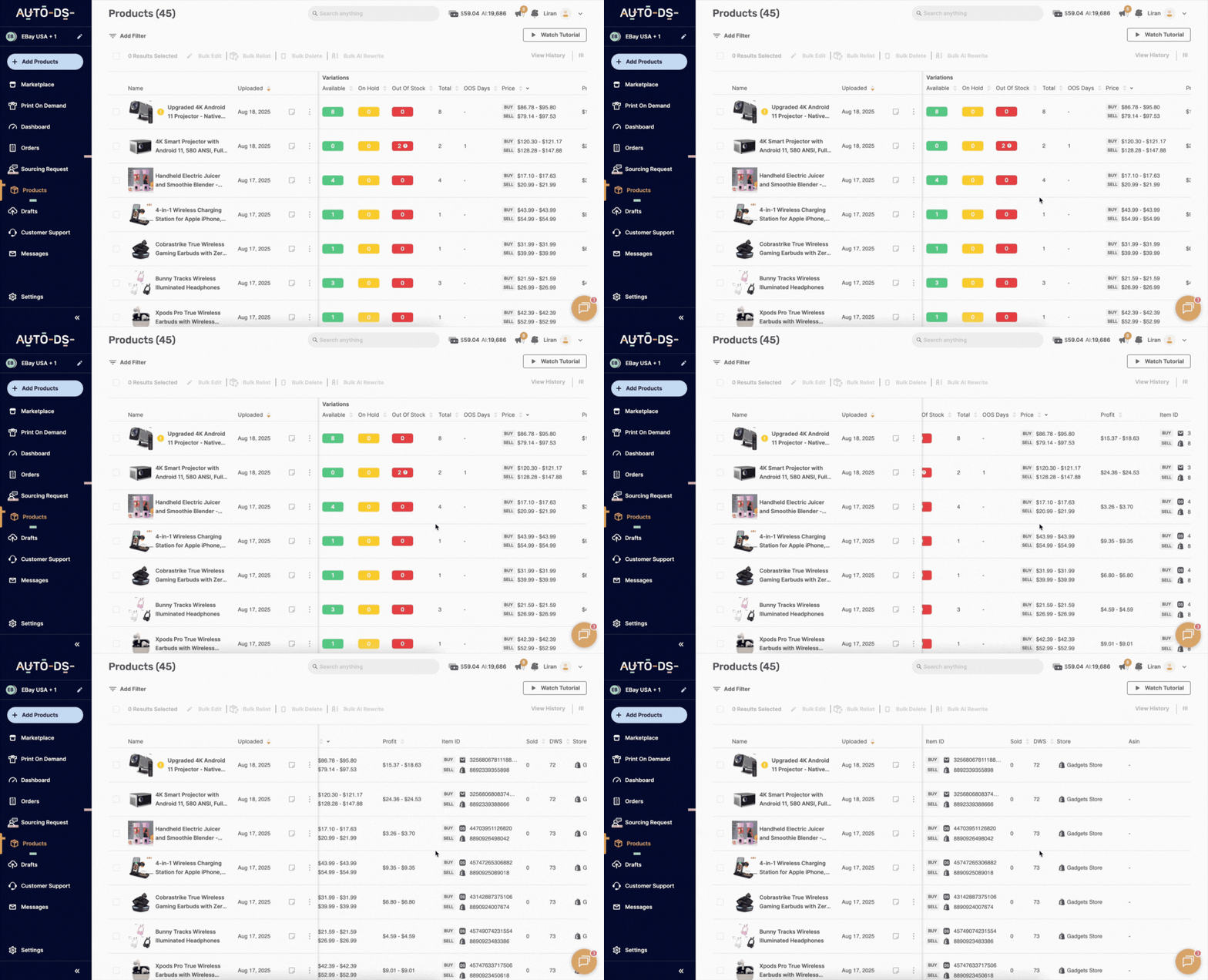
Next, let’s zoom in on each tool and capability.
An Instant Editing Tool

AutoDS’s inventory management feature lets you edit each listing one by one or in bulk without hours of manual input. You get +20 parameters you can edit at the same time for multiple items. For example, fees, shipping policy, shipping price, and more. Just pick the items you want to edit, add the parameters you want to update, and then the system applies them instantly across your listings.
💡 Pro Tip: You can use bulk editing when updating seasonal prices or running promotions. It saves hours and keeps your entire store consistent in just a few clicks.
Multi-Store Management

You can manage all your products from multiple stores in one single place. Let’s say you have an eBay, Amazon, and Shopify store. You don’t need multiple dashboards or accounts. You just use the AutoDS inventory management tool as your central hub. You’ll see all your inventory, stock status, and price changes in a single view, making it easy to stay consistent across platforms.
In simple terms, it’s a huge time-saver for sellers scaling up to more than one store. No tab chaos, no duplicate work. Just smooth organization.
🆕 Beginner’s Tip: If you manage multiple stores, connect them all to AutoDS from the start. You’ll get a full overview of your business and avoid duplicate listings or missed updates later on.
Untracked Products

Ever feel like some products just disappear from your listings? AutoDS fixes that. The tool automatically identifies any untracked or unsynced items, so you can re-track them in one click. This saves you from hours of scrolling through supplier pages and guessing what’s missing. With just a click, you can identify and retrack them. No detective work required.
Smart Filters

With +30 smart filters, AutoDS lets you tailor the dashboard to see exactly what you need to measure and track. For example, you can filter by the basics, like niche, profitability, competition level, etc. But you can also zoom in on city location, sold date, on-hold reason, out-of-stock delays, and many more. This makes finding and comparing products easy and quick.
Stock Availability

With AutoDS, you’ll always know what’s in stock and what’s not across all your stores and suppliers. The system flags out-of-stock items automatically and lets you restock them in seconds. You can even set rules for automatic restocking to keep your bestsellers available at all times.
Products’ Performance

AutoDS’s winner identifier tool highlights your bestsellers and underperformers at a glance. You’ll see which products are driving profits and which ones are just taking up space. From there, you can optimize pricing, switch suppliers, or remove those with low demand.
All based on real data, not guesswork. It’s a simple but powerful way to make data-driven decisions and keep your catalog profitable.
💡 Pro Tip: Treat your Winner Identifier insights like a mini lab. Experiment! Try testing different titles, images, or prices on your top performers, then track how small tweaks impact conversions. It’s the fastest way to turn good sellers into viral ones.
More Than Just Inventory Management: An All-In-One Dropshipping Tool
The thing about AutoDS is that it is not just an inventory management tool. It’s an all-in-one dropshipping platform that handles the entire workflow—from product sourcing to order fulfillment.
That means that inventory management can work hand in hand with other automation features that make managing logistics way easier. Let’s see what else you can do with AutoDS to supercharge your inventory management process:
1. Bulk import products from multiple suppliers at once. In just a couple of clicks, you will see an entire collection of items on your inventory dashboard. You can also upload single products.

2. Edit product titles and descriptions using AI to generate high-converting, SEO-friendly copy in seconds. Perfect for making your listings stand out without the need for copywriting expertise or hours spent crafting the perfect copy.

3. Set custom pricing rules to automate your profit strategy. This will automatically update your product prices based on performance to stay competitive without adjusting them manually.

4. Enable price and stock monitoring to keep your listings accurate 24/7. When turned on, it tracks price and stock changes from your suppliers and updates your product information accordingly. This way, you avoid overselling or outdated prices.
🆕 Beginner’s Tip: You can set price and stock monitoring individually for each listing, or bulk-apply it to dozens or hundreds of products at once with the bulk editor in the inventory management dashboard.

All in all, these features complement your inventory management with full automation at every step.
Frequently Asked Questions
Can I manage products across multiple stores at the same time?
Yes! With AutoDS, you can manage products across multiple stores at once. From the same dashboard, you can view, filter, and edit products. No switching tabs or logging into separate accounts.
Can I migrate my products and settings from another tool?
Yes, you can absolutely import products from other platforms or tools and continue managing them through AutoDS without starting from scratch. The migration process from a third-party tool to AutoDS is pretty straightforward.
Is there a way to filter products that haven’t sold?
Yes, with AutoDS, you can filter products that haven’t sold using smart filters to quickly spot underperformers. There are more than 30 filters available.
Can I edit multiple products at once?
Yes, you can edit multiple products at once. AutoDS includes a powerful bulk editor so you can update everything in just a few clicks.
What’s the easiest way to get started with AutoDS?
To get started with AutoDS, you can try the 14-day trial for just $1. Then, connect your Shopify, eBay, Wix, WooCommerce, Amazon, Etsy, TikTok Shop, or Facebook Marketplace account to AutoDS, and that’s it.
Centralize Your Dropshipping Operations With AutoDS
At the end of the day, strong inventory management isn’t just about keeping things tidy. It’s about building a system that helps your dropshipping business grow without chaos. The goal is to monitor every product, edit listings in bulk, and track performance from one single dashboard. This way, you’re not just managing your store, you’re running it strategically.
AutoDS provides a centralized inventory management system with automation tools and simple multi-store integration to help you stay on top of everything. You can scale and expand your business across suppliers and platforms without overloading the system or having to juggle multiple tools.
Start your $1 trial today and see how AutoDS turns complex dropshipping operations into one smooth, automated workflow.
AutoDS is an all-in-one solution. Here are some of the best features that can elevate your dropshipping game: