Ever tried to set up a dropshipping store manually? Then you already know what it’s all about. And mostly, you probably know this: it’s never as simple as the YouTube tutorial made it seem. One minute you’re feeling confident, and the next? You’re lost in the middle of tabs, supplier spreadsheets, Chrome extensions, shipping settings, and API keys. And then the best part: then you have to repeat everything for all 200 products.
But here’s the thing: it doesn’t have to be like that. Automation can reduce that entire process into just a couple of clicks.
That’s exactly why this article exists. We’re breaking down the technical reality behind manual dropshipping. Then, we’re comparing it with the much smoother, quicker, and beginner-friendly setup you get with automation. For instance, AutoDS simplifies complicated, repetitive tech steps and turns them into simple clicks.
Manual dropshipping is far more technical than beginners expect. It involves constant configuration, data entry, supplier management, and troubleshooting.
AutoDS removes 90% of the technical workload with full automation that includes features like one-click importing, auto-fulfillment, real-time syncing, and built-in tracking updates.
Beginners, content creators, sellers looking to scale, and side-hustlers benefit most from automation, launching stores faster and avoiding the complexity of manual workflows.
The Technical Reality of Manual Dropshipping (What Most Beginners Don’t Know)
Most beginners step into dropshipping thinking it’s all about uploading some products and making sales immediately. Cute, but quick reality check: it’s not. The technical workload behind manual dropshipping is real. Here’s what actually goes behind the scenes:
1. Manual Product Importing Requires Editing Code-Like Elements
When you import products manually, you’re not just copying and pasting titles and a few photos. You quickly end up dealing with things that feel suspiciously like coding, like:
- Variant IDs that look like they came straight out of The Matrix.
- URL parameters you need to extract or clean.
- HTML descriptions you must rewrite, delete, or reorganize.
- Manual formatting for SEO, like spacing, paragraphs, keywords, bold text, and image alignment.
If you’ve never done any of these things before, this part alone can feel like a mini computer science degree.
2. Order Fulfillment Requires Re-Entering Customer Data
Manual order fulfillment = becoming a human copy-paste machine. This means…
- Matching product SKUs between your store and your supplier.
- Manually checking warehouse availability every single time.
- Copying and pasting customer addresses into supplier checkout forms.
- Sending out tracking numbers or copying and pasting them back into your store.
- Managing payment methods order by order.
And that’s not the worst part. Mess up a single digit in this entire process, and get ready for chaos. Type in the wrong address or zip code and see how the package goes all the way to the other side of the country. The thing about fulfillment is this: one little mistake can cost you an angry customer, as well as extra fees in shipping, chargebacks, and returns.
3. Price & Stock Monitoring Requires Manual Auditing
Suppliers update prices and stock daily. If you don’t catch every single change, your store will be outdated. That means selling items with the wrong price or offering out-of-stock items. To avoid this, you have to…
- Check supplier stock levels manually for every single listing.
- Update prices manually on your store when suppliers raise or lower theirs.
- Keep multiple tabs open to monitor product pages like a stock market trader.
- Track changes in spreadsheets that slowly take over your screen.
In other words? A full-time job that makes it really hard to scale with more listings, stores, and suppliers.
4. Supplier Management Is Technical
Each supplier feels like learning a new platform from scratch. Every manufacturer or reseller has its own unique rules, layouts, product structures, shipping systems, and ways of presenting information. Nothing is standardized. What works with one of them won’t make sense with another.
So instead of having one single workflow, beginners end up trying to balance five mini-ecosystems that all speak different technical languages. For each supplier, you basically have to:
- Connect APIs or deal with browser extensions.
- Learn each supplier’s interface, workflows, and rules.
- Navigate currency differences that could affect or impact your margins.
- Map shipping methods correctly so customers get what they paid for.
So yes, manual supplier management isn’t just about “finding products”. It’s managing multiple systems, currencies, rules, interfaces, and workflows… all at the same time.
📦 Supplier’s Tip: If you’re managing suppliers manually, start with just a few of them. Each supplier adds its own workflow, so keep it simple at first and add one at a time to prevent technical or logistical mistakes.
5. Store Structure Requires Technical Shopify Steps
Shopify is powerful, but when you’re doing everything manually, there are a bunch of steps you have to follow. Beginners expect a simple process where they upload a product, then publish it, and that’s it.
But Shopify actually requires you to build the entire structure of your site from scratch (just like Wix or WooCommerce, for that matter). That means setting up many things that require time and some knowledge to get around them, such as:
- Creating collections and assigning products.
- Building a clean navigation menu.
- Adjusting product templates and metafields.
- Editing theme sections so your site looks decent and not like a site from 2005.
Each one of these things has its own settings, logic, and hidden ways to get around. Mostly, they require patience and trial and error.
6. Returns & Tracking Are Fully Manual
Returns and tracking are another major part of the dropshipping workflow, where manual tasks can get messy. On paper, it sounds simple. You just send the customer the tracking number and handle returns when needed… sure. In reality, you become the middle-person between an angry customer and the supplier.
Suppliers don’t automatically sync tracking to your store, so if nothing about this part is automated, you have to:
- Download tracking numbers from suppliers and upload them back into your store.
- Email customers updates manually, including the tracking number (which customers usually expect immediately once the order is shipped).
- Handle disputes and returns one case at a time, ensuring compliance with all return policies.
Without automation, this is all doable. But, honestly… who wants to deal with angry customers, sending out tracking numbers as quickly as possible, and managing returns with suppliers? Probably no one, as there are easier ways to manage it.
Either way, one thing is clear: manual dropshipping setups are extremely technical, much more than YouTube tutorials warn about. But it’s not all bad news: automation can make all of this easier, reducing these six steps into just a few clicks.
🆕 Beginner’s Tip: When managing everything manually, document your steps as you go. Even a quick checklist helps you avoid errors when you’re copy-pasting data, updating stock, or fulfilling orders, especially when you have multiple products to manage.
The AutoDS Approach: Beginner-Friendly Dropshipping

As we’ve covered in the previous section, manual dropshipping can feel like operating a spaceship with no training. AutoDS takes that chaos into a clean control panel with buttons that can do it all.
As an all-in-one dropshipping platform, there’s no juggling 40 different tasks, tools, and dashboards. Instead, you get a system that handles most of the job with full automation. Let’s zoom in.
1. One-Click Product Importing

Manually importing products isn’t necessarily a complex task. But as you add more and more listings, at some point, it can become a full-time job. AutoDS automates this process entirely, removing every technical barrier and every repetitive step. With one click, the system:
- Pulls all product data, like titles, descriptions, variants, specs, everything, for multiple products at once.
- Automatically formats descriptions and compresses images to prevent them from breaking when going from the supplier site to your store.
- Cleans up messy supplier HTML (bye bye to floating tables and tiny fonts).
- Imports products from multiple suppliers to more than one store if necessary.
This way, you no longer need to take an hour to add and optimize each listing. The system does everything automatically in seconds.

2. Auto-Ordering Eliminates All Manual Steps
AutoDS automates fulfillment, eliminating all potential errors that could lead to chargebacks, returns, wrong shipping addresses, and miscommunications. It automatically:
- Sends the order to your supplier the moment a customer buys.
- Auto-fills every customer detail (no typos, no mistakes).
- Automatically updates order status as it moves along.
- Reduces fulfillment time dramatically.
- With Fulfilled by AutoDS, it even uses AutoDS’s own seller accounts to guarantee compliance and avoid issues on your end.
“Let’s just say you’re doing more than 5, 10+ orders a day. Instead of having to manually import the customer’s info each time and purchasing each unit, you just turn on the automation. It’s kind of like having your product pipeline on autopilot.” – Andy Stauring, 7-figure e-commerce businessman
This way, there’s no more re-entering customer info, SKU mismatches, or clicking through supplier checkout forms one by one. Everything is done automatically and smoothly.
3. Real-Time Stock & Price Syncing

This is the feature that saves sellers from stalking every single supplier, every single day, just to check prices and stock are accurate. AutoDS’s price and stock monitoring tool tracks your suppliers’ listings every 60 minutes to make sure your store is always updated. This is how it does it:
- AutoDS pauses products when they go out of stock to prevent overselling.
- Adjusts product availability instantly.
- Updates your store price if the supplier changes theirs, all based on your own pricing rules.
- Prevents accidental loss due to margin drops.
- Removes the need for spreadsheets, daily audits, or manual updates.
In short? AutoDS monitors 24/7, so you don’t have to, eliminating hours of work entirely.
4. Tracking Number Automation
Another time-consuming task? Tracking. Shoppers want to know their order status as soon as they click “Buy”. We’ve all been there, right? Anxiously refreshing the page, hoping it will make our package arrive sooner. AutoDS handles that anxiety so you don’t have to, automating tracking from start to finish:
- Identifies the tracking number directly from the supplier.
- Uploads it automatically to your store’s dashboard without you touching it.
- Sends an automatic email to the customer with the number.
- Updates shipping status in real time.
All in all, this reduces customer inquiries about order status. Moreover, shoppers stay updated, and you stay stress-free knowing everything is quietly being handled automatically.
5. Multi-Supplier Support Without Any Technical Mapping

Manual supplier setup usually requires learning each supplier’s system and mapping everything manually. Automation removes all of that.
AutoDS connects with the biggest dropshipping suppliers, like Amazon, Walmart, AliExpress, eBay, Target, CJDropshipping, and many more. This makes it a seamless experience to take products from their marketplaces directly to your store.
This removes the need to deal with API keys or go through a complex technical setup process. You also don’t need to learn five different workflows. Everything is handled the same way, with one-click importing and listing optimization.
“I think what really makes them stand out is all their worldwide suppliers that they’re connected to. Most softwares are just connected to AliExpress and their own suppliers. But these guys are: Amazon, Walmart, eBay, Costco, Target, Overstock, Lowe’s, and so many more.” – Scott Hilse, e-commerce entrepreneur
6. Built-In Product Optimization Tools
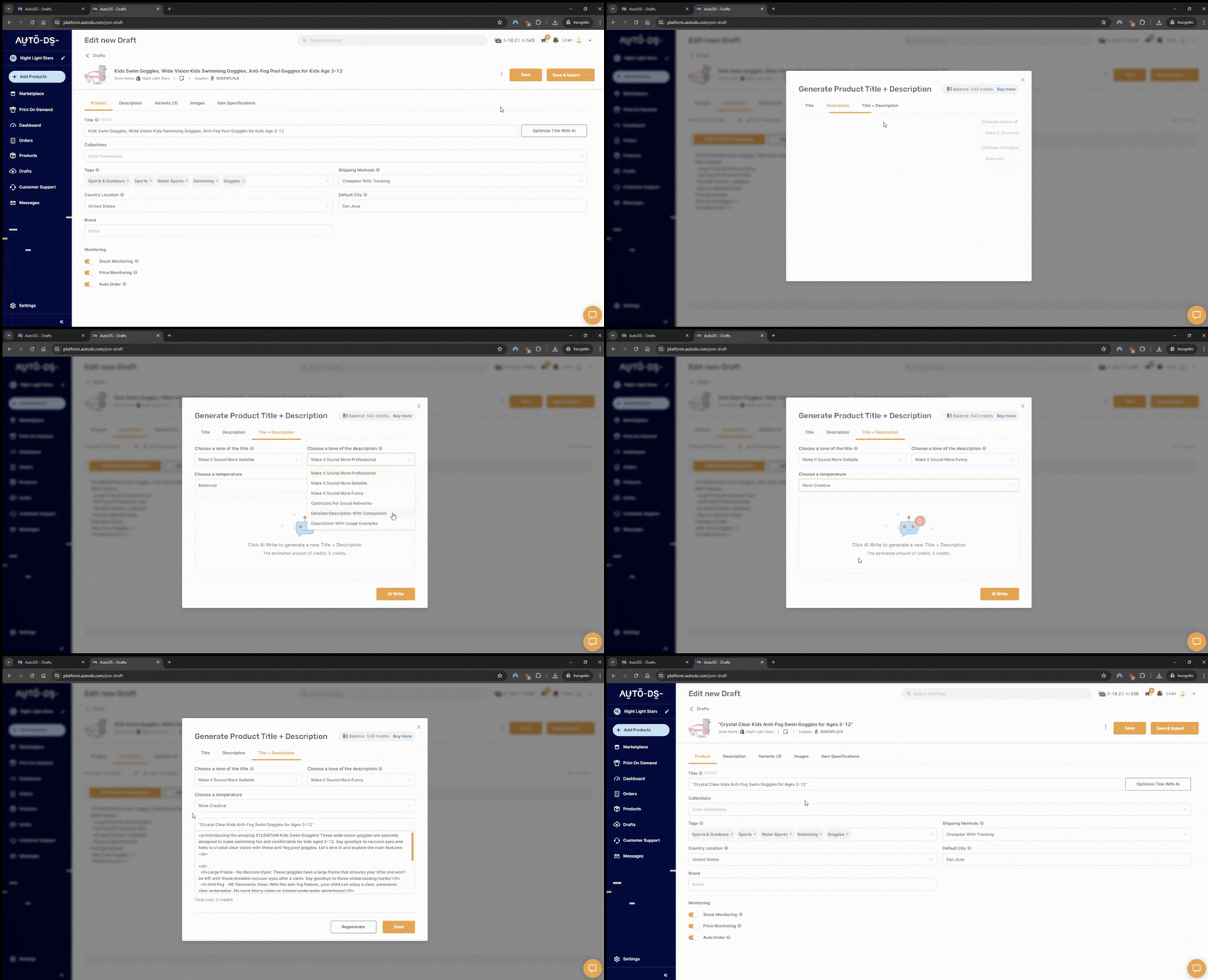
AutoDS offers built-in listing optimization tools so you can do it all from the same dashboard. This way, you don’t need five different extra apps. This includes:
- Title rewriting: it turns supplier titles into clear, SEO-friendly copy.
- Description creation: AutoDS offers AI-powered descriptions based on your preferred voice and tone with the AI Product title & description generator.
- Photo enhancement: It improves clarity and compresses images automatically.
- Variant grouping: combines duplicate variants, fixes clutter, and organizes product options.
- Handles SEO optimization.
This way, beginners get professional-looking listings without needing to learn how to design or write high-converting copy.
7. Guided Setup for Beginners

AutoDS doesn’t assume you just know how to set everything up. It provides built-in visuals and videos to teach how to use each feature, guiding you along the way. To do this, it uses:
- A step-by-step onboarding process.
- Video tutorials and quick guides explaining features.
- AutoDS Academy courses (for free!) to learn how to automate multiple selling channels, like eBay, Shopify, Amazon, and more.
The goal? That even those who’ve never dropshipped before feel comfortable and confident to start selling right away.
Bottom line? AutoDS replaces 10 – 15 technical tasks with full automation and guided tools, turning a complicated setup into something everyone can master. Want to give it a try? 🚀 Start the $1 trial today!
Comparison Table: AutoDS vs Manual Dropshipping Configuration
| Workflow Step | Manual Setup | AutoDS Setup |
|---|---|---|
| Product import | Copy/paste HTML & images | One click |
| Variant mapping | Manual variant IDs | Automatic |
| Order fulfillment | Manual checkout | Auto-ordering |
| Tracking updates | Manually updated | Automatic |
| Price & stock monitoring | Manual | Real-time automation, 24/7 |
| Supplier setup | Manual and highly technical | Pre-integrated with major suppliers, like Amazon, Walmart, eBay, Target, and more |
| Trend and product research | Manual searching | Built-in tools for trending products based on real-time market data |
| Returns workflow | Manual emails | Automatic |
| Time requirement | 3-6 hours/day | 30-60 minutes/day |
What Makes Manual Dropshipping “Technical”?
So far, we’ve covered the differences between manual and automated dropshipping. As we’ve established, while the first one can take hours a day, the second one is simple, quick, and straightforward. But what makes manual dropshipping so technical? Let’s see.
1. Multiple websites and tools must be connected manually
When you run everything by hand, you’re the one connecting the dots. You know, copying links, adjusting variants, double-checking prices, and updating stock. This means juggling selling channels, suppliers, spreadsheets, extensions, email tools, and more, where each tool has its own rules and workflows.
2. Store admin involves many semi-technical steps
Even simple tasks can become multi-step processes, like optimizing listings, connecting selling channels, and designing your store’s layout. This turns one little thing into hours sitting on the computer.
3. Supplier shipping rules require technical understanding
Every supplier has different warehouses, methods, delivery times, and rules. Some ship by region, others have five shipping options, and some others require extra fees. Every supplier is a different universe, and it takes time (and some memory) to know them all.
📦 Supplier’s Tip: Always vet your suppliers wisely. Order test samples, check for transparent policies and shipping times, and read customer reviews. Only partner with those that consistently deliver quality products and reliable fulfillment.
4. Product data clean-up requires tech-savvy editing
Supplier product pages come loaded with messy HTML, oversized images, tables that might break your layout, descriptions written like an IKEA manual, and variant data that triplicates listings. Cleaning and optimizing all that requires lots of editing, formatting, rewriting, and, mostly, time.
5. Scaling requires API-like thinking
Manual dropshipping doesn’t scale unless you start thinking like a developer. You need to be one step ahead and think about how to prevent errors as you scale, how to keep stock synced across multiple suppliers, how to avoid duplicate variants or mismatches, and so on. These are essentially API problems that have to do with the way platforms connect and exchange data with each other.
How AutoDS Removes Technical Barriers for Beginners
AutoDS and similar tools take all the confusing and technical parts of dropshipping and turn them into simple clicks. Instead of feeling like you’re putting together a spaceship, you just follow clean buttons and guided steps. Here’s how it removes the biggest technical barriers that often confuse beginners:
1. No coding required
With AutoDS, you never touch HTML, CSS, variant IDs, metafields, or any code. Everything in AutoDS is UI-based: buttons, sliders, checkboxes, and dropdowns. If you can click, you can use it.
2. No fulfillment spreadsheet required
AutoDS removes every single need to keep spreadsheets. You don’t need to keep track of orders, tracking numbers, supplier status, or customer updates. All of this information is centralized in one single dashboard. No manual inputs, no updates required. Everything is tracked and updated automatically.

3. No copy-pasting between supplier and store
AutoDS connects your suppliers and your store automatically, so you don’t have to move titles, descriptions, images, SKUs, tracking numbers, and customer addresses all around the internet. It basically handles the entire bridge between platforms.
4. No manual data entry
With AutoDS, order fulfillment becomes a fully automated flow. When a customer places an order on your store, AutoDS autofills supplier checkout forms and shipping info, placing the order automatically on your supplier’s page.
5. No trend analysis tools needed
AutoDS comes with a full product research suite built in, including an exclusive marketplace of private suppliers, a trending products hub, a hand-picked curation, and an ad spy tool. All of these features include performance insights based on real-time market data. This way, you don’t have to guess what will sell. The platform gives you all the data you need to source products in a smart way.

6. No marketplace knowledge needed
AutoDS’s auto-routing feature figures out which supplier is best for each order. This way, you don’t need to understand the complexities of Amazon, AliExpress, Walmart, CJDropshipping, or any other marketplace. AutoDS simply chooses the fastest, most cost-efficient supplier automatically.
“The great thing about AutoDS is that it triples as a product research, order fulfillment, and automation tool. This is going to reduce your overall expenses and the amount of work that you need to do.” – AC Hampton, dropshipping expert
Do I Need Technical Skills to Start Dropshipping?
Short answer? Manual dropshipping requires technical skills, while automating the workflow with AutoDS doesn’t require them at all. Let’s understand why.
On one hand, manual dropshipping means you’re in charge of making sure everything works. You’ll need to handle:
- Constant setups, like shipping settings, variants, templates, and menu options.
- Lots of data entry, like customer info, SKUs, tracking numbers, supplier details… all typed by hand.
- Supplier integration knowledge, like understanding their rules, structures, and workflows.
- Store structure setup, like collections, metafields, navigation, and theme editing.
- Troubleshooting potential problems (because manual systems break easily).
If you’re not familiar with these things, this part can feel like putting together a puzzle with a thousand pieces.
On the other hand, there’s a fully automated setup with AutoDS. This eliminates almost all the complexity by turning technical tasks into simple steps:
- Step-by-step guided setup so you never feel lost.
- Automations that replace 90% of technical tasks, from sourcing and importing to fulfillment and tracking.
- Tools designed for beginners, with clean UI, clear options, and no hidden settings.
- Built-in multi-supplier sync with no API keys or mapping.
- Auto-ordering that removes the most technical workflows, including checkout, data entry, and tracking.
With AutoDS, you don’t need coding skills, dropshipping mastery, or knowledge of each specific supplier. You just need basic clicking skills (and a solid strategy).
Who Should Use AutoDS for Technical Setup Relief?
If dropshipping seems complex, time-consuming, or totally confusing, then AutoDS was definitely built for you. All in all, AutoDS is for anyone who wants to simplify the entire dropshipping workflow to scale faster and easier. Here’s who benefits the most from full automation:
- Beginners with no tech experience. If you’ve never touched HTML, set up an e-commerce store, or sourced products, this one is for you. AutoDS turns the whole setup into a guided, beginner-friendly experience. Nope…no tech or e-commerce skills needed.
- Sellers who want fast store launches. If you want to go from idea to a live store quickly, great news: AutoDS cuts out all the manual setup steps that usually slow people down. It lets you source products, import them, optimize them, and launch super fast.
- Side hustlers with limited hours. No time to think about every little detail, tweak every single configuration, and optimize each listing one by one? No worries. AutoDS reduces daily work from three to six hours a day to less than an hour. This way, you’re not spending your weekends writing titles and descriptions and scrolling through supplier pages. Instead, the AutoDS system is doing it for you.
- Non-technical Shopify entrepreneurs. If you’re great at marketing, branding, and content, but not so great at UX design, suppliers, or data entry, then automation is for you. AutoDS handles the technical aspects of dropshipping, keeping everything running smoothly, while you can focus on the fun parts, like content, marketing, strategy, and profits.
- Creators promoting viral TikTok products. Creators need speed. When something goes viral, you only have a couple of days to jump on the wagon. That means you have to find those items fast and list them even faster. AutoDS gives you all the market data you need to be one step ahead of viral trends, spot winning products before your competitors, and list them in just one click. That way, you go from a viral TikTok to a high-converting product in seconds.
- Multi-niche store owners. Running multiple stores manually is… a little bit of chaos, to put it nicely. AutoDS centralizes your entire operation into one single place, syncing suppliers automatically, managing orders for you, and updating tracking across all stores without extra effort. To put it simply: the easiest and quickest way to scale.
Frequently Asked Questions
Do I need technical skills to dropship on Shopify?
Without automation, yes, you do need technical skills to dropship on Shopify, as it requires a lot of manual work. Instead, if you’re using AutoDS, the platform automates the technical workflows, making it smooth and easy for you.
Is dropshipping setup difficult?
If it’s done manually, yes, the dropshipping setup can be difficult, especially for beginners or sellers without lots of experience. AutoDS simplifies this dramatically with full automation at every step of the process, making it easier and faster.
Can a beginner handle AutoDS?
Yes, a beginner can totally handle AutoDS. The dashboard and automation features are built for beginners, sellers who want to scale fast, and side hustlers with limited time.
Why not just do manual dropshipping?
Sellers can totally do manual dropshipping, but it can take too long, is too prone to errors, and can become impossible to scale. Instead, automating the dropshipping workflow with AutoDS eliminates repetitive, time-consuming tasks, making it easier and faster to launch and scale.
Is AutoDS worth it for non-technical sellers?
Yes, AutoDS is totally worth it for non-technical sellers. Automation replaces nearly every technical step, from product importing to fulfillment. Instead of dealing with HTML, supplier rules, spreadsheets, and daily monitoring, you just let the system run on autopilot. It’s the easiest way to start dropshipping without the tech hurdles.
Final Verdict: AutoDS Is the Solution That Makes Dropshipping Easy
Manual dropshipping can work, but why spend hours fixing bugs, managing spreadsheets, editing HTML, fulfilling orders, and handling customer support when you can automate the entire thing? For beginners (and honestly, for anyone who values their time and sanity), the technical workload of manual dropshipping is simply too much.
AutoDS simplifies the dropshipping process with full automation at every step. Instead of using a dozen tools at once and troubleshooting every moving part, you get a clean, automated system that handles the repetitive, technical stuff. Everything that used to be “technical” is reduced to simple clicks, from product sourcing and importing to syncing price and stock, tracking updates, and routing suppliers.
Dropshipping doesn’t have to be complicated. And with AutoDS, it isn’t 👉 Start today for just $1!
In the meantime, here are a few reads from our blog you might find helpful: