


If your eBay listings are live but don’t get many views, eBay Promoted Listings can help you put them in front of more potential buyers.
eBay currently offers two ways to promote your listings: General campaigns follow a cost-per-sale model, meaning you pay an ad fee when a promoted item sells after a click on your ad, while Priority campaigns work on a cost-per-click (CPC) model, giving you more advanced targeting controls in exchange for paying for valid clicks, whether they lead to a sale or not.
Now, paying for visibility doesn’t automatically mean more profit. You still need to know which products are worth promoting, how much you can afford to spend, and which campaign strategy actually makes sense for your store.
And that’s exactly what I’ll cover in this guide: I’ll break down everything you need to know, from how eBay Promoted Listings work to how to set up your campaigns from scratch, plus a few tips and best practices for dropshipping on eBay.
Let’s get started.
eBay Promoted Listings come in two main formats: General campaigns charge when an attributed sale happens, while Priority campaigns use a pay-per-click model with more control over targeting and bids.
Ad spend should always be tied to profitability. With General campaigns, the ad rate is a percentage of the total sale amount, while Priority campaigns require closer monitoring of CPC, conversions, and budget.
The best listings to promote are selective, not random: proven bestsellers, promising new products, seasonal items, and products competing in crowded, high-demand niches.
AutoDS can help dropshippers keep promoted listings viable by monitoring supplier stock and price changes and automatically updating eBay listings, reducing the risk of advertising products that are unavailable or no longer profitable.
What Are eBay Promoted Listings?
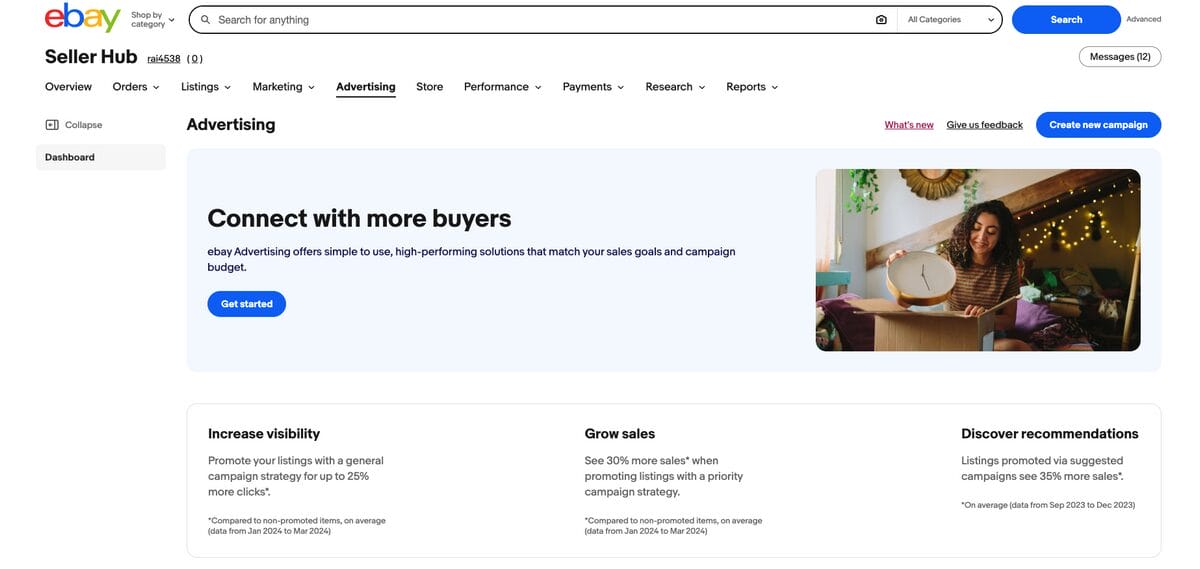
eBay Promoted Listings is eBay’s paid advertising service for sellers who want to increase the visibility of their catalog.
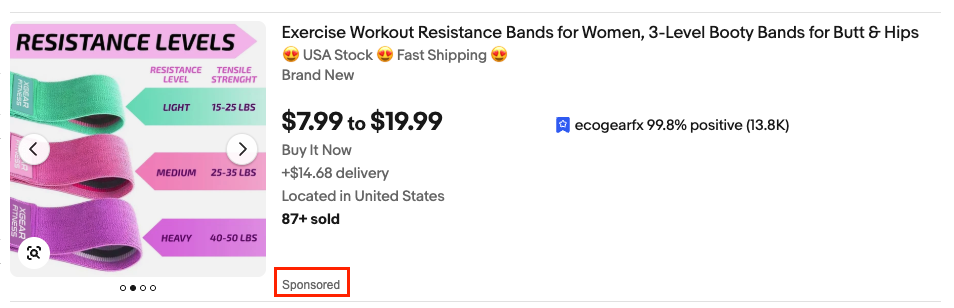
Instead of relying on organic marketing alone, you can pay to have your listings appear more often across eBay, including search results, listing/product pages, and other placements across the marketplace. When you do that, promoted products are marked with a “Sponsored” label, so buyers can clearly distinguish paid placements from regular listings.
The goal is simple: to put your products in front of more shoppers, especially when you’re competing in crowded categories or trying to give certain listings an extra push.
How eBay Promoted Listings Work
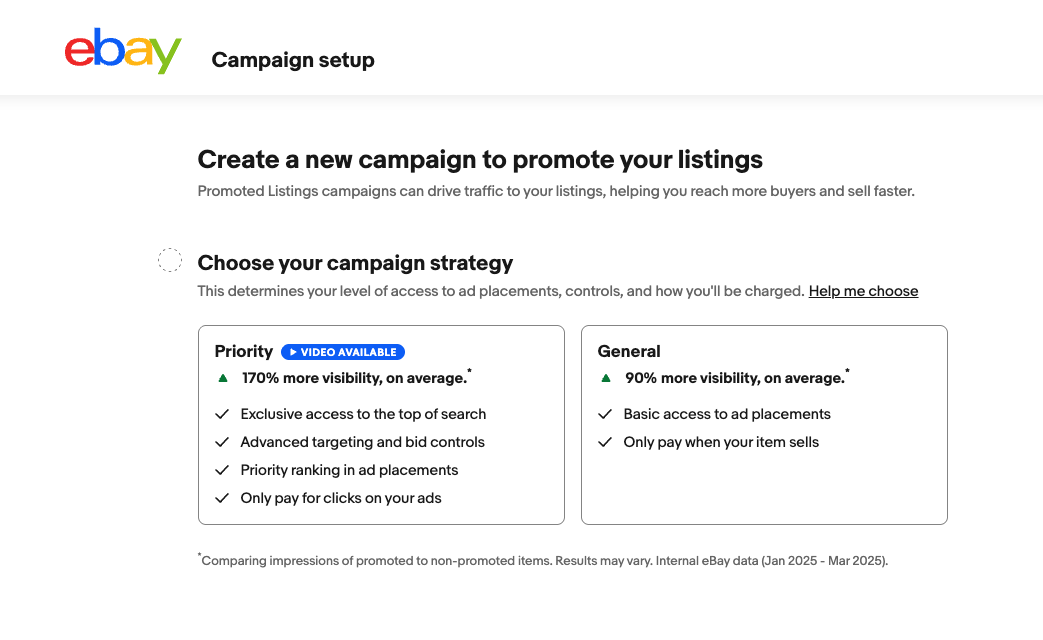
eBay Promoted Listings work differently depending on the campaign strategy you choose. The biggest difference comes down to what triggers the advertising fee: with General campaigns, you pay when a promoted product sells, while with Priority campaigns, you pay when someone clicks the ad. Let’s take a closer look at each.
💡 Pro Tip: Neither option replaces the basics of a strong listing. Good pricing, relevant keywords, solid photos, and competitive shipping still matter. Promoted Listings simply give you another way to increase exposure when organic traffic alone isn’t enough.
General Campaigns: Pay When You Sell
With a General campaign, you choose an ad rate (a percentage of the item’s total sale amount) that you’re willing to pay for the extra exposure. If the promoted item sells after a qualifying click on the ad, eBay charges the advertising fee based on the ad rate in effect at the time of the sale.
This makes General campaigns a relatively straightforward way to start experimenting with paid visibility, since you’re not paying up front every time someone clicks. You can use a fixed ad rate or let eBay dynamically adjust it according to its suggested rate.
An important note here is that the attribution window runs 30 days from the click. If the item sells to any buyer within 30 days of someone clicking the ad, it counts as an attributed sale, even if the eventual buyer wasn’t the one who clicked (the item must be promoted at both the time of the click and the time of the sale).
With General campaigns, attribution is tied to the item, not necessarily to the individual buyer. This means that one shopper’s click can still lead to an ad fee when another shopper later buys that same promoted item.
If this sounds unfamiliar, that may be because eBay rolled out this attribution model across different markets between 2025 and 2026, replacing the previous buyer-specific model in those marketplaces.
Priority Campaigns: Pay For Clicks
Priority campaigns work more like traditional PPC advertising. You pay for valid clicks on your promoted listings, whether those clicks turn into sales or not. In return, you get priority access to ad placements and more control over how your advertising budget is used.
Priority campaigns also track “halo” sales. If a buyer clicks your priority ad and then buys a different item from your store within 30 days (even if that second item is not promoted), that counts as an attributed sale, too. You don’t pay any extra fee for it, since Priority fees are strictly per-click, not per-sale.
You can choose Smart targeting, where eBay automatically targets relevant buyers, or Manual targeting, where you select keywords and control your bids. That extra control can be useful when you know exactly which searches you want to compete for, but because every click costs money, you’ll want to keep a much closer eye on your budget and campaign performance.
How Much Do eBay Promoted Listings Cost?
There’s no flat fee for eBay Promoted Listings. What you pay depends on the campaign strategy you use and, with General campaigns, the ad rate you choose for each listing.
For General campaigns, your ad rate is a percentage of the item’s total sale amount, not just its listed price. eBay currently lets sellers choose an ad rate between 2% and 100%, while its suggested rate varies from listing to listing based on factors like competition, demand, listing quality, and past performance.
Let’s put it into practice. The total sale amount includes the item price, shipping, taxes, and other applicable fees. So, for example, if a product sells for $50, the buyer pays $5 for shipping and $4.40 in sales tax, the total is $59.40. At a 5% ad rate, your Promoted Listings fee would be $2.97, not $2.50. For US sellers in particular, remember that sales tax collected on the order is part of the amount used to calculate the ad fee.
Now, if eBay lets you start at 2%, why not just stick to the minimum? Because the ad rate also affects how competitive your listing is for promoted placement. A higher rate can improve your chances of getting more visibility, while a lower one may limit how often your ad appears.
That’s why there’s no single ad rate that works for every product. The goal is always the same: to balance exposure with profitability. Start conservatively, compare your rate with eBay’s suggested rate, and only increase it if the extra visibility is actually leading to profitable sales.
And this is the biggest safety net with General campaigns: you don’t pay just because someone sees or clicks your ad. The ad fee is charged when the promoted item sells under eBay’s attribution rules. That makes it much easier to control risk than a traditional PPC campaign, especially when you’re starting out.
Priority campaigns work differently. They use a cost-per-click model, so there’s no percentage-based ad fee. Instead, you pay for valid clicks. With Manual targeting, you set keyword bids yourself, while with Smart targeting, eBay applies bids automatically. Your actual CPC depends on factors such as the bid, keyword relevance, competition, listing quality, and eBay’s second-price auction.
Which Products Should You Promote?
Promoted Listings work best when you’re strategic about which products actually need the extra visibility (and, therefore, the extra budget). Instead of putting your whole catalog behind ads, focus on listings where more exposure has a realistic chance of turning into profitable sales.
The best eBay dropshipping products to promote typically include:
- Competitive, high-demand niches. Categories like Home & Garden, Sports & Outdoors, Electronics, and Fashion & Beauty can get crowded fast. They also tend to be highly specific, meaning shoppers often search for a particular type, size, use case, or feature. If your listing is relevant but buried among dozens of similar options, promotion can help it surface in front of buyers who are already looking for exactly that kind of product.
- Seasonal products. Promote these before demand reaches its peak, not after. Summer accessories, back-to-school products, Halloween items, or holiday gifts need time to gain impressions and momentum while shoppers are beginning to search. In this case, a little boost can help you stand out from the crowd before other sellers start competing for the same seasonal traffic.
- Proven bestsellers. Products that already convert well are strong candidates because you know there’s demand. Giving them more visibility can help you scale something that’s already working rather than spending money trying to rescue a weak product.
- New listings with strong potential. A new product can be well-priced and well-optimized and still struggle to get noticed at first. Promotion can give promising new listings an initial visibility push while they begin accumulating impressions, clicks, and sales.
💡 Pro Tip: There’s no need to promote everything at once. Start with a small, manageable group of listings, compare performance, and expand only once you can see which products are actually turning that extra exposure into profitable sales.
How to Set Up eBay Promoted Listings
Ready to give your listings a little extra visibility? You can create your promoted listing campaign directly from eBay Seller Hub in a few simple steps.
Step 1: Check Your Eligibility
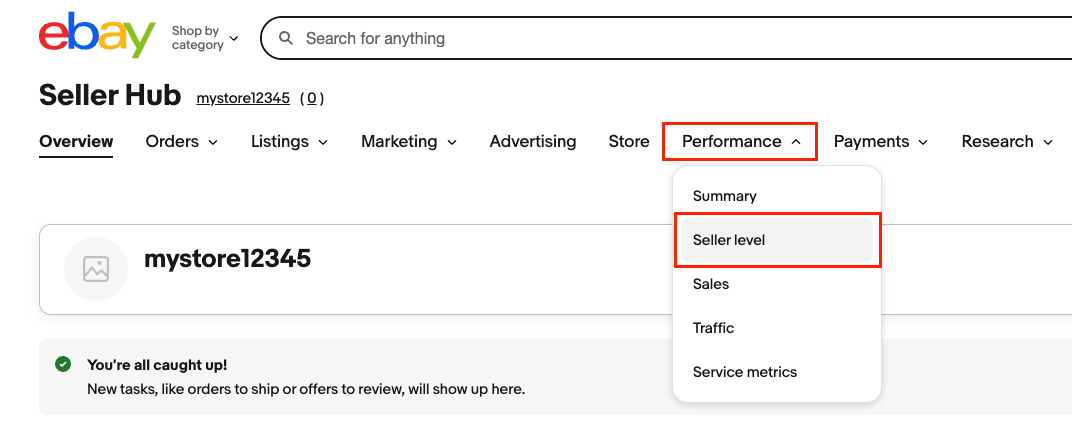
To use Promoted listings, you need enough account activity and an Above Standard or Top Rated seller level.
You can check your current and projected level in your Seller Dashboard (Performance > Seller level), where eBay evaluates your performance every month based on things like transaction defects, unresolved buyer cases, and shipping performance.
If your account is Above Standard or Top Rated, you meet the seller-performance requirement. eBay also requires enough account activity before you can access Promoted Listings.
Your listings also need to be eligible. eBay currently allows qualifying fixed-price listings in most categories to use General or Priority campaigns.
The good news? You don’t need an eBay store subscription to use General or Priority campaigns. That requirement applies to Promoted Stores, which is a separate advertising product.
Step 2: Open The Advertising Dashboard
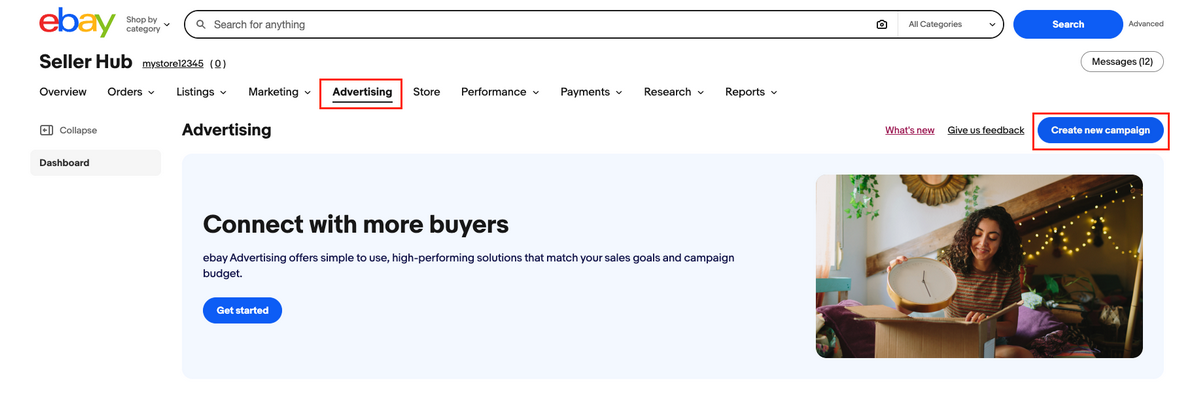
Everything clear to move forward? Good, then go to Seller Hub, open the Advertising tab (the fifth one on the menu). This is where you’ll manage your campaigns, review performance, and make adjustments later.
From there, select the Create new campaign button at the top right. This is where you’ll choose between General and Priority. If you’re new to eBay advertising, General is the simpler setup. Priority gives you more control, but there are also more settings to keep an eye on.
Step 3: Select The Listings You Want To Promote
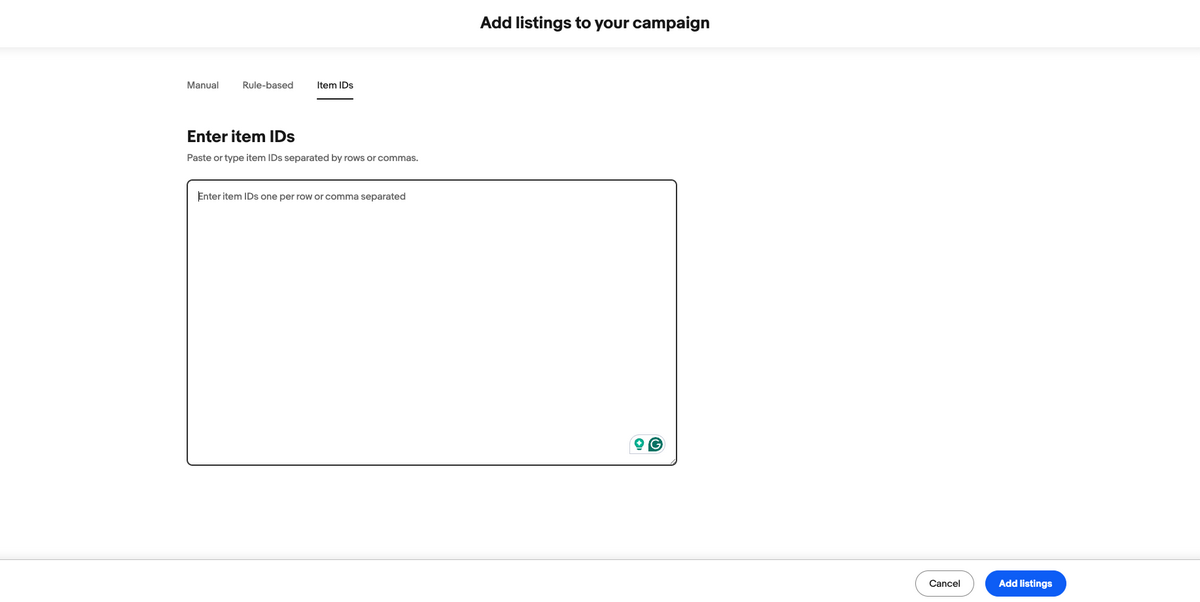
Choose the products you want to include in the campaign. For General campaigns, eBay lets you manually select listings, enter item IDs, upload a CSV, or create rules that automatically select qualifying inventory. Priority campaigns support manual selection, item IDs, and rule-based selection.
Rules can be useful for larger catalogs because eBay can automatically add or remove listings based on criteria such as category, price, brand, condition, days on site, and quantity available. For Priority campaigns, rule-based listing selection works with Smart targeting, which automatically optimizes bidding and targeting as eligible listings enter or leave the campaign.
You can also edit current promoted listings through Seller Hub > Listings > Active. Just choose the one you want to promote or edit and select Edit promoted listing.

Step 4: Configure Your Advertising Settings
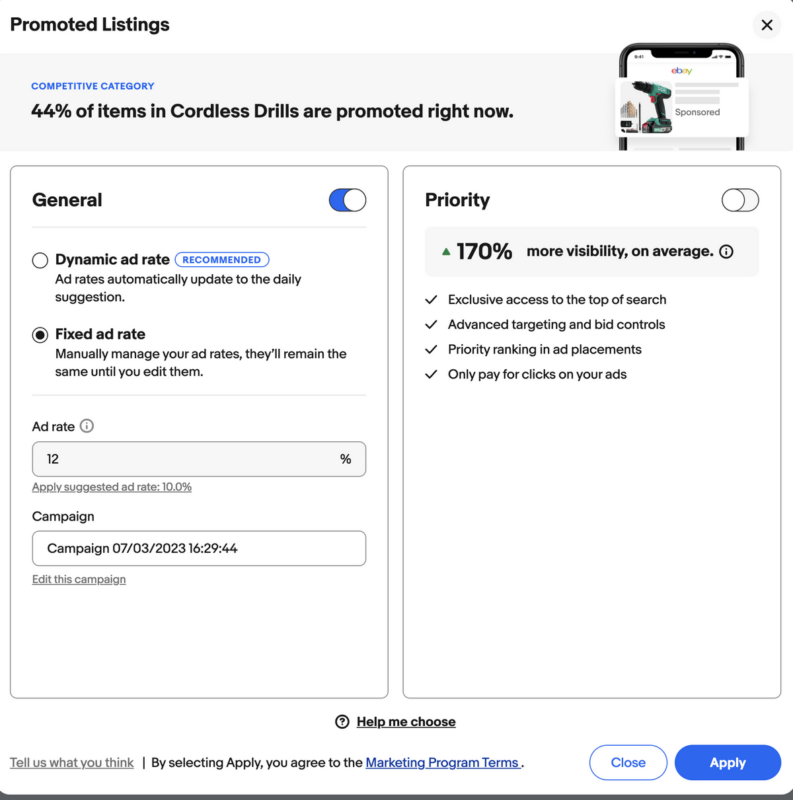
This is where the setup branches depending on the strategy you selected.
For a General campaign, choose between:
- Dynamic ad rate: eBay updates your rate daily to its suggested rate. You can also set an ad-rate cap so it doesn’t go above the maximum percentage you’re comfortable paying.
- Fixed ad rate: You choose the percentage yourself, and it stays the same until you change it. You can also apply eBay’s current suggested rate as your starting point.
For Priority campaigns, first choose your targeting method:
- Smart targeting: eBay automatically targets relevant buyers. You set a target daily budget and can optionally set a maximum CPC, or the most you’re willing to pay for one click.
- Manual targeting: You choose keywords and set your bids. You’ll also select either fixed or dynamic bidding and review your ad groups, keyword targeting, and keyword bids.
Priority campaigns also let you add a video to individual promoted listings if you want to use video-enabled ad placements.
Step 5: Set Your Budget If You’re Using Priority
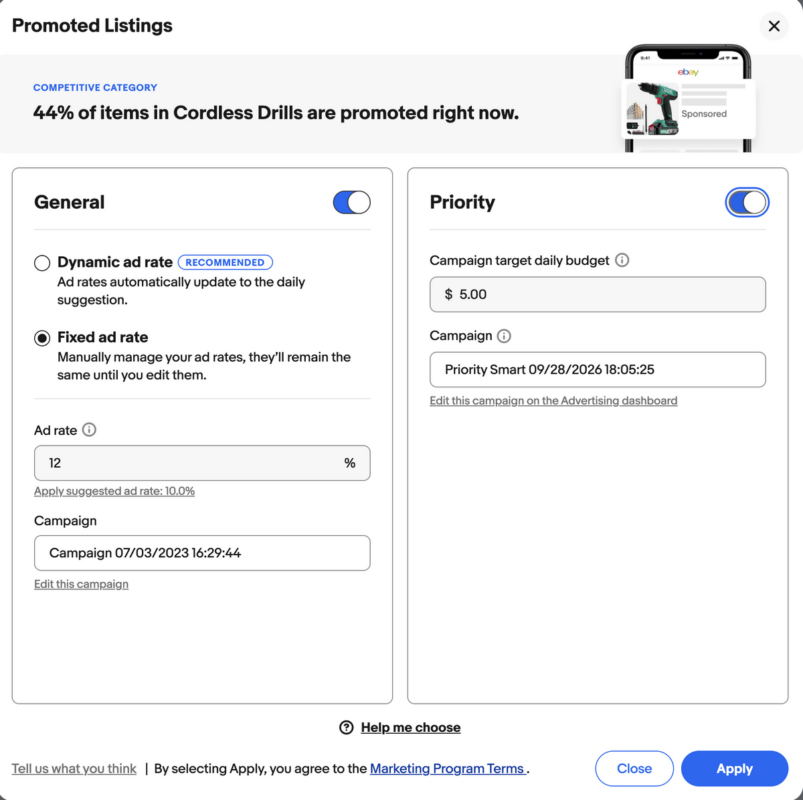
Priority campaigns require a target daily budget, which represents the average amount you’re comfortable spending per day over the calendar month.
There’s an important catch: this isn’t a strict daily spending cap. According to eBay, your campaign can spend less than your target on some days and up to twice the target daily budget on others, depending on traffic and advertising opportunities.
Over a full calendar month, eBay generally caps your total spend at 30.4 times your target daily budget (30.4 being the average number of days in a month) unless you change the budget during that month. For example, a $10 daily target would translate into a monthly maximum of $304.
Step 6: Name, Schedule, And Launch Your Campaign
Finally, enter a campaign name and choose your start and end dates. Review your listing and advertising settings one more time, then select Launch campaign.
Once it’s live, head back to your Advertising dashboard to monitor metrics such as impressions, clicks, sales, ad fees, conversion rate, and ROAS. The real value comes from seeing what performs and adjusting your rates, bids, budget, or listings accordingly.
Best Practices for eBay Promoted Listings
Promoted Listings aren’t a magic visibility button you press and suddenly sales spike. You still need to know what you’re promoting, how much you’re paying for that exposure, and whether it’s actually helping you sell more. A few small adjustments can make a big difference:
- Start small and stay selective. Begin with a focused group of listings instead of promoting your entire catalog. This makes it easier to see which products actually benefit from the extra visibility and which ones are just adding unnecessary ad spend.
- Watch ad costs against actual sales. More impressions and clicks are nice, but profitable sales are what matter. With General campaigns, make sure the ad fee still leaves you with a healthy margin. With Priority campaigns, also watch how much you’re paying per click and how many of those clicks actually turn into sales.
- Adjust based on performance. If a listing is converting, you may have room to increase its rate or budget. But if it’s getting plenty of visibility but few sales, increasing spend probably isn’t the answer. Review the listing itself, like price, images, title, shipping, and overall offer, before throwing more money at it.
- Don’t set it and forget it. Competition, demand, and eBay’s suggested rates can change over time. Check campaign performance regularly and move your budget toward the products that are actually delivering results.
- Use eBay’s recommendations as a benchmark, not a rule. eBay provides suggested ad rates for General campaigns and keyword and bid recommendations for Priority campaigns. They’re useful reference points, but your own margins and campaign results should ultimately determine how much you spend.
- Test both campaign strategies when it makes sense. General and Priority don’t have to be mutually exclusive tactics for your entire store. Different products may perform better under different strategies, so testing both on suitable listings can help you figure out where to use each.
eBay Promoted Listings for Dropshippers: What to Know
For dropshippers, Promoted Listings are great for increasing eBay traffic and sales, but they can also come with one extra complication: your margins are usually tighter, and your inventory isn’t fully under your control. That means advertising decisions need to be tied much more closely to your product costs, supplier reliability, and profit per sale.
First, factor the ad cost into your margin before you promote anything. A product that looks profitable at first can quickly become much less attractive once you add eBay fees, shipping, supplier costs, and a Promoted Listings fee. With Priority campaigns, this matters even more because you’re paying for clicks whether they convert or not. Bottom line? Always make sure you are still making money after advertising.
Then, there’s supplier volatility. Your supplier can raise the price, change shipping costs, or run out of stock while your promoted listing is still live. If you’re using Priority, you could be paying for traffic to a product whose economics have already changed. And even with General campaigns, selling an item that your supplier can no longer fulfill can lead to cancellations and hurt the customer experience.
This is where automation becomes especially useful to keep your store updated and profitable. For instance, AutoDS integrates directly with eBay to monitor supplier price and stock changes and update your eBay listings accordingly. This way, you’re less likely to keep promoting an item that has gone out of stock or is no longer profitable at its current price.
Here’s the thing: the whole point of advertising is to bring more eyes to a listing and, ideally, more sales. But if the stock isn’t there or your prices are outdated, you’re paying to amplify a problem instead of a listing. That’s where automation keeps your products viable.
Frequently Asked Questions
What are eBay Promoted Listings and how do they work?
eBay Promoted Listings are paid ads that give eligible products extra visibility across eBay, including search results and other high-traffic placements. Sellers can choose between General campaigns, which charge an ad fee when a promoted item sells after a qualifying ad click, and Priority campaigns, which use a pay-per-click model.
How much do eBay Promoted Listings cost?
It depends on the campaign type. With General campaigns, you choose an ad rate as a percentage of the item’s total sale amount. With Priority campaigns, you pay per valid click based on your bidding and targeting settings. Your ideal spend should always leave enough room for product costs, eBay fees, shipping, and profit.
Do I have to pay if my promoted listing doesn’t sell?
With a General campaign, no. You only pay the advertising fee when the promoted item sells under eBay’s attribution rules. With a Priority campaign, yes: you pay for valid clicks whether or not they result in a sale.
Which listings should I promote first?
Start with a small group of products that already have strong sales potential. Good candidates include proven eBay bestsellers, promising new listings, seasonal products ahead of peak demand, and items competing in crowded categories where extra visibility can make a difference.
Are eBay Promoted Listings worth it for dropshippers?
They can be, as long as the numbers make sense. Dropshipping margins can be relatively tight, so advertising costs need to be included in your per-product profit calculations. It’s also especially important to keep supplier stock and pricing updated, since promoting an unavailable or suddenly unprofitable item can quickly waste ad spend.
Make Every eBay Promoted Listing Count
So, there you go: eBay Promoted Listings can be a useful way to increase visibility, but the real value comes from using them selectively. Choose the right products, understand the difference between General and Priority Campaigns, keep a close eye on margins, and adjust based on actual performance instead of simply increasing your ad rate and hoping for the best.
For dropshippers, that also means making sure the product behind the ad is still viable. AutoDS can help by keeping your eBay listings updated automatically with price and stock monitoring, so you’re not spending money promoting products that are unavailable or no longer profitable.
At the end of the day, more visibility only helps when the listing is ready to convert. If not, it’s best to allocate your budget strategically to listings that make more sense.
Want to learn more about eBay dropshipping? Here are other articles you might find useful:







