


Amazon dropshipping is one of the easiest ways to start selling online without buying inventory upfront or handling shipping yourself. You find compliant suppliers, list a product, a customer orders it, and your supplier ships it directly to them.
I’ve been dropshipping for more than eight years, and I’ve seen how quickly the right product can start selling on Amazon, having made over $3 million as a result. That doesn’t mean every product will sell right away (you still need the right strategy), but it shows what can happen when you list the right products on a marketplace where people are already looking to buy.
In this guide, I’ll show you how to set up your seller account, find products, choose suppliers, calculate fees, automate repetitive tasks, and avoid the mistakes that can slow you down. By the end, you’ll have a clear roadmap for building a profitable Amazon dropshipping business in 2027.
Amazon allows dropshipping as long as you’re the seller of record: your name on all packaging, invoices, and packing slips, no third-party branding in the box, and returns handled under your own business name.
Your supplier’s reliability becomes your account health. Late shipments, missing tracking, or stock problems land on your metrics, not theirs — so prioritize fast handling times, valid tracking with major carriers, and neutral packaging, and never depend on a single supplier.
Product research is the heart of your strategy. Find products from data rather than hunches, validate demand against Amazon’s own numbers, and confirm you can actually enter the listing before importing anything.
Price with the fees already built in. Referral fees of 8–15% plus the $0.30 minimum come out of every sale, so build an 18–20% buffer up front rather than discovering your real margin after the order lands.
Automation is what makes the model scale. AutoDS monitors supplier prices and stock hourly, imports products in seconds, fulfills orders, and uploads tracking automatically, so you can run hundreds of listings without babysitting a single one.
Can You Dropship on Amazon Without Getting Banned?
Let’s get the most common fear out of the way: Yes, you can dropship on Amazon without getting banned. Amazon allows dropshipping, but only when it’s clear to the customer that you are the seller, not the supplier fulfilling the order.
This means one simple thing: you are the visible entity and point of contact of your business. Not Amazon, not your supplier. This includes having your name appear on order information, invoices, and packaging, as well as managing customer service and returns yourself.
I’ve seen many beginners worry that Amazon will ban them simply for dropshipping, but that’s not how it works. The business model itself is allowed. Problems usually start when sellers use the wrong supplier, misrepresent where an order is coming from, or fail to take responsibility after the sale.
I’ll zoom in on this in the following section, but for now, know this: as long as you follow Amazon’s rules and choose your suppliers carefully, there’s no reason you can’t build a long-term dropshipping business on the platform.
Amazon Dropshipping Policy & Compliance in 2027
Now that you know it is totally legal to dropship on Amazon, the next question is how to stay compliant. One simple answer: Amazon has specific dropshipping policies that you must follow.
The rules are not complicated, but Amazon does take them seriously. Following them helps protect your account, keeps your listings active, and gives you a stronger chance of competing for the Featured Offer (also known as the Buy Box, which is the most competitive offer selected by Amazon to occupy the first spot).
What Amazon’s Official Dropshipping Policy Says
According to Amazon’s Dropshipping Policy (Seller Central), sellers may use dropshipping only if they:
- Have a supplier agreement confirming they are the seller of record.
- Appear as the seller on all packaging, invoices, packing slips, and customer-facing documents.
- Remove any names, logos, receipts, or materials identifying another retailer or supplier.
- Accept and process returns under their own business name.
Your supplier may handle the physical fulfillment, but you are still responsible for everything the customer sees and experiences: the listing, price, shipping time, tracking, customer service, refunds, and returns.
This is where choosing the right supplier becomes so important. You don’t want a customer opening their package and finding another retailer’s receipt inside. That creates a big policy problem.
Now, let’s look at each requirement more closely.
Be the Seller of Record
This is the most important rule: the customer must see you as the seller, not the supplier fulfilling the order.
Your business should appear as the seller on:
- Packing slips
- Invoices
- Order information
- External packaging
I recommend confirming this with every supplier before listing their products. Amazon requires you to have an agreement stating that you (and no one else) will be identified as the seller.
Remove All Third-Party Branding
The package cannot arrive with another retailer’s logo, receipt, invoice, or promotional materials inside.
For example, you cannot purchase an item from Walmart and have it delivered to your Amazon customer in a Walmart-branded box with a Walmart receipt. From the customer’s perspective, it should be clear that the order came from your business.
Tip: I always recommend checking how a supplier packages orders before relying on them. To do this, order samples before listing and assess the overall experience, from packaging to delivery. If your preferred supplier doesn’t do this, reach out to them and see if neutral packaging is available.
Handle Returns Yourself
Even though your supplier ships the product, you remain responsible for:
- Communicating with the buyer
- Accepting return requests
- Providing return instructions
- Processing refunds
Your supplier may support you behind the scenes, but Amazon holds your business responsible for the customer from start to finish. Before choosing a supplier, check its return window, refund process, and whether it provides prepaid return labels.
Protect Your Shipping Metrics
Amazon pays close attention to how reliably seller-fulfilled orders are shipped and delivered. As a general target, you should maintain:
- A Valid Tracking Rate above 95%
- A Late Shipment Rate below 4%
- An On-Time Delivery Rate of at least 90%
- An Order Defect Rate below 1%
Failing to meet these metrics can affect your listings, Featured Offer eligibility, or ability to fulfill orders yourself. And that’s exactly where manual management becomes difficult as your store grows and automation saves the day (we’ll zoom in on this ahead in the article).
Tip: Avoid unnecessary chaos that can hurt these metrics. AutoDS handles your entire back-end (from stock and price monitoring to automated returns) to keep your operation healthy and reliable at all times. You can try AutoDS for just $1 and start today.
Avoid Retail Arbitrage-Style Dropshipping
Buying from another online retailer and sending the order directly to your Amazon customer is risky when that retailer appears at any point in the buyer experience.
Amazon specifically prohibits fulfillment methods where another seller appears on the packaging, packing slip, invoice, or other order materials. Retail receipts also generally won’t work as the proper supplier invoices that Amazon may request when verifying your sourcing or approving you to sell restricted products.
So, can you use retail suppliers? Only when you can guarantee that the order fully complies with Amazon’s policy. Personally, I always stick to suppliers that understand dropshipping, provide valid tracking, communicate clearly, and can ship without their own branding. It removes a lot of unnecessary risk.
Pros & Cons Of Dropshipping On Amazon
As with anything, there are two sides to this. Let me be honest about both pros and cons, because while disadvantages are real, they’re just more manageable than they look.
What Makes Amazon Worth It
- Free organic traffic
- No warehouse cost
- Large active user base
- Multiple product categories
- Easy scalability
- Efficient order fulfillment
Let’s break it down.
The biggest advantage, by far, is that you don’t pay for traffic. Amazon is a search platform where people arrive already intending to buy something. Nobody browses Amazon to kill time. They type in what they want, and if your listing is the best offer on that page, you get the sale. No ad budget, no creative testing, no burning money to find out whether a product works.
I’ll give you an example of how little effort this can take. While I was preparing the Amazon tutorial video, I added two products to a brand-new store just for demonstration purposes. A couple of days later, I woke up to a sale I wasn’t expecting at all. Two products in the air, and one of them sold on its own, organically.
I am not promising it will happen to you that fast, but it shows what happens when you list something people are actively searching for on a marketplace that already has the buyers.
That connects to the second advantage: listing is free. Amazon doesn’t charge you per listing, so you can put up 10 products or 1,000, and it costs the same. Combine that with not holding inventory, and you get a business where testing is nearly free.
On top of that, you can target any market you want with multiple product categories available. Start broad, sell across different categories, see which ones actually move, then double down on those while you keep testing new ground.
And once you’ve got automation in place, orders get processed, tracking gets uploaded, and statuses update while you’re asleep or out with your family, making it scalable in the long-term.
The Real Downsides
- Limited branding
- Competition
- Strict policies
Now, let’s talk about the hurdles when dropshipping on Amazon. For starters, branding is limited. You’re not operating your own Shopify or WooCommerce store where you get to fully customize your site. In this case, you’re inside the Amazon structure, so you can’t really stand out with an authentic brand design.
Then, competition is fierce. Free traffic and an existing customer base attract everyone, so you’re rarely the only seller on a page. But competition is only a problem if you’re competing in the wrong space.
The established listings with thousands of reviews and brand approval requirements aren’t your target, so skip them. Sort by newest arrivals instead and look for recent listings from small sellers who haven’t branded their products. Those are the ones where you can enter, undercut, and take the Featured Offer.
Tip: You can also stack advantages that cost you almost nothing. Offering free returns is a clear one, as most third-party sellers don’t offer them. Even if they eat into profits occasionally, you’re attracting a larger volume of shoppers.
Finally, the policies are strict. And nope: there’s no getting around this one. As I’ve covered above, Amazon has rules about who appears as the seller, what’s in the box, who handles returns, and how fast you ship. Break them, and you risk your listings or your account.
That said, strict isn’t the same as complicated. Follow the policy, pick suppliers who understand dropshipping, and this stops being a threat and becomes a filter that pushes out the sellers who cut corners.
Amazon Dropshipping Profit Potential
Amazon dropshipping is still profitable in 2027, and the reason is simple: you’re listing on a platform where people show up already intending to buy.
The numbers back this up. According to Amazon’s Q1 2026 earnings release (filed April 29, 2026), independent third-party sellers accounted for 60% of worldwide paid units sold. That means the majority of everything moving through Amazon comes from sellers like you, not from Amazon itself.
But percentages don’t pay your bills, so let me show you what this looks like on an actual product.
- Example 1: One of the items in my store is a squeaky chew toy for dogs. My cost is $7.30 plus $2 shipping, so about $9.30 landed. I listed it at $19.99, and after Amazon’s fees of roughly $3, that’s about $8 profit on a single order.
- Example 2: Another product, a rotating drying rack, costs me around $7.50. The only other seller on that listing was asking $89.99, so I came in at $19.99 to compete on price, resulting in a $10 profit per unit. I could have gone higher, but I didn’t think the product itself would carry much more than that, so I left it.
That’s the part beginners tend to miss. You’re not always fighting for pennies. Sometimes you find a listing where the existing seller has an expensive supplier, and you have room to undercut them and still walk away with a healthy margin.
A few honest caveats, because I don’t want to sell you a fantasy: Amazon takes its cut, of course, and you need to consider fees in your pricing strategy (we’ll get into that later).
Also, not every product sells, and that’s where your product research comes into play. I’ve listed items that did nothing. That’s the job. You test, you find a winner, then you double down on what’s working while you keep testing.
So while Amazon dropshipping is a very profitable model, it doesn’t happen without a strategy.
Tip: The profit only stays profit if your pricing keeps up with your supplier. If their cost goes up and your listing doesn’t, you’re selling at a loss without knowing it. AutoDSmonitors supplier prices and stock hourly and adjusts your listings based on the rules you set, so your margin doesn’t quietly disappear.
How To Dropship On Amazon: Step-By-Step Guide
Time to get hands-on. Next, I’ll go through the entire Amazon dropshipping workflow, from creating your account to fulfilling your first orders.
Step 1: Create An Amazon Seller Account
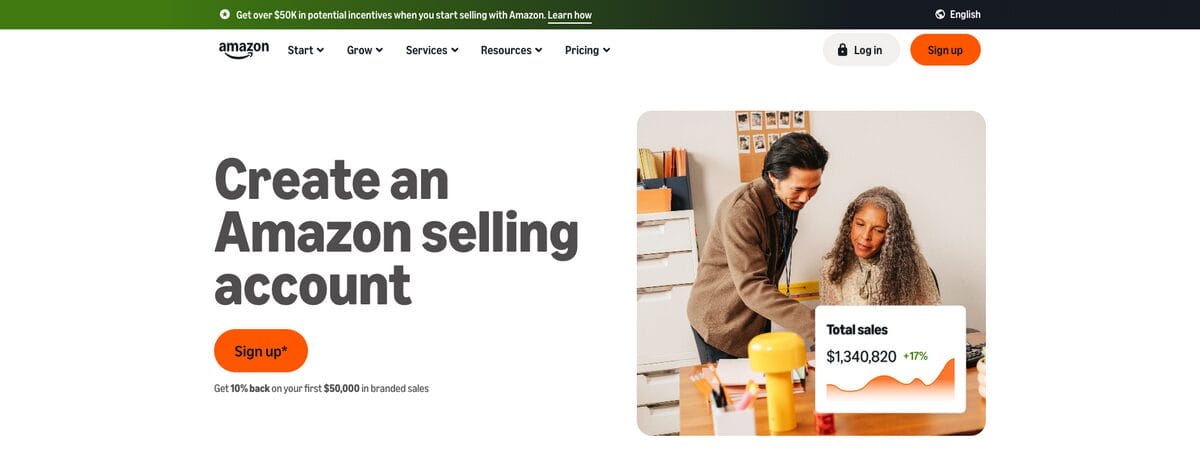
This is the easiest step in the whole process, and it doesn’t cost you anything. It also doesn’t matter where in the world you’re based. You can create an Amazon seller account and sell on the US marketplace from anywhere.
The signup itself is exactly what you’d expect. Your name, email, home or business address, and phone number. And if you haven’t registered a business yet, don’t let that stop you. You can use your personal address for both fields and still open the account.
Verification is the part that makes people nervous, so let me walk you through what Amazon actually wants:
- A government-issued ID, scanned and uploaded.
- A bank or credit card statement.
- Your payment and banking details, so Amazon knows how to charge you and where to send your payouts.
The whole point is proving you’re who you say you are, which means the details in your seller account need to match what’s on your ID and your bank documents. Mismatches are what cause delays here, not anything sinister.
You may also get asked to do a short verification video call. I had to do one. It took about two minutes, and all they wanted was to see my face and have me hold up the ID and bank statement I’d already submitted. Nothing to prepare for and nothing to worry about.
The best part is that all of this is a one-time thing. Once you’re verified, your seller account is yours to keep for as long as you want it.
Step 2: Choose Your Amazon Selling Plan
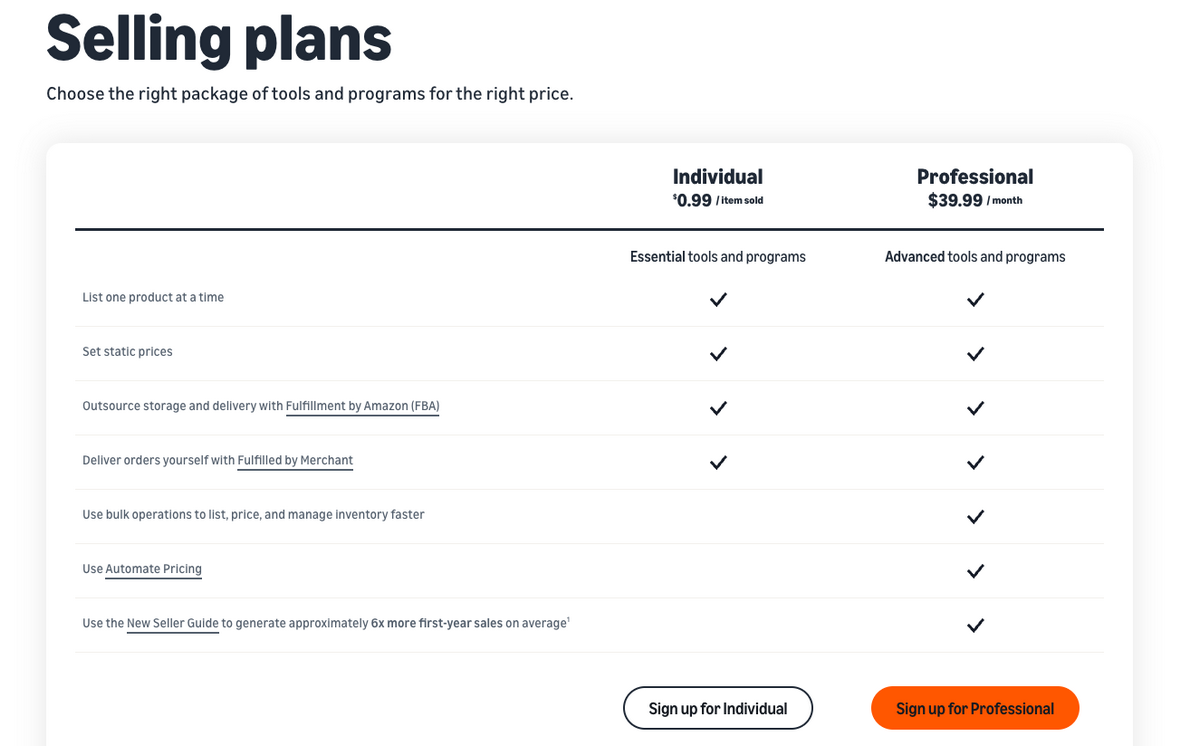
Amazon has two plans, and the choice matters more than it looks.
- The Individual Plan has no monthly subscription, but Amazon charges you a per-item fee on every sale, currently $0.99/item. That makes it reasonable if you’re selling under 40 items a month and just want to look around before committing.
- The Professional Plan costs $39.99/month flat. The math flips in its favor somewhere around 40 sales, since past that point, the subscription costs less than the per-item fees would. But that’s not the real reason to be on it.
Here’s the reason: automation requires the Professional Plan. API access is Professional-only, meaning no automation tool (including AutoDS) can connect to an Individual account.
Remember: automation is what lets you run hundreds of listings with monitored prices and stock instead of manually babysitting a dozen. I’ve been automating my dropshipping business for over eight years, and I couldn’t have scaled any of it without that. So if you’re serious, this is the cost of entry.
Don’t Forget the Referral Fees
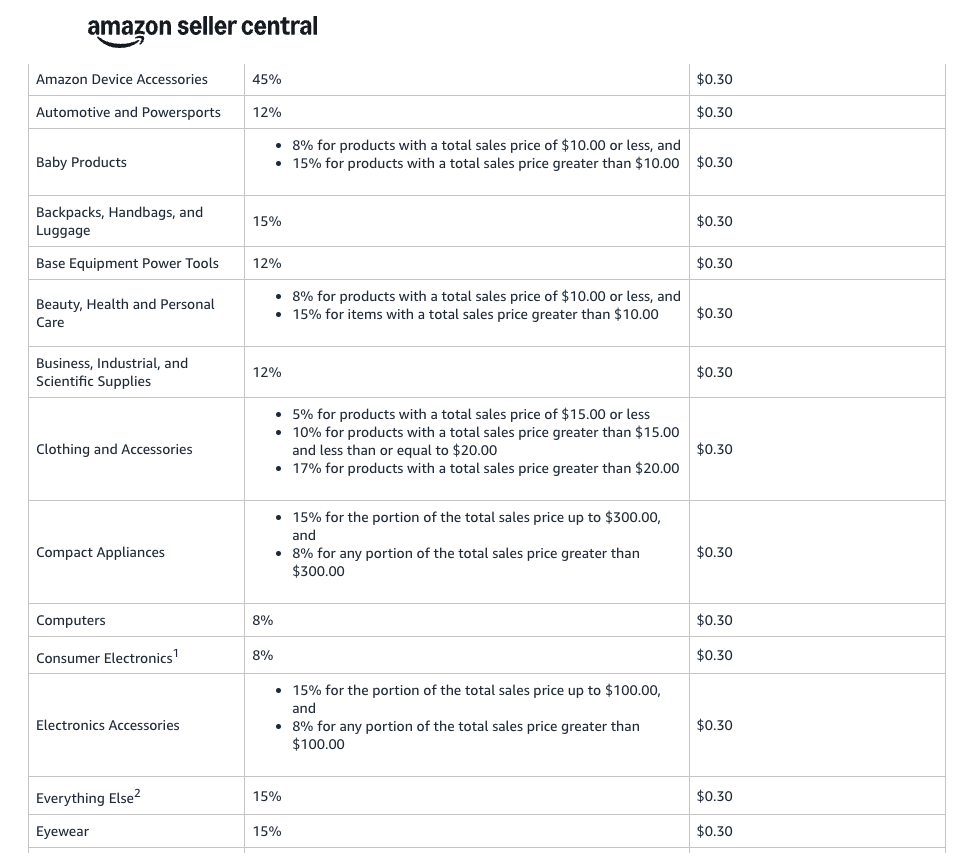
The subscription isn’t the only thing Amazon takes. Every sale also carries a referral fee, and it can eat into your margins if you don’t plan for it.
According to the current referral fee schedule on Amazon Seller Central, most categories land between 8% and 15%, with a $0.30 minimum. A few run higher, such as jewelry, which sits around 20%, and some specialty categories go higher still, up to 45%.
Tip: Always check your exact category and price tier in Seller Central before pricing anything, because the rate varies, and so does the fixed portion.
What I do is take an average across the categories I actually sell in. Home and kitchen, garden, office products, pet supplies, sports and outdoors, toys and games, tools and home improvement — all of these sit around 15%.
So I plan on 15% plus a $0.30 fixed fee as my baseline, and I set that as my break-even inside AutoDS before adding my profit percentage on top. That way, every product I import gets priced with the fee already accounted for, automatically.
Here’s how it plays out on a real sale. Sell a $40 item in a 15% category, and Amazon takes about $6. If your supplier cost was $25, you’re left with roughly $9 (around 22.5%). Still a good sale. But if you’d priced that item thinking $40 minus $25 equals $15 in profit, you just lost 40% of what you expected.
All in all, aim to build an 18–20% fee buffer into your pricing strategy from the start. It absorbs referral fees, protects you when supplier costs shift, and leaves you room if you decide to run Amazon PPC later.
Step 3: Connect Amazon to AutoDS
With your seller account verified, this is where the business stops being manual and starts operating on its own.
The connection takes about a minute. First, sign up for AutoDS with the $1 trial.
Then click Add Store in the top-left, choose Amazon, and continue. This process sends you to Seller Central to authorize. Approve the request, and your store appears in AutoDS. Like I’ve mentioned before, you’ll need the Professional plan for this, since API access is Professional-only.
The AutoDS subscription unlocks a bunch of automation features you’ll need throughout the entire dropshipping workflow:
- Price and stock monitoring is my favorite. AutoDS checks your suppliers hourly. If a supplier raises their price, your Amazon listing adjusts to protect your margin. If they run out of stock, your listing goes out of stock too, so you’re not selling something you can’t fulfill.
- Product research. AutoDS provides multiple product research tools to help you pick winners based on real-time market data. We’ll get into it next step.
- Product importing turns a listing into a live offer in seconds rather than minutes. From the marketplace, it’s a single click; from an external supplier, you paste two URLs.
- Automatic orders and Fulfilled by AutoDS handle fulfillment once a sale comes in, including uploading tracking back to Amazon. We’ll get into how these differ later, but the short version is that one uses AutoDS’s buyer accounts to protect yours.
- Automatic price optimization raises your price when a product is selling consistently and lowers it when sales stall, within limits you set, until it settles at the point where the item keeps moving at the best margin it can hold.
Turn On Automation
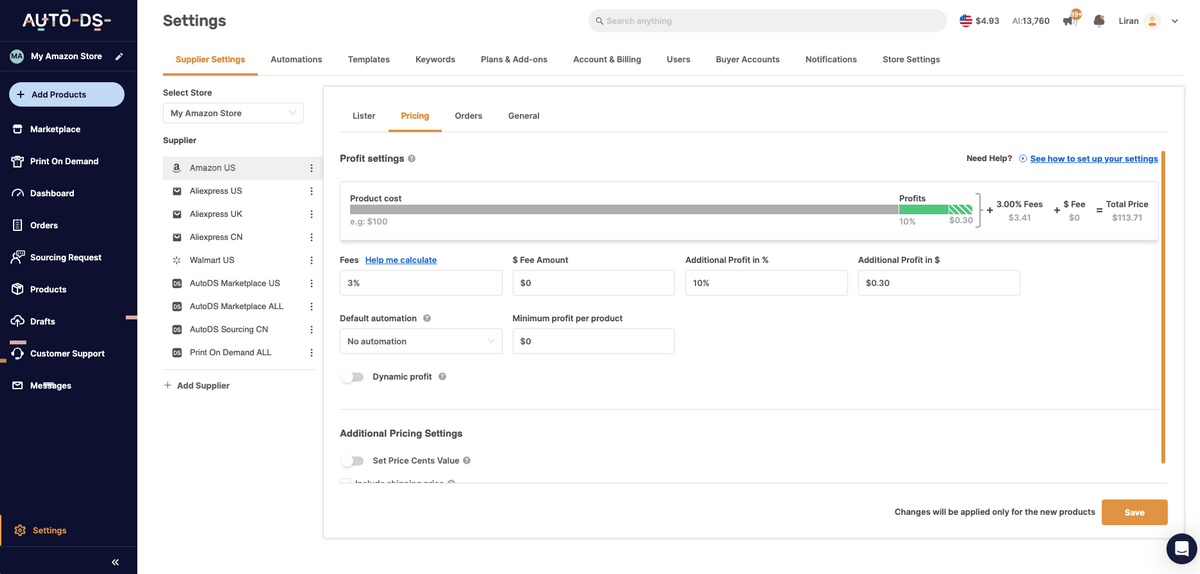
Do this now, not later. As soon as you set up your store on AutoDS, head to Settings. First, turn on Price & Stock monitoring. Then, set automatic price optimization as well.
In Settings, select your Amazon store and the supplier these rules apply to. Set your break-even to 15% plus $0.30 to cover referral fees across most categories, then add your profit margin. Turn on rounding to .99 so prices stay clean when they auto-adjust.
Set this up once, and every product you import gets priced correctly on its own. Skip it, and you’ll be doing arithmetic on every listing.
Step 4: Product Research
This is the section that matters most. Product research for Amazon is where you’ll spend the majority of your time, and it’s the one part that can’t be completely automated (although automation tools help a lot).
Before anything else, one rule: don’t research from a hunch. If you’re sitting there thinking, “I bet portable fans would sell,” put that thought down. You’re going to find products with data, then validate them against Amazon’s own numbers. Guessing is how people waste weeks.
The workflow I use has two halves. First, find trending products from a database that’s actively updated. Second, check whether that product is genuinely performing on Amazon and whether there’s a listing you can actually enter.
Both halves are necessary: a product can be trending everywhere and still be a dead end on Amazon if every listing is brand-locked.
Find Product Ideas
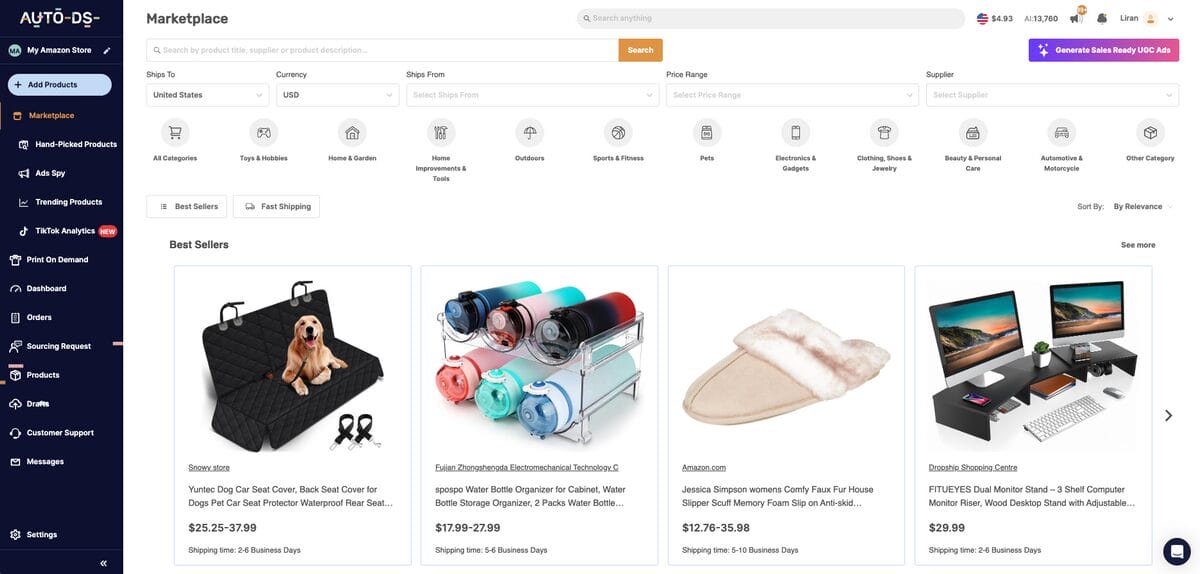
First, I start with the AutoDS Marketplace. This is where the biggest shortcut lives. The database is constantly updated, everything in it is already selling, and you can browse by category: home and garden, sports and fitness, whatever you’re drawn to.
Open a product, and you get the full picture: name, specifications, shipping and return policies, where it ships from, available variations, and reviews, if any.
Inside the marketplace, there are three more tools worth knowing separately:
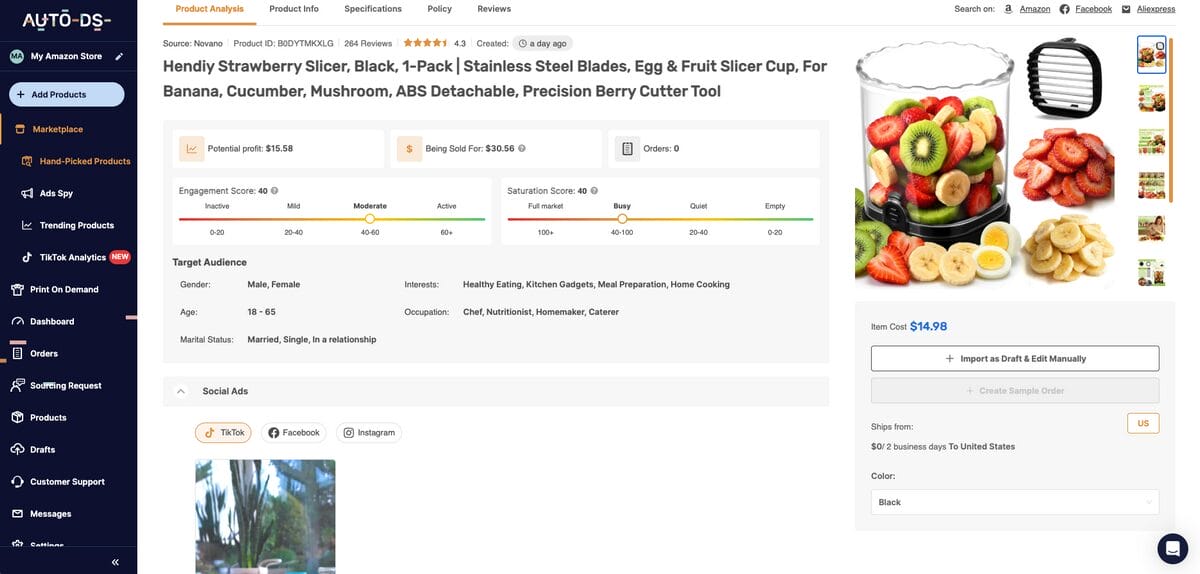
- Hand-Picked Products is the one I use most. There’s a team adding products to it daily, so everything in there is fresh. Open any item, and you’ll see potential profit, current selling prices, order counts, engagement and saturation scores, and the ads other sellers are running for it. Finding something here takes less than a minute of scrolling. I found a children’s hanging pod chair this way, a product I’d never have thought of on my own, and that’s exactly the point.
- Trending Products works from real-time data and AI rather than a curation team. You get sold counts, profit ranges, and product distribution, showing which countries an item is moving in.
- Ad Spy Tools cover TikTok, Facebook, and Instagram. This is less directly useful for Amazon since we’re not running paid ads, but it’s excellent for spotting which niches have real audience interest. You can filter by likes, interaction rate, whether there’s a linked product, and more. If a video for some product is pulling hundreds of likes, that tells you people care about it — then you go check whether Amazon buyers care too.
There are free options too, and they work fine if you’d rather not spend anything yet:
- Amazon Best Sellers shows you what’s performing, though you’ll wade through a lot of big brands and gated products you can’t touch.
- Amazon Movers & Shakers highlights items that performed well in the last 24 hours. Use the category sidebar to narrow down and look for patterns.
- AliExpress Dropshipping Center is another free option for spotting what’s selling, though I’ll be honest: I wouldn’t source from AliExpress if I could avoid it. It’s fine for finding ideas, but there are better supplier alternatives.
- Google Trends shows search intent on Google, so you can compare different products throughout a specific time period.
Validate on Amazon
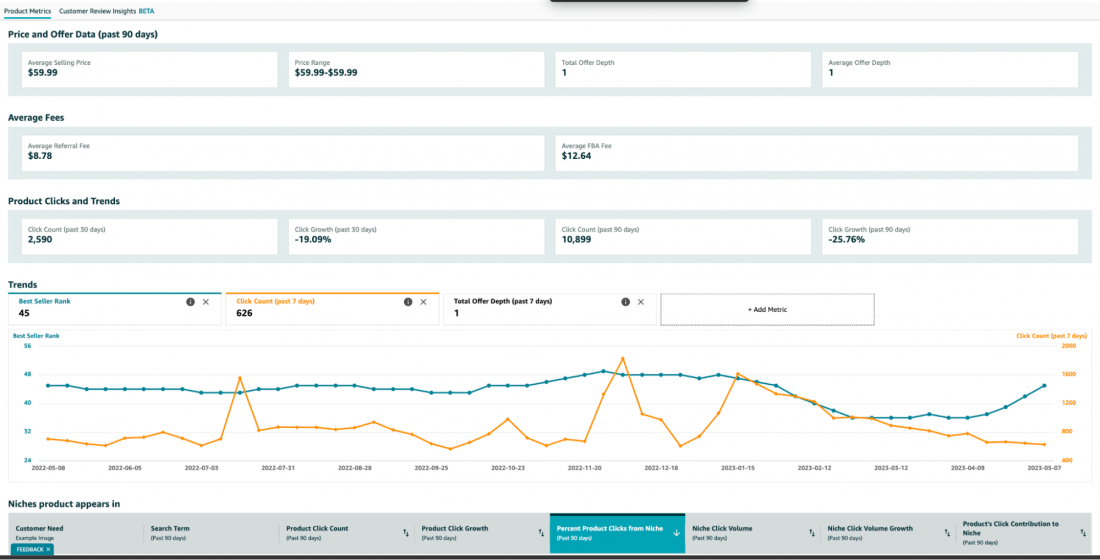
Now, take your product idea and check it against Amazon’s data using the Product Opportunity Explorer. This is free, it requires a Professional seller account, and it’s the most accurate tool available because it comes straight from Amazon.
Search your product or niche, and you’ll get: top search terms buyers actually use, total search volume over the last 360 days, search growth over 180 days and 90 days, units sold, average price, and return rate.
On return rate, my rule is simple: 1–3% is safe. Anything higher and I slow down. That benchmark is for the categories I sell in, like home, pet, gadgets, and similar. Apparel and footwear run far higher by nature, so judge those against their own category, not against this.
Two Things I’d Tell Any Beginner
Before I let you go to the next step, two pieces of advice:
First, start with evergreen products. Products that sell all year, like laptop stands, storage, and everyday household items, will keep producing while you learn. Seasonal products spike but die out completely once the season changes. Get established on evergreen, then add seasonal later.
And second, aim higher on price when you can. I once found a car RGB music light that I could source for $7.60, but the competing listing was at $9.99. Technically, I could enter it. Practically, there was no profit worth having, so I just walked away. Higher-ticket products carry better margins, and the work to find them is identical.
Step 5: Select a Dropshipping Supplier
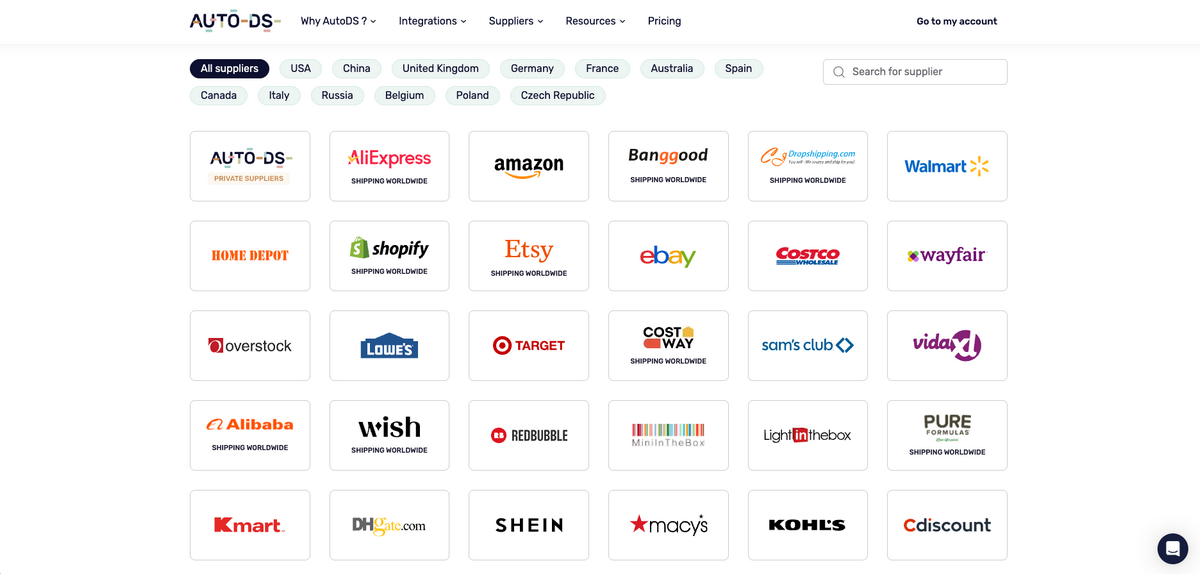
We covered what to look for in a supplier earlier. Now let’s talk about who’s actually out there, because the options fall into three groups and they behave very differently.
- Retailers. This includes AliExpress, Walmart, Costco, Target, eBay, DHgate, and more. These open up millions of products. AutoDS supports 25+ global suppliers, so importing and monitoring work normally. The catch is that not all retailers are designed to supply Amazon dropshippers. Ship to enough different addresses from one buyer account, and some of them will lock it. There’s also the compliance problem from earlier: a Walmart box with a Walmart receipt inside is an Amazon policy violation. Workable, but you need to know what you’re managing.
- Wholesalers like Alibaba sell in bulk to resellers. Plenty of manufacturers behind them, but many want a minimum order quantity, which defeats the point of not holding inventory.
- Private suppliers are what I actually recommend. In the AutoDS marketplace, these are vetted individually before their products go live, and you can message them directly. I’ve asked suppliers which carriers they use and whether they have products not yet listed, making supplier management way easier. Some even support customizable branding, meaning your logo ships with the product.
When browsing, use the filters: ships-to, ships-from, currency, price range, niche, and sort by shipping time. I’d start with US-to-US domestic suppliers if you can, to overcome long delivery times. Your store is new, you need positive reviews and a healthy account, and domestic shipping is the fastest route there. Expand internationally once you’re established.
Step 6: Create Amazon Listings & Import Products
You’ve got your list of validated products. Now, it’s time to turn them into live offers. Before importing anything, check whether Amazon will let you sell on that listing at all.
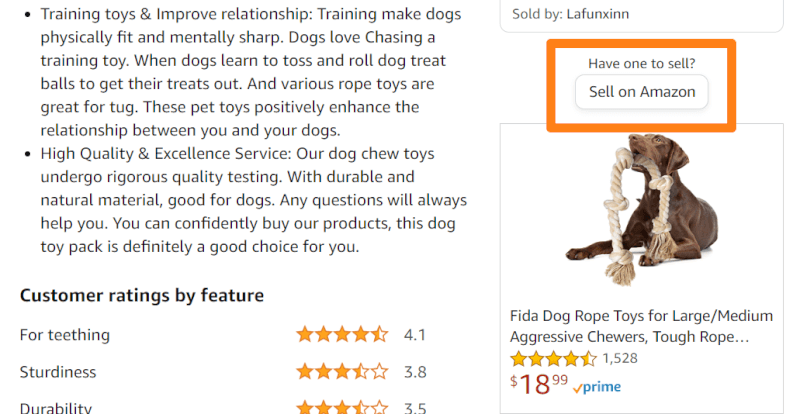
To do this, copy the ASIN, go to Catalog → Add Products in Seller Central, paste it, and select condition New.
Note: The ASIN, by the way, is Amazon’s product ID. It sits in the listing URL, or you can search the page for “ASIN,” and it’ll jump you there.
- If you see “Apply to sell,” the listing is gated and requires approval, so just move on to the next one.
- If you see “Sell this product,” click it. Generic-brand listings look open until this point, then throw an error telling you that you can’t change another seller’s generic product detail page. Also a dead end.
- No error means you’re clear to list.
From here, you have two options. You can finish the listing manually in Seller Central. This includes setting up quantity, price, condition, fulfillment channel, and marketplace.
I’d only do that once or twice just to see how it works, because manual listings get you no price monitoring, no stock monitoring, and no order automation, which means every listing becomes something you have to babysit.
The better option is importing with automation through AutoDS.
Importing Through AutoDS
There are two paths, depending on where you found the product.
If it came from the AutoDS marketplace, hit Import Draft on the product (make sure your Amazon store is selected in the top left, then paste the URL or ASIN of the listing you’re joining. AutoDS already knows the supplier, so that’s all it needs.
If it came from an external supplier (AliExpress, Walmart, anywhere), go to Add Products → Single Product and give it two things: the ASIN of the Amazon listing, and the supplier’s product URL. AutoDS automatically detects the source and ship-from location. You can also import in bulk or schedule imports for later.

Your product lands in Drafts, and most fields will be greyed out. Titles, descriptions, images, and item specifications belong to the shared Amazon product page, not to you, so AutoDS can’t change them.
Open Variants and click edit. The buy price shown includes shipping, so you’re looking at your true landed cost. If you set your pricing rules earlier, your selling price is already calculated — just check the number and override it if the listing gives you more room than the default assumes.
Finally, hit Import. The product moves from Drafts to Products and goes live.
Key Elements of an Amazon Product Detail Page
Whether you’re creating a listing or looking at one you want to sell on, you should know what a strong Amazon product detail page is made of. Every element on it influences whether someone buys, and the pages that convert best get all of them right.
- The basics. This includes a clear description, up to seven images, a product video, the price, and up to five bullet points covering what the product does and why it’s worth buying.
- Product details. This includes product specs and variations, like colors, sizes, or configurations. A+ Content is worth using if you have access to it through Brand Registry, since it gives you a much richer description than plain text.
- Trust signals. Reviews and ratings do more heavy lifting than anything you write yourself, and Customer Q&A answers the objections people have before they commit. Also, Best Seller and Amazon’s Choice badges signal that the product is performing.
- Conversion boosters. These are the elements that push a browsing customer toward checkout and lift the value of the order when they get there. This includes special offers and promotions, “Frequently bought together” and related-product placements.
Go through these one at a time and present each clearly and concisely. That’s what helps a customer decide, and a page that helps people decide is a page that sells.
Step 7: Market Your Amazon Dropshipping Products
Here’s the thing about marketing on Amazon: you can get away with doing none of it. Amazon is a search platform, and people arrive already intending to buy. List a product someone is actively looking for at the best price on the page, and you’ll get sales without spending a cent on ads.
So treat everything below as optional acceleration, not a requirement. Get organic sales first, learn what converts, then decide whether to layer anything on top.
Winning the Featured Offer
This is your most valuable marketing move, and it’s free. The Featured Offer is the “Add to Cart” and “Buy Now” section.
When a buyer doesn’t manually pick a seller, whoever holds that spot gets the sale. You win it with a competitive landed price, faster shipping than the sellers you’re up against, and clean metrics: low cancellations, low late shipments, low defect rate.
Free returns help too, since most third-party sellers don’t offer them. That’s why price and stock monitoring matter so much. A supplier going out of stock or a listing sitting at the wrong price is how you quietly lose the placement.
Amazon PPC (Sponsored Products)
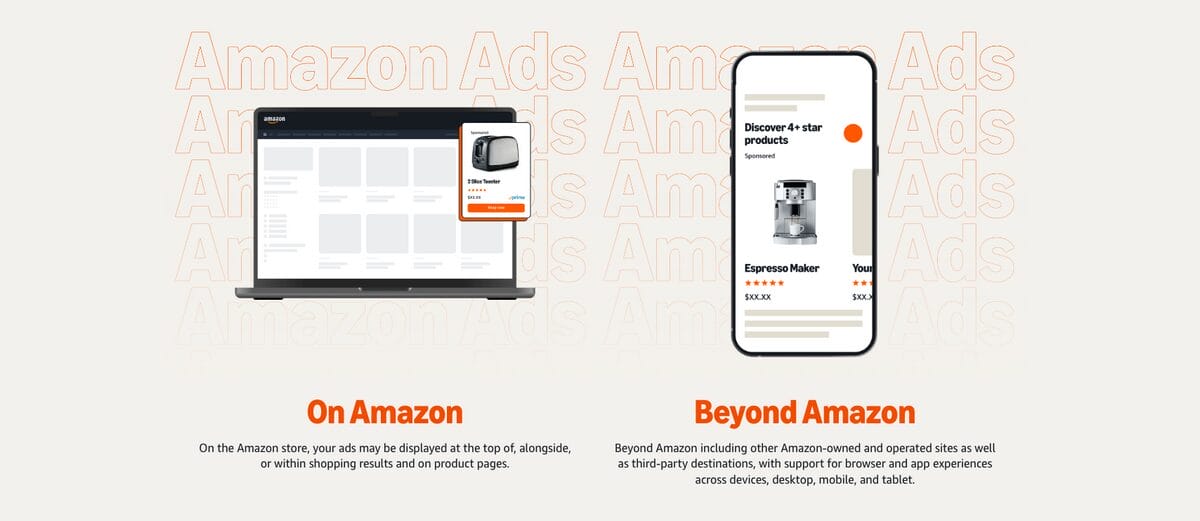
Paid ads inside Amazon put your listing in search results and on product pages marked “Sponsored,” and you pay per click. It works, and you get useful data back, like the keywords buyers actually use to find you, and what each click costs.
But be careful with it early on. With no historical data, Amazon will spend a meaningful chunk of your budget before the campaign starts performing. I’d wait until you have organic sales and know which products deserve the spend.
Organic Social Content
Organic content is where I’d put my effort before paid ads. To start, order the product to your house, shoot as many videos as you want with it, and post to TikTok, Instagram, and YouTube. Your only cost is the product itself.
I’ve seen dropshippers pull hundreds of likes on simple videos of a product being used, and that traffic finds its way to your listing.
We’re in the era of viral content, so organic dropshipping is definitely possible, at least before you start making real sales.
Social Media Ads
Social media ads, like Facebook, Instagram, and TikTok, let you target audiences directly and pick your objective: conversions, traffic, or reach. TikTok skews younger if that’s who you want, while Meta targets a broader audience.
They’re proven channels, but they’re a cost center you don’t need on Amazon, where the traffic is already there. If you go this route, do it once you have a proven product rather than as a way to find one.
Honest recommendation: focus on winning Featured Offers across a large catalog of well-chosen products. That’s the strategy that scales here. Ads are a supplement to a business that’s already working, not the thing that makes it work.
Step 8: Fulfill Your Customer Orders
With your store live and your marketing efforts driving traffic, you’ll probably start seeing sales. Now you need to get the product to your customer fast, because delivery speed is what turns a buyer into a repeat buyer.
I’ve already covered what the manual process looks like: pull the shipping address from the order details page in Seller Central, go to your supplier’s website, add the product to the cart, and check out using your customer’s address rather than your own. Then click Confirm Shipment under Manage Orders and fill in the tracking details.
This works fine at low volume. It also means you’re doing this at every hour of the day, and shipping to the wrong address is a mistake that costs you real money.
Two things to know before your first order. Check that the order is in Unshipped status, not Pending, which usually means Amazon is still verifying the payment, so don’t fulfill it yet.
Also, expect your early payouts to sit in reserve. When my first sale came in, the balance was held on the account level while Amazon got to know me as a new seller, which means you’re covering those first orders out of pocket for a short while. It’s a small amount, and it comes back.
Automating Fulfillment

Now, the automatic way is much different:
- Orders show up on your AutoDS orders page, and from there, the system can place them with your supplier and ship directly to your buyer.
- Statuses move on their own: pending, ordered with the supplier’s order ID, shipped with tracking, then delivered.
- Tracking uploads to Amazon automatically as soon as the supplier provides it, so your customer can follow the package without you touching anything.
This is what basic Automatic Orders look like, where the system uses your own buyer accounts and your own card.
Now, AutoDS goes beyond that with Fulfilled by AutoDS. This service uses AutoDS’s own buyer accounts to purchase your products, so your buyer account never gets flagged for shipping to dozens of different addresses, and your card details never touch supplier sites.
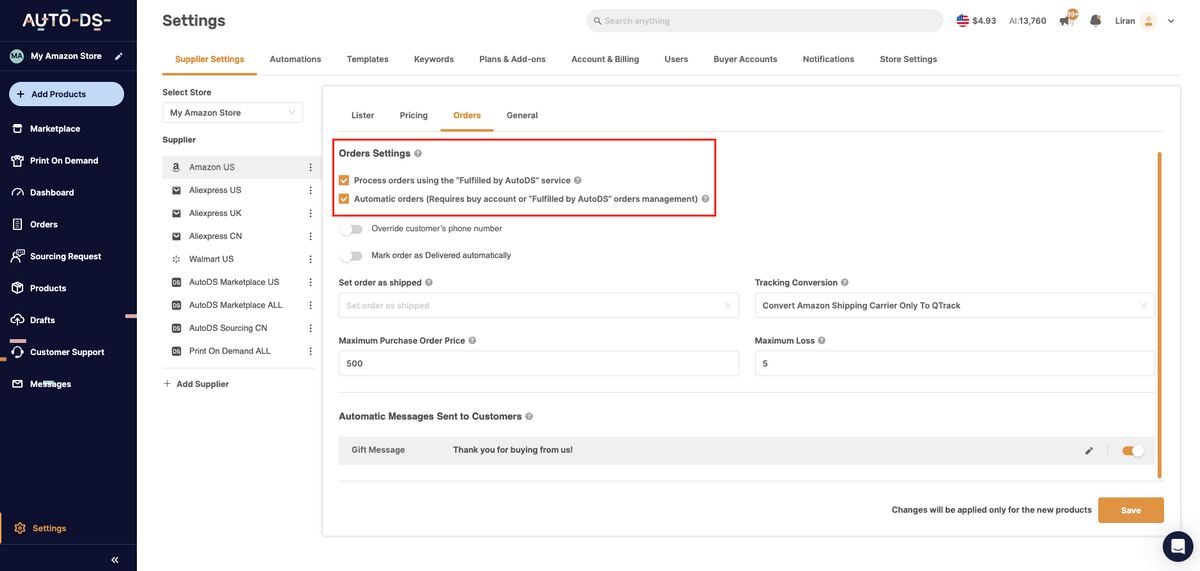
To turn it on: enable the orders processor under Settings → Plans and Add-ons ($8/month), activate it for the relevant suppliers under Supplier Settings, load a balance to pay for orders, and buy order credits (a few cents each). One sale a month covers the whole setup.
Then, make sure to turn it on in Settings > Supplier Settings > Orders, always under your Amazon store.
Sourcing Requests: How I Cut My Cost by a Third
This is the feature I use most, and here’s a real example.
The squeaky dog toy in my store came from AliExpress at $7.30 plus $2 shipping, just under $10 landed. When it sold, instead of fulfilling from AliExpress, I hit Sourcing Request on the order. Status changed to “in progress,” and AutoDS looked for a private agent who could do better.
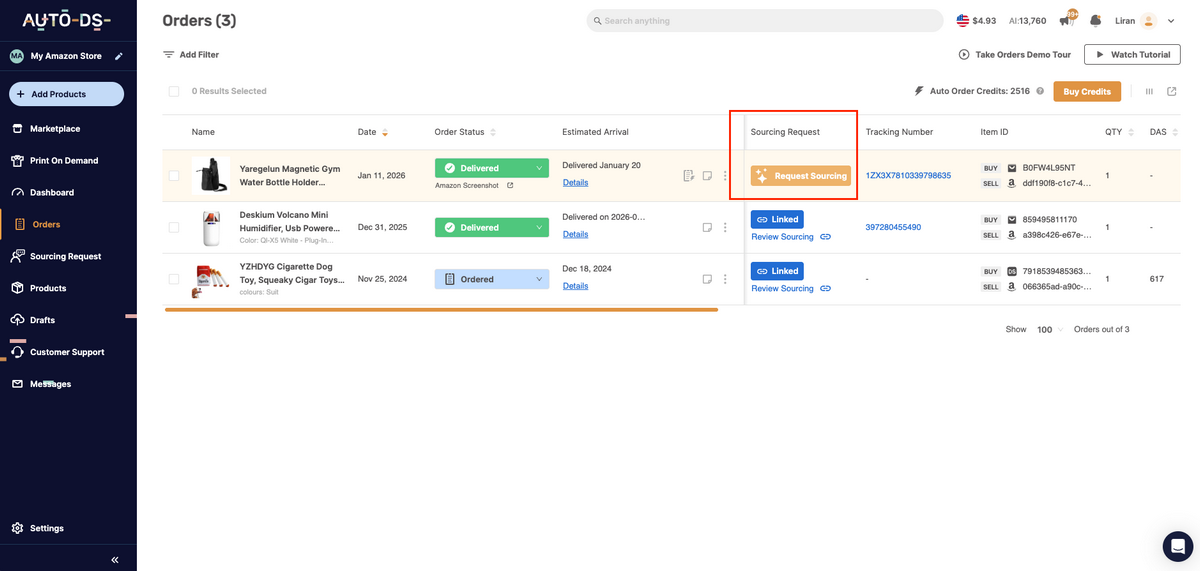
Several hours later, it came back ready. The quote: $3 for the item, $3 for shipping, five-day delivery. Six dollars against my original ten. On the sourcing details page, I could see the item cost, the variation, and the shipping options with carriers and transit times. And if I’d wanted a different variation, there’s a request-change option, or I could message the supplier directly.
Final numbers on that sale: bought at around $6, sold at $19.99, about $11 profit after fees. Three dollars better than fulfilling from AliExpress, with faster shipping, on a single unit.
That’s the whole point of sourcing. Three things you get out of it:
- Quality inspection, since products pass through a warehouse before reaching your customer.
- Faster delivery, because you pick from real shipping options rather than accepting whatever the retailer offers.
- Lower cost, which flows straight to your margin.
Quotes typically come back within 48 hours. And once a product is linked, that link holds for future orders too, so you only do this once per product.
Step 9: Provide Excellent Customer Service
Last but not least: customer service. This is one of the few levers you fully control on Amazon. Pricing and product pages look nearly identical across sellers, so quick replies and no runaround when something goes wrong is how you actually stand out, and what keeps your metrics healthy.
Know where your responsibility ends:
- You handle product questions, damaged or incorrect items, and return requests.
- Amazon handles payment processing, account-level issues, and A-to-z Guarantee claims.
Knowing that line means you respond faster instead of chasing problems that were never yours.
Returns are the part people dread, and they shouldn’t. Expect somewhere between 1% and 3% of orders. When a customer wants to return something, request a return on the order in AutoDS. If you’re eligible, a return label appears for you to download and send to your buyer. They ship it back, you get a refund from the supplier, and you refund the customer.
On Amazon’s side, that’s just clicking the arrow next to the order and choosing Refund order, selecting the reason, and submitting.
If your return rate on a product climbs past 3%, that’s not a customer service problem, but a product problem. Find out why, then either replace the supplier or drop the item.
The payoff is measurable: fewer negative reviews, a stronger Order Defect Rate, and steadier sales because that rate feeds directly into Featured Offer eligibility.
Supplier Requirements for Amazon Dropshipping
So, let’s talk about suppliers, because they are one of the most important parts of your online business, whether you’re dropshipping or holding inventory. Amazon doesn’t hand out a list of approved suppliers. There’s no vetting process you can point to, no badge your supplier can earn.
What Amazon does instead is measure your performance. And since your supplier is the one actually shipping your orders, their reliability becomes your account’s health. That’s the whole relationship in one sentence: you get judged on their work.
So what am I actually looking for in a supplier? A few things — and here’s a quick checklist for you to save as your cheatsheet to find reliable Amazon dropshipping suppliers.
- Fast handling time comes first, meaning they get a tracking number into the system within a day or two, because handling time is about how quickly you provide tracking, not how long delivery takes.
- Valid tracking with a major carrier comes next, so both you and your customer can actually follow the package. If a buyer messages you asking where their order is, and you have nothing to show them, you’re refunding out of pocket on an item-not-received claim.
- Neutral packaging with no other retailer’s branding anywhere in the box (we’ve already covered this one above).
- Consistent stock so you’re not selling things that are no longer available.
- A straightforward return process. I always check the return window and whether they’ll issue a prepaid label, because when a customer wants to send something back, that’s not the moment to be discovering your supplier’s policy.
One more thing I’d add that isn’t on anyone’s checklist: message them before you commit. I do this with every private supplier I work with. I’ll send a short note asking which carriers they use and whether they have products they haven’t listed yet.
The answer matters less than the response time. A supplier who replies within a day is a supplier who’ll help you when an order goes sideways. One who ignores you now will ignore you then, too.
But here’s the most important advice: don’t build your store on a single supplier. Diversify so you always have a backup plan.
For instance, Chinese suppliers close for holidays that don’t line up with anything on your calendar, and you can lose two weeks of fulfillment with no warning. Suppliers also run out of stock on the exact product that’s finally selling for you. Start with one, sure, but add more as you go so a single disruption doesn’t take your whole store offline.
Can I Dropship From an Amazon Supplier to My Amazon Store?
You can dropship to your Amazon store from just about any supplier, and yes, that technically includes Amazon itself. But this one comes with enough caveats that I’d steer you elsewhere.
If you do it, you have to source from a different Amazon marketplace than the one you’re selling on. Amazon UK to Amazon US, for example. Sourcing within the same marketplace means competing on a listing while buying from it, which is a mess.
The policy problem is the bigger issue. You still have to be the seller of record, and every trace of Amazon UK, like packaging, invoices, packing slips, and branding, has to be gone before the box reaches your US buyer.
Amazon is also well known for locking buyer accounts that repeatedly ship to different addresses, since that pattern is easy to spot. Between the branding requirement and the account risk, you’re taking on a lot for no real advantage.
The reason I don’t bother is simple: private suppliers do this better. They understand dropshipping, they ship without their own branding, they’ll talk to you when something goes wrong, and some will put your logo on the package. None of that is true of a retailer that would rather you weren’t reselling their orders at all.
So the honest answer is that Amazon-to-Amazon is possible, but it’s near the bottom of the list. With 25+ supported suppliers and a marketplace full of vetted private agents, you have far better options.
Manual vs Automated Amazon Dropshipping
Before we get into the actual setup, you need to decide how you’re going to run this thing. You’ve got two options: you can do it manually, or go all in with automation (my top pick).
Task Manual Automated (e.g. AutoDS)
Product research Compare suppliers, demand, competition, and margins by hand Product data and performance insights surface potential items
Listing optimization Write and edit titles, descriptions, images, and details individually AI rewrites titles, descriptions, and product details
Stock monitoring Recheck supplier inventory and update listings one by one Supplier inventory changes sync with Amazon listings
Price updates Track supplier costs and revise each listing manually Pricing rules adjust listings when supplier costs change
Tracking upload Copy tracking numbers into Amazon for every order Supplier tracking details upload to Amazon after shipment
Order fulfillment Place each supplier order and enter customer details manually Customer orders are sent to the supplier for processing
Policy-compliance risk Review listings, suppliers, and fulfillment steps without system alerts Centralized monitoring helps flag stock, pricing, and fulfillment issues
Manual Amazon Dropshipping
Doing it manually means you’re the system. You find the products, you list them one by one in Seller Central, you check your suppliers’ pages to see whether prices or stock have changed, you go to the supplier’s website and place each order with your customer’s address, you copy the tracking number back into Amazon, and you keep the buyer updated.
All of it works. I’ve done it. With five or ten products, it’s completely fine, and honestly, it’s worth doing manually a few times just so you understand what’s happening underneath.
The problem shows up the moment you try to grow. The whole reason Amazon works for dropshipping is that listing items is free. You can put up hundreds or thousands of products at no extra cost, and more listings mean more chances to be the cheapest offer on a page someone’s already searching.
But now think about price and stock monitoring at that scale. You cannot open a few hundred supplier pages every morning to check whether anything moved. It doesn’t scale, and it isn’t a real plan.
Automated Amazon Dropshipping
Automation is what closes those gaps. Products are imported in seconds instead of minutes. Supplier prices and stock get checked hourly, and your listings adjust to match, so your margin holds, and you stop selling things that aren’t there. Orders are placed with the supplier, and tracking is uploaded back to Amazon automatically.
There’s also automatic price optimization, which I like a lot: you set rules so that when a product sells consistently, the price nudges up, and when it stalls, it drops back down within limits you define. The system finds the point at which the item continues to sell at the highest margin it can sustain.
At the end of the day, everything happens on autopilot, making your business scalable and efficient. You can go from one product to 100 in one single day, while the system keeps everything under control. No selling out of stock, no outdated prices, no manual fulfillment.
Honest recommendation: List your first few products manually. Then, switch to automation before you scale, not after. Everything, from monitoring to ordering and tracking updates, is work that a system should be doing for you if you really want to scale.
Amazon FBA vs Dropshipping in 2027: Which Model Fits You?
This is probably the question I get asked most, so let me settle it: FBA and dropshipping are built for two completely different situations.
With Fulfilled by Amazon (FBA), you buy inventory upfront, ship it into Amazon’s warehouses, and Amazon takes over from there — storage, packing, delivery, returns, and customer service. In exchange, your products qualify for Prime, which is a real advantage. Prime listings ship in a day or two, and that speed makes them much harder to beat for the Featured Offer.
The catch is that you’re paying for all of it, and you’re paying whether or not the product sells. Standard-size FBA fulfillment fees generally run somewhere around $3 to $6 or more per unit, depending on weight and dimensions, and that’s before monthly storage, long-term storage on anything that sits too long, and removal fees if you want your unsold stock back.
Tip: Check Amazon’s FBA Fee Calculator for your specific product, because the tiers move. The bigger risk isn’t the fees, but the fact that you’ve already spent the money.
Dropshipping flips that entirely. You don’t buy anything until a customer has already paid you. No storage fees, no bulk orders, no dead inventory. And because listing costs you nothing on Amazon, you can put up ten products or a thousand and test the market without risking a cent on stock. That’s the part I love about it: you’re testing with your time instead of your bank account.
What you give up is speed. When I’m sourcing from a supplier in China, delivery takes one to two weeks, and I’m not going to pretend it competes with Prime. So I don’t try to. Instead, I look for third-party sellers and beat them on price.
So which one fits you?
- If you’ve got capital, you’ve validated a product, and you want Prime’s speed, FBA makes sense.
- If you’re starting out, you want to test broadly, and you’d rather not gamble on inventory, dropshipping is the lower-risk entry point. I’ve spent eight years on the dropshipping side because the ability to test unlimited products without buying any of them is worth more to me than shaving days off delivery.
Example To Compete With Prime Shipping
Here’s a real example of how to beat Prime on price. I found a broom-and-dustpan combo listed by a third-party seller for $74. My landed cost was under $5.
So, how do you think I priced it? I dropped it to $17.99. Think about it from the buyer’s side: someone paying Prime prices is getting their item in two days, and mine takes about a week, so the tradeoff makes sense. I was still making roughly $10 per unit, and I took the Featured Offer.
That’s the whole strategy in one move. You can’t out-ship FBA, but you can out-price it, and you can stack on things like free returns to close the gap even further. Most third-party sellers don’t offer free returns. If you do, and your price is lower, you become the obvious choice.
Common Amazon Dropshipping Pitfalls In 2027
Knowing what gets sellers suspended is just as valuable as knowing what works, so here are the ones I’d watch.
- Shipping from retailers with their branding intact. Still the fastest route to a suspension. A Walmart box with a Walmart receipt inside tells your customer exactly who really sold them the product, and that’s a direct policy violation.
- Weak tracking upload rate. Amazon expects valid tracking on seller-fulfilled orders. Miss it or upload late, and you lose Featured Offer visibility, which means you lose sales even with listings that are otherwise fine.
- Thin margins after fees. This is the one that catches beginners. You look at a $5 cost and a $20 price and think you’ve made $15. Then the referral fee comes out, plus the fixed charge, plus shipping, and you’re closer to $10, which is still good, but only if you planned for it. Price with the fees already built in, then revisit as supplier costs shift.
- Restricted and gated products. Amazon has a very specific list of restricted or prohibited products, including hazardous materials, liquids, supplements and medicines, anything with a choking hazard, tobacco, firearms, and trademarked or copyrighted goods. There are millions of products you can sell without touching any of that. Don’t spend your account on the risky ones.
- Ignoring your Account Health dashboard. Amazon’s Account Health Rating scores you on policy compliance and performance violations, and it’s the earliest warning you’ll get. Sellers who only check it after receiving a notice are already behind. Look at it regularly, the way you’d check your bank balance.
Frequently Asked Questions
Is Amazon dropshipping legal in 2027?
Yes, Amazon dropshipping is legal in 2027, provided you follow Amazon’s Drop Shipping Policy: be the seller of record, remove third-party branding, and handle returns yourself. Your name must appear on all packing slips, invoices, and external packaging, while any information identifying the supplier or another retailer must be removed. Buying from another online retailer and having it ship directly to your customer is prohibited when that retailer appears as the seller.
What are Amazon’s dropshipping policy requirements?
To comply with Amazon’s dropshipping policy requirements, you must be the seller of record, identify yourself (not your supplier) on every packing slip, invoice, and piece of external packaging, and take responsibility for accepting and processing returns. Beyond that, no third-party branding or paperwork from another retailer can appear in the box, and you must comply with Amazon’s general Seller Code of Conduct and Terms of Service.
What fees will I pay to dropship on Amazon?
The main costs are a selling-plan fee ($0.99/item on Individual, or $39.99/month on Professional, which pays off past ~40 items/month), and a referral fee of 8%-15% of the sale price (up to 20%-45% in a few categories, $0.30 minimum). On top of that, you also pay for your supplier’s product and shipping costs, plus any advertising you run.
Is Amazon dropshipping still profitable in 2027?
For many sellers, yes, dropshipping is still profitable in 2027. That said, margins are tight. Industry data pegs typical dropshipping net margins at 15–20%, with top performers reaching 30% and beginners often below 10%.
How do I win the Featured Offer (Buy Box)?
To win the Featured Offer (Buy Box), keep your landed price (item + shipping) competitive, maintain strong seller metrics (low defect rate, on-time shipping), and stay in stock. Amazon never publishes the exact formula, and no single factor guarantees a win. What works is the combination, reassessed continuously.
Do I need the Professional Plan for automation tools?
Yes, you do need the Professional Plan, as repricers and other automation tools require SP-API access, which is Professional-only. If you’re planning to dropship at any real volume or use repricing/inventory automation, the Professional plan ($39.99/month) is effectively mandatory rather than optional.
How do I find reliable Amazon dropshipping suppliers?
To find reliable Amazon dropshipping suppliers, use vetted directories or Amazon-friendly platforms, such as AutoDS. Before committing, verify the supplier can ship in unbranded packaging and order samples before scaling up. Be cautious with free or informal suppliers, as they might not comply with Amazon’s policies.
What products should I avoid dropshipping on Amazon?
When dropshipping on Amazon, avoid gated categories you’re not approved for (jewelry, supplements, watches), brand-protected items that require an authorized-distributor invoice to unlock, and items sourced from retailers that ship with their own branding or receipts inside. Outright prohibited regardless of category include counterfeit goods, recalled products, weapons, explosives, and other restricted health/safety items.
What happens if I violate Amazon’s dropshipping policy?
If you violate Amazon’s dropshipping policy, expect listing removal or account suspension, which freezes your funds and inventory. Repeated violations can mean permanent deactivation.
Ready To Start Dropshipping on Amazon?
Dropshipping on Amazon in 2027 is still one of the smartest ways to build an e-commerce business with minimal risk — but the rules are tighter, the competition is fiercer, and automation is no longer optional. Success now depends on compliance, speed, and how efficiently you manage every moving part of your store.
That’s exactly where AutoDS comes in. AutoDS provides an all-in-one automation system that centralizes product research, imports, pricing, and fulfillment for Amazon sellers. From real-time stock monitoring to automatic order fulfillment and tracking updates, it keeps your business running smoothly even while you sleep.
The takeaway? Focus on strategy, not spreadsheets. Let AutoDS handle the repetitive work so you can scale your Amazon store, improve your Featured Offer visibility, and grow your profits consistently. 👉 Start your AutoDS $1 trial and see the difference!
For more dropshipping on Amazon tips, take a look at the following articles:
- Amazon Dropshipping Without Getting Banned?
- Amazon Dropshipping Policy & Compliance
- Pros & Cons Of Dropshipping On Amazon
- Amazon Dropshipping Profit Potential
- How To Start Dropshipping On Amazon
- Supplier Requirements For Dropshipping
- Can You Dropship From Amazon To Amazon?
- Manual VS Automated Dropshipping
- Amazon FBA VS Dropshipping
- Common Amazon Dropshipping Pitfalls
- FAQ
- Conclusion







