If you’ve ever spent hours copying product details from a supplier’s page, uploading images one by one, and fixing broken variants, you already know how painful manual importing can be. That’s exactly why AutoDS built its Product Importer — a smart, flexible, and fully automated tool that turns a two-hour task into a ten-second one.
With the AutoDS Product Importer, we can add single products, entire collections, or hundreds of listings in bulk, all optimized and ready to sell. Let’s look at how it works, what makes it unique, and how it helps us scale faster with less effort.
Manual importing is obsolete. AutoDS automates every step, saving hours of manual work.
AutoDS imports from 30+ suppliers, letting dropshippers build diverse catalogs and scale faster with full automation.
AI optimization makes listings sell-ready, rewriting titles, descriptions, and pricing for higher conversions.
Scheduling and bulk importing unlock real scalability, letting you plan campaigns, test niches, and launch stores effortlessly.
How the AutoDS Product Importer Works

The AutoDS Product Importer was designed to simplify every type of import in various ways:
Single-Product Import
Found a product you love? Copy its URL and paste it into AutoDS. The system instantly pulls every detail (title, images, description, price, and variants) and saves it as a draft. From there, we can edit and publish it directly to our store.
One-Click Import via Chrome Extension
When browsing a supplier’s site (like Amazon, Walmart, or AliExpress), we can click once on the AutoDS extension, and boom — the product is added to our drafts automatically.
Bulk Import for Multiple Items
Instead of copying URLs one by one, paste a full list or upload a CSV file. AutoDS recognizes every supplier and imports hundreds of products at once — ideal for store setups or seasonal launches.
Compare the SKU product import capacity limit of AutoDS vs Oberlo, DSers, & Spocket. Discover how to import thousands of products in bulk.
Scheduled Imports
Want your summer collection to go live on June 1st? No problem. AutoDS lets us set import dates and publish automatically when the time is right.
“AutoDS takes care of everything, from importing brand new products into your shop by store to fulfilling those orders” – Andy Stauring, dropshipping expert
Smarter Importing With AI and Automation
The Product Importer doesn’t stop at bringing items into our store: it actually improves them.
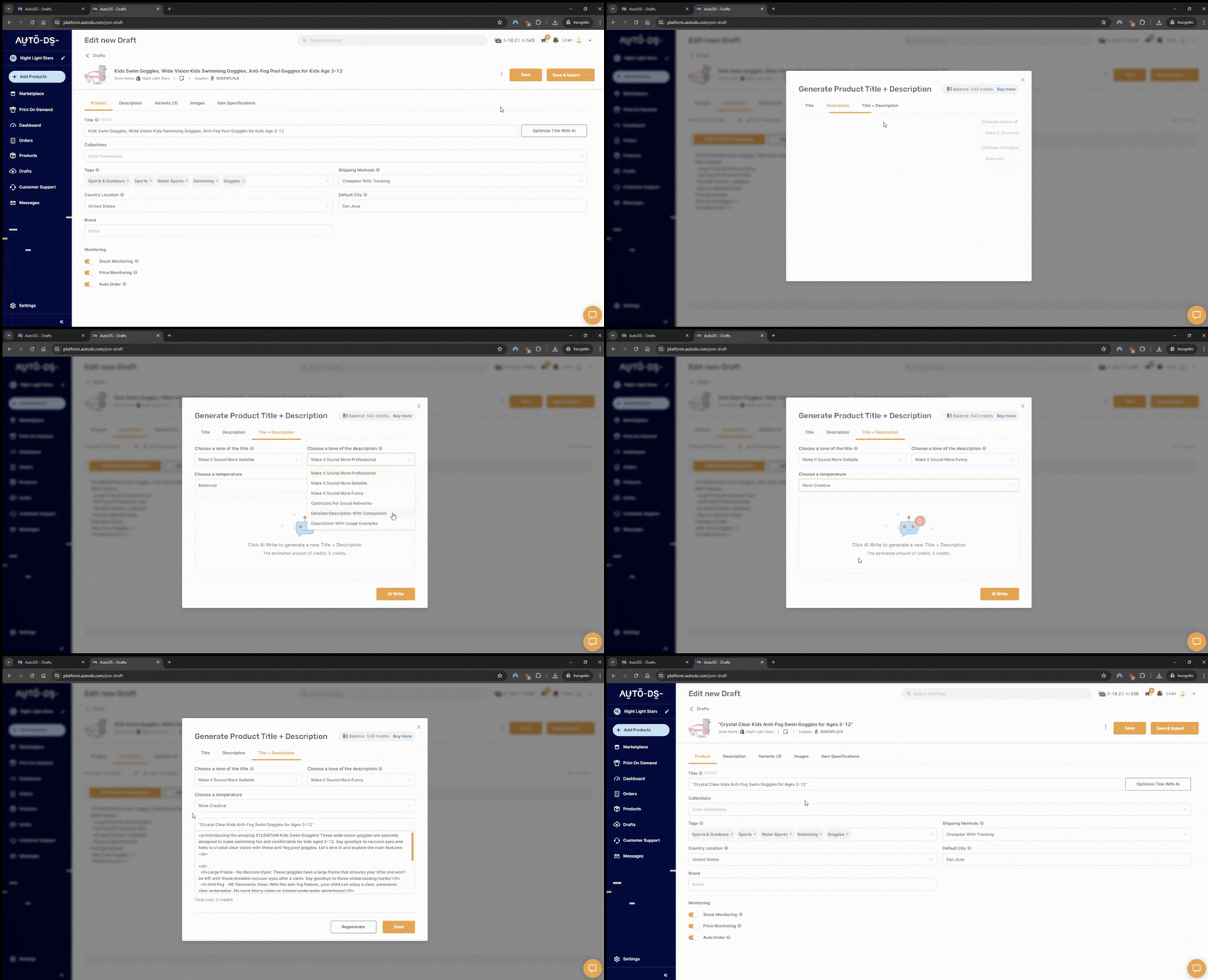
- AI Title & Description Optimization: AutoDS’s built-in AI rewrites titles and descriptions to fit our tone and SEO needs. We can choose from multiple styles and instantly make listings more clickable.
- Custom Pricing Rules: Set percentage or fixed mark-ups, breakeven points, and profit margins once; AutoDS applies them to every future import automatically.
- Price & Stock Monitoring: AutoDS keeps every listing synced with the supplier’s stock and pricing, so we never oversell or lose profit when prices change.
- Draft Management: Edit, optimize, and preview everything in the Drafts section before publishing.
Together, these tools form a complete automation loop, from import to optimization to publishing.
👉 Start your $1 AutoDS trial and see how easy importing can be.
Make The Most Out Of The AutoDS Product Importer

The AutoDS Product Importer is one of those tools that grows with us, no matter where we are in our dropshipping journey.
Every AutoDS feature is built to save time and help us make smarter choices as we scale. Instead of juggling dozens of tabs, we can plan, schedule, and optimize every product we bring in.
In other words, it’s a full strategy in motion. Let’s explore a few real-world scenarios where the AutoDS Product Importer truly shines.
Launching a New Store
When we’re starting from scratch, the hardest part is building a catalog that looks professional and ready to sell. With AutoDS, we can bulk-import dozens or even hundreds of products from different suppliers in just a few clicks.
This means we can test multiple categories right away without wasting days uploading each product manually. It’s the fastest way to go from zero to a fully stocked, visually consistent store.
Testing New Niches
Every dropshipper knows that finding winning products takes experimentation.
The AutoDS Product Importer lets us pull trending products from multiple suppliers, compare their performance, and quickly pivot toward what’s selling best.
For example, we can import 20 skincare gadgets from AliExpress, 10 fitness accessories from Walmart, and 15 tech items from Amazon, all in one go. Then we simply track what converts and remove the rest.
Running Seasonal Campaigns
Seasonal dropshipping is all about timing, and that’s where scheduling imports becomes a secret weapon.
No matter if we’re thinking about Christmas ornaments, Valentine’s gifts, or summer beachwear, AutoDS lets us set products to publish automatically when it makes sense. We can plan ahead, schedule our catalog for launch day, and focus on marketing while the system does the heavy lifting.
Switching or Expanding Suppliers
Sometimes a supplier runs out of stock or raises prices. Instead of panicking, AutoDS helps us replace those products instantly.
The Chrome Extension lets us import from an alternative supplier with one click, keeping our listings active and profitable. It’s also perfect for expanding our store’s reach, for instance, replacing Chinese-sourced products with US-based ones to offer faster shipping times.
Scaling Without Limits
Once the store begins to grow, automation becomes essential. The importer integrates seamlessly with the rest of AutoDS tools, like AI optimization, pricing automation, and stock monitoring, so we can manage thousands of listings without burnout.
Each new import follows our preset rules, meaning we scale consistently while maintaining profit margins and brand quality.
At the end of the day, the AutoDS Product Importer is ideal for unlocking growth, reducing manual errors, and creating space to focus on what truly matters: building a brand, understanding our audience, and driving more sales.
Frequently Asked Questions
Can I import from multiple suppliers at once?
Yes. AutoDS supports importing from over 30 suppliers worldwide, allowing you to build a diverse catalog without switching tools.
Can I edit products before they go live?
Absolutely. All products land in your drafts, where you can tweak titles, descriptions, and pricing before publishing.
Does AutoDS sync stock and prices automatically?
Yes — it tracks supplier data 24/7 and updates your listings instantly whenever stock or prices change.
Can I use AutoDS for bulk product imports?
Yes, the AutoDS Bulk Importer lets you upload multiple URLs or a CSV file and import hundreds of products simultaneously.
Can I schedule imports for future dates?
Yes, AutoDS lets you schedule imports so your new products go live automatically when the timing is right.
Automate Smarter, Scale Faster
Manual importing is the kind of task that feels productive but actually slows us down. It eats hours, adds stress, and makes it almost impossible to scale efficiently. The AutoDS Product Importer changes that completely.
Instead of juggling spreadsheets, copying product data, and checking for updates one by one, we get everything handled from a single, smart dashboard. The process becomes smooth, fast, and precise.
In other words, the AutoDS Product Importer turns time-consuming effort into actual business momentum: the kind that helps us scale smarter, not harder.
If you’re ready to stop copying and start scaling, now’s the time. 👉 Start your $1 AutoDS trial today and import your first product in seconds.
For more in-depth information about AutoDS’s features, check these out: