Ever tried sourcing products and importing them to your store, all at the same time? If you did, then you know the pain: too many tabs, too little time. That’s where dropshipping Chrome extensions come in. They are these little tools that connect your browser and your e-commerce platform, helping you automate product importing, source products faster, and connect supplier data with your store in real time.
In this article, we’ll compare the best dropshipping Chrome extensions available. Specifically, we’ll show how the AutoDS Chrome extension makes sourcing and importing easy and quick with just a few clicks. Plus, we’ll compare it to competitors like DSers, CJDropshipping, and Zendrop.
Dropshipping Chrome extensions are a bridge between supplier websites and your store. They help you import products, sync data, and simplify tasks directly from your browser.
AutoDS offers the most advanced Chrome extension, with multi-supplier support, bulk importing, and automation features competitors don’t provide.
Most extensions, like those from DSers, Zendrop, and CJDropshipping, focus on a single supplier, limiting flexibility and slowing down your workflow when sourcing from multiple marketplaces.
What Are Dropshipping Chrome Extensions?
Dropshipping Chrome extensions are browser add-ons that connect your online store with supplier websites. The goal is simple: to make it easier to source, list, and manage products. With these tools, you’re not copying product details, images, and prices manually. You’re just importing products with a single click and syncing them directly with your store.
Think of them as a shortcut between your browser and your dropshipping platform. See a product you like while browsing your favorite marketplace? You’ve got it. In just a couple of clicks, you can take that same product directly into your store. The result? Less time spent on admin work and fewer errors.
Most platforms offer their own Chrome extensions. But not all are built with the same workflow in mind. Some are limited to one supplier, while others go the extra mile with multiple suppliers and regions.
Why Chrome Extensions Matter for Dropshippers
Running a dropshipping business is almost like learning how to dominate the art of juggling. You’ve got products to source and import, listings to optimize, orders to fulfill, prices to update… You know the movie Everything, Everywhere, All At Once? Well, that’s dropshipping. And when you’re dealing with so many fronts, time is money.
The trick is not to go crazy and try to do it all, but to automate and simplify repetitive tasks. And that’s what Chrome extensions are for: reducing a step that could take 30 minutes into one single click.
When you’re sourcing and importing products, you’re probably exploring dozens of suppliers at the same time, taking time to choose the right item, and then copying and pasting every single detail into your store. Do it once, twice, or three times, and there’s no big deal. But when you’re sourcing hundreds of items, this can become a lot.
And the faster you do this, the more money you make. Dropshipping is all about timing. You know: having the right product at the right time (because selling Christmas decorations in January makes no sense). Seasonality is everything, and the faster you get your listings live, the more profitable your business will be.
With a dropshipping Chrome extension, this entire process is reduced to a single click (literally). You just see a product you like, click import, and that’s it.
AutoDS Chrome Extension Overview
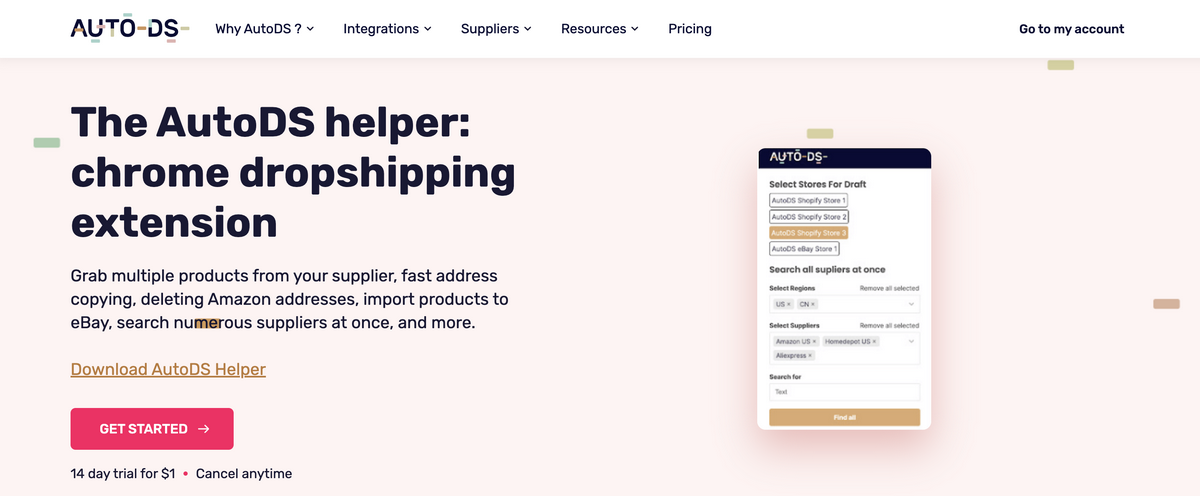
The AutoDS Helper (Chrome extension) is a powerful add-on designed to simplify the product sourcing and importing workflow. It basically brings automation and efficiency directly into your browser, letting you add products into your store as you see them, in just one click (literally, just one).
It includes features for faster product import, multi-store support, and a smoother dropshipping workflow, such as:
- One-click imports to multiple stores. Instead of manually switching between stores, AutoDS lets you select multiple connected stores and import a product into all of them with a single click.
- “Search all suppliers” tool. This feature lets you browse many supported supplier platforms at once from within the extension.
- Supplier and region automation. The AutoDS Chrome extension automates supplier and shipping-region selection based on your previous preferences, reducing repetitive setup steps and the risk of error.
- Bulk and single-product importing. The AutoDS Chrome extension lets you import one or multiple products at once, guiding you through the process.
All in all, the AutoDS Chrome extension helps sellers save time, reduce friction, and avoid repetitive steps. How? Just by moving much of the product sourcing and importing workflows into the browser. The extension truly acts as a bridge between suppliers and your store, letting you source and import in seconds.
“AutoDS is truly the all-in-one tool you need for all your drop shipping needs”, says dropshipping expert Scott Hilse. Start the $1 trial today and see how much faster and easier your entire workflow becomes.
Competitor Chrome Extensions Overview
Most dropshipping tools provide a browser extension to help you import products from supplier websites into their platform. But the level of automation, supported suppliers, and workflow efficiency are not always the same from tool to tool.
Here is an overview of how AutoDS compares to DSers, CJDropshipping, and Zendrop.
AutoDS vs DSers: Chrome Extension Feature

The DSers Chrome extension is built primarily for AliExpress sourcing. Its main function is to let you import products from AliExpress to DSers with a single click, then manage those items inside the DSers dashboard.
It can also help with mapping variants and organizing bundles. But most of that process happens after the import, not during browsing. As an importing tool, it’s simple and works well if AliExpress is your only or main supplier.
Where it becomes more limited is outside the AliExpress ecosystem. DSers doesn’t support importing directly from other suppliers through the extension, and browser-level automation is minimal. There’s no multi-store importing, no bulk sourcing, and no region-preference automation.
👉 Bottom line: AutoDS goes beyond DSer’s Chrome extension, offering wider supplier support, multi-store importing, and more browser automation built directly into the extension.
AutoDS vs CJDropshipping: Chrome Extension Feature

CJDropshipping also offers a Chrome extension. It lets sellers import products directly from CJDopshipping’s marketplace pages and submit image or URL sourcing requests. It’s useful if you already use CJ as a supplier, especially because it lets you request the system to find similar options or custom options.
But here’s the thing: the CJDropshipping Chrome extension is not built for cross-supplier sourcing. It doesn’t connect with retailers like Amazon, eBay, or Walmart, nor with multi-supplier workflows. Its only focus is the CJ platform, which means you can’t use it for your entire dropshipping workflows.
👉 Bottom line: AutoDS stands out against CJDropshipping with a Chrome extension that offers higher flexibility across multiple suppliers and regions.
AutoDS vs Zendrop: Chrome Extension Feature

Zendrop’s Chrome extension is built mainly to import products from AliExpress to Zendrop. You basically browse AliExpress, click the extension, and import the product into your Zendrop account. It was designed to simplify the switch from AliExpress suppliers to Zendrop suppliers. This can be especially helpful for sellers looking to improve shipping times or diversify the product catalog.
Still, the extension is fairly limited in scope. While it adds an alternative for Zendrop sellers mainly to source from AliExpress, it doesn’t really support anything else other than that. There’s no supplier flexibility, multi-store importing, or bulk sourcing. Its core purpose is migration, not broad product research or automation.
It’s worth noting that Zendrop’s Chrome extension hasn’t been available since 2024, and there’s no update on when it will be reinstated.
👉 Bottom line: AutoDS exceeds Zendrop’s Chrome extension with a more complete sourcing tool that includes multi-supplier support, bulk actions, and more built-in browser automation features.
Side-by-Side Feature Comparison Table: Dropshipping Chrome Extensions
Next, let’s compare all four platforms by breaking down their features. All in all, AutoDS offers the only dropshipping Chrome extension designed to automate both imports and fulfillment across multiple suppliers and platforms, not just AliExpress or one source.
| Feature | AutoDS | DSers | CJDropshipping | Zendrop |
|---|---|---|---|---|
| Supplier sources | 25+ (AliExpress, Amazon, Walmart) | AliExpress only | CJDropshipping only | AliExpress only |
| One-click import | ✅ | ✅ | ✅ | ✅ |
| Bulk import | ✅ | ❌ | ❌ | ⚠️ Premium only |
| Price & stock sync | ✅ | ⚠️ AliExpress only | ⚠️ Manual | ✅ |
| Order automation | ✅ | ⚠️ Partial | ❌ | ❌ |
| Multi-platform support | ✅ | ✅ | ✅ | ⚠️Shopify only |
| Product research integration | ✅ | ❌ | ❌ | ❌ |
| Automation depth | ✅ Full | ⚠️ Basic | ⚠️ Limited | ⚠️ Moderate |
Technical Advantages of the AutoDS Extension

The AutoDS Chrome Extension is way more than just a product-import button like other extensions on the market. It’s a full browser-level automation tool designed to simplify sourcing and listing across multiple suppliers and selling channels. What makes it stand out is how it reduces the sourcing and importing steps into one single click.
Then, there’s multi-supplier compatibility. While most competitor extensions work with a single marketplace (like AliExpress or CJDropshipping’s own catalog), AutoDS supports a wide range of retailers and suppliers.
This means you can browse Amazon, Walmart, AliExpress, and more, and import products to your store with the same one-click process. For dropshippers working with multiple regions or fulfillment strategies, this flexibility is a major time-saver.

Another big plus is bulk and multi-store importing directly through the extension. You don’t need to open separate tabs or repeat the same steps for each store. AutoDS lets you select multiple connected shops and add the same product to all of them instantly. If you’re managing many stores or selling across multiple marketplaces, this feature eliminates repetitive tasks completely.
💡 Pro Tip: Use the multi-store import option strategically. Add the same product to several stores, but test different titles, prices, or images in each one. It’s an easy way to A/B test variations and quickly see which version converts best.

The extension also includes practical browser automation, like built-in sourcing and auto-saved supplier preferences. Together, they speed up sourcing and importing (especially when adding dozens of listings).

Lastly, AutoDS connects the extension to its dashboard. Any product you import is immediately added to your drafts. There, you can optimize titles and descriptions with AI, pricing with custom rules, and images. Because the extension and the platform work hand-in-hand, you get a simple, quick pipeline from supplier page to browser to listing to store.
Frequently Asked Questions
What are the best dropshipping Chrome dropshipping tool extensions?
The best dropshipping Chrome extensions are the ones that help you source products faster, automate repetitive tasks, and connect supplier data with your store. Popular options include AutoDS, DSers, CJDropshipping, and Zendrop. Each has a different focus, but AutoDS stands out for supporting multiple suppliers and offering stronger automation.
AutoDS extension vs competitors — what’s the difference?
The biggest difference between the AutoDS extension and competitors is automation depth and supplier flexibility. DSers, CJDropshipping, and Zendrop focus on one or two suppliers, while AutoDS works with a wide range of retailers and marketplaces. It also offers features like bulk importing, multi-store importing, and region-preference automation.
Is the AutoDS Chrome extension free?
Yes, the AutoDS Chrome extension is completely free to install from the Chrome Web Store. You only need an AutoDS account to connect it and start importing products.
Do I need technical skills to use a Chrome extension tool?
No, you don’t need technical skills to use a Chrome extension tool. These are designed to be simple and beginner-friendly. You install them with one click, log into your account, and start importing products directly from supplier pages in seconds. There’s no coding and no technical setup needed.
Final Verdict — AutoDS Has The Best Dropshipping Chrome Extension
When you compare all the major Chrome extensions side by side, the difference becomes clear. Most competitors focus on a single supplier or a single workflow. On the other hand, the AutoDS Chrome extension supports the entire dropshipping process across multiple platforms and retailers. From one-click imports to multi-store publishing, supplier flexibility, and browser-level automation, it simply covers more ground with fewer steps.
Looking to source products faster, avoid repetitive manual work, and run your business more efficiently? Then there you have it. The AutoDS Chrome extension is the most complete option with a solid combo of automation, compatibility, and ease of use.
Download it today and start sourcing and importing products in one single click, directly from your browser. Don’t have an AutoDS account yet? Start the $1 trial today!