



There’s a new app in town, and if you sell on Facebook Marketplace, it’s worth five minutes of your attention. Meta just rolled out Seller, built to help frequent sellers manage listings, messages, and performance, all from one place.
For anyone dropshipping on Facebook Marketplace, that launch brings some genuinely useful features. But it also raises the question: how much of the operation can this app actually handle?
That’s what I want to unpack here: what the Facebook Seller App gets right, who it was built for, and where it starts running out of road. From there, you’ll discover how platforms like AutoDS fill those gaps, tying sourcing, inventory, pricing, and multi-channel selling into one system built to scale.
The Facebook Seller App gives active Marketplace users one focused space to manage listings and day-to-day selling activities.
Meta AI-powered tools turn photos into listings and support bulk creation, reducing repetitive manual work.
Access is currently limited to eligible US iOS users aged 18+, while Android remains in testing as of August 2026.
The app simplifies Facebook Marketplace management, but sourcing, supplier monitoring, fulfillment, and multi-channel operations require additional tools.
AutoDS extends automation across these workflows, helping dropshippers manage suppliers, products, orders, and supported sales channels as they scale. 👇
Facebook Seller App: What Marketplace Sellers Need to Know
Launched on July 24, 2026, Seller is Meta’s standalone app for anyone running a business on Facebook Marketplace. What does that mean once you strip away the announcement language? You get a space of your own to work from, instead of the same general feed everyone else happens to be browsing.
That’s the whole point: seller-first, with tools built specifically for the job. You can create listings with Meta AI, manage inventory and buyer messages, upload in bulk, and keep an eye on how sales are actually performing—all in the same dashboard. Considering that 250 million people already list items on the platform, this isn’t a minor update. It’s Meta treating Marketplace like the serious piece of commerce infrastructure it’s become.
The app is already live on the App Store, but access is limited: iOS only, US only, and you’ll need to be 18 or older to use it. Android is still sitting in Meta’s testing pipeline. That said, if you qualify and download the iOS app, a web version opens up too, so you’re not chained to your phone every time you need to check something.
What Is the Facebook Seller App?

The Facebook Seller App is exactly what it sounds like: a separate tool, built specifically for people who sell through Facebook Marketplace, that never actually replaces Marketplace itself.
Worth clearing up early: anything you build inside Seller shows up on Marketplace automatically, and everything you’ve already got (your catalog, your messages, your selling history) syncs straight into the app with no setup required on your end.
Prefer to keep listing directly through Facebook, the way you always have? Nothing’s stopping you. Seller isn’t a requirement; it’s an option for sellers who want sharper controls without abandoning the storefront buyers already know. And that’s really the bottom line here: shoppers keep browsing the same Marketplace they always have. You’re just the one getting a better set of levers to pull behind the scenes.
What Can the Facebook Marketplace Seller App Do?
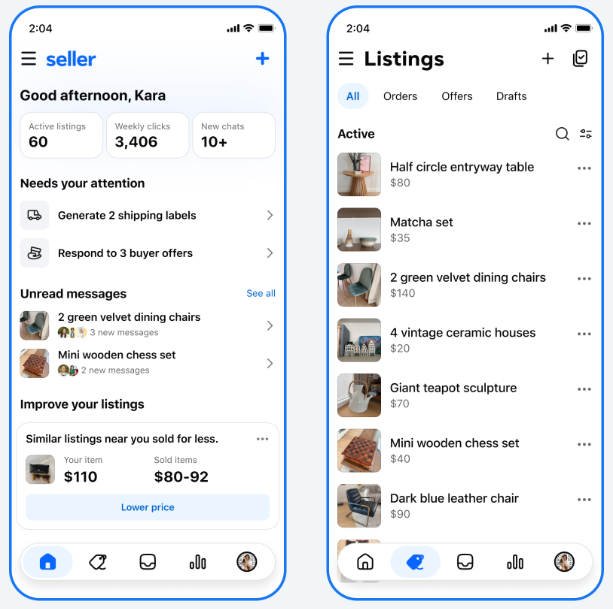
So what actually changes the moment you open Seller? The app is built to speed up several core parts of the Marketplace workflow: creating listings, tracking inventory, talking to buyers, and understanding what’s actually selling.
Let’s break it down:
Create Listings With Meta AI
Instead of writing every listing from scratch, you start by uploading photos of the item. Meta AI analyzes the images and takes it from there, suggesting a title, description, price, and category based on what it sees.
Nothing is published without your say-so, as you still review and adjust everything the AI drafts. But if you’re adding products on any kind of regular schedule, that step alone strips out a big chunk of the busywork.
Create Listings in Bulk
When you have more than a handful of items to sell, creating listings one by one can quickly become time-consuming. Seller’s bulk tools let you work through several listings in a single pass instead.
That’s especially handy if your catalog runs deep: more products published, less of the individual grind each one used to demand.
Manage Inventory & Reprice Listings
Seller also gives you one centralized screen to see everything happening across your Marketplace inventory: review and edit active listings, relist products, and spot items that might need a price bump or cut.
The home dashboard does some of the thinking for you, too, surfacing listings that need attention, such as items waiting to ship, and others that look overdue for a price change. Worth knowing, though: these tools help you spot what needs adjusting; they don’t automatically reprice based on supplier costs or what’s happening on your other sales channels. That part’s still on you.
Manage Buyer Messages in One Inbox
Rather than chasing separate Marketplace conversations across who-knows-how-many threads, Seller funnels every buyer message into a single inbox, with the relevant product attached, so you’re never digging for context.
If you’re handling any real volume of listings, having every conversation tied to the right item turns the daily back-and-forth from scattered into manageable.
See Marketplace Performance Insights
Finally, Seller hands you the numbers behind your listings: views, clicks, message threads, items sold. Together, they tell you which products are pulling attention and which ones are just sitting there.
Use that data well, and you’ll start spotting your strongest listings, catching the ones that need a rework, and making more informed calls about what’s worth keeping around.
Who Can Use the Facebook Seller App?
Worth repeating, since it changes who this is actually for: as of August 2026, the Facebook Seller App is available to users aged 18 and older in the US through Apple’s App Store. An Android version is still being tested, while Meta also offers a web experience for sellers who have downloaded Seller on iOS.
Already selling on Facebook Marketplace? Good news: you’re not starting from zero. Seller plugs right into what you’ve already got going: your products, messages, and sales history carry over into the app with no extra setup.
Meta’s fairly specific about who this app is for (active Marketplace sellers) and what it takes to qualify (age, location), but nowhere does it say you need a separate business account. That makes the jump even easier for anyone already selling through their existing Facebook presence.
Is the Facebook Seller App Good for Dropshippers?
Short answer: yes, the Facebook Seller App can be useful for dropshippers who primarily sell through Facebook Marketplace. If you’re used to wrestling with listings by hand, Seller brings a lot of that grind into one cleaner, purpose-built interface.
The bigger your Marketplace activity, the more this pays off. Bulk tools cut down the one-by-one publishing, Meta AI helps get the listing details drafted, the unified inbox keeps buyer conversations from scattering everywhere, and the performance numbers give you an honest read on what’s actually working.
But there’s an important distinction: making Marketplace selling smoother is not the same thing as automating a dropshipping business.
Seller’s whole world is what happens inside Facebook Marketplace. But dropshipping doesn’t stop there; there’s a lot happening behind each listing, too: sourcing from suppliers, keeping stock and prices in sync as supplier info shifts, processing orders, and often juggling the same products across more than one selling channel.
And that gap widens the moment you scale. Seller can absolutely tighten up everything Marketplace-facing. But the machinery running underneath those listings (the part your buyers never see) needs a different kind of automation, or it becomes the bottleneck you didn’t see coming.
💡 Pro Tip: Here’s something I’d tell any seller relying on one platform: that ceiling is one you set yourself. Each marketplace opens the door to a different audience and plays to its own strengths, and having a foot in more than one keeps you steady when the ecommerce ground shifts. Multi-channel dropshipping tools are what make running all of that at once actually realistic.
Facebook Seller App vs AutoDS
So how does Seller actually stack up against a platform built for automation, like AutoDS? Here’s the short version: Seller handles what happens inside Marketplace. AutoDS handles the operational side of running a dropshipping business, full stop.
They do overlap here and there, listing and product management being the obvious spots. But they’re solving genuinely different problems. Seller makes your Facebook Marketplace activity run smoother. AutoDS automates the ecommerce engine underneath it: products, suppliers, and workflows across every supported sales channel. Here’s how they compare, side by side:
| Feature | Facebook Seller App | AutoDS |
|---|---|---|
| Primary purpose | Manage Facebook Marketplace selling | Automate ecommerce & dropshipping operations |
| Facebook Marketplace workflows | ✅ Native Marketplace experience | ✅ Supported |
| Listing assistance | ✅ Meta AI | ✅ AI & product publishing tools |
| Bulk listing | ✅ Yes | ✅ Yes |
| Buyer messages | ✅ Dedicated Marketplace inbox | Not a primary function |
| Performance insights | ✅ Marketplace listing insights | ✅ Product/store analytics depending on the selling channel and workflow |
| Supplier-linked stock monitoring | ❌ No | ✅ Yes |
| Supplier price monitoring | ❌ No | ✅ Yes |
| Automated fulfillment workflows | Limited to Facebook Marketplace | ✅ Available for supported suppliers and workflows |
| Multi-channel selling | ❌ No, Marketplace only | ✅ Supports multiple selling channels |
| Product sourcing & research | ❌ No | ✅ Several research and sourcing tools |
| Availability | US; iOS, with Android in testing | Web-based platform; availability varies by supported channel and region |
🆕 Beginner’s Tip: See that product research row above? Don’t overlook it. You can automate every workflow in the world; none of it matters if you’re pushing the wrong items. This guide on Facebook Marketplace product research walks you through spotting the best sellers actually worth your time.
The pattern to watch for: if you sell exclusively on Marketplace and handle suppliers, prices, stock, and orders yourself, Meta’s free app may cover much of your day-to-day Marketplace operations. Add more products, suppliers, or a second sales channel, and you’ll hit workflows Seller was never built to handle. That’s your cue to bring in AutoDS.
How to Get Started With the Facebook Seller App
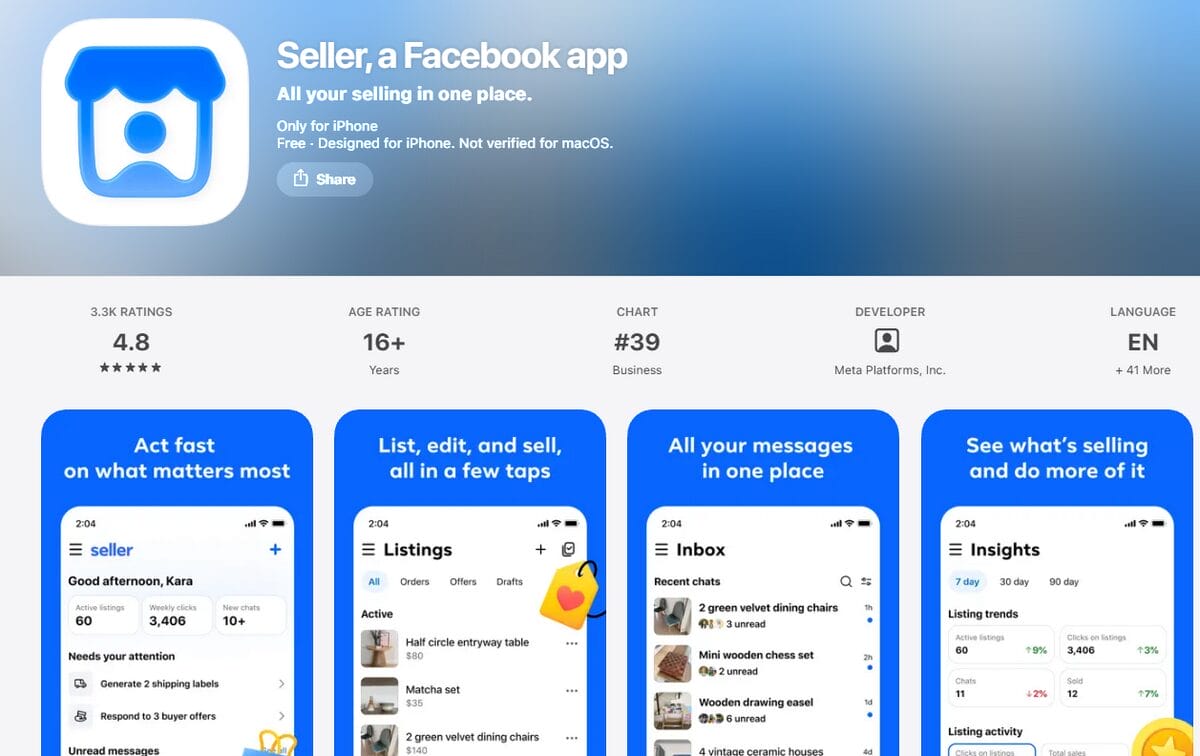
Getting up and running with Seller doesn’t take much if Marketplace is already part of your routine. Here’s the process:
1️⃣ Download Seller From the App Store
If you’re an eligible US user, head to Apple’s App Store and grab the Facebook Seller App. Keep in mind: for now, it’s iOS-only, while Meta keeps working on the Android version behind the scenes.
2️⃣ Sign In With Your Facebook Account
Use the same account you already sell through on Marketplace. Seller pulls in everything automatically: listings, messages, your full selling history.
3️⃣ Review Your Existing Listings & Messages
Once you’re in, take a minute to confirm everything actually made the jump. It’s also a good moment to scan your inventory and flag anything that needs a second look before you move forward.
4️⃣ Create or Bulk-Create Listings
From here, list items one at a time, or use the bulk tools if you’ve got a stack of products waiting. Either route works the same way: whatever you publish through Seller shows up on Marketplace too.
5️⃣ Review Meta AI Suggestions Before Publishing
Using Meta AI to turn photos into listing details? Don’t hit publish on autopilot. Give the title, description, price, and category an honest look first. AI speeds up the process, sure, but you’re still the one vouching for what’s actually being sold.
6️⃣ Monitor Your Inbox & Performance
Once listings go live, keep two tabs open in your head: the inbox for buyer conversations, and the performance numbers (views, clicks, messages, sales). Over time, that combination tells you exactly which listings are earning their spot and which ones need a rethink.
Frequently Asked Questions
What is the Facebook Marketplace Seller app?
The Facebook Marketplace Seller app is Meta’s standalone app for frequent Marketplace sellers. It provides a dedicated space to create and manage listings, track inventory, organize buyer messages, and review performance insights, all synced with your existing Marketplace activity.
Is the Facebook Seller app available outside the US?
No, the Facebook Seller app is currently only available in the US for eligible users aged 18 and older. As of August 2026, Meta has not announced when availability will expand to other countries.
Does the Facebook Seller app work on Android?
No, the Facebook Seller app is not currently available on Android. Meta initially launched it for iOS and is still testing an Android version. A web experience is also available for sellers who have downloaded the iOS app.
Is the Facebook Seller app free to use?
Yes, the Facebook Seller app is free to download and use for eligible Marketplace sellers. It is currently available through Apple’s App Store in the US, with no separate subscription required.
Do I need a business account to use the Facebook Seller app?
Meta doesn’t state that a dedicated business account is required to use the Facebook Seller app. The app connects to your existing Marketplace activity, carrying over your listings, conversation history, and sales activity. For now, eligible Marketplace sellers can use the free app without a separate approval process or business license.
Can the Facebook Seller app list products on other marketplaces besides Facebook?
No, the Facebook Seller app only manages listings within Facebook Marketplace. If you sell across multiple supported channels, ecommerce automation platforms like AutoDS can help centralize product management and automate operations beyond Facebook.
How does the AI listing feature in the Facebook Seller app work?
The Facebook Seller app’s AI listing feature uses AI to generate listing suggestions from your product photos. Once you upload images, it automatically suggests a title, description, price, and category, which you can review and edit before publishing.
Can AutoDS automate Facebook Marketplace listings alongside or instead of the Seller app?
Yes, AutoDS can support Facebook Marketplace workflows alongside or beyond the Seller app. While Seller focuses on managing your activity within Marketplace, AutoDS adds supplier-linked product importing, stock and price monitoring, and broader ecommerce automation, making it useful as your selling operation expands.
Open A Facebook Seller App and Use AutoDS To Scale
The Facebook Seller App is a real step forward for anyone selling often on Marketplace. But here’s the part worth sitting with: running Facebook listings is only one piece of the business. The moment you’re sourcing from more than one supplier, or spreading across other sales channels, that’s usually where the real challenge starts to surface.
That’s exactly where AutoDS picks up the thread. Rather than stopping at the Marketplace-facing side of things, it connects product and supplier management with full automation, watching stock and prices for you, streamlining fulfillment, and keeping products in sync across every channel you sell on.
To be clear, this isn’t an either-or decision. You don’t have to choose between a smoother Facebook selling experience and real automation underneath it. Use Seller to run Marketplace well. Use AutoDS to run everything else, once your business outgrows what any single platform can hold.
📈 Ready to go beyond just managing listings? Explore AutoDS for $1 and see what it feels like to run a connected, scalable operation.
Still in learning mode? Grab another cup of coffee and dive into these next reads:







