



One negative comment can make you want to refresh your eBay profile until it magically disappears. If you’re searching for how to remove negative feedback on eBay, though, there’s no universal delete button. You have two legitimate paths: ask the buyer to revise their feedback, or ask eBay to remove it under its feedback policy.
Both options have limits. Buyers can decline a revision request, even after you resolve their issue, and eBay won’t remove a comment simply because you disagree with it. Its feedback policy sets out the situations that qualify for removal.
I’ll walk you through which option fits your situation, how to submit your request, and the deadlines you need to watch. You’ll also learn what to avoid and how to protect your store’s reputation if the feedback stays.
Buyers can voluntarily revise feedback, or eBay can remove it when its policy allows.
Revision requests require feedback less than 30 days old; removal requests to eBay must be submitted within 90 days of the transaction.
Revision requests are limited. Sellers get 5 per calendar year, plus 5 for every 1,000 feedback ratings received that year. Buyers have 10 days to respond.
Resolve issues without buying better ratings. Never make a refund, replacement, or discount conditional on a feedback change.
Protect your reputation either way. If feedback stays, reply professionally and address recurring order issues to help prevent future complaints.
Can You Actually Remove Negative Feedback on eBay?
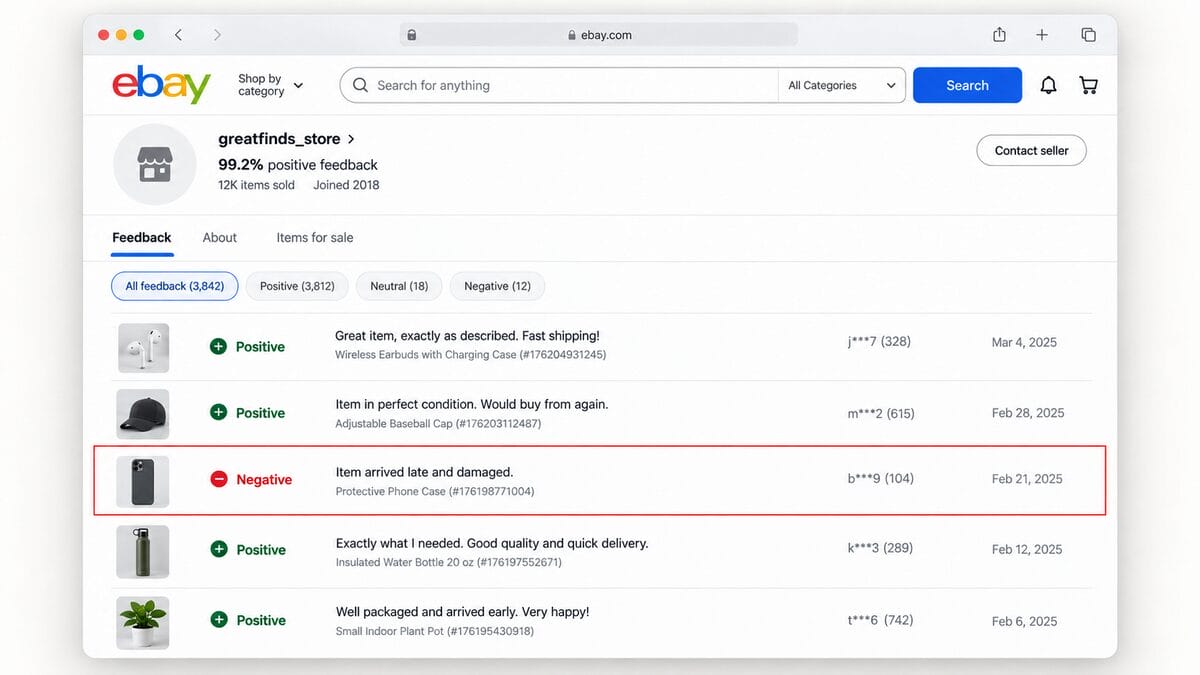
Yes, but only in specific situations. As a seller, you can ask the buyer to revise their rating and comment, or request removal from eBay if the feedback qualifies under its policy. You can’t delete feedback from your profile yourself.
Everything depends on why the buyer left it. If their order arrived damaged and you’ve arranged a replacement, they may be willing to revise their feedback. If the comment contains threats or clearly refers to another seller’s item, you may have grounds to ask eBay to remove it.
If neither route succeeds, the feedback stays on your profile. A refund doesn’t automatically erase it, and reporting it doesn’t guarantee removal. You can still post a calm, helpful reply to show future shoppers how you handle problems. Treat that response as part of your customer service, because your next buyer may read it.
Option 1: Request a Feedback Revision From the Buyer
If the buyer had a genuine problem with their order, start by fixing the issue. A replacement, an appropriate refund, or a clear explanation may help, depending on what happened. Keep the conversation in eBay Messages so there’s a record of your communication.
Here’s how I’d approach it:
- Offer a practical solution. Acknowledge the specific complaint and explain what you can do. If the wrong item arrived, for example, explain how you’ll arrange a return or replacement.
- Check that the issue is resolved. Once the solution has actually reached the buyer, ask whether they’d be willing to revise their feedback. Wait for their agreement before using a limited request.
- Send the official request. Open eBay’s feedback revision guide, select “Request a feedback revision,” and sign in. Choose the eligible feedback and explain your reason for requesting the change.
- Leave the decision with the buyer. They’ll receive an email from eBay and can accept, decline, or let the request expire.
According to eBay’s current revision rules, these are the limits:
- Annual allowance: You can send 5 feedback revision requests per calendar year.
- Additional requests: You receive 5 more requests for every 1,000 feedback ratings received during that year.
- Eligible feedback: The feedback must be less than 30 days old when you send the request.
- Buyer response window: The buyer has 10 days to respond before the request expires.
💡 Pro Tip: Resolve first, request second. Offer a refund or replacement because it’s the right solution to the order issue. Never make it conditional on receiving better feedback.
Option 2: Ask eBay to Remove Feedback for a Policy Violation
If the feedback qualifies under eBay’s feedback policy, you can request removal without the buyer’s permission. Some removals happen automatically; others require manual review. The key is identifying the specific rule that applies.
Which situations qualify for removal?
These are examples of eligible situations, subject to eBay’s review:
- Prohibited content: Profanity, threats, personal information, or links encouraging purchases outside eBay.
- Customs complaints: Feedback about import duties or tax issues that eBay identifies as outside your control.
- Declined change-of-mind returns: The buyer complains that you refused a return because they changed their mind, and your listing didn’t offer returns. This isn’t blanket permission to reject complaints about faulty or misdescribed items.
- Confirmed eBay technical issues: The complaint concerns a problem caused by the platform.
- Feedback for the wrong seller: The comment clearly concerns another transaction.
- Eligible delivery problems: Tracking proves you met handling or delivery expectations, or a qualifying weather event or carrier disruption caused the delay. “My supplier shipped it late” isn’t the same protection.
- Unpaid orders: The buyer didn’t pay within the allowed time, and you canceled the order for nonpayment.
- Confirmed abusive buying: eBay determines that the buyer violated its abusive buyer policy and removes associated feedback. Don’t assume an account suspension for an unknown reason guarantees removal.
How to request a manual review
Submit your request through Seller Help within 90 days of the transaction date. You can access it from eBay’s feedback policy page. Depending on the circumstances, eBay may remove the comment, rating, images, or a combination.
I’d prepare a short, evidence-led explanation before submitting. Identify the feedback, name the relevant policy provision, and point to supporting messages, tracking scans, or listing details. Make it easy for the reviewer to connect the complaint with the evidence.
🔍 Research Tip: Match your evidence to the complaint. For a delivery dispute, highlight the carrier’s acceptance scan and your stated handling time. A long account of how frustrating the buyer was won’t establish when you shipped.
What Not to Do When Trying to Remove Feedback
A negative comment is frustrating, but don’t turn it into a negotiation over your rating. Under eBay’s feedback manipulation policy, offering money, discounts, free products, or other incentives in exchange for positive feedback is prohibited. That includes offering a refund on the condition that a buyer changes their negative rating to positive.
The condition makes the difference. “I’ll refund you if you change your feedback” ties customer support to your reputation. “I’m sorry the item arrived damaged. Here’s how to return it for a refund” addresses the purchase problem. After resolving it, you can ask whether the buyer is willing to reconsider their feedback, but the solution shouldn’t depend on their answer.
Avoid these mistakes, too:
- Trying to retaliate. Sellers cannot leave negative or neutral feedback for buyers. Hiding a negative comment inside a positive rating isn’t a workaround; eBay says it will remove that feedback. Report policy-breaking buyer behavior through the appropriate channel instead.
- Pressuring the buyer after a refusal. Repeated messages are unlikely to rebuild trust. If they decline, focus on a professional public response.
- Posting while you’re angry. Your reply is for future shoppers as much as the original buyer. Keep it factual, brief, and free of personal accusations. This is customer service, not your villain origin story.
Use one simple test before sending a message: would I be comfortable with a future customer reading it? If the answer is no, give yourself a minute and rewrite it.
How to Prevent Negative Feedback in the First Place
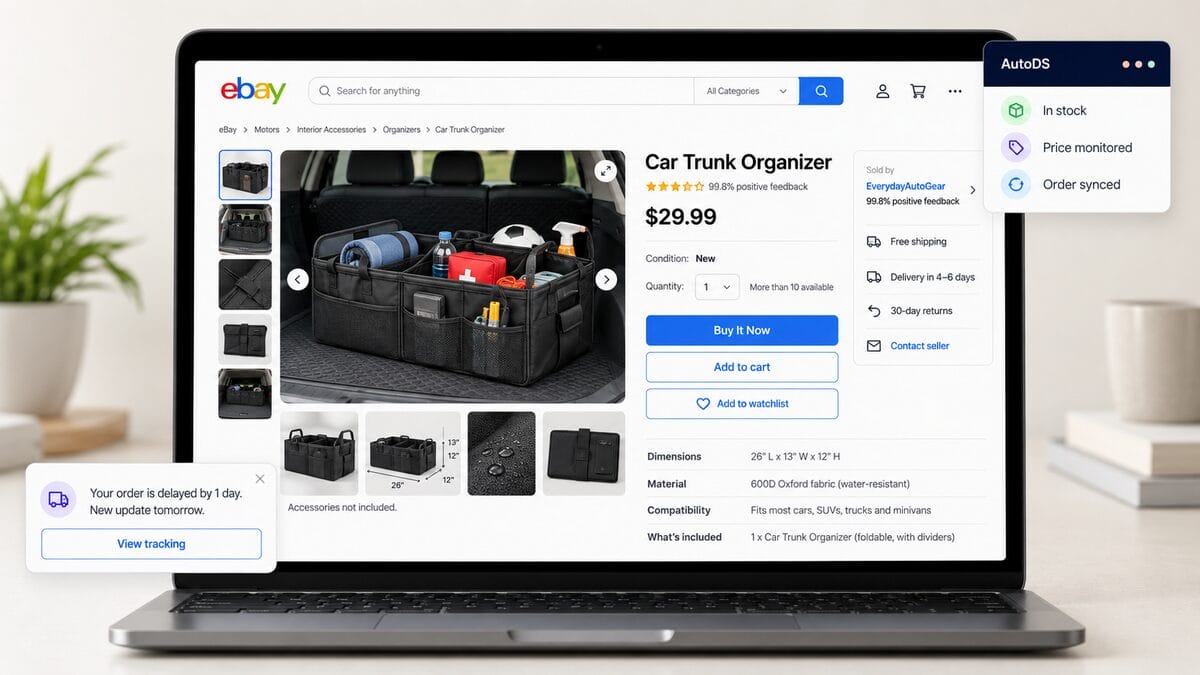
You can’t control every buyer’s reaction, but you can reduce avoidable surprises. I’d focus on the details that shape the experience before the customer ever considers leaving feedback:
- Make listings specific. Include accurate measurements, compatibility details, materials, and what’s actually in the package. If a product photo shows accessories that aren’t included, say so clearly.
- Set realistic shipping expectations. Base handling times and delivery estimates on your supplier’s actual capabilities. A hopeful delivery promise can quickly become a disappointed buyer.
- Communicate before buyers have to ask. If you spot a delay, explain what you know and when you’ll provide the next update. Avoid promising an arrival date you can’t confirm.
- Give complaints a clear next step. Instead of “I’ll look into it,” explain what you’re checking, what the buyer needs to do, and when they can expect your response.
- Automate routine order tasks. AutoDS dropshipping automation brings stock monitoring and automated order workflows into one platform. These tools can help reduce manual oversights while you stay responsible for supplier performance and resolving customer issues.
📦 Supplier’s Tip: Track recurring complaints by supplier. If the same sizing error, damaged packaging, or dispatch delay keeps appearing, address the source before sending more orders their way.
Frequently Asked Questions
How many feedback revision requests can a seller send on eBay?
Sellers get 5 feedback revision requests per calendar year, plus 5 additional requests for every 1,000 feedback ratings received during that year. The extra allowance is based on feedback received, not orders completed.
Can eBay remove feedback without the buyer’s permission?
Yes. eBay can remove feedback without the buyer’s permission when it meets the platform’s removal criteria, such as prohibited content or qualifying seller-protection situations. Some removals happen automatically; others require a request through Seller Help. Disagreeing with a buyer’s opinion isn’t enough.
Is it against eBay policy to offer a refund in exchange for better feedback?
Yes. Making a refund conditional on better feedback is feedback manipulation. You can offer an appropriate refund to resolve an order problem, then ask whether the buyer is willing to reconsider their feedback. The refund must not depend on their agreement or the rating they choose.
How long do I have to request a feedback revision after receiving negative feedback?
The feedback must be less than 30 days old when you send the revision request. Once sent, the buyer has 10 days to respond before it expires. This is separate from requesting removal through eBay, which has a 90-day window measured from the transaction date.
Can a buyer refuse to change their feedback even after I resolve the issue?
Yes. Resolving the issue doesn’t obligate the buyer to revise their feedback. They can decline your request or leave it unanswered. If the feedback remains, a brief, professional public reply can explain how you addressed the problem without pressuring the buyer.
Can automation tools like AutoDS help reduce negative feedback from order and shipping issues?
AutoDS offers stock monitoring and automated order workflows that can help reduce manual oversights behind some complaints. However, automation cannot guarantee on-time delivery, prevent every supplier mistake, or remove negative feedback. You still need to monitor exceptions and help buyers when something goes wrong.
Conclusion
Knowing how to remove negative feedback on eBay starts with choosing the right route: a voluntary buyer revision or removal by eBay when its policy applies. Check the deadline, address the actual problem, and support any removal request with relevant evidence.
If the feedback stays, your response still matters. I’d focus on showing future buyers that you listen, follow through, and handle difficult orders professionally. One unhappy customer doesn’t have to define how you run your store.
To reduce the manual work behind stock and order management, you can try AutoDS for $1 and explore its eBay automation tools. Give yourself more time to catch problems early and help buyers when they need you.
Ready to keep improving your store? Here’s what to read next:







