In 2026, TikTok Shop has evolved beyond a marketplace. Now, it’s a discovery engine where content and commerce happen in the same scroll. That creates real opportunity, but it also means setup matters. Knowing how to open a TikTok Shop is becoming an essential skill for anyone who wants to build or grow in e-commerce, and it’s one of the first moves in any TikTok dropshipping strategy.
Opening a TikTok Shop takes six crucial steps, and in this guide, I’ll walk you through each one, from registration to your first product listing. Whether you register as an individual or a business, you’ll have a clear path from sign-up to a live shop.
TikTok Shop lets you sell directly inside the app, turning content into a built-in sales channel without needing external traffic.
Opening a TikTok Shop takes six steps: registration, verification, setup, payments, storefront customization, and product listing. Most sellers can complete this in under a week.
Content drives sales on TikTok Shop, with short-form videos generating the majority of purchases—your videos matter more than your listings.
TikTok Shop has low entry costs, with free setup and ~6% referral fees, making it easier to test products compared to traditional marketplaces.
Automation is key to scaling, and tools like AutoDS handle product importing, inventory sync, and order fulfillment so you can focus on growth.
What Is TikTok Shop & Why Dropshippers Are Flocking To It
TikTok Shop is TikTok’s native e-commerce platform, allowing sellers to list products and complete transactions without users ever leaving the app. Buyers discover products through shoppable videos, livestreams, and the built-in Shop tab, turning content into a direct sales channel.
Yes, dropshipping is allowed on TikTok Shop, which is a big part of why so many new sellers are entering the space. You don’t need to hold inventory to get started, and you can launch products quickly as trends emerge.
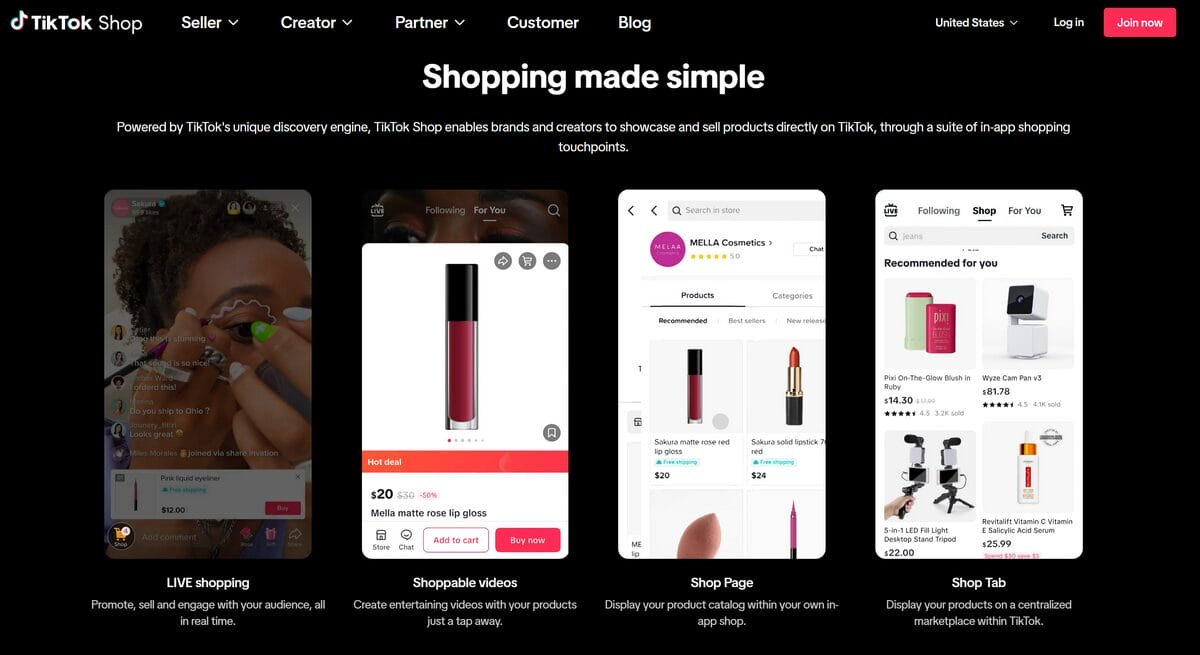
The main advantages of opening a TikTok Shop come down to three core elements:
- Content-Driven Discovery: Unlike traditional marketplaces where buyers search for specific products, TikTok Shop operates on content-driven discovery. Products find buyers through entertaining videos rather than keyword searches. The algorithm surfaces products to users based on their viewing behavior, interests, and engagement patterns. This gives new sellers with zero followers a real chance to reach buyers: your product video can go viral regardless of your account size.
- How Sales Happen on TikTok Shop: Short-form video content drives approximately 60% of TikTok Shop’s GMV. The in-app Shop tab accounts for roughly 30%, while livestream shopping contributes around 10%. For dropshippers, this means your content strategy directly impacts your sales volume. Products that translate well to short video demonstrations (gadgets, beauty items, home organization products) tend to perform best.
- Fee Structure: TikTok Shop is free to open. The platform charges a 6% referral fee on each sale, which is significantly lower than Amazon’s approximately 15%. New sellers in the U.S. typically receive a promotional rate of 3% for the first 30 days (promotional terms may vary by market), making it one of the lowest-cost marketplaces to test products.
- Market Scale: TikTok’s shopping audience is projected to reach 57.7 million U.S. buyers in 2026, with the average U.S. order value at approximately $59. The combination of a massive user base, low fees, and algorithm-driven discovery creates an opportunity that dropshippers cannot afford to ignore.
Pros & Cons of Selling on TikTok Shop
Selling on TikTok Shop comes with a unique mix of advantages and trade-offs. The platform lowers the barrier to entry, but it also shifts the workload toward content and consistency.
✅ Pros of Selling on TikTok Shop
- Low cost to start: Opening a TikTok Shop is free, with referral fees typically around 6% per sale.
- Algorithm-driven exposure: Unlike traditional marketplaces, TikTok gives new sellers a real chance to reach buyers through content.
- High in-app purchase behavior: Nearly half of U.S. TikTok users have made a purchase directly on the platform.
- Built-in affiliate ecosystem: TikTok Shop connects you with creators who can promote your products through performance-based commissions.
- Automation-friendly: Direct integration with AutoDS lets you automate product imports, order fulfillment, and inventory updates, reducing manual work as you scale.
❌ Cons of Selling on TikTok Shop
- Initial limitations: New sellers enter the Shop Probation Program, which includes product listing caps and daily order limits until performance benchmarks are met.
- High competition in popular niches: Beauty, fashion, and tech accessories are crowded, making differentiation essential.
- Content is non-negotiable: Product listings alone won’t generate sales. Consistent video creation is required to drive traffic and conversions.
How To Open a TikTok Shop: Step-by-Step Registration & Setup
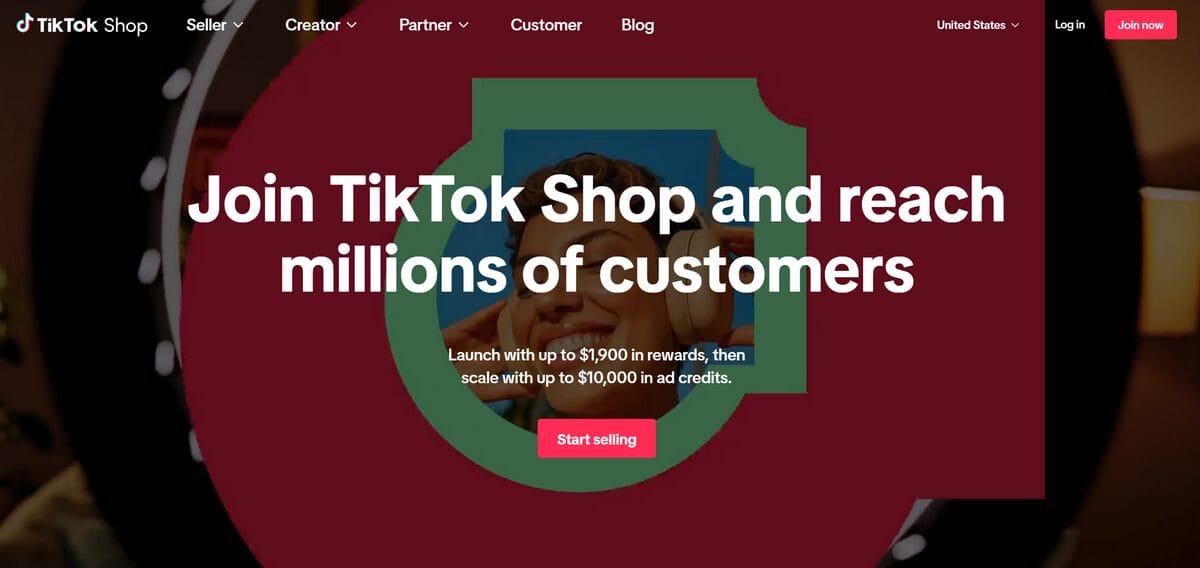
If you’re researching how to open a TikTok Shop, your timing could not be better.
TikTok Shop generated $64.3 billion in global GMV in 2025, underscoring how fast social commerce is scaling. That growth is creating real opportunity for new sellers, but getting started still begins with the fundamentals: setting up your shop correctly, meeting platform requirements, and publishing products the right way.
The six steps below walk you through the full registration and setup process. If you plan to run a dropshipping model, tools like AutoDS can support the operational side later with product importing, automated fulfillment, and inventory syncing, but first, you need your TikTok Shop live. Let’s start with step one.
Step 1️⃣ — Check Your Eligibility
Before anything else, make sure you meet TikTok Shop’s requirements. You must be at least 18 years old and a legal resident of a supported country, including the United States, the United Kingdom, and several Southeast Asian markets, with expansion into Europe underway. (If you’re based in the UK, see our guide to TikTok Shop dropshipping in the UK).
You will need a valid government-issued ID, a business address (your home address works for individual sellers), a bank account for payouts, and a phone number and email address that are not already linked to another TikTok Shop account.
This step is easy to overlook, but it’s where many delays start. Confirm every requirement upfront so you don’t get stuck during verification.
Step 2️⃣ — Create Your Seller Account
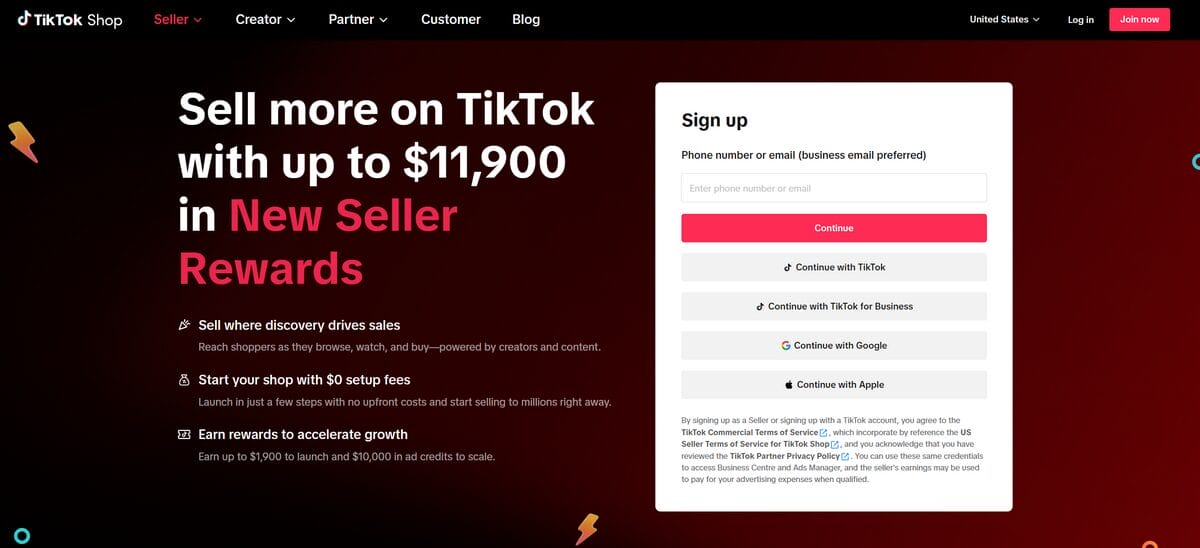
Navigate to the TikTok Shop Seller Center and click the sign-up button. You can sign up using an existing TikTok account or create a new one with your email or phone number.
Next, select your country of operation. This determines your tax requirements, verification process, and available features, so choose carefully.
Then, choose your seller type:
- Individual: simplest setup, no registered business required
- Sole Proprietorship: for self-employed sellers with a registered name
- Corporation or Partnership: for legally registered companies
Your selection directly impacts the documents you’ll need in the next step. Once your account is created, you’re ready to move into verification.
Step 3️⃣ — Choose Your Seller Type & Submit Documents
Prepare your documents before uploading to avoid interruptions.
For individual sellers:
- Government-issued ID (passport, driver’s license, or state ID)
- SSN or ITIN
- Proof of address
- Phone number for verification
For business sellers:
- Business license or incorporation certificate
- EIN (business tax ID)
- Legal representative’s ID
- Company formation documents
- Registered business address
Verification typically takes 1–3 business days when everything is submitted correctly. As of 2026, TikTok also requires two-step verification for all seller accounts, adding an extra layer of security during or right after this process.
💡 Pro Tip: Make sure names match exactly across all documents. Even minor inconsistencies can trigger rejection.
Step 4️⃣ — Set Up Your Warehouse & Return Address
Next, define where your orders will be shipped from and where returns will be sent. For most dropshippers, these can be the same address, but you can separate them if you’re working with a fulfillment partner.
You’ll also configure:
- Shipping carriers
- Delivery time estimates
- Seller terms and conditions
These settings directly affect customer expectations. TikTok displays estimated delivery times on product pages, so inaccurate information can lead to poor reviews or disputes.
Take your time here! This step quietly shapes your customer experience.
Step 5️⃣ — Link Your Bank Account
TikTok Shop requires a linked bank account for payouts. The account holder’s name must match your registered seller name exactly. If you registered as an individual, the bank account must be in your personal name. If you registered as a business, it must be in the company’s name.
TikTok releases payouts after orders are completed and the return window closes, typically 7–15 days after delivery confirmation, depending on your account status.
New sellers may experience slightly longer payout cycles at the beginning, so plan your cash flow accordingly.
Once your bank account is linked, your shop is financially ready to operate.
Step 6️⃣ — Customize Your Storefront & Add Products
Now you’re building the part customers actually see. A complete storefront improves both trust and visibility inside TikTok’s algorithm.
Add your shop name, logo, hero image, and a bio that describes what you sell. Shops with complete profiles rank higher in TikTok’s search results and receive better algorithmic recommendations.
Then, it’s time to start listing products. For each product, you will enter a title, upload images (and ideally a video), set pricing, and select the appropriate category. Product listings with video content perform significantly better on TikTok, as the platform prioritizes video-first discovery.
Finding products to sell and uploading them is where most new dropshippers spend the majority of their time, and where automation makes the biggest difference.
Tools like the AutoDS Ads Spy Tool identify trending products that are already selling well on TikTok Shop, so you can import proven winners rather than guessing what might work. On the other hand, the AutoDS product importer connects directly to TikTok Shop, allowing you to import products from millions of listings across supported suppliers.
🆕 Beginner’s Tip: Opening your TikTok Shop is only the first move. Once your store is live, learn how to sell on TikTok Shop with a strategy that covers product listing, advertising, and order fulfillment to start generating consistent sales.
⚠️ Shop Probation Program for US Sellers
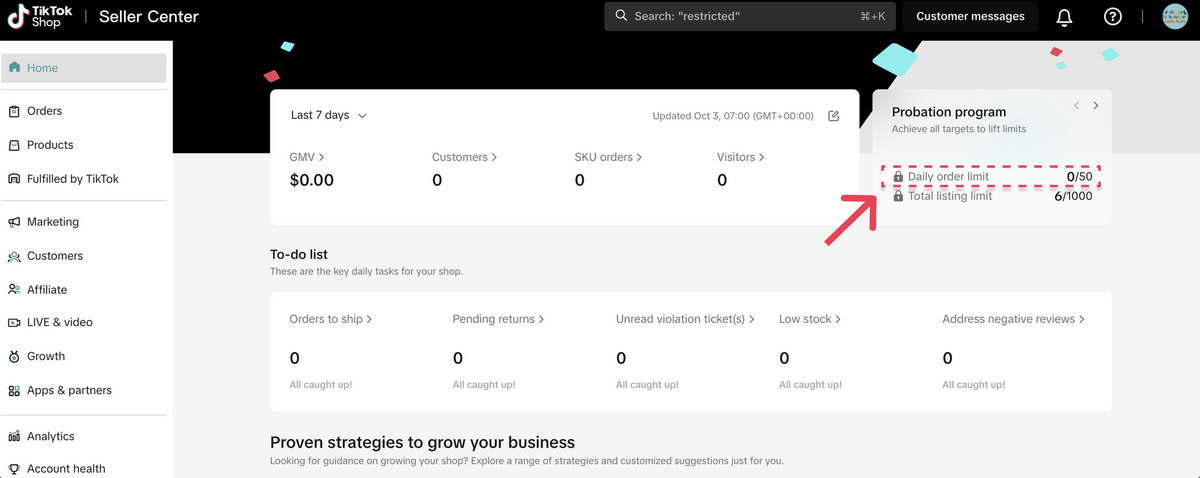
A quick heads up: All new TikTok Shop sellers in the U.S. start under the Shop Probation Program. During this period, your shop has listing limits and daily order caps (specifics vary by market). Probation typically lasts until you meet TikTok’s performance thresholds for order volume, delivery speed, and customer satisfaction. Once your shop graduates from probation, these limits are removed.
Common TikTok Shop Verification Issues & How To Fix Them
Most verification rejections on TikTok Shop come down to the following issues:
- Name Mismatch: The name on your government ID must match the name on your bank account and your registration information exactly. This includes middle names, suffixes (Jr., III), and legal name variations. If your ID shows “Robert” but your bank account uses “Bob,” verification will fail.
- Blurry or Cropped Documents: TikTok’s verification system uses automated document scanning. Images that are blurry, poorly lit, or cropped too tightly often fail automated checks. Photograph documents on a flat surface with even lighting, ensuring all four corners and all text are clearly visible.
- Expired ID: Your government ID must be valid at the time of submission. Check expiration dates before uploading — even if your ID expires next week, submit your application with a current document.
- Wrong Business Type Selected: If you select “Corporation” but submit individual identification documents, your application will be rejected. Review your seller type selection carefully and ensure your documents match.
- Account Already Linked: Each phone number and email address can only be associated with one TikTok Shop. If you see an error indicating your credentials are already in use, you may have a dormant or abandoned shop on those contact details.
- Re-Submission Process: If your verification is rejected, you will receive an email explaining the reason. Address the specific issue cited, then resubmit through the Seller Center. Most re-submissions are reviewed within 1–3 business days.
Completing your profile fully, including shop logo, bio, and return policies, improves your account standing and can contribute to faster verification on resubmission.
Automate Your TikTok Shop With AutoDS
Running a TikTok Shop manually is possible, but it doesn’t scale well. Between listing products, tracking stock, adjusting prices, and placing orders, the operational workload grows fast. The more your content performs, the more pressure you put on your backend.
That’s where automation becomes essential.
AutoDS connects directly to TikTok Shop and handles the repetitive, error-prone tasks that slow most sellers down. Instead of managing everything manually, you can build a system where your store stays updated, orders are processed automatically, and your focus shifts to content and growth.
How AutoDS Works With TikTok Shop
- Connect your TikTok Shop to your AutoDS account through the dashboard
- Import products from supported suppliers using the product importer
- Set pricing rules to automatically calculate your margins
- Enable automated fulfillment so orders are placed and tracked in the background
Key AutoDS Features For TikTok Shop Sellers
- Product Importing: AutoDS lets you import items from hundreds of supplier listings in seconds.
- Ads Spy Tool: This tool shows what’s already performing on TikTok Shop. You can analyze sales trends, filter by category, and import proven products directly into your store.
- Automatic Inventory & Price Monitoring: Supplier stock and pricing change constantly. AutoDS tracks these changes and updates your listings in real time, preventing overselling and protecting your margins without manual checks.
- Automated Order Fulfillment: With Fulfilled by AutoDS, orders are processed automatically when a customer purchases.
- Multi-Platform Management: If you’re selling beyond TikTok Shop (e.g., Shopify, eBay, or Amazon), AutoDS centralizes everything in a single dashboard.
TikTok Shop rewards sellers who focus on content and testing, and AutoDS gives you the infrastructure to do that without getting stuck in daily operations. Or said simply: the less time you spend managing your store, the more time you have to grow it.
Frequently Asked Questions
How much does it cost to open a TikTok Shop?
Opening a TikTok Shop is free. The platform typically charges a ~6% referral fee per sale, with promotional rates (such as ~3% for new sellers) sometimes available depending on the market and period.
Do you need followers to open a TikTok Shop?
No, you do not need followers to open a TikTok Shop. However, creators who want to promote products through the affiliate program usually need at least 5,000 followers to participate.
Can I open a TikTok Shop as an individual without a business license?
Yes. TikTok Shop allows individual sellers to register using a government-issued ID, without requiring a business license or EIN. This makes it accessible for beginners to test the platform.
How long does TikTok Shop verification take?
TikTok Shop verification typically takes 1–3 business days when documents are submitted correctly. Delays usually happen when documents are unclear, expired, or contain mismatched information.
What documents do I need to open a TikTok Shop?
Requirements depend on your seller type:
- Individual sellers: Government-issued ID, SSN or ITIN, phone number, and bank account
- Business sellers: Business license, EIN, legal representative ID, and registered business address
Providing complete and accurate documents speeds up approval.
What is the TikTok Shop Probation Program?
The TikTok Shop Probation Program applies to new sellers and includes listing limits and daily order caps. These restrictions are lifted once the shop meets performance criteria such as order volume, delivery reliability, and customer satisfaction.
Open Your TikTok Shop Account & Start Selling With AutoDS
Opening a TikTok Shop follows a clear path: create your seller account, verify your identity, configure shipping and payouts, customize your storefront, and add your first products. Most sellers can complete this process in under a week, moving from registration to a live shop quickly.
The opportunity is real, and it’s growing fast.
And by automating product import, inventory and price monitoring, and order fulfillment, AutoDS removes the repetitive work that can sometimes slow sellers down. Instead of managing your store day to day, you can focus on testing products, creating content, and scaling what works.
🚀 TikTok Shop moves fast. Try AutoDS for just $1 and put the day-to-day grind on autopilot, so your store can compete on speed, consistency, and execution, without you burning out trying to keep pace by hand.
If you want to go deeper and start seeing real results faster, these guides will help: