
Shopify dropshipping means selling products through a Shopify store, with third-party suppliers holding inventory and shipping orders directly to your customers. You never buy stock upfront — you pay the supplier only after a customer pays you, and your margin is the difference.
Three things to know upfront:
- To get started, set up your Shopify store, find winning products, vet suppliers, import and rewrite listings, launch with organic content before paid ads, and automate fulfillment and pricing.
- Initial costs range from ~$200 to $600+, depending on ads and apps.
- You can have a store live in a weekend, but expect 2–8 weeks of product testing before consistent sales.
In this guide, I’ll walk you through all 20 steps in detail, including the parts most guides skip — Shopify Collective, taxes, and how to leverage automation to scale fast.
Full disclosure: AutoDS is a dropshipping automation platform that connects to Shopify and automates product imports, pricing, stock monitoring, and order fulfillment. I’ll cover both the manual and automated ways for each step. Start Now For $1
What Is Shopify Dropshipping?
After nine years in dropshipping, I’ll give it to you straight: Shopify is still one of the easiest ways to build an online store, even if you’ve never touched an e-commerce platform in your life. No coding, no headaches, no excuses.
With 2.8 million online stores globally, it hands you everything you need in one place: customizable themes, built-in payment options, and a single dashboard to manage your products, orders, and customers. You’re not stitching together five different tools — it’s all right there.
The best part? It works whether you’re a total beginner or you’ve been doing this for years. The interface is intuitive, and the app store is stacked with everything you need to grow and automate your business.
Pros and Cons of Using Shopify for Dropshipping

Let’s start with what Shopify gets right. It’s clean, beginner-friendly, and backed by solid customer support with integrations for basically anything you’d want to add. You can launch fast, scale without headaches, and automate as much of the grunt work as you want with apps or tools built for specific tasks.
On top of that, you actually own your store. You have full control over your branding, your customer data, and your checkout experience. Add in reliable uptime, built-in SEO tools, and a massive app ecosystem, and you’ve got a platform built to scale with you.
Now, of course, it has its drawbacks. First, it’s not free: you’re paying a monthly fee, and some of the best apps add extra costs on top. There’s also a real learning curve if you want to go beyond the basics, whether that’s customizing your theme’s code or wiring together a more advanced automation stack.
And unlike marketplaces such as Amazon or Etsy, Shopify doesn’t hand you built-in traffic. You’re responsible for driving your own visitors, which means marketing is part of the cost of doing business here.
Still, here’s the thing: that small investment and that bit of a learning curve pay for themselves. Shopify saves you time, cuts down on manual work, and makes your whole operation look and run like a real business.
Why Shopify Works So Well for Dropshipping
So, why use it for dropshipping? Honestly, Shopify just makes it simple, even if you’re a beginner. You’re not coding, you’re not designing every little part of your store, and you’re not setting up payments, legal pages, and shipping from scratch. Shopify gives you the infrastructure to set everything up in just a few clicks.
On top of that, Shopify gives you something a lot of other options don’t: real ownership. Your store, your customers, your data, your rules. Nobody can shut you down overnight or bury you under someone else’s marketplace algorithm. That’s not a small thing. It’s the difference between building a business and just renting space in someone else’s.
Pair it with a tool like AutoDS, and it gets even better. Import products, automate orders, update prices, all running in the background while you sleep. That’s the whole game: you put your energy into finding winning products, building a brand people trust, and scaling on your own terms, instead of drowning in busywork.
Three Ways To Source: Shopify Collective Vs. Apps Vs. Direct Suppliers
Here’s something people don’t talk about enough: how you source your products matters just as much as what you sell. And with Shopify, you’ve basically got three lanes to choose from.
Shopify Collective is the newest player here. It lets you sell products from other US-based Shopify brands directly in your store. No negotiating, no cold emailing suppliers. You pick the brand, add the product, and when it sells, the original brand ships it for you. It’s clean, fast, and because you’re working with real Shopify merchants (not random overseas suppliers), quality and shipping times tend to be a lot more predictable.
Then you have specialized dropshipping apps, like AutoDS. This is a classic route, and honestly, still the most popular for a reason. You get access to thousands of products from suppliers all over the globe, and the automation does the heavy lifting: importing products, updating prices, placing orders, tracking shipments. This is where most beginners should start, because it removes almost all the manual work while still giving you a massive catalog to test from.
Lastly, working with direct suppliers is your pro move. This is where you build a real relationship with a manufacturer or wholesaler, maybe even negotiate your own pricing, get custom packaging, or lock in faster shipping. It takes more work upfront, and it’s not where I’d tell a beginner to start. But once you know what sells, going direct is how you turn a store into an actual brand with real margins.
What Shopify Dropshipping Really Costs in 2026
Let’s cut through the noise because this is the part that trips up almost every beginner: Shopify’s pricing looks simple on the surface, but the “real” cost of running a dropshipping store lies a few layers beneath the sticker price. Here’s the breakdown of every expense:
| Cost | What You're Paying For | Typical Range (2026) |
|---|---|---|
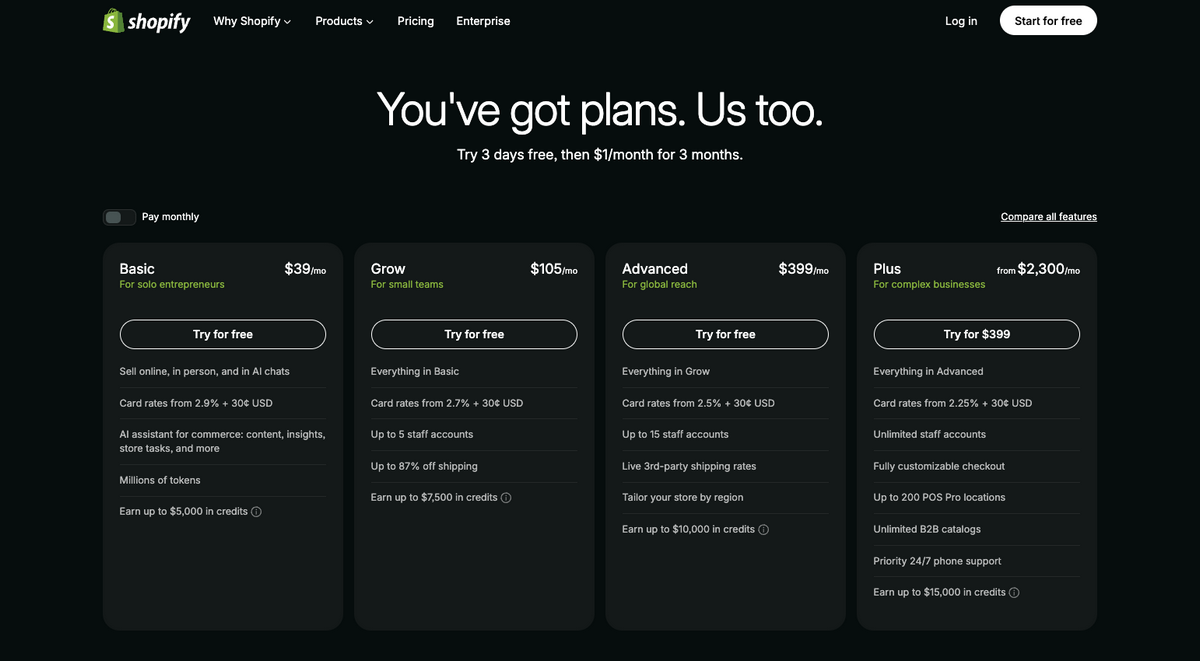
| Shopify plan | Your storefront, hosting, and dashboard | Basic $39/mo, Grow $105/mo, Advanced $399/mo (roughly 25% less on annual billing) — first three months for just $1/month |
| Card processing fees | Every time a customer pays, this is unavoidable; every platform charges it | 2.9% + $0.30 on Basic, dropping to 2.7% on Grow, 2.5% on Advanced (using Shopify Payments) |
| Third-party gateway fee | An extra Shopify surcharge if you skip Shopify Payments | 2% on Basic, 1% on Grow, 0.6% on Advanced (skip this entirely by using Shopify Payments) |
| Theme | Store design — free themes exist, but most serious stores upgrade | $0-$350 one-time |
| Apps | Automation tools like AutoDS, reviews apps, upsell apps, etc. | $20-$50+/mo depending on your stack |
| Domain | Your custom .com or .store | ~$10-$20/year |
| Marketing | Ads, influencer shoutouts, content creation — this is what actually gets people into your store | $100–$300+ |
| Total Costs | ~ $200-$600+/mo (plus a one-time $0-$350 for theme, and ~$10-$20/year for your domain) |
Now here’s the thing people get wrong: they see “$39/month” and think that’s the whole story. It’s not. The plan fee is just your ticket into the building. What actually determines your monthly cost is your app stack, how you handle payments, and, most importantly, marketing.
Ads and marketing costs are where most beginners either underestimate fees or skip the budget entirely, thinking organic content alone will carry them. It won’t, at least not at the start. If you want real data on whether a product works, you need real traffic, and that traffic isn’t free.
Realistically, if you’re testing Facebook or TikTok ads, budget around $10/day per product while you’re validating it and getting started. That’s up to $300/month just to know if something’s worth scaling. Some people get lucky with organic or influencer seeding at a lower cost, but don’t build your whole plan around luck.
My advice? Start on Basic. Use Shopify Payments so you’re not stacking extra fees on top of fees. Keep your app list lean in the beginning. You don’t need ten automation tools when you’re testing your first products. You need one or two that actually move the needle.
Realistically, a beginner store runs somewhere around $200/month once you factor in a solid automation tool and a modest ad budget to start testing, and up to $600/month+ if you want to go hard on advertising, which is not absolutely necessary at first (but always a nice to have).
How To Start Dropshipping on Shopify
Alright, we’ve covered the basics. Now, it’s time to actually roll up your sleeves and get into the real process. I know starting a dropshipping business can feel like this huge, overwhelming task from the outside, but it’s much simpler than it sounds.
And look, I’m not going to pretend the manual route doesn’t exist, but why would you go that way when tools like AutoDS let beginners launch a store way faster? We’ll get into exactly how that works, too.
So let’s take this one step at a time and turn your e-commerce dreams into an actual, running business.
1. Pick Your Niche
Before you sign up for anything, let’s talk about the biggest decision here: your niche. This shapes everything down the road: what you name your store, what products you research, which suppliers you work with, and how you market.
You probably already know what you are going to sell, or at least you have an idea. This step is about validating that. Here’s what I’d actually look for in a niche:
- Real, ongoing demand. Not a fad that peaked six months ago. Check Google Trends, check what’s still selling on Amazon and AliExpress, and make sure people are consistently searching for this, not just searching for it right now.
- A clear audience you can picture. If you can describe who’s buying — their age, their interests, what problem they have — you can market to them. Vague niches get vague results.
- Room to expand. Pick something with more than one product in it. “Cat toys” gives you dozens of angles to test. “This one specific cat toy” gives you one shot.
- Enough margin to work with. Some niches are inherently low-margin (think ultra-cheap gadgets everyone’s already racing to the bottom on). Make sure there’s room to price for profit, not just to compete.
For example, popular Shopify niches include fashion and beauty, home decor, fitness gear, pet accessories, tech gadgets, and baby products.
You don’t need to overthink this into paralysis, though. Pick something with real demand, real audience, and real margin potential, and move forward. You can always refine as you go, but you have to start somewhere.
2. Sign Up For Shopify
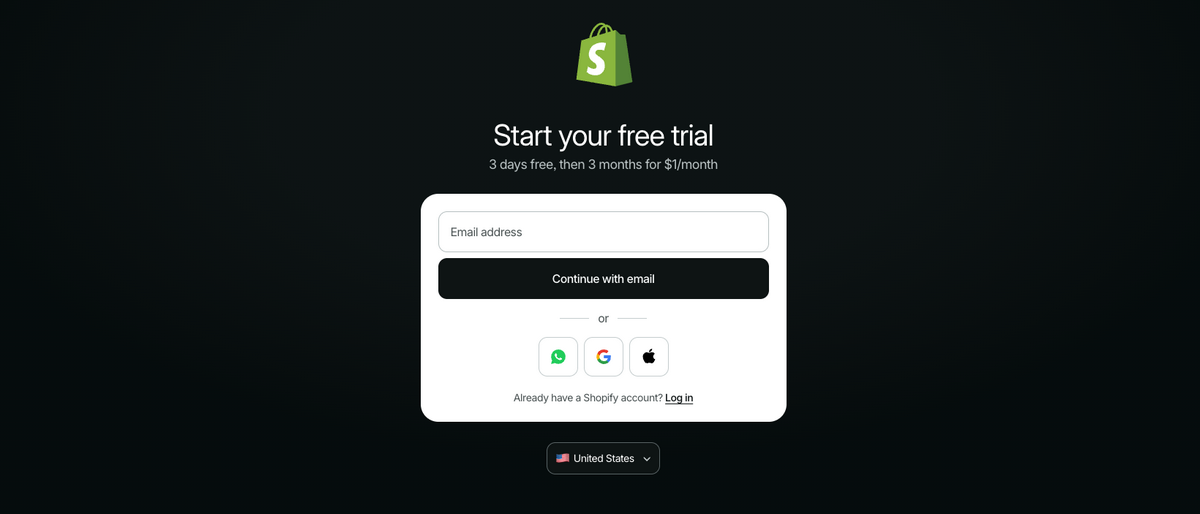
First things first: getting your Shopify account. No worries — the process is very simple.
Here’s how you get started: head to the Shopify homepage and hit “Sign Up” at the top. Fill in a few basic details about your business, pick your plan, and that’s it; that’s the whole barrier to entry. Once that’s done, you’ve got the keys to every feature Shopify offers to help you build a real, profitable online store.
Note: Shopify currently offers a free trial, and you get your first 3 months for just $1/month (subject to change). This way, you can try out a plan before being charged. This makes it even more affordable to enter.
3. Name Your Shopify Store
Once you’ve got your Shopify account set up, it’s time for one of the most underrated steps in this whole process: naming your business. People rush this part, but a good name does real work for you. It helps you stand out, it tells people what you’re about before they even scroll, and it sticks in someone’s head after they close the tab.
So here’s what actually matters when you’re picking a name for your store:
- Use relevant keywords
- Get inspiration from other brands in your space
- Make it easy to remember and even easier to pronounce
- Check if the domain name is actually available before you fall in love with it
- Use a business name generator if you’re stuck
- Use AI tools like ChatGPT — seriously, this one’s a game-changer
Let me show you exactly how that last one works. Here’s a prompt you can literally copy and use right now:
Prompt: Generate 10 distinctive business name ideas for an online fitness equipment store targeting home-gym enthusiasts. The brand should feel modern, energetic, trustworthy, and accessible rather than overly aggressive or bodybuilding-focused.
For each name, include:
- A one-sentence explanation of the concept
- A short tagline
- The intended brand impression
Keep the names short, memorable, easy to pronounce, and suitable for a website and social media.
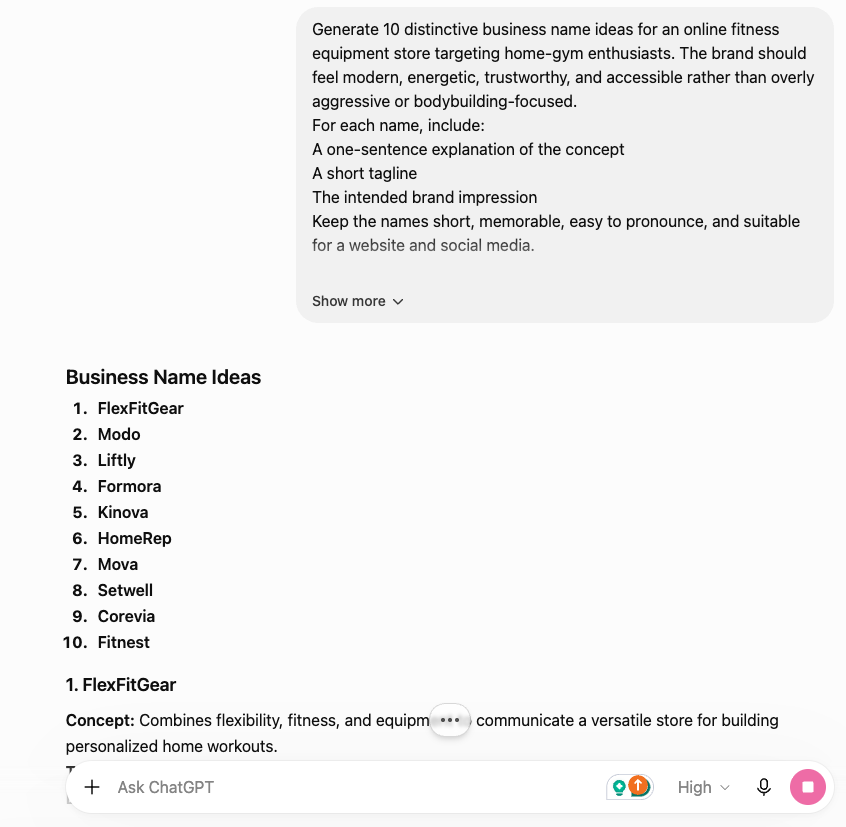
Look at that. Every single name fits a fitness niche store. And here’s the part most people miss: the keywords you feed into that prompt matter just as much as the name itself, because they’re what pull in the right audience. So don’t just stop at names: use ChatGPT to help you nail down the right keywords too.
4. Connect Your Domain
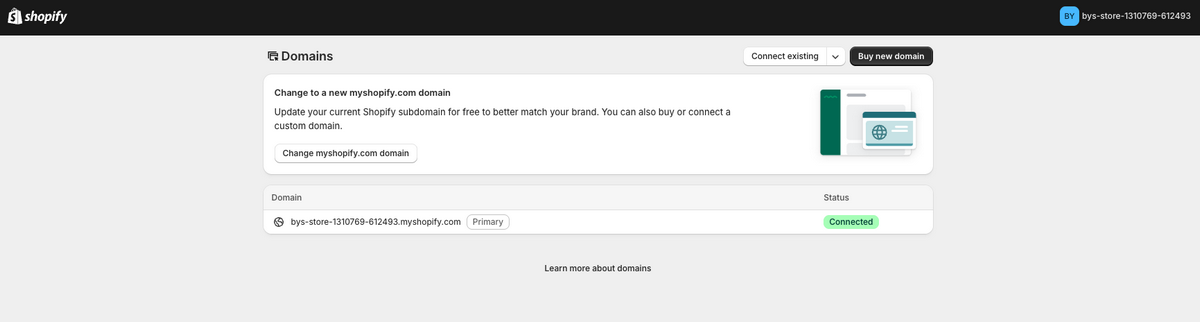
Let’s talk about your domain. Linking a custom domain to your Shopify store is essential if you actually want to look like a real business. Think about it: “flexfitgear.com” versus “flexfitgear.myshopify.com”. The first one looks like a brand, the other looks like you’re still testing something out.
Your own domain builds trust, strengthens your brand identity, and, yes, helps your SEO too. Customers notice this stuff, even if they can’t quite explain why.
Getting one is easy. You can reserve a domain through GoDaddy for around $10-$20, or just buy it straight through Shopify if you want to keep everything in one place.
Either way, once you’ve got a valid domain and you follow Shopify’s guidelines, the connection happens pretty much automatically. Just go to “Settings”, then click “Domains”, and then either pick “Connect Existing” or “Buy New Domain”.
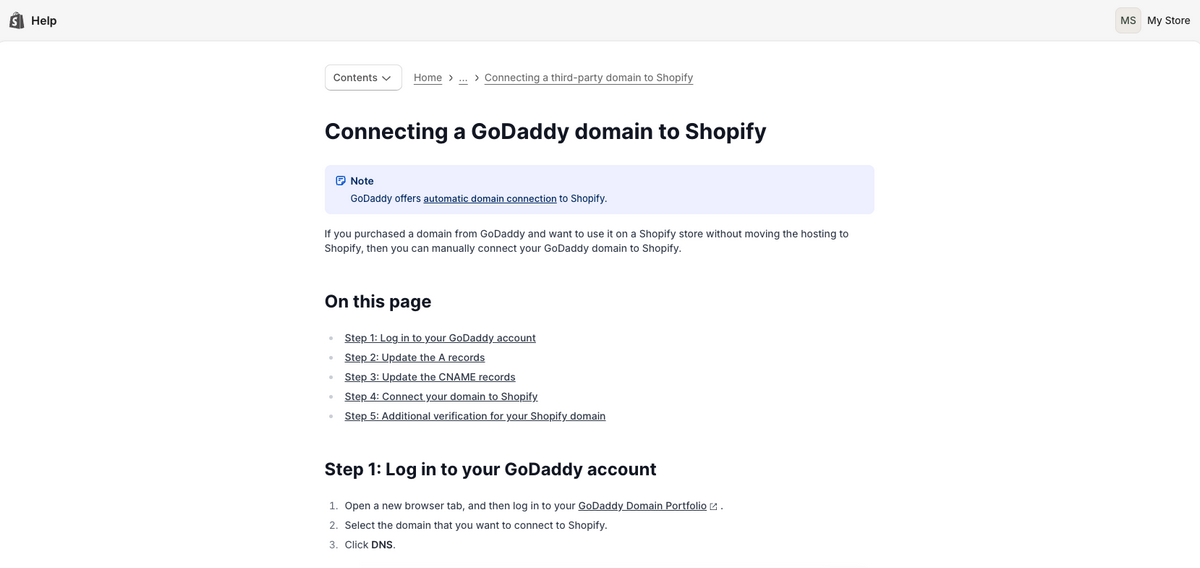
And if that automatic linking doesn’t cooperate for whatever reason, no stress — on its Help Center, Shopify has a tutorial for most domain providers that walks you through connecting a third-party domain manually. Takes a few extra minutes, that’s it.
5. Design A Shopify Dropshipping Store Logo
Just like your business name, your logo deserves some real thought. This isn’t a “throw something together in five minutes” step, even though the tools out there make it fast. A well-designed logo does a lot of heavy lifting: it makes your business look legit and visually separates you from every other store selling the same product.
Here are some of the best logo generators for your Shopify dropshipping store:
- Canva
- Shopify’s free AI logo maker
- Looka
- BrandCrown
Let me walk you through Shopify’s free AI logo maker, specifically, because it’s genuinely one of the easiest wins here. Here’s how it works:
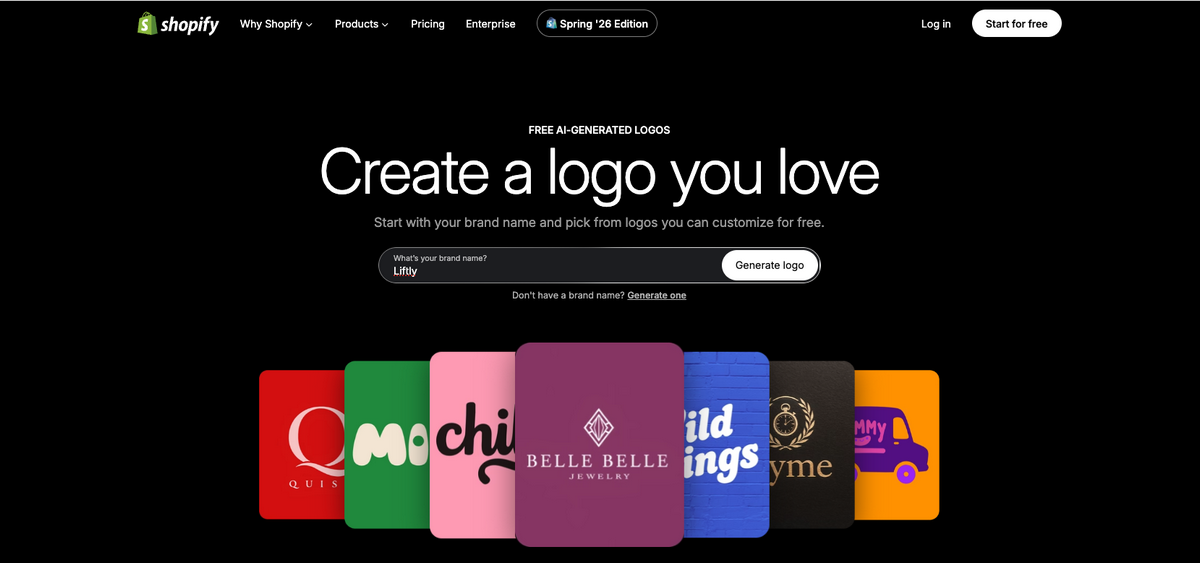
First, head to Shopify’s Logo Maker and type in your brand’s name. You don’t even need a Shopify account to start designing.
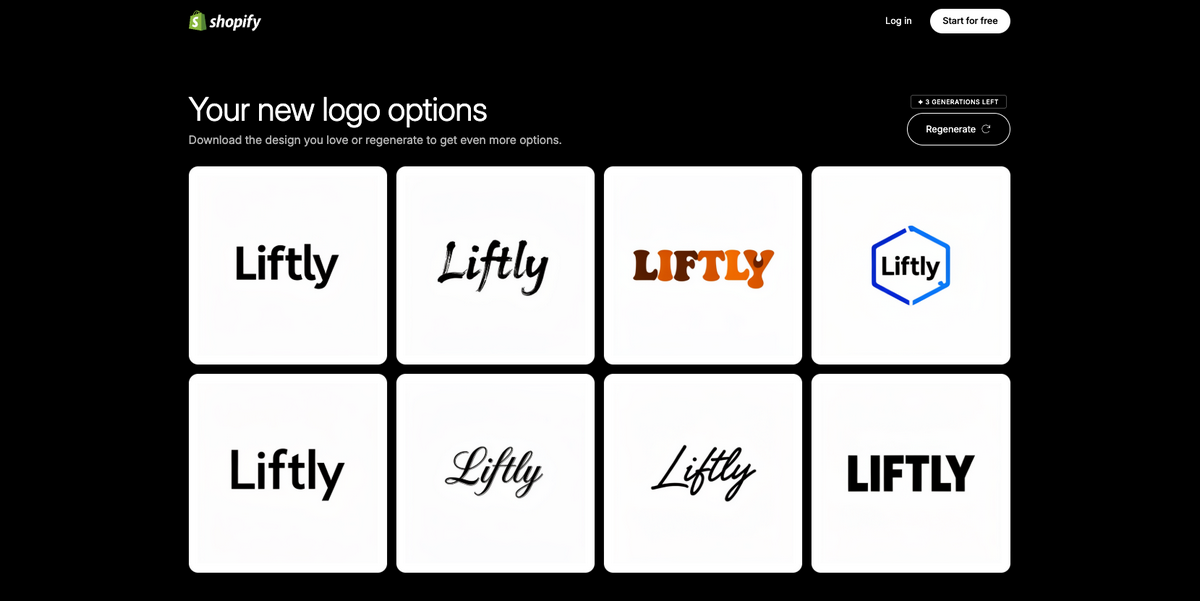
Next, Shopify will give you a bunch of options based on your name. Choose a visual style you’re drawn to or, if you don’t like the options, just click on “Regenerate” to see a few more alternatives.
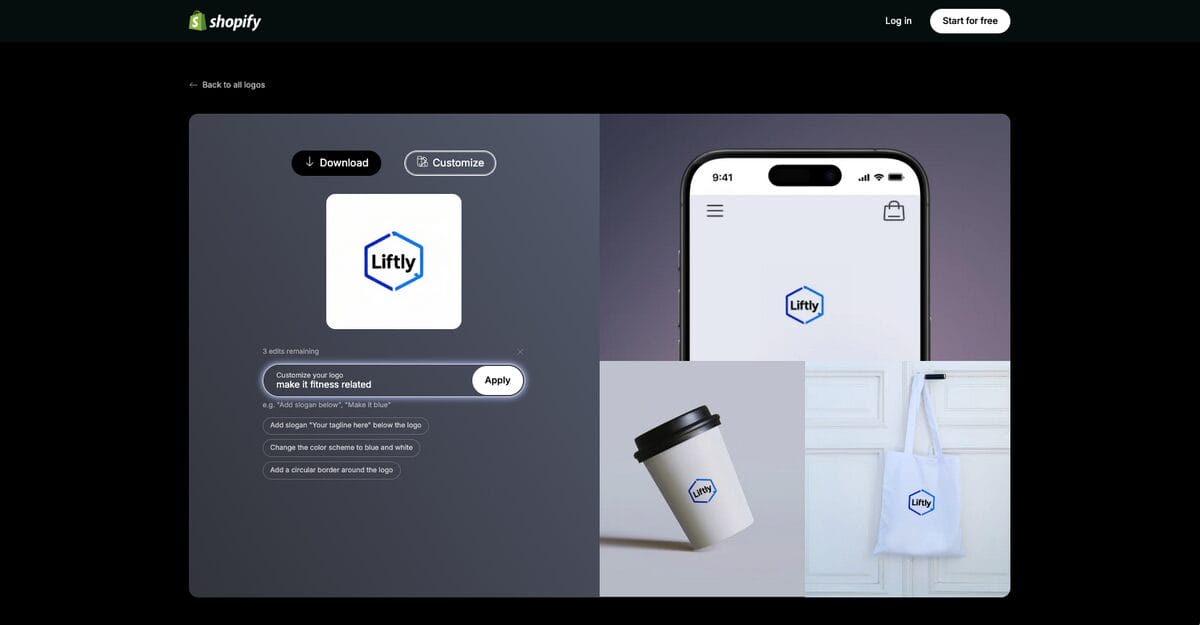
Once you’ve chosen your favorite, the system will grant you three more customization edits based on your own prompts. For example, you can request to change colors, add a slogan, or make it more related to your own niche.
One honest note here: don’t expect agency-level design. It’s fast, it’s free, and it’s a genuinely solid placeholder to launch with, but the results lean toward a template-heavy look, so think of it as a starting point, not your final brand identity. Plenty of stores launch with it and upgrade to something custom once they’ve proven the concept works.
The bottom line? You don’t need design skills to make your store look professional anymore. These tools do the heavy lifting. You just need to actually use them.
6. Choose A Shopify Store Theme
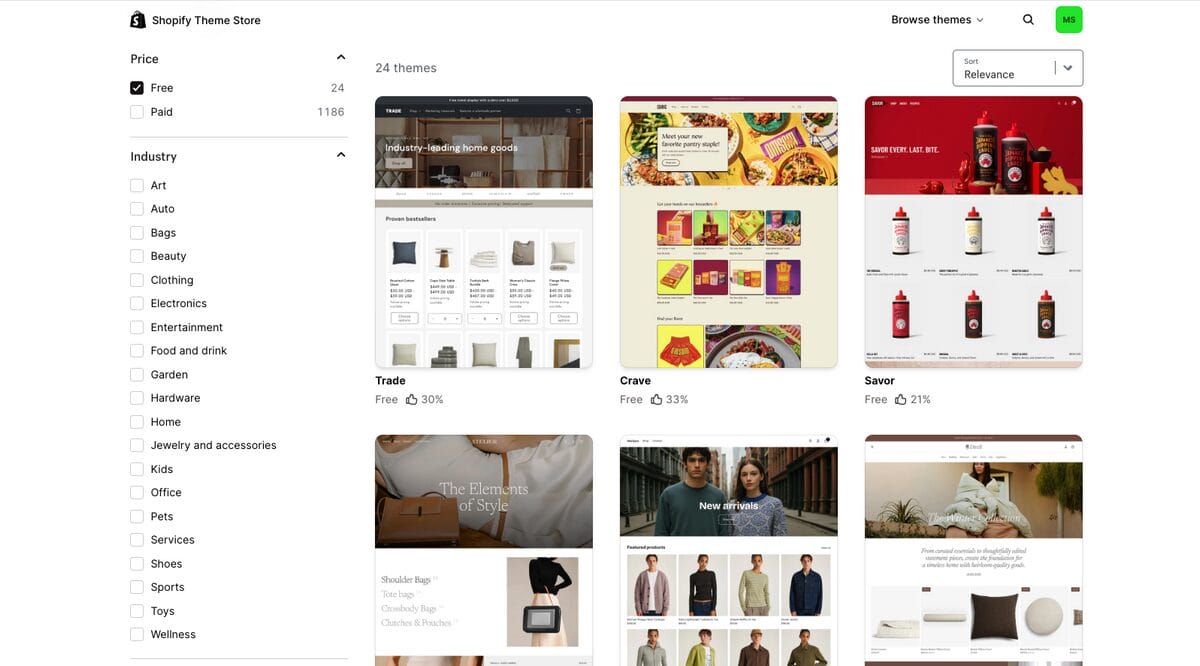
Next stop: picking your theme. This sets the entire tone for your store. Get it right, and customers feel at home the second they land. Get it wrong, and you’re fighting an uphill battle before they even see your products.
Note: With AutoDS, you can get a ready-to-sell AI-built Shopify store in just 2 minutes, already included in your subscription. The store comes filled with proven best-sellers in the niche of your choosing. You can always take that route instead of doing it manually. If so, follow the next steps.
Here’s the good news: Shopify offers dozens of professionally designed themes to choose from, and many of the free ones already look clean, modern, and mobile-friendly.
That last part isn’t optional. A responsive theme can make or break your conversions. Mobile devices generate over 60% of global e-commerce sales, according to Statista. So, if your theme isn’t built to look sharp on a phone, you’re losing sales before you even realize it.
And here’s something I want beginners to actually hear: you don’t need to spend a dollar on a theme to start. None of it. Grab a free one, customize it with your brand colors and logo, and upgrade down the line if you outgrow it. Shopify’s made this stuff genuinely easy, so you don’t need to have built a website in your life to make this work.
Here’s how to actually pick one:
- Go to the Shopify Theme Store and click Explore Themes under “Online Store” on the left menu.
- Hit the Sort button and choose Price (Low to High), or just filter by Free.
- Click into any theme that fits your brand and hit “Try Theme” to preview it on your actual store.
- You’ll find it as a draft on your “Draft Themes” dashboard (you can have as many drafts as you wish, so don’t be scared of testing different options). From there, you can proceed to customize it and, once you’re happy with it, go back to your theme library, select the theme, and click “Publish.”
Quick heads up: this replaces whatever theme you had running before (usually the default Dawn theme) with your new one.
That’s it! Your theme is already installed and ready to be customized, which you’ll do in the following step.
7. Customize Your Shopify Store Homepage
Your homepage does more work than most people give it credit for. It’s the first thing a visitor sees, and within a few seconds, they’ve already decided whether they trust you enough to keep scrolling. So it needs to look sharp, function smoothly, and tell people exactly what your store is about.
A few things I always check when building one out:
- High-Quality Images: Grainy or stretched photos are an instant red flag for shoppers, even if they can’t articulate why. Pull the highest resolution shots your supplier offers and lead with the ones that show off the product’s best angle.
- Image Editing: The raw supplier photo is rarely the finished product. Adjust the lighting, tighten the crop, and layer in your branding. Small tweaks like this are often the difference between a listing that looks amateur and one that looks legit.
- Minimal Text: Every extra sentence is a chance for someone to lose interest. Say less, say it clearly, and let your product speak for itself through the visuals rather than a wall of copy.
- Categories and Links: If someone lands on your store and can’t figure out where to click next, you’ve already lost them. Group your products into categories that actually make sense, and build a path that gets people from “browsing” to “checkout” without friction.
- Customization: A theme picked off the shelf and left untouched tells people nothing about who you are. Adjust the colors, the layout, the little details until it actually reflects your niche and your brand, not just whatever came pre-loaded.
Nail these, and your homepage shifts from being a place people pass through to being the reason they decide to stay.
How To Customize Your Shopify Store Homepage
Once your theme is installed, go to “Online Store” on the left menu, then click on “Edit Theme”.
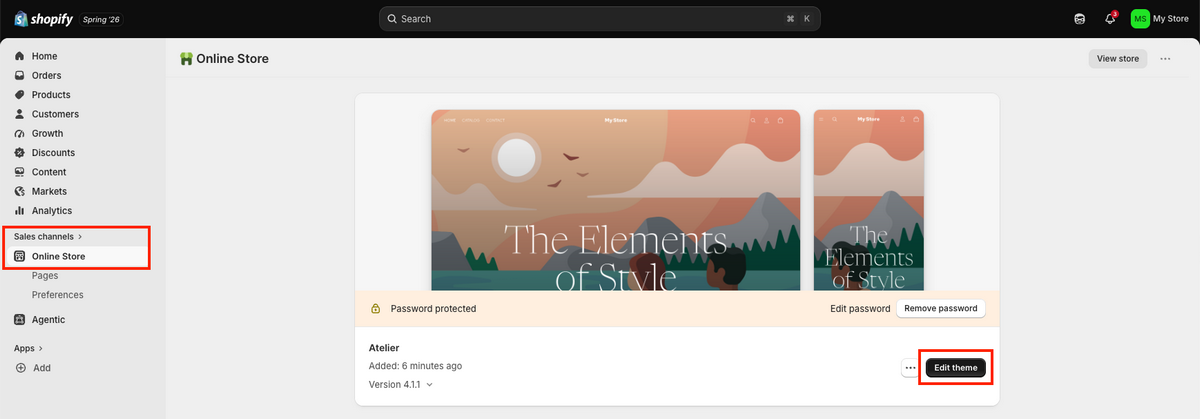
Here, you’ll enter Shopify’s Theme Editor. Think of this as your control room from here on out. Every section of your homepage, every color, every block of text lives inside this one editor, so get comfortable with it, because you’ll be coming back here a lot as you build out and tweak your store.
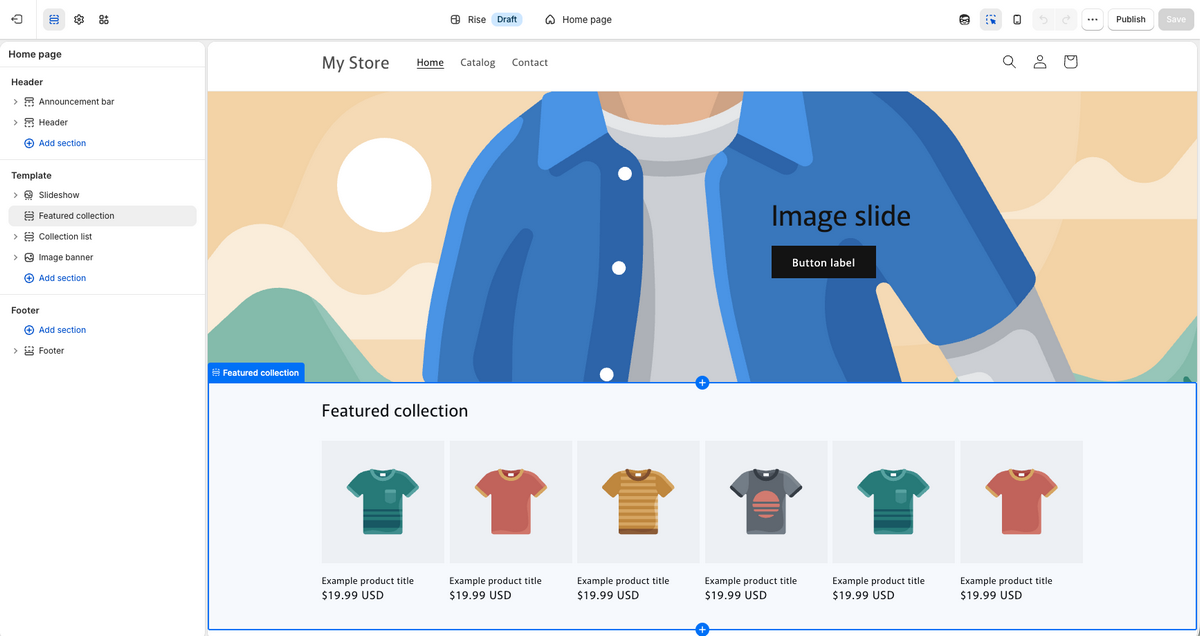
Then, start customizing your new theme. You don’t need to go full-on web designer here. Focus on the handful of things that actually move the needle. Start by customizing:
- Your brand’s primary color. This may sound small, but consistency here is what makes a store feel put-together rather than thrown together.
- Your logo. Click “Header,” select Logo, and then click on “Edit your logo in theme settings,” upload your image, and choose where you want it placed.
- Hero. First, click the “Text” button beneath the banner. Swap that placeholder text for your actual brand message, something that tells a visitor exactly what you’re about the moment the page loads. Then, if your template supports it, change the image for one that represents your niche.
- Announcement bar. This adds a message at the very top of your homepage. Something like “Free shipping on orders above $45” works well here, as it catches someone’s eye in the first two seconds and gives them a reason to keep looking around.
From here, it’s just a matter of building out. Keep layering in sections (featured products, blog content, whatever fits your store) and your homepage will keep getting stronger the more intentional you are with each piece.
8. Sign Up For AutoDS For Automation
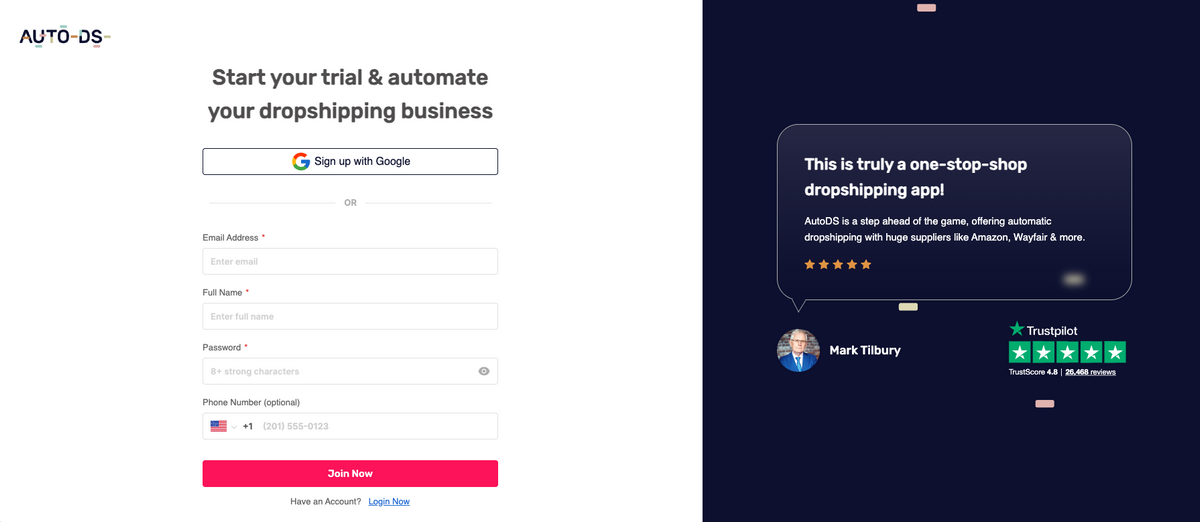
Now, here’s where we plug your Shopify account into full automation. AutoDS is an all-in-one dropshipping platform that integrates directly with Shopify and automates the entire operation for you, especially everything that comes next.
By signing up now, you’re automating from day one rather than building your store manually and then scrambling to bolt on automation later. Trust me, that second approach is the hard way.
Setting it up takes a few minutes. Head to the AutoDS $1 trial, create your account, and you’ll immediately unlock every feature, including the AI Shopify store builder, which we’re getting to next.
9. Connect AutoDS to Shopify
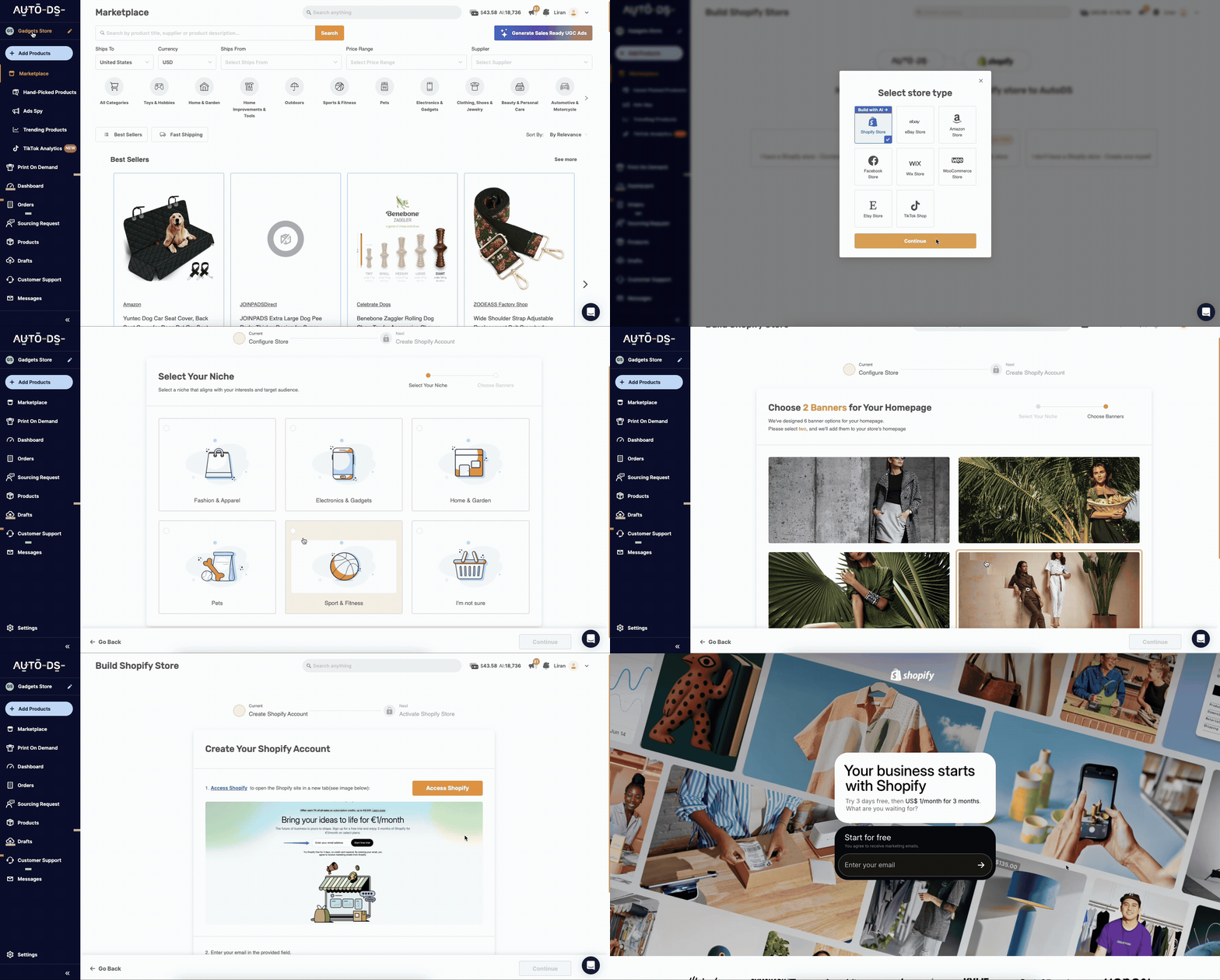
Setting up AutoDS with Shopify takes less than 10 minutes:
- After signing in, go to the left menu, click on your current store’s name or just on “Add Stores” under the AutoDS logo, and select Shopify Store as the store type.
- Then, you can either choose to connect it to your current store, create one manually, or build one with AutoDS’s AI store builder.
- Next, add the AutoDS app to your Shopify store and select the Shopify account.
- Finally, click “Install app” to integrate it with the Shopify store.
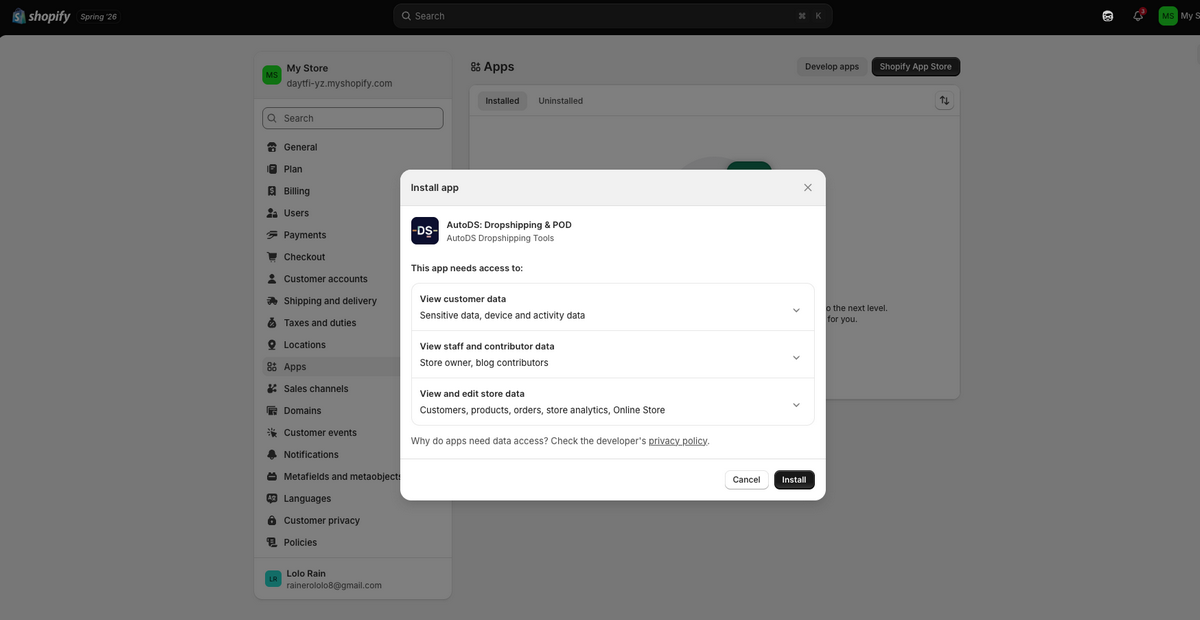
And that’s it! If you choose to create your store with AutoDS’s AI Store Builder, the system will automatically generate a ready-to-launch store for you. As I mentioned earlier, it comes with a professional design, optimized pages, pre-loaded products, and a .store free domain. This way, you can skip the manual setup and start selling faster.
10. Conduct Shopify Dropshipping Product Research
Now that your store’s up and running with automation handling the busywork, it’s time to talk about the real star of the show: the product.
I’ll say this every chance I get, because it’s true: product research is the single biggest factor in whether your store succeeds or flops. It’s the heart of your dropshipping business.
Everything else — your theme, your logo, your automation — none of that matters if you’re selling something nobody wants. A trending item with real demand behind it will always outsell the “cool idea” nobody’s actually searching for. Every time.
And don’t sleep on margins. It’s not enough to find something people want. You need products that sell well and still leave you room for a real markup. A product that’s flying off the shelves but barely making you a profit is a trap.
To avoid that, here’s the good news: finding products in 2026 is basically easy mode compared to years ago. You have AI, tools, data, and shortcuts to make informed decisions instead of guessing. One trending product can get you from zero to sold out in minutes if chosen strategically.
Bottom line: product research isn’t some box to check off your list. It’s the foundation on which everything else gets built. Get this part right, and the rest of the process gets a whole lot easier.
What Makes A Good Dropshipping Product
Let’s break down exactly what I look for when I’m evaluating a product:
- ‘Wow’ factor or problem solver: A product needs to do one of two things. Either make someone stop scrolling and go “I need that,” or solve a problem they deal with regularly. If it doesn’t do either, you’re going to be fighting an uphill battle no matter how good your ads are.
- Easy to show on video: If you can’t get someone to actually picture it working in ten seconds of footage, it’s going to be a hard sell. The best dropshipping products are the ones that demo well — a quick before-and-after, a satisfying mechanism, a “wait, it does that?” moment.
- Proven interest, verified by Google Trends: Don’t just trust your gut here. Check Google Trends. You want to see consistent, sustained interest, not a spike that’s already dying by the time you launch. Real demand shows up in the data, not just in your feed.
- Healthy price margins: This one’s non-negotiable, full stop. If you’re not making at least double your cost back, you don’t have a business, but a hobby that happens to move products around. Your margin is what keeps the lights on and lets you actually scale.
- Lightweight and shippable: Heavy or bulky items eat into your margins and drag out delivery times. Stick to products that are easy and cheap to ship — it keeps your costs predictable and your shipping times fast.
- Evergreen appeal: Trends come and go fast. I’ve watched people build a whole store around a product that was dead within six weeks. Go for products with staying power, ones people will still want next year, not just this week.
These are the pillars of building an actual product research strategy. One that matches what people want, keeps your margins healthy, and gives you something to scale instead of something you’ll be replacing in a month.
Tip: I suggest going for a 2.5x to 3x markup on your source price, with a product price range between $25 and $80. Hit that, and you’ve got real room to grow. Go below it, and you’re just working hard for very little.
Best Product Research Methods In 2026
Let’s talk methods, because in 2026, the tools you use for product research are a fundamental part of your strategy. I’ve already covered the basics of product sourcing for Shopify dropshipping.
Like I’ve mentioned, you have Shopify Collective, specific product research tools, and direct supplier management. Let’s zoom in a bit on tools, because you have options:
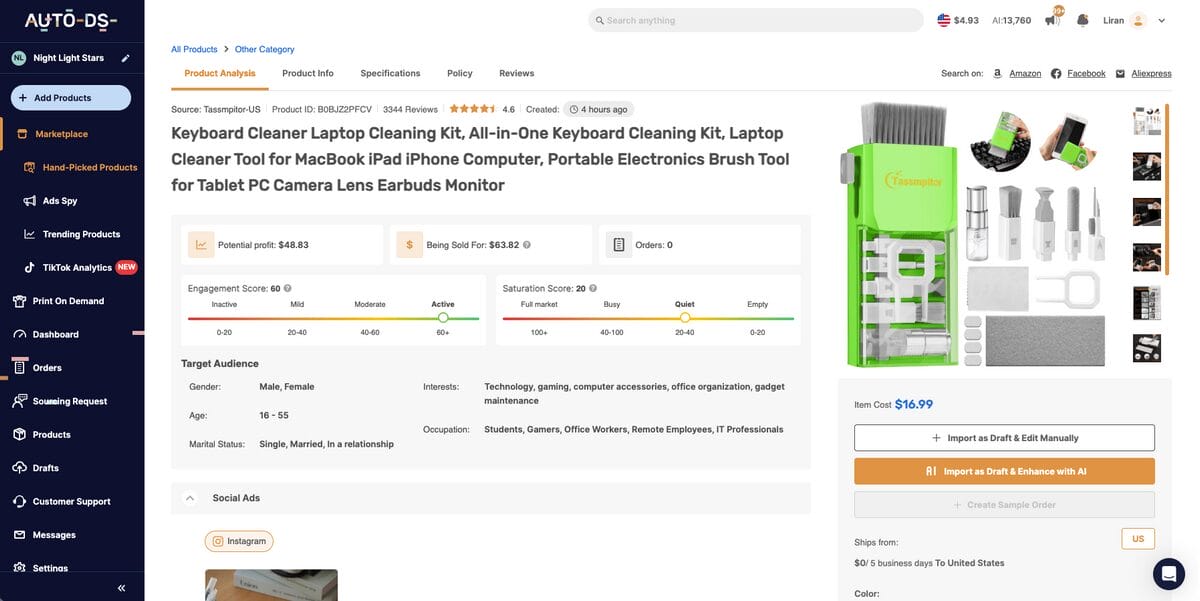
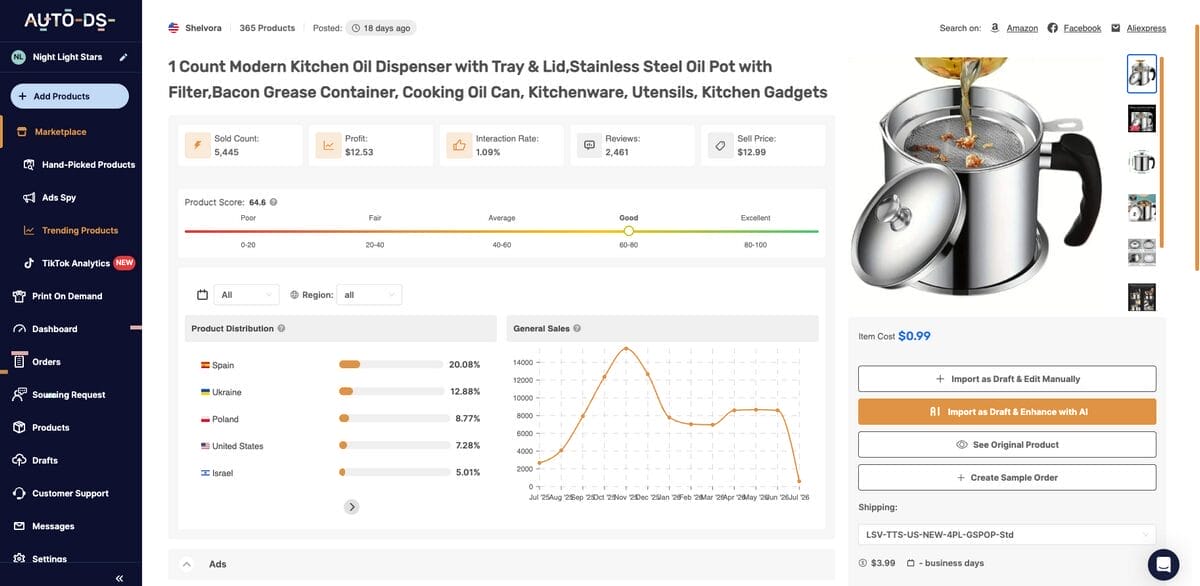
1. AutoDS Hand-Picked Products: This is basically a shortcut through the guesswork. AutoDS curates a list of winning products based on real-time data and expert analysis, so instead of digging through thousands of items hoping to strike gold, you’re getting inspired by what’s already proven to work. Plus, you get data like real-time engagement and saturation scores to assess current demand and competition.
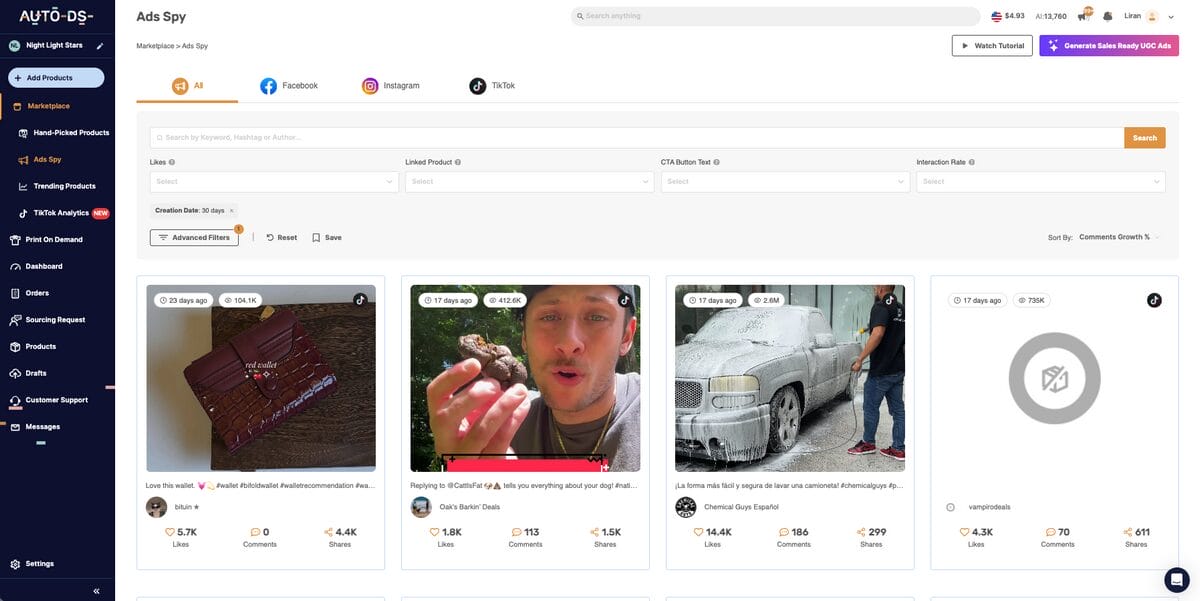
2. AutoDS Ads Spy: Want to know what’s actually converting right now? This lets you spy on high-performing ads across Facebook, Instagram, and TikTok. If a product already has social proof and momentum behind it, you’re not starting from zero — you’re jumping in mid-wave.
3. AutoDS Trending Products Hub: This one is about watching momentum in real time. It tracks what’s actually gaining traction across the market right now, so you can jump on a rising product before it gets saturated, instead of finding out about it after everyone else already has.
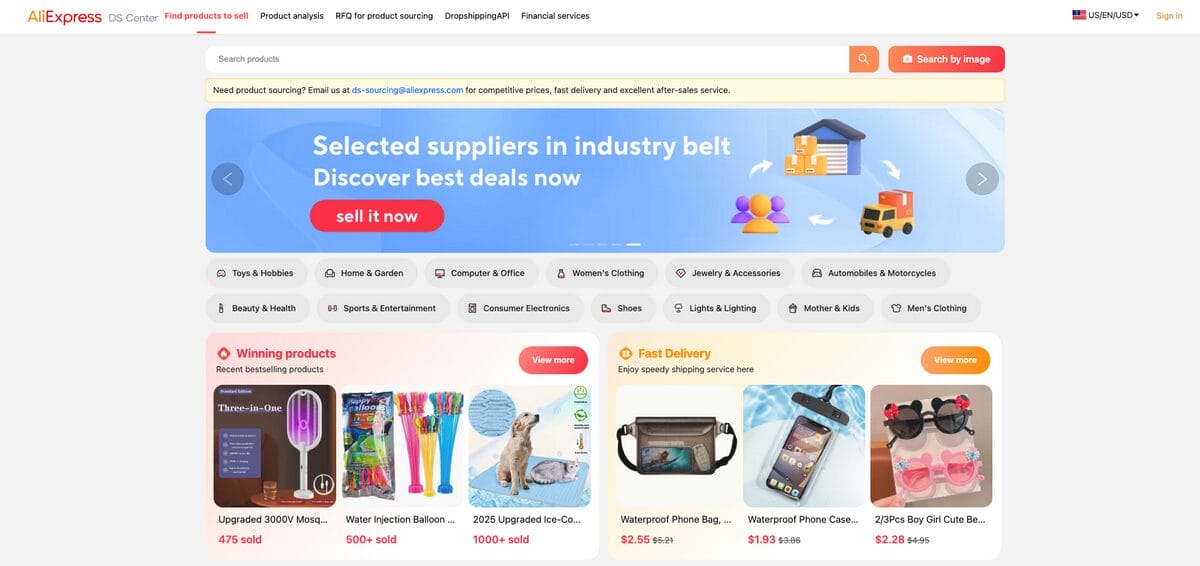
4. AliExpress Dropshipping Center: Don’t sleep on this one. AliExpress has a dedicated Dropshipping Center that shows you trending items, real order volumes, and entire niches you might not have considered, straight from one of the biggest product sources on the planet.
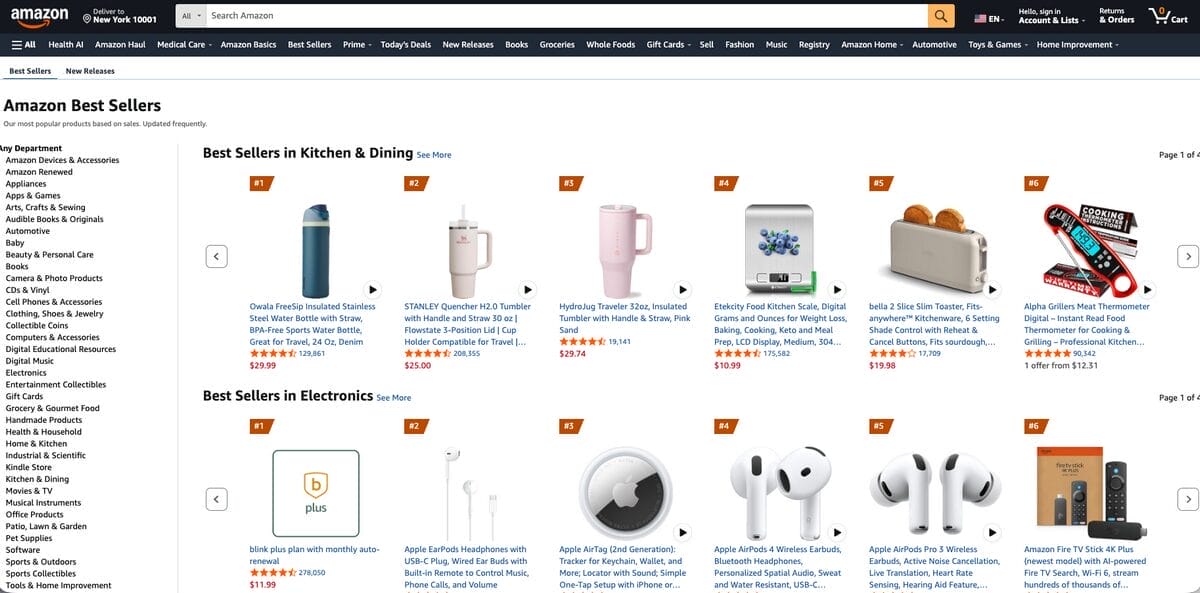
5. Amazon’s Best Sellers: Amazon’s Best Sellers and Movers & Shakers lists update hourly, and that’s real customer demand talking, not a guess. Use it to spot what’s actually popular and get ahead of what might work in your own store.
6. ChatGPT: OpenAI recently partnered with Shopify and Etsy, enabling users to sell products directly through ChatGPT. For us as dropshippers, that’s huge. It’s a brand-new AI-powered sales channel that blends discovery and checkout into one seamless chat experience. I’d get familiar with this now, not after everyone else already has.
Additionally, keep your finger on the pulse of social media with trending hashtags: #gadgets, #amazonfinds, #tiktokmademebuyit, #getreadywithme if you’re into beauty or fashion, and niche-specific tags related to your target audience. These can help you spot emerging products, viral formats, and shifting consumer interests before they become overly competitive.
11. Find A Shopify Dropshipping Supplier
It all comes down to this: securing reliable suppliers. I can’t stress this enough. Your suppliers are your business partners. Product quality, shipping times, customer satisfaction… it all traces back to who you’re sourcing from. Let’s break down a few solid options.
AutoDS Marketplace
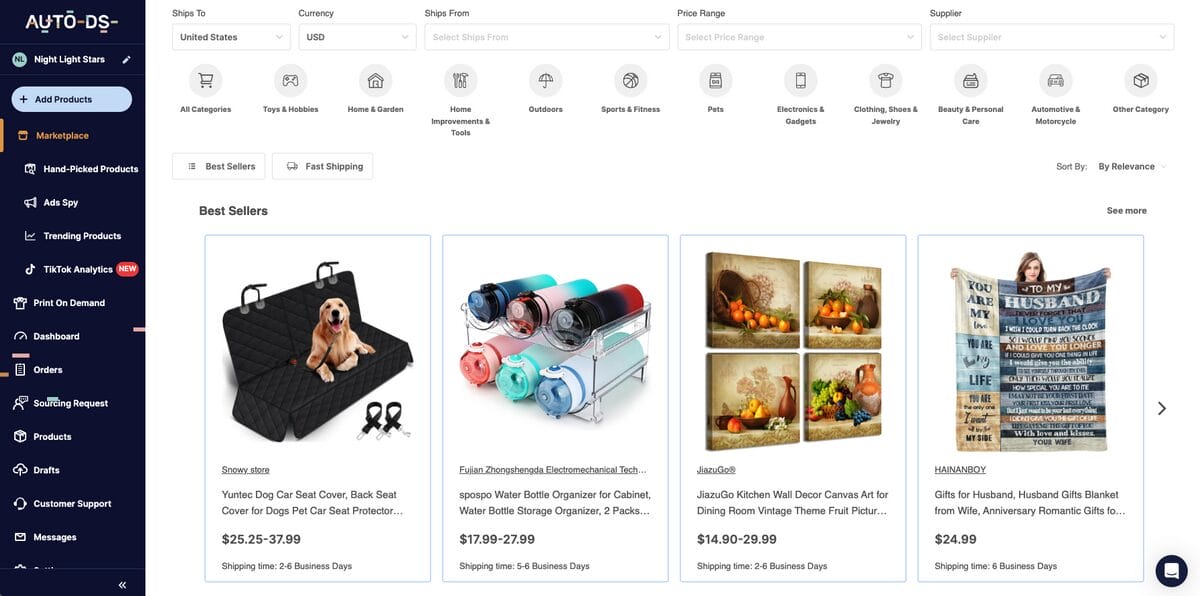
This is where I’d point most people first. AutoDS Marketplace gives you access to a diverse range of private, retail, and wholesale suppliers, while also handing you the tools to actually run a real business with them (which I’ve already mentioned in the previous step).
These suppliers are already vetted for reliability, so you’re not stuck doing the guesswork of checking reviews, testing shipping times, or hoping a random overseas supplier actually delivers. That legwork’s done for you: you get to focus on picking products and building your store, not babysitting a supplier relationship from scratch.
AliExpress
AliExpress has been around forever for a reason: the sheer volume of products is hard to beat. But finding a good supplier here takes a little more effort on your end:
- Product Selection: Pick something that actually fits your niche and your audience, don’t just grab whatever looks cool.
- Seller Overview: Vet the seller before you commit. I’d look for 1,000+ followers and 95%+ positive feedback as your baseline. Skip this step, and you’re gambling with your customers’ experience.
- Contacting Suppliers: Hit “contact,” keep your message short and clear, and try to move the conversation over to WhatsApp or WeChat. Communication gets a lot smoother once you’re off-platform.
- Negotiation: Don’t be afraid to negotiate. Try to get bulk discounts, better shipping terms, all of it’s on the table if you ask.
- Build Relationships: This is the part people skip, and it’s a mistake. A real relationship with your supplier means you’re the first to know about winning trends and you’ve got a partner, not just a vendor.
AutoDS’s 25+ Dropshipping Suppliers
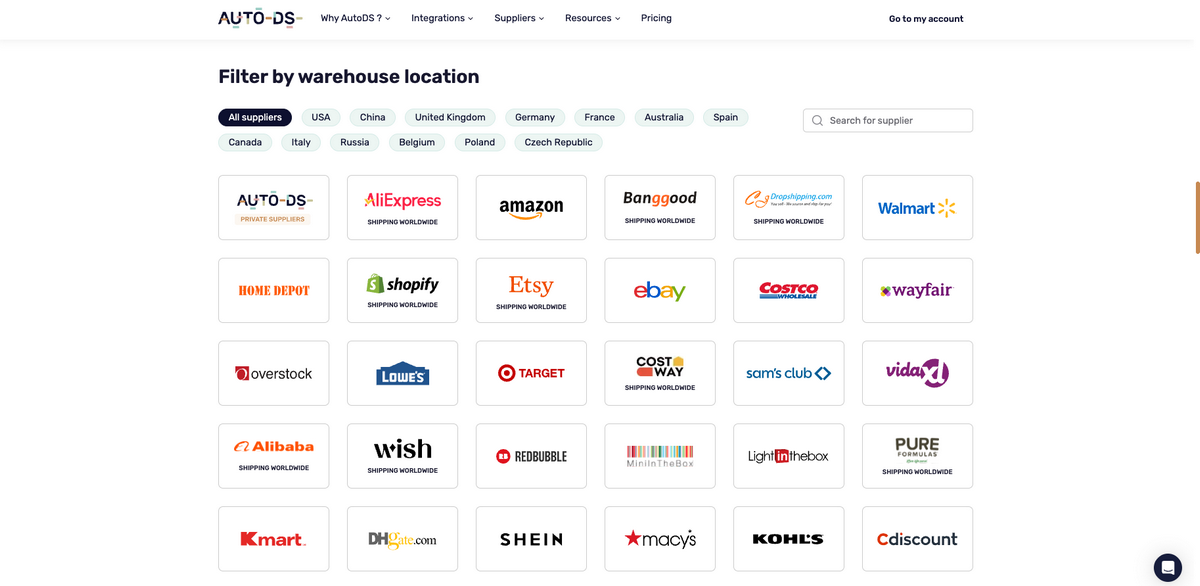
AutoDS also supports 25+ global suppliers, like Amazon, eBay, Walmart, Target, Home Depot, Costco, Macy’s, you name it. You can even filter by location to access each supplier’s local warehouse, like Amazon UK or Banggood Australia. This way, you can have a global network of vendors and sell internationally with local delivery for each target region.
Shopify Collective
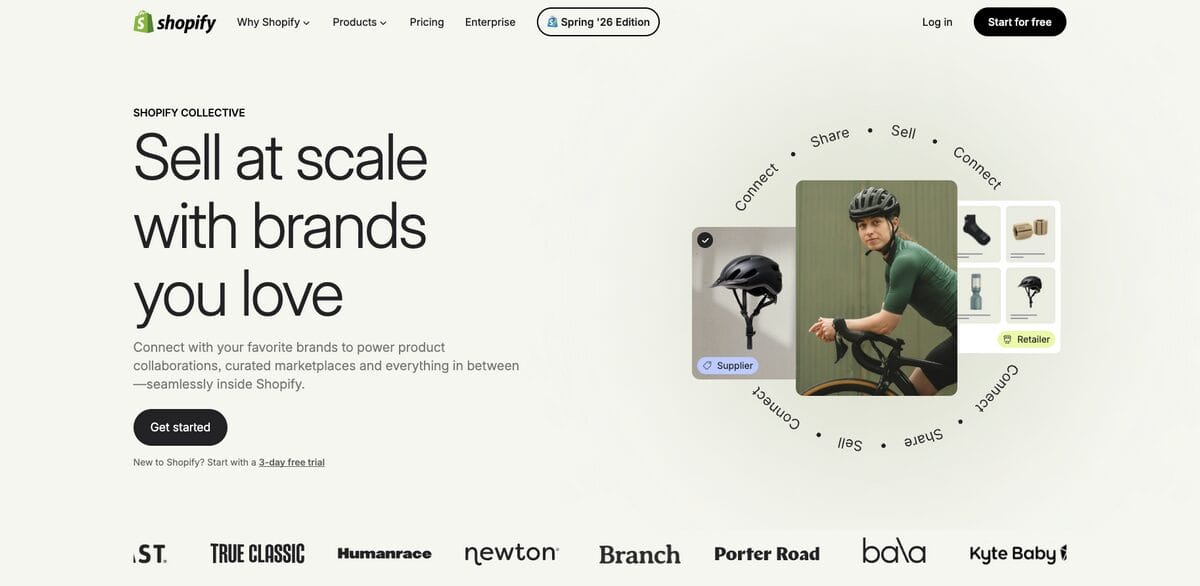
Remember this one? We touched on it earlier in the article, but it’s worth double-clicking on here because this is exactly where it belongs. Shopify Collective lets you source products directly from other US-based Shopify brands.
You add their products to your store, and when a sale comes in, they handle fulfillment. The upside is real: US-based quality, faster shipping, and a level of predictability you don’t always get with overseas suppliers. If you want a sourcing option that feels a little more “brand,” not just “dropship,” this is where I’d test it.
3PL (Third-Party Logistics)
3PL can get you better pricing, no argument there. But it usually comes with a real investment upfront, including a minimum order quantity. And honestly? I don’t recommend this route for beginners. The costs just aren’t worth the risk this early. Once you’re established and looking to scale, though, 3PL can genuinely improve your efficiency and margins.
Tip: Whatever path you choose, always order a few samples before committing to a supplier. This will let you assess product quality, shipping times, packaging, and overall delivery experience.
12. Import Products To Your Shopify Dropshipping Store
Next up: getting your products into your Shopify store. There are two ways to do this: manual and automatic. Once I explain both, you’ll know exactly which one you’re going to pick.
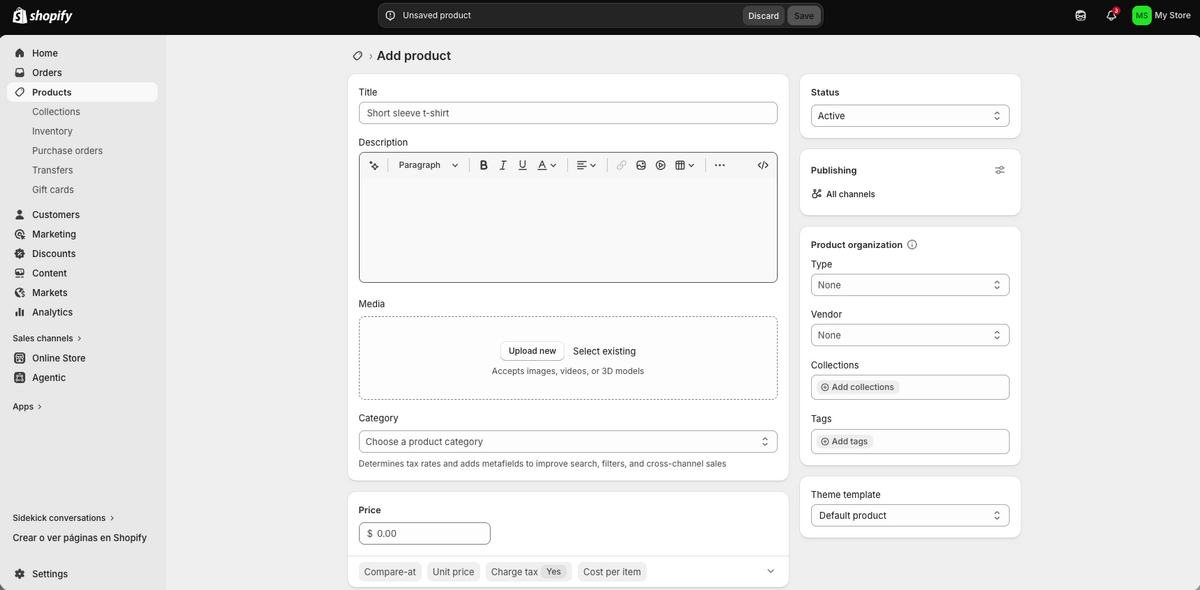
The manual route means going to your supplier’s site, copying titles, descriptions, and images, one field at a time. In this case, you add product by product from Shopify’s dashboard. Just head to “Products”, then click on “Add Product”, and then fill in the details (copies, images, variations, price, inventory, all of that).
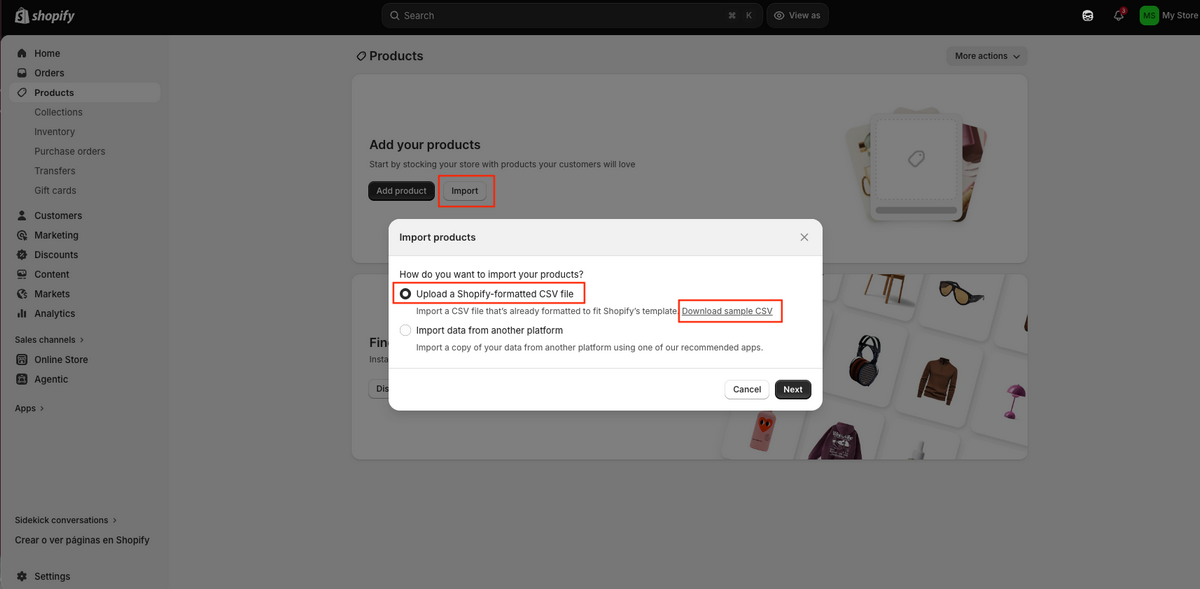
You can also import them through a CSV file, which involves something worse: spreadsheets. In this case, you can use Shopify’s CSV template to fill in the details of each one of your items.
Both ways work, sure. But they’re slow, repetitive, and eat your whole afternoon for zero strategic value. That’s where a tool like the AutoDS product importer comes in and just… does it for you.
AutoDS’s automatic importing pulls product details straight from the supplier’s site and drops them directly into your store’s listings. Faster, easier, and honestly a lot less painful. There are three ways to use this feature:
- Single Product Importer
- Multiple Product Importer
- Bulk Upload with a CSV File

Let’s walk through the Single Product Importer, since that’s the one most beginners start with. First thing you need to access this tool: an AutoDS account, which you’ve already created on Step 8. Then:
- Search for the item you want. Found something good on Amazon, eBay, AliExpress, or any other supported supplier? Cool. Just copy the product URL or ID from the original listing.
- Open AutoDS and click “Add Products” in the left menu.
- Select “Single Product” and paste in that URL or ID.
- Click “Add As a Draft” to send the product to your drafts.
That’s it. The whole thing takes under a minute. This is exactly why I keep pushing automated tools like AutoDS. Every minute you save on tasks like this is a minute you get back to spend on things that actually move the needle, like marketing and product research.
Tip: You can also use AutoDS’s Chrome extension. Browse any supported supplier’s website and then add the product with just one click. It’s literally that simple — see something you like, click, and it’s in your AutoDS drafts ready to optimize.
13. Optimize Product Pages
Here’s the thing about your product page: this is where the actual buying decision happens. Everything before this (the ads, the traffic, the clicks) all funnels down to this one page. So treat it like it matters, because it does.
One mistake I constantly see is this: dropshippers just copy-paste the generic name and description straight from the supplier. Don’t do that. Those descriptions are usually way too long, badly formatted, and about as exciting as reading a manual. If you wouldn’t want to read it yourself, don’t expect your customer to.
Now, the good news. You don’t need to sit there manually rewriting every single listing from scratch. AutoDS makes this seamless. Titles, descriptions, images, pricing… You edit all of it directly from the platform. No jumping between five different apps, no juggling dashboards. One place, everything handled.
Enhancing Product Descriptions with AI
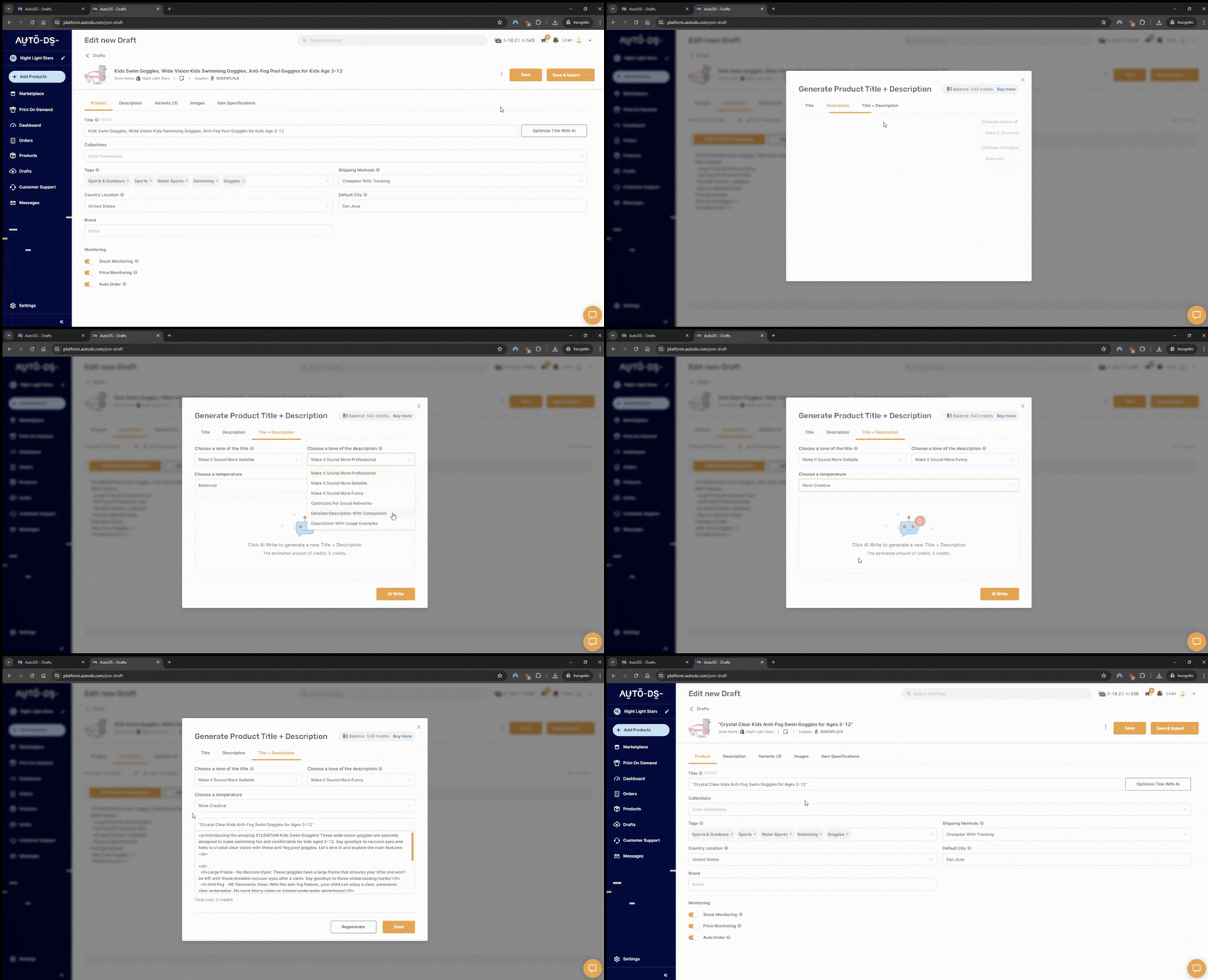
Here’s the part I actually love: optimizing listings with AI. AutoDS’s AI product title and description generator rewrites and reformats your listings so they read well, highlight what actually matters to the customer, and, at the end of the day, sell.
Instead of the clunky, generic text you get from a supplier, you end up with something clean and converting. You know — proper grammar, the right keywords front and center, even relevant emojis where they help the reader. It’s the difference between a listing that looks like it was thrown together and one that looks like a real brand made it.
On top of that, you get a product page with a title and description that’s genuinely yours, not a copy-paste job that 50 other stores are using word-for-word.
But don’t stop there. A great description only gets you so far. Pair it with high-quality images, real customer reviews, and product variations, and now you’ve got a page built to convert.
Taking Product Optimization to the Next Level with AutoDS
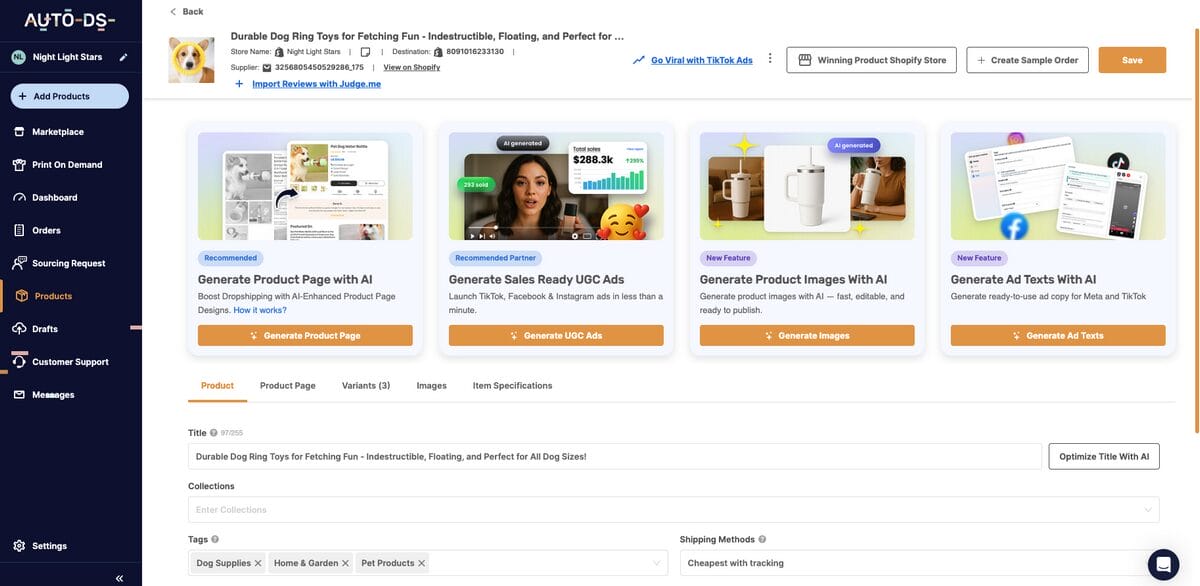
Descriptions are just the start. Now, let’s go further. AutoDS lets you fully optimize your listings from one single dashboard, no jumping around required:
- Edit and replace images – Upload photos that actually stand out, not the same recycled supplier shots everyone else is using. AutoDS generates product images with AI so you don’t used recycled supplier visuals or stock photos.
- Offer product variations – Give people options, such as sizes, colors, and styles. More options, more chances to close the sale.
- Optimize pricing – Set prices that are competitive, and let AI-driven adjustments do the fine-tuning for you in real time.
- Monitor pricing and stock — Suppliers change prices and run out of stock without warning, and manually checking every listing for that is a losing game. Could you imagine? You’d have to do it every single day, for every single product. AutoDS keeps an eye on this for you around the clock, automatically adjusting your prices and inventory levels.
- Use a conversion-optimized product page template – AutoDS lets you create product pages straight from a Product Page template built specifically to convert. It’s AI-powered, so instead of a generic layout, you get a dynamic template designed to actually turn browsers into buyers, linked automatically the moment you import.
- Add customer reviews – Trust sells. Social proof is one of the easiest conversion boosts you’re not fully using if you skip this.
Here’s the point: instead of manually updating each listing inside Shopify one by one, you handle every optimization inside AutoDS. Yes: everything syncs automatically to Shopify in real time. That means your product pages look professional, engaging, and genuinely conversion-ready before a single customer ever sees them. That’s the whole point of automation: less busywork, better results.
And this isn’t just about looking good. Well-optimized pages improve the entire shopping experience, drive more sales, and cut down your bounce rate.
Think about it: according to Statista, the average conversion rate for e-commerce websites is 1.4%. One of the most reliable ways to increase that is through optimization. As cited by HubSpot, 77% of U.S. consumers rate convenience as “important” to their buying decisions, including comfort, speed, accessibility and availability.
The goal is simple: give people a reason to want what you’re selling and a frictionless way to actually buy it. Optimize any part of that chain, and you’re off to higher conversion rates.
14. Select Your Shopify Store Currency
Next up: currency. Simple step, but skip it, and you’ll create confusion at the worst possible moment, right when someone’s about to pay.
Getting this right means customers see exact, accurate pricing for whatever they’re buying, no guessing, no mental math on their end.
Here’s how to set it: log into Shopify, click “Settings” on the left-hand menu, choose “General”, scroll down a bit, and pick whatever fits your business under “Currency display”. The real question is who you’re actually selling to. Targeting US customers? Set it to USD, plain and simple.
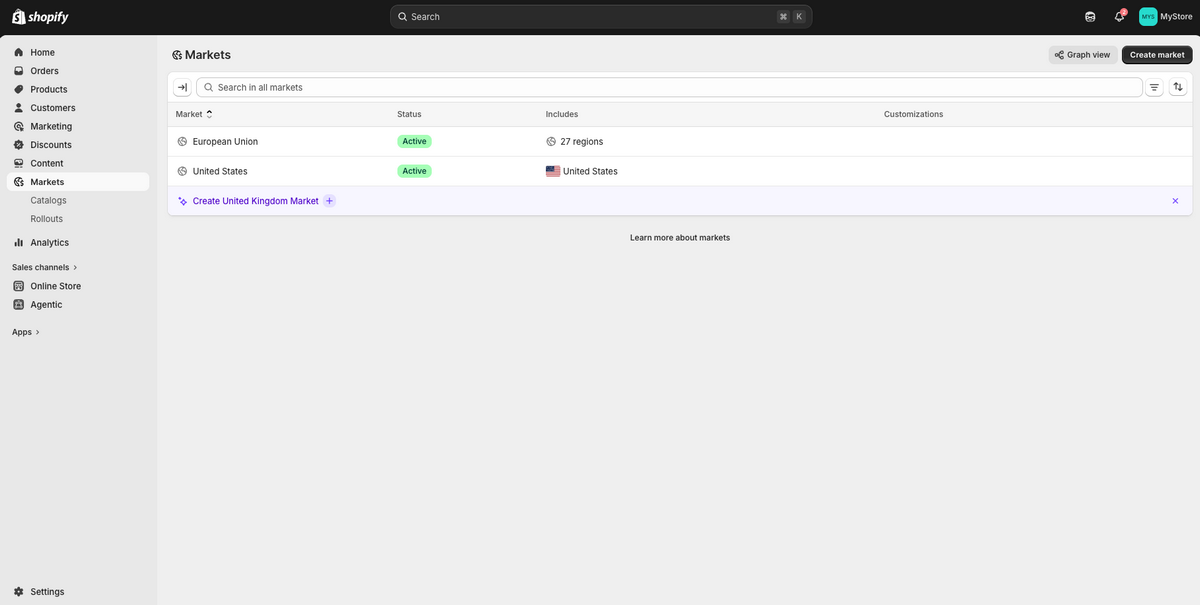
But if you’ve got your sights on a global audience, that’s where Shopify Markets comes in. This feature is built into every Shopify plan, and once it’s set up alongside Shopify Payments, it automatically displays prices in each customer’s local currency and handles the conversion for you. No extra app needed for the basics. To set this up, go to “Markets” on the left side menu, and add as many as you see fit.
That said, Markets currency display requires Shopify Payments. If you’re on a different payment provider, or if you want extra controls Markets doesn’t offer, like geo-detection based on city or manual redirects, third-party apps like Auto Multi-Currency Converter or Geo Targetly can fill that gap.
15. Set Up Shopify Checkout Settings & Shipping Zones
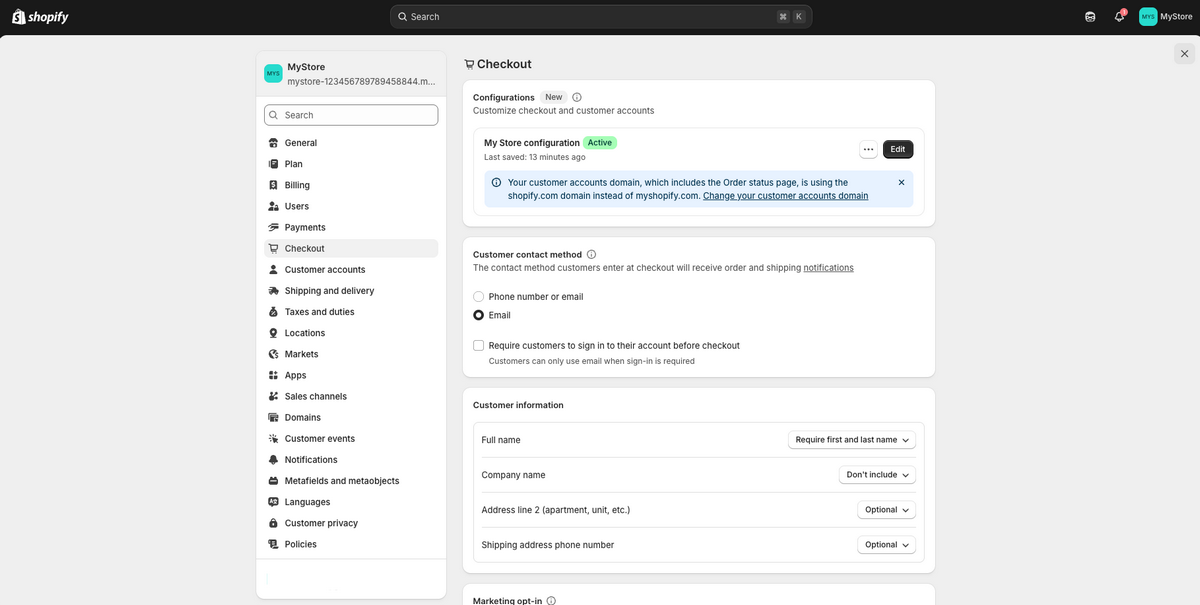
Once your currency’s locked in, there are two more settings you cannot skip: checkout and shipping zones.
Start with checkout. Head to “Settings”, then “Checkout”. This is where you decide exactly what information you’re asking customers for: first name, last name, that kind of thing. You can also choose how you collect contact details, like phone number, email, or let the customer pick. One thing worth knowing: you can’t require both phone and email on standard plans at once, so decide which one matters more for your business.
Now let’s set up shipping. If you’re selling to US customers, you need a shipping zone that covers the US. Go to “Settings”, then “Shipping and Delivery”. This is your hub for everything shipping-related: local delivery, pickup, packaging, labels, all of it.
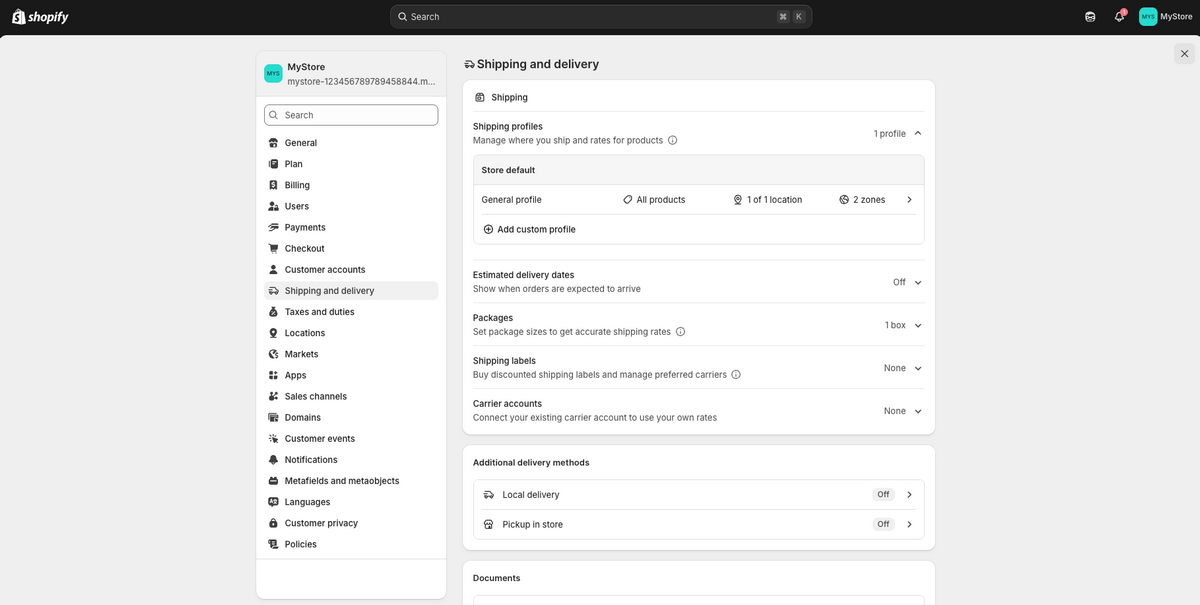
Under “Shipping Profiles”, either edit the General Profile or click “Create Custom Profile”, and then complete with your fulfillment location and shipping zone. You can create multiple shipping profiles depending on the regions you’re targeting.
In this same section, customize your shipping strategy, from shipping rates for each zone to additional delivery methods, package sizes, estimated delivery dates, and more.
Here’s a move I like: set that rate to $0. Just like that, you’re offering free shipping — then just fold that cost into your product’s pricing. This builds trust, keeps customers coming back, and in many cases, it’s the deciding factor between someone checking out or abandoning their cart altogether.
16. Generate Shopify Store Policies & Legal Pages
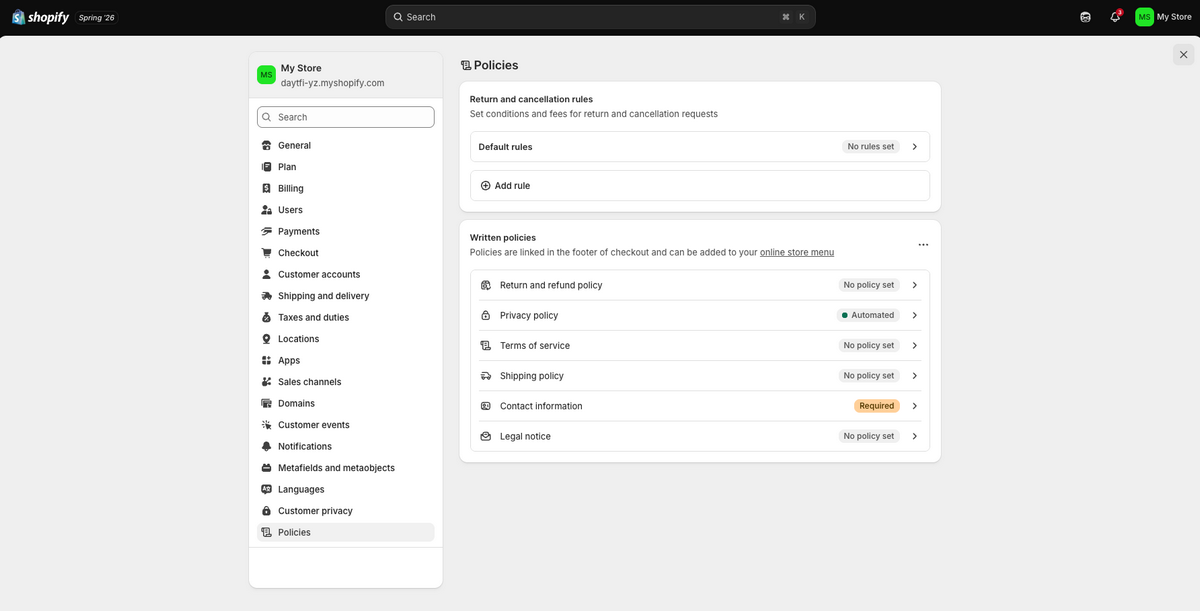
Policies, legal, pages, terms and conditions… this might seem like the boring part of setting up your store, but it’s absolutely necessary.
Store policies and legal pages aren’t just boilerplate to check off. They include your return & refund policy, shipping policy, privacy policy, terms of service, and often an FAQ or contact page. Without these, get ready for confused customers, dozens of returns, and disputed chargebacks.
Setting these up is simple. In your Shopify dashboard, go to “Settings” in the lower-left corner, then click “Policies”. From there, you’ll see options to add or edit each one.
Now here’s the part that saves you time: Shopify doesn’t leave you starting from a blank page: The Privacy Policy is generated automatically, while the others — Return & Refund, Terms of Service, Shipping Policy, and Contact Information— provide a template all ready for you to use. Just click on each policy and then click on “Insert Template”.
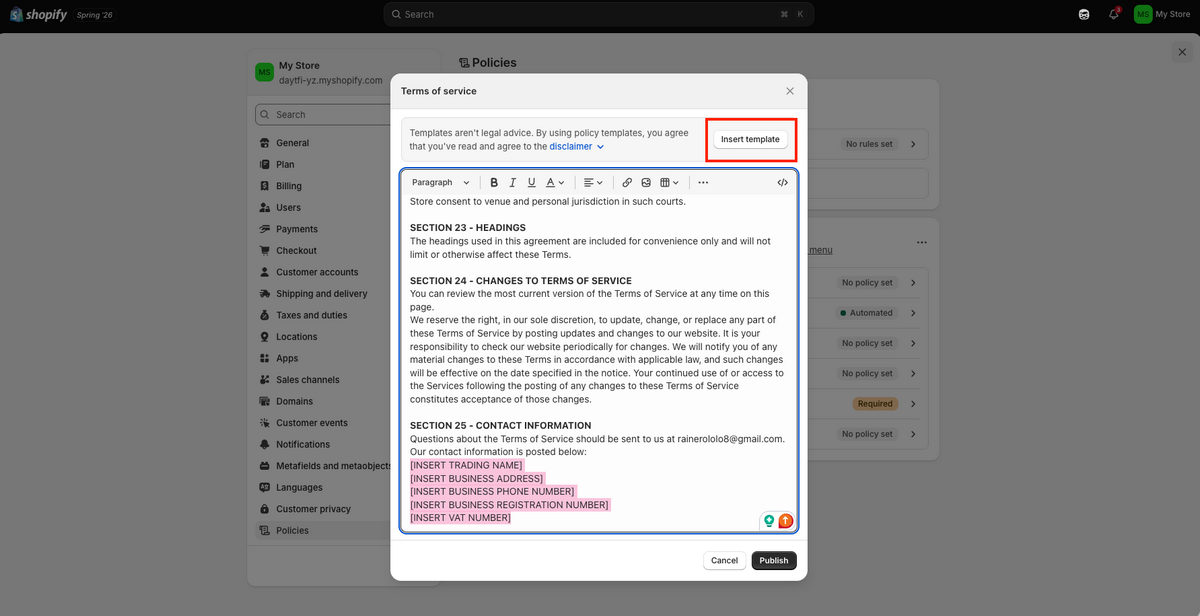
You still need to go in and fill in with your store’s details. A policy with “[Insert business name]” still sitting in can genuinely fall apart if a customer or a card issuer ever needs to hold you to it. But it’s a real head start, rather than having to write them from scratch.
The only one that doesn’t provide a shortcut is Legal Notice, which you’ll need to write yourself based on your business’s specific legal structure and location. It’s less common for smaller stores to need this one right away, but if you’re operating as a registered business, it’s worth having in place.
If you want more control over the wording of your policies, tools like ChatGPT work well here, too. Something as simple as this prompt gets you a solid starting point:
Prompt: “Generate a detailed returns and refund policy for a Shopify store. Returns are accepted within 30 days. Customers have to pay the return shipping.” The more information about your business you include in the prompt, the more complete the result.
Either way (Shopify’s built-in generator or an AI-assisted draft), the goal is the same: clear, complete policies that protect your business and give your customers zero reason to feel confused about how you operate.
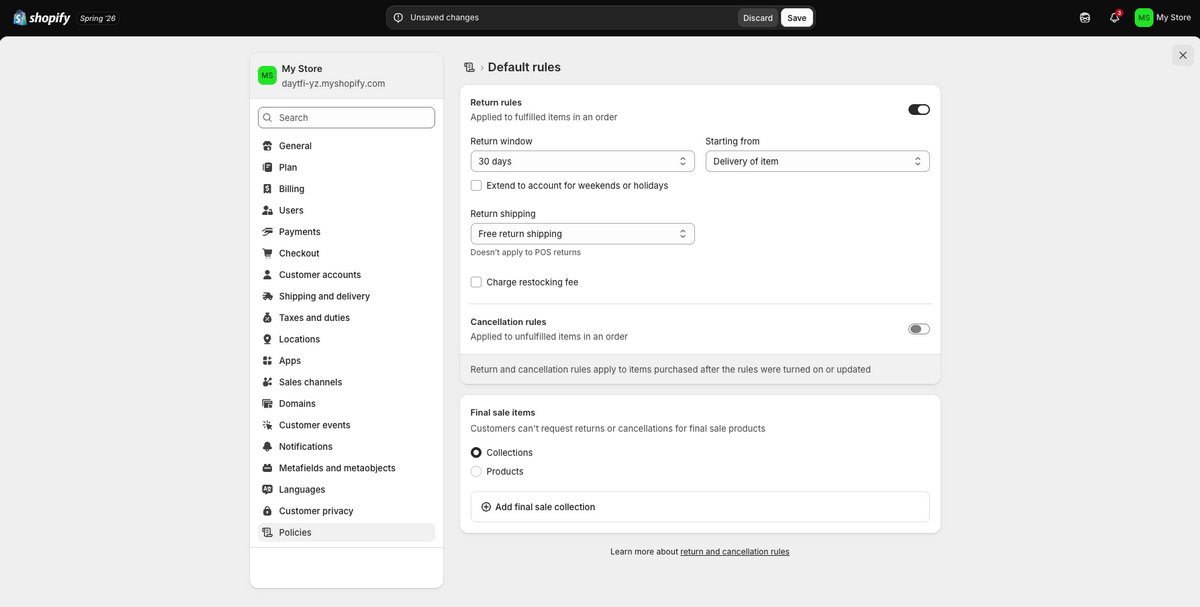
This is also the place where you establish your return and cancellation rules. Under “Policies”, you’ll find “Default Rules”, where you set a return window (30 days is Shopify’s default, and you can extend it to account for weekends or holidays), decide where that window starts counting from (typically delivery of the item), and choose whether you’re offering free return shipping or charging a restocking fee.
Right below that, “Cancellation Rules” let you set separate terms for orders that haven’t been fulfilled yet. You can also mark certain collections or products as final sale, meaning no returns or cancellations apply to them at all.
Other Taxes & Legal Basics
Besides legal pages, there are other compliance considerations you need to keep in mind. Taxes aren’t optional, and “I didn’t know” isn’t a defense the IRS or a state tax authority will accept. Let’s break down what you actually need to know.
First, your business structure. You don’t need an LLC to start dropshipping, as plenty of people begin as sole proprietors. But once real money starts coming in, I’d strongly consider setting one up, getting an EIN, and opening a separate business bank account. Mixing personal and business funds is one of the fastest ways to create a mess for yourself later.
Second, sales tax. This is where most beginners get caught off guard. If you’re selling in the US, you’re required to collect sales tax in any state where you have “nexus”. This means either a physical presence (you, an office, or a warehouse) or that you’ve crossed that state’s economic threshold, typically around $100,000 in sales or 200 transactions a year, though the exact number varies by state.
Hit that threshold, and you’re legally required to register for a sales tax permit and start collecting, even if your supplier ships from somewhere else entirely. As the merchant, that responsibility sits with you, not them.
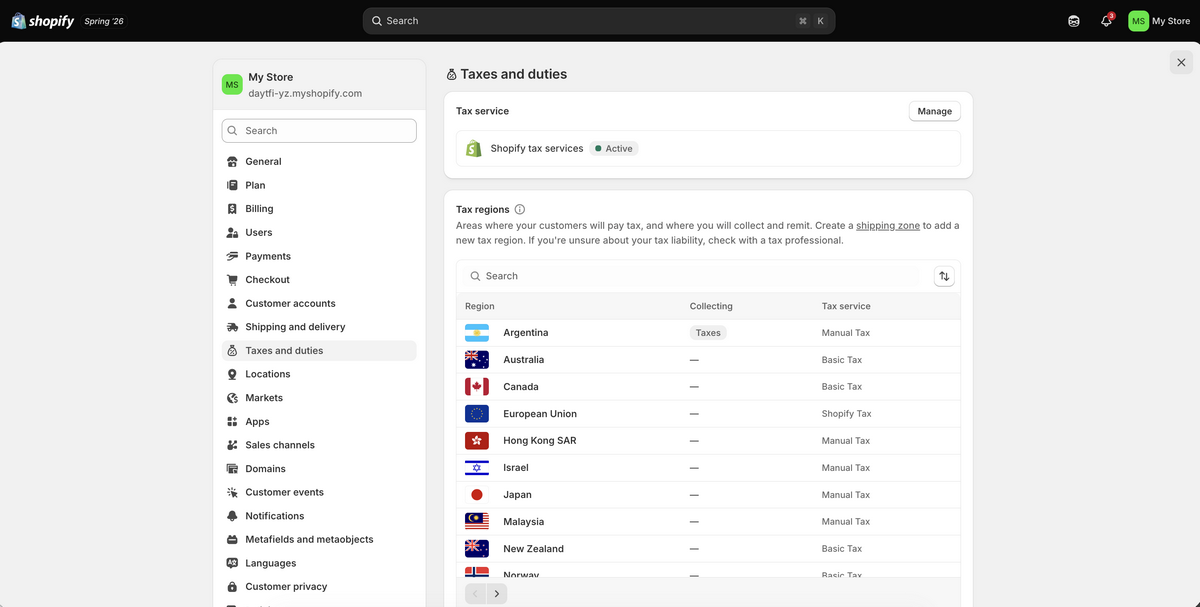
The good news: Shopify Tax calculates the correct rate automatically at checkout once you’ve set it up under “Settings”, then “Taxes and Duties”. It’ll even flag when you’re approaching a nexus threshold in a new state.
Important: The part Shopify doesn’t do for you is register you or file your returns. That part’s still on you, unless you’re using an automated filing partner or a service built for this.
Third, income tax. Whatever you’re making from this business is real income, and it’s taxable — full stop, no matter how small the store still is. A common rule of thumb: set aside 25-30% of your profit for taxes so you’re not blindsided later.
Look, I’m not a tax advisor, and I’d genuinely recommend looping in a real accountant or CPA once you’re generating consistent revenue. But the mindset I want you to walk away with is this: treat this like a real business from day one, not a side hustle you’re hoping stays under the radar.
17. Create A Blog Page To Drive Organic Traffic
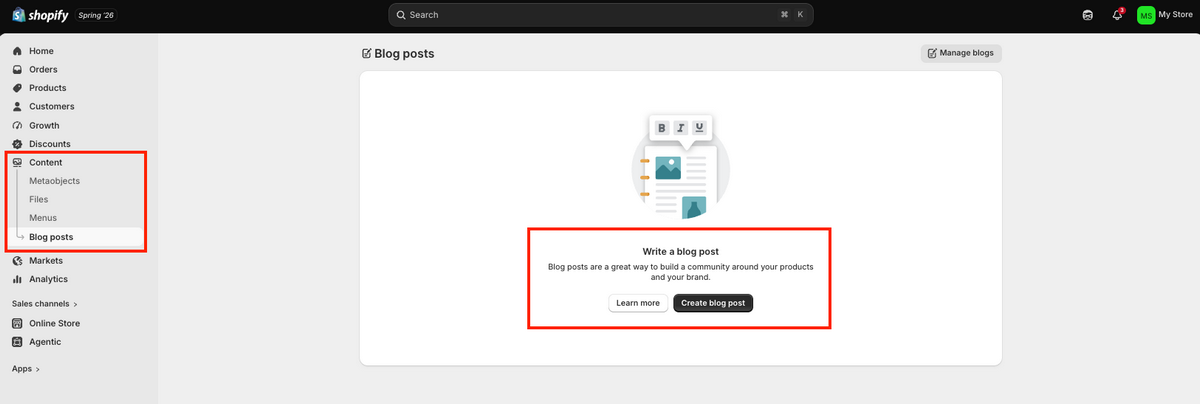
Here’s a channel a lot of dropshippers completely ignore: your blog. And I get why: it’s not as flashy as running ads or going viral on TikTok. But it’s one of the few traffic sources that keeps working for you long after you post your article, without you paying for it every single day.
To set one up, go to “Content”, then “Blog Posts”, in your Shopify admin. Your store already comes with a built-in blog called “News”. You can use that one or create a new one from there.
Now, what do you actually write about? Tie it to what you sell. If you’re in fitness equipment, for example, you want content that your audience is already searching for. And you don’t need to sit there staring at a blank page, as ChatGPT can generate topic ideas for you in seconds.
Prompt: “Generate 5 article titles for a Shopify store selling fitness equipment.”
Again, the more info you include in the prompt, the more niche-specific the articles it generates. Pick the one that fits best, then keep going with ChatGPT to actually build it out. Start with the intro, then move into the body. For example:
Prompt: “Write an introduction for an article on How to Build Your Perfect At-Home Workout Routine with Your Fitness Equipment.”
Once your draft is solid, go back and optimize it: tighten the writing, make sure it actually reads well, and work in the keywords your audience is searching for.
Then head back to your Shopify admin, click “Add Blog Post”, paste your content in, and hit “Save”.
That’s genuinely it. Do this consistently, and you’re building a growing library of content that keeps bringing people to your store long after you stop actively promoting each individual post.
18. Edit The Shopify Navigation Menu
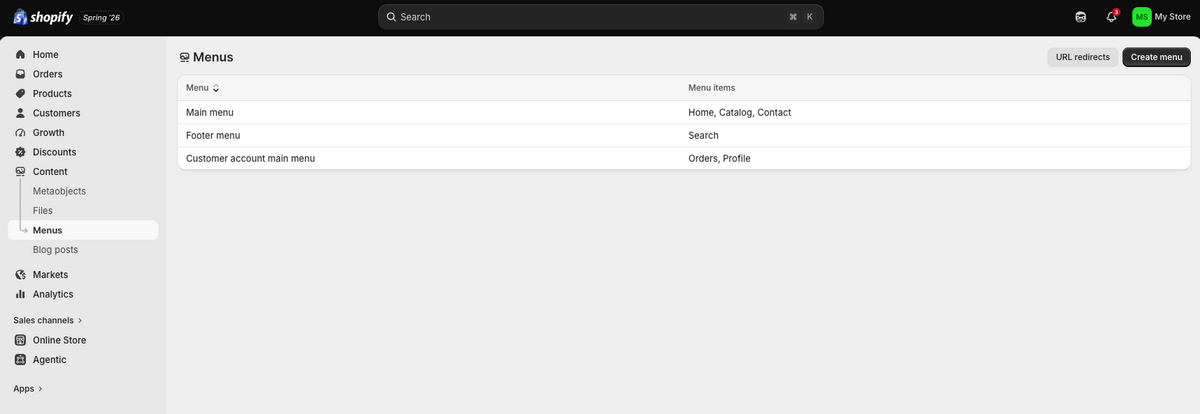
Let’s talk about something that seems small but genuinely shapes how customers experience your store: your navigation menu. This is what lets people actually move around and find your policies, your blog, your legal pages, whatever they’re looking for. Most stores split this into two spots: the main menu up top, and the footer menu down below.
To set it up, go to “Content” in your Shopify admin, then click “Menus”. From there, select the menu you want to edit (usually your Main Menu or Footer) and click on it to customize it or just create a new one.
Let’s say you want to add your blog. Click on “Add menu item”, type in the name (something like “Blog”), and link it to the blog page you already created. Now, every time someone clicks that link, it takes them exactly where you want them.
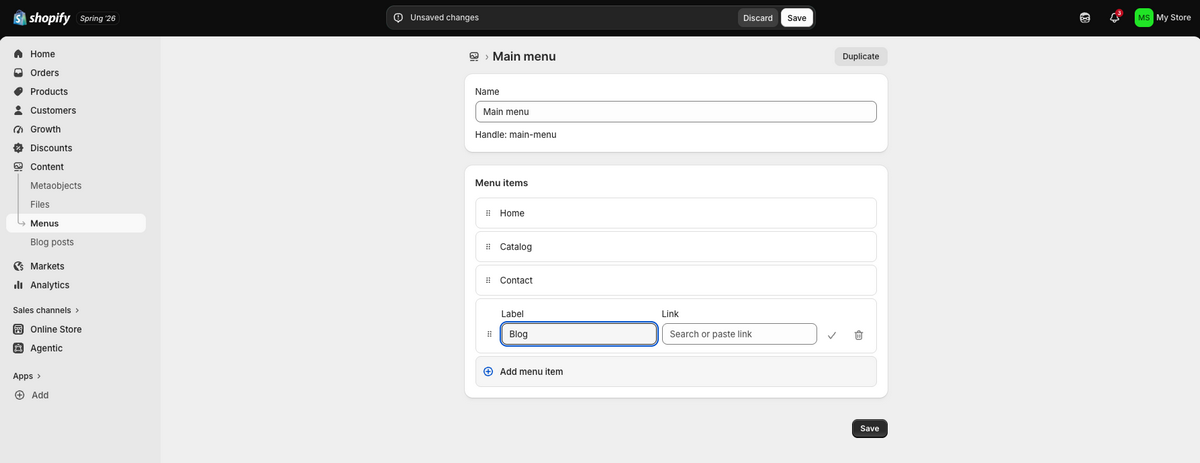
Now, here’s the part that actually matters for conversions: where you place things. You have two options:
- Your header should hold the pages people need constantly: Home, About Us, Products, Order Tracking. These are high-traffic, high-priority pages, and burying them prevents users from clicking.
- Your footer, on the other hand, is where things like Return Policy and Shipping Info belong. This is important, sure, but not something someone’s clicking every visit.
Remember your goal here: to make it effortless for a customer to find exactly what they need, right when they need it. And that’s a bigger deal for conversions than most people give it credit for.
19. Configure Payment Providers
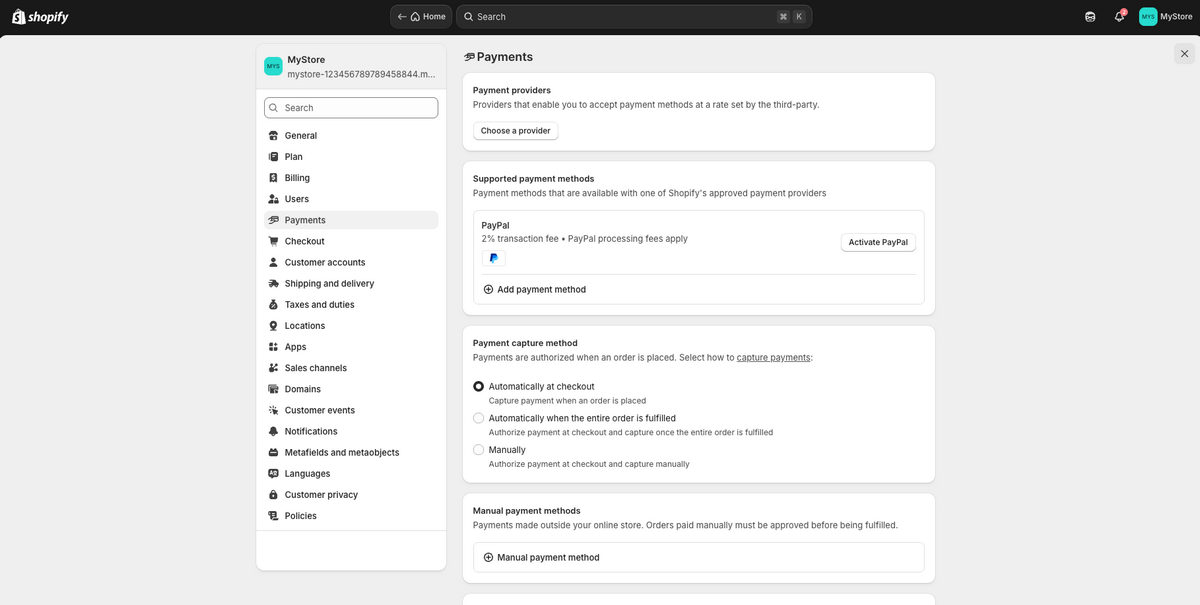
Last step before your store’s truly ready to take orders: payments. No matter how good your product page looks or how smooth your checkout is, none of it matters if a customer can’t actually pay you.
Here’s the thing about payment providers: they’re not universal. What you use depends entirely on where your business is registered. If you’re US-based, this part’s easy: Shopify Payments shows up right on this same page as your default option, and it’s genuinely the best choice. It accepts all major credit cards, keeps everything native to Shopify, and reduces friction and extra fees.
Setting it up takes two clicks: go to “Settings”, then “Payments”, and activate it directly from there.
Now, if your country isn’t on Shopify Payments’ supported list, you’ll set up your primary gateway a little differently. On this same Payments page, under Payment Providers, click “Choose a Provider”. This is where you’ll find the options available for your specific market, such as Stripe, Razorpay, Flutterwave, or whatever’s relevant to your location.
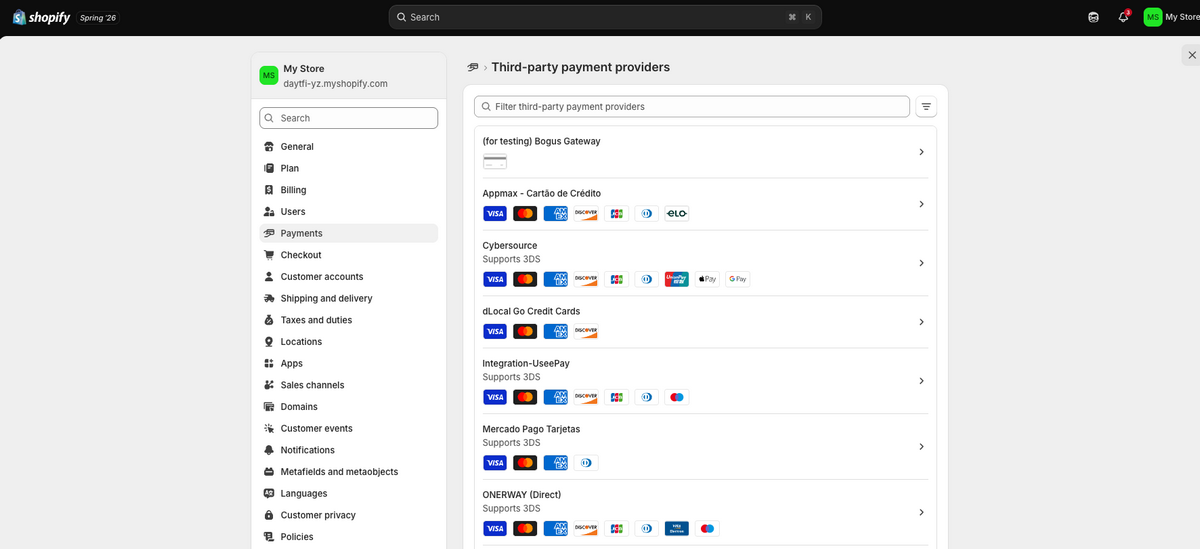
On top of that, you can layer in extra payment methods like PayPal under “Additional Payment Methods”. Just click “Add Payment Method” (or Activate PayPal, if it’s already listed) to offer customers more ways to check out.
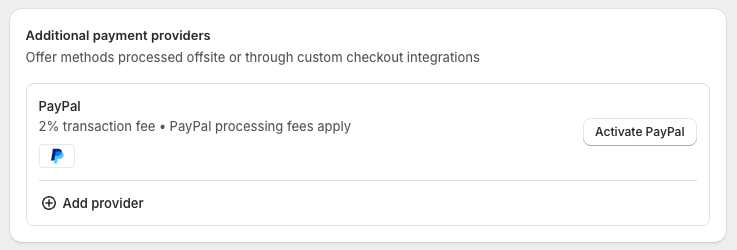
Pick the provider that fits your market, follow their setup flow to connect your account, and that’s it. One extra step compared to Shopify Payments, sure, but it’s not complicated.
20. Market Your Shopify Dropshipping Store
Last but not least, let’s talk traffic, because none of this matters if nobody’s seeing your store. Marketing is what actually puts your product in front of people and turns random visitors into an actual customer base.
Here’s how I’d break down where to put your time and money:
Free Strategies
- Organic Short-Form Video Content: TikTok, IG Reels, YouTube Shorts — this is where I’d start if the budget’s tight. Your only real cost is ordering the product itself, and you get to keep it after. Post consistently, test different angles and hooks, and let the platform tell you which video actually works.
- Create a Blog Page: This one is a bit slow, but it adds up over time. Share real insights, product breakdowns, industry trends, or any other content that builds trust while quietly pulling in organic search traffic month after month.
- Email Marketing: Don’t sleep on your list. This is how you turn a one-time buyer into a repeat customer. Keep them in the loop on new products, promotions, and anything exclusive that makes them feel like they’re getting something extra.
Paid Strategies
- Facebook Ads: Still one of the best places to get specific with targeting. Use it to reach the exact demographic that’s actually going to buy, not just anyone scrolling.
- TikTok Ads: The platform’s built for attention, so lean into that. Creative, fast-paced, native-feeling ads perform way better here than anything that looks like a traditional ad.
- Google Ads: This is intent-based traffic. People are already searching for what you sell. Show up here, and you’re catching customers at the exact moment they’re ready to buy.
Here’s the real takeaway: don’t pick one lane and ignore the rest. Combining free and paid Shopify marketing tools is what actually builds a well-rounded strategy, one that hits different segments of your audience from different angles. And in this game, consistency and adapting as you go always beat chasing the one “perfect” tactic.
What to Expect — Timelines, Margins, and Why Stores Fail
Let’s be honest for a second, because most guides won’t be. I could keep selling you the highlight reel — the wins, the fast starts, the “you’ll be profitable in no time” energy. But you’re going to end up on Reddit anyway, reading horror stories from people who tried this and quit. So let’s just get ahead of that conversation right now.
Realistic Timelines
You can have a store live in a weekend. That part’s true, and it’s genuinely not hard. But live isn’t the same as profitable, and that’s where expectations usually go sideways.
From launch, expect somewhere around 2-8 weeks of actual product testing before you see consistent sales, and that’s if you’re doing things right: testing multiple products, running real ad budget, adjusting based on data instead of gut feeling.
Some people get lucky and sell fast. Most don’t, and that’s not a sign you’re doing it wrong, it’s just how testing works. You’re not looking for one lucky guess, you’re looking for a repeatable process.
If you’re three weeks in with zero sales, that’s not failure. The real problem is quitting at week three instead of adjusting and testing again.
Realistic Margins
Here’s the number I keep coming back to: like I’ve already mentioned, aim for a 2.5x to 3x markup on your source price, with product prices between $25 and $80. That range gives you enough room to actually cover ad costs, platform fees, and returns while still walking away with real profit.
Go below that markup, and you’re not building a business, you’re funding someone else’s ad platform. I’ve seen people get excited about “high volume, low margin” products, thinking they’ll make it up in scale. It rarely works out that way when you factor in ad costs realistically.
Why Stores Actually Fail
Let’s talk about the real reasons stores die, because it’s rarely “the market” or “bad luck.” It’s almost always one of three things:
- Unreliable suppliers. Late shipping, inconsistent quality, or a supplier who just stops responding. This kills trust with customers, and trust is nearly impossible to win back once it’s gone. This is exactly why vetting your supplier matters as much as picking your product. Sample orders make all the difference here.
- Undifferentiated products. Selling the exact same item, with the exact same photos, at the exact same price as fifty other stores running the same ad. If there’s nothing about your store that stands out, you’re just competing on price, and that’s a race to the bottom.
- Underfunded marketing. This is the quiet killer. People launch, run $20 in ads total, get no sales, and conclude the product (or dropshipping itself) doesn’t work. In reality, that’s not close to enough data to know anything. You need real traffic, tested consistently, before you can actually judge whether a product’s worth scaling.
Here’s the pattern I see over and over: people give up right around the point where the data would’ve actually started telling them something useful. Don’t be that story. Expect the slow weeks, build in real margin, vet your suppliers, and give your tests enough runway to actually mean something.
How To Scale Your Shopify Dropshipping Store
Alright, your store’s live, orders are coming in, and that’s genuinely something to be proud of. But launching isn’t the finish line, but where the fun actually begins. Let’s talk about what actually takes this from “a store that works” to “a business that scales.”
Automate Your Store
Once you’re live, the next move is putting a real automation tool behind everything you’re doing. Like I’ve mentioned throughout this article, AutoDS is one of the best dropshipping platforms with Shopify integration.
AutoDS takes the repetitive tasks off your plate so you can actually spend your time where it counts, like expanding your catalog, testing new products, and driving growth. It covers three areas that matter most as you scale:
- Reliable, vetted suppliers. AutoDS connects you with 25+ fast, reliable suppliers and private vendors, which means consistent shipping times, fewer fulfillment challenges, and fewer of those chargebacks that quietly eat into your margins.
- Built-in product research tools. AutoDS’s features like the Hand-Picked Products hub, Trending Products, and Ad Spy tools let you find winning products with high chances of converting.
- Full automation. This is where AutoDS earns its place. Price and stock monitoring, product importing, price optimization, order fulfillment, inventory management, automatic tracking updates, even print-on-demand — all are handled on autopilot from a single dashboard.
The result is a business that runs cleaner, with fewer fires to put out, so you can actually focus on scaling instead of babysitting.
Bi-Directional Sync: Keeping AutoDS and Shopify Consistent
Here’s a detail worth knowing about: AutoDS and Shopify now stay in sync in both directions, not just one. In the past, updates made inside AutoDS would push to Shopify automatically, but if you edited something directly on Shopify, you had to go fix it manually inside AutoDS, too. Not anymore.
Now, when you update a title, description, tag, collection, stock level, or price directly in Shopify, AutoDS picks it up automatically and reflects it on its own end. No more going back and forth between both platforms. It’s all synced now.
Work With Multiple Suppliers
Here’s a move that separates the stores built to last from the ones that fold the second something goes wrong: don’t rely on one supplier. Diversifying gives you flexibility, cuts your risk, and lets you adapt fast when the market shifts.
Spread your sourcing across multiple suppliers, and you can:
- Offer a wider range of products to pull in more customers.
- Bring in Print on Demand items for unique, customizable options.
- Have backups ready if one supplier hits a stockout or shipping delay.
- Negotiate better pricing and protect your margins.
- Expand into new regions by sourcing locally where you’re selling.
- Unlock volume discounts as your order numbers grow.
- Keep product quality consistent by not putting all your eggs in one basket.
- Move fast on trends and seasonal demand instead of waiting on one supplier’s timeline.
If you’re serious about scaling sustainably, this gives you a real edge.
Provide Excellent Customer Service
Last piece: customer service. This is what turns a one-time buyer into a repeat customer, and repeat customers are where the real profit lives. According to Salesforce, 88% of customers say good service makes them more likely to buy from you again. That’s not a small number — that’s most of your customer base telling you exactly what keeps them coming back.
So here’s where I’d focus:
- Use live chat so customers can reach you in real time.
- Build out an FAQ page so people find answers without waiting on you.
- Handle returns and refunds fast. Don’t let them drag.
- Send personalized messages instead of generic templates.
- Use a proper customer support tool once volume picks up, so nothing slips through the cracks.
Get this right, and you’ll have a base of loyal customers buying from you repeatedly.
Frequently Asked Questions
How much does it cost to start dropshipping on Shopify?
Starting dropshipping on Shopify typically costs $39/month for the Basic Shopify plan, plus around $10–20/year for a domain. You may also spend $0–50/month on dropshipping apps and $100–$300+ on marketing to promote your store. Overall, most new dropshippers budget ~$200–$600+ for their first month.
What Shopify plan is best for new dropshippers?
If you’re just getting started with dropshipping, the best plan is usually the Shopify Basic plan. It gives you a full online store, customization options, order and product management — everything you need at a lower monthly cost.
Which Shopify apps are essential for dropshipping?
The most essential Shopify app to use is AutoDS. AutoDS automates and optimizes your entire dropshipping business from product research, importing and listing, to price & stock monitoring, price optimization, order fulfillment, and much more. It even offers POD and a prebuilt AI store. Other helpful apps focus on reviews, email marketing, and loyalty programs to boost sales and customer retention.
How do I set up automated order fulfillment on Shopify?
You can use AutoDS to automate order fulfillment on Shopify. It automatically handles your orders as soon as they arrive and provides automated tracking updates, saving time and reducing manual work.
What payment gateways work best for Shopify dropshipping?
The best payment gateways for Shopify dropshipping are Shopify Payments, PayPal, and Stripe. They integrate smoothly with Shopify, support multiple currencies, and are trusted by buyers worldwide. For best results, enable both Shopify Payments (or Stripe) and PayPal to cover all customer preferences.
How do I optimize my Shopify store for conversions?
To boost conversions, focus on a clean design, fast loading speeds, and mobile responsiveness. Use high-quality product images, clear descriptions, and trust signals like reviews and secure payment badges. You can also simplify checkout, offer multiple payment options, and use tools like AutoDS to automate pricing, inventory, and product testing for better performance.
Can I use multiple suppliers with one Shopify store?
Of course! You can source from multiple suppliers in one Shopify store. Choose any of the 25+ reliable and vetted suppliers supported by AutoDS.
How do I handle inventory management in Shopify dropshipping?
In dropshipping, your suppliers manage stock, but you need real-time updates to avoid selling out-of-stock items. Use automation tools like AutoDS to sync inventory levels, update product availability automatically, and prevent overselling. This ensures smooth order fulfillment and a better customer experience.
Is Shopify Collective better than a dropshipping app?
No, Shopify Collective isn’t necessarily better than a dropshipping app. It’s just different. Shopify Collective gives you US-based products and faster shipping, but it’s limited to what other Shopify brands offer. Apps like AutoDS give you far more volume, automation, and access to global suppliers. Most stores end up using both.
Do I need an LLC to dropship on Shopify?
No, you don’t need an LLC to get started; you can run as a sole proprietor. But once real money’s coming in, you should set one up, as it protects you personally and makes taxes cleaner.
How long until my first sale?
There’s no fixed timeline from launching to your first sale. It depends on your product, marketing, and how fast you test. Some people sell within days, others take weeks. Focus on getting traffic and testing products, not on the clock.
AutoDS Is the Best Way to Succeed with Shopify Dropshipping in 2026
Dropshipping on Shopify is genuinely one of the most accessible ways to build a business today. But here’s the catch: your success comes down to the tools you use from day one, not just the product you pick.
That’s where automation comes in. AutoDS handles everything, from product imports to pricing updates, order fulfillment, and tracking — all from one dashboard. It’s the difference between running a basic Shopify store and running a business that’s actually built to scale.
And for beginners especially, AutoDS is everything you need to launch, grow, and streamline your store without drowning in manual work in 2026. Give it a try now for just $1 and start automating right away.
Want to go further? Check out these guides to level up your strategy: