


Boxes of products, spreadsheets full of stock numbers, and warehouses. These are the images that come to mind when an entrepreneur thinks about opening an online store, and many don’t realize it’s possible to run a business without any inventory at all.
Models like dropshipping let you sell from the comfort of your home with nothing but a computer, without ever touching the products. In this guide, we’ll take a closer look at this way of selling and the traditional inventory model, so you can decide which one best fits your situation.
Starting without inventory means a supplier stores and ships your products after a customer orders, so you never hold stock.
Dropshipping keeps your budget and risk lower than the inventory model, but gives you less control over fulfillment.
Real demand comes first. Use supplier best-seller pages, competitor research, Google Trends, and AutoDS tools to choose products.
Reliable suppliers matter. Avoid minimum order quantities and work with more than one supplier.
Pick a channel that fits your goal: Shopify or Wix for your own brand, or eBay, Facebook Marketplace, and TikTok Shop for existing shoppers.
Automation scales your store, from importing products to price and stock monitoring and order fulfillment with AutoDS.
Inventory vs. No-Inventory: Quick Comparison
In dropshipping, you partner with a supplier who ships products directly to your customers. You act as the middleman and earn a profit from the difference between the price at which you sell the product and the price you pay the supplier. Here are the main differences compared to an inventory-based business:
| Aspects | Inventory Model | Dropshipping |
|---|---|---|
| How it works | You buy products in advance, store them, and ship each order yourself. | A supplier stores the product and ships it directly to your customer after they order. |
| Risk | Unsold or outdated stock can tie up your money. | No unsold stock, but you depend on suppliers for availability and shipping times. |
| Scalability | Grows with more storage, staff, and capital. | storage, staff, and capital. Grows by adding products and automating tasks like importing and order fulfillment |
| Startup cost | Higher, since you pay for stock and storage before you sell. | Lower, since you only pay for a product when a customer buys it. |
| Control over fulfillment | Full control over packaging, shipping speed, and quality. | Limited control, so choosing reliable suppliers matters. |
The inventory model offers more control and can bring bulk discounts, while dropshipping keeps your budget and risk low. For a deeper look at each side, read our full guide on the advantages and disadvantages of dropshipping.
How to Start an Online Store Without Inventory: Step-by-Step
Step 1: Product Research: Find Products To Sell
Not all products sell the same way, and choosing the right ones is essential to building a store. That’s why the first step is to find products people actually want to buy, based on real demand rather than guesswork. You can analyze that demand with any of the following methods:
- Supplier Best-Seller Pages: Most large suppliers publish best-seller or trending sections. For example, Amazon’s Best Sellers shows the top products in each category and updates frequently, which makes it a quick source of ideas.
- Competitor Research: Look at what other sellers already sell well. On eBay, search your niche and turn on the Sold items filter to see which products actually sold. You can also use ad spy tools to see which products competitors are promoting on social media.
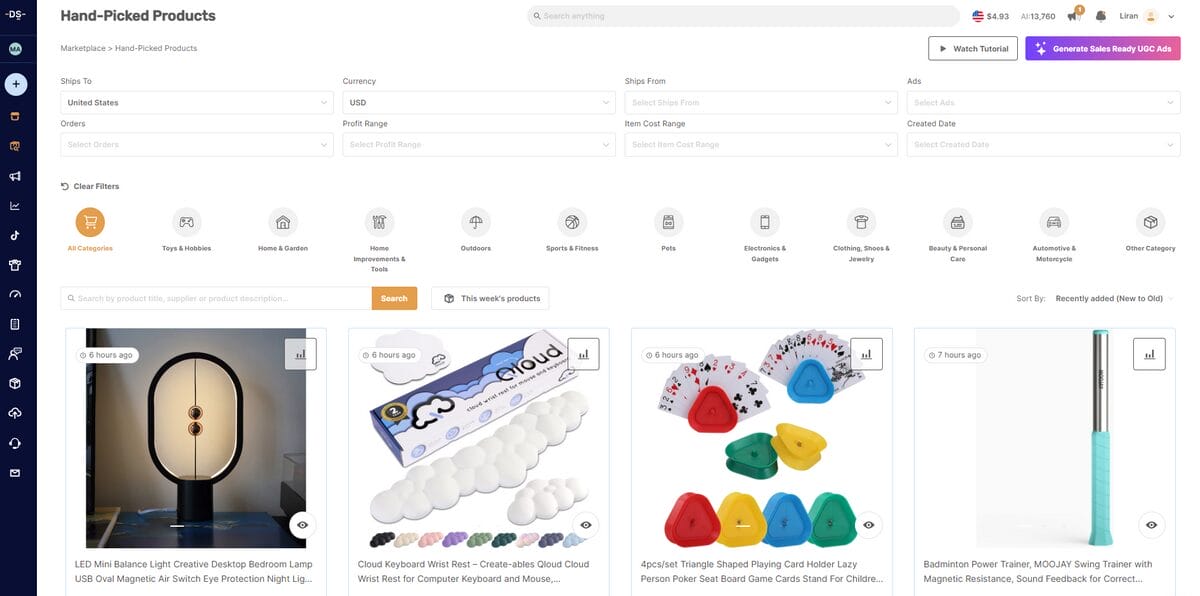
- AutoDS Product Research Tools: AutoDS puts product discovery in one place. With the AutoDS marketplace, you can filter products by price, supplier, ratings, and shipping times. Hand-picked products show what’s gaining traction, and the Ads Spy tools reveal top-performing TikTok, Facebook, and Instagram ads.
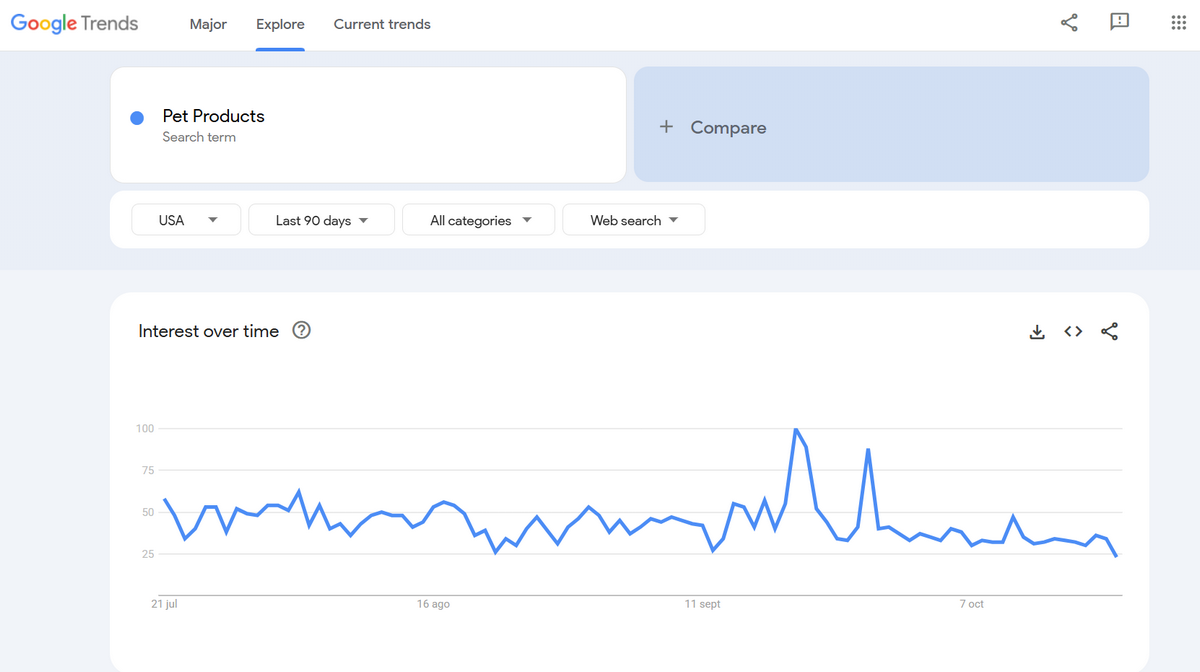
- Google Trends: Google Trends lets you analyze demand for specific niches and products. It shows how interest changes over a chosen period, so you can see when a trend peaks and when it drops.
🔍 Research Tip: Combine at least two methods before choosing a product. A product that shows up as a bestseller and has active ads is a stronger signal than one that appears in a single place.
Step 2: Choose A Supplier That Ships Without MOQ
Once you have a list of products, you need a dropshipping supplier that has them in stock and can ship them to your customers. Compare suppliers using these factors:
- Minimum order quantity (MOQ): Does the supplier require a minimum order? If so, it’s best to avoid them.
- Pricing: Are prices affordable, and are discounts available?
- Product niche: What product categories does the supplier specialize in?
- Dropshipping fees: Do you pay for dropshipping services separately?
- Shipping and delivery times: How long does it take to ship an order?
- Shipping carriers: Which carriers does the supplier use?
- Payment methods: Which payment methods does the supplier accept?
- Return policy: How are returns and refunds handled?
All of these matter, but MOQ is the most critical. In dropshipping, you place orders with your supplier one at a time. If a supplier requires a minimum quantity and you don’t have enough orders to meet it, you end up holding inventory, which defeats the purpose of the model.
Relying on a single supplier is risky. If it runs out of stock or delays shipments, your sales stop. Working with several suppliers gives you a wider product selection, a backup when one source fails, and more room to negotiate prices.
AutoDS connects you with multiple suppliers worldwide from a single platform, and you can browse its supported and private suppliers to choose from trusted options.
Step 3: Choose Your Selling Channel
Your selling channel is where customers find and buy your products. There are two main types: customizable platforms like Shopify and Wix, where you build your own branded store, and marketplaces like eBay, Facebook Marketplace, and TikTok Shop, which already have shoppers browsing. Here are the pros and cons of each.
Shopify
One of the best eCommerce platforms designed specifically for online stores, and one of the most popular choices among dropshippers. It gives you your own branded storefront, but you bring the traffic yourself.
Pros of Shopify:
- Professional, designer-made templates
- Large app store to extend your store
- Reliable customer support
Cons of Shopify:
- No built-in traffic, so you need to invest in marketing
- Paid plans start at $39/month for Basic ($29/month billed annually), and go up to $105 for Grow and $399 for Advanced
Wix
Wix is a website builder that lets you create your own branded dropshipping store. You control the store’s entire look, but you’re also responsible for bringing visitors to it.
Pros of Wix
- Fully customizable design with no coding needed
- Easy-to-use drag-and-drop interface
- App Market with eCommerce tools
Cons of Wix
- No built-in traffic, so you need to drive visitors yourself
- Higher marketing costs to attract customers
eBay
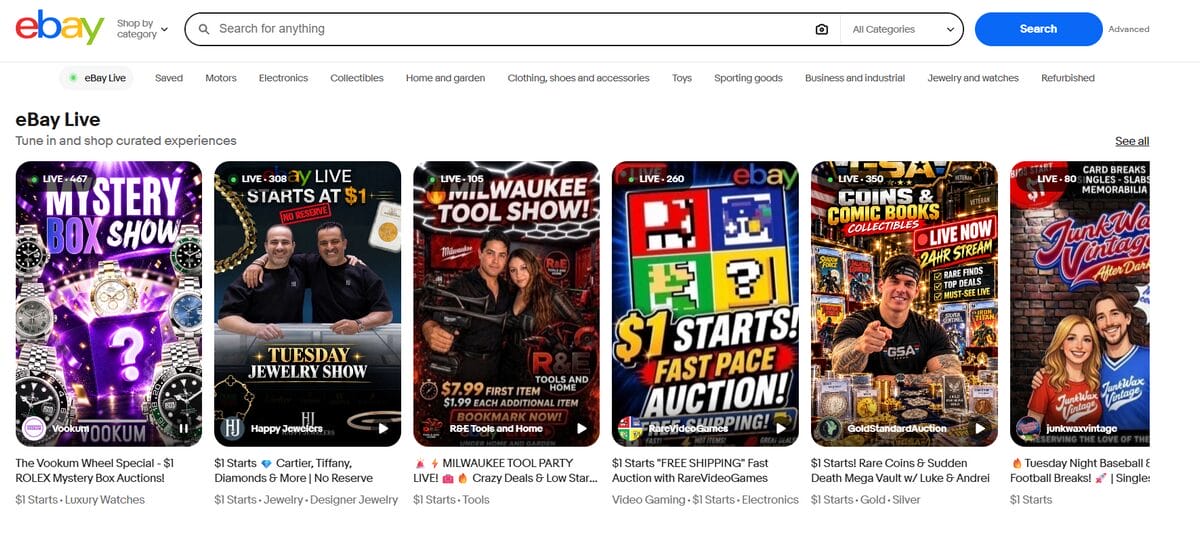
eBay is an established marketplace where buyers are already searching for products. That means your listings can get visibility from day one, without needing your own website.
Pros of eBay:
- Easy to set up, with low startup costs
- Built-in organic traffic
- Promoted Listings to boost visibility
Cons of eBay
- New sellers typically face selling limits, often around 10 items and $500 per month, until their account builds a track record
- Final value fees, usually around 13% to 14% in most categories
- Optional Store subscriptions, from $4.95 per month on annual billing for Starter up to $2,999.95 per month for Enterprise
Facebook Marketplace
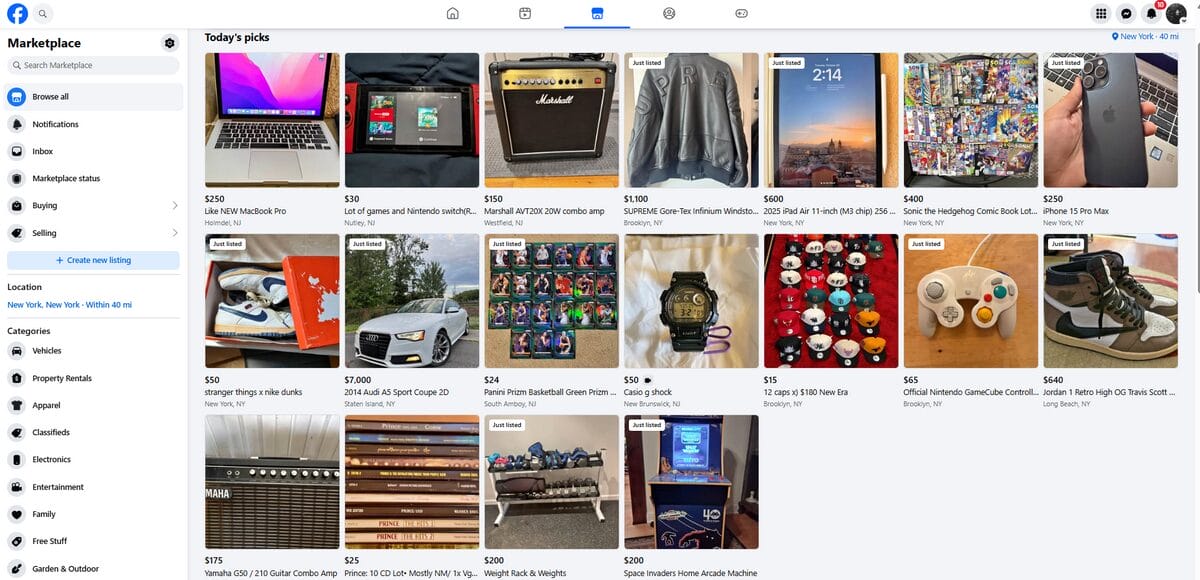
Facebook Marketplace is Facebook’s built-in marketplace, where users buy and sell directly inside the platform. It’s a simple way to reach shoppers without building a store.
Pros of Facebook Marketplace:
- Free organic traffic from Facebook’s user base
- No listing fees
- Less competition than larger marketplaces
Cons of Facebook Marketplace:
- 10% selling fee on shipped orders (minimum $0.80)
- No dedicated store page to build your brand
- Shipping checkout isn’t available in every country
TikTok Shop
TikTok Shop lets you sell directly inside TikTok through videos, live streams, and creator links. Since discovery happens through content, it suits products that look good on camera.
Pros of TikTok Shop
- Built-in reach through short videos and creators
- No monthly or listing fees
- Strong fit for visual, demo-friendly products
Cons of TikTok Shop
- Referral fee on every sale, around 6% to 8% for most categories
- Creator commissions add to your costs if you work with affiliates
- Success depends on creating engaging content
Customizable platforms are a good choice if you want to build your own brand and control the customer experience. Marketplaces are better if you want shoppers from day one without having to drive traffic yourself.
💰 Financial Tip: Platform fees and plans change often. Before you commit, check each platform’s current pricing page and include the fees in your product margins.
Step 4: Automate Your Business
The reality is that you can scale your store manually, but it would be a truly tedious process that wastes your time unnecessarily.
Keep in mind that when you dropship manually, you have to visit your supplier’s website, copy the title, download the images, and recreate every variation by hand just to import a single product.
The same applies to updating prices, checking stock, and placing orders. It works for a handful of products, but it quickly becomes unmanageable as you grow.
Automated dropshipping hands those tasks to software, so you can spend your time on marketing and growth. AutoDS dropshipping platform automates the entire workflow, from finding products to fulfilling orders, so your store keeps running without constant manual work.
What AutoDS Automates:
- Product research: Find winning products with built-in filters and trend data.
- Product importing: Add products to your store without manually copying details.
- Price and stock monitoring: Keep your listings in sync with supplier changes.
- Automatic orders and Fulfilled by AutoDS: Place and process customer orders automatically.
- Tracking number updates: Send tracking details to your customers with no extra work.
Step 5: Create Your Online Store
Now you need a place to list your products. How you set it up depends on the channel you chose in Step 3.
Build a Shopify Store With AI
The fastest way to launch a Shopify store is the AutoDS AI Store Builder, a free tool powered by AutoDS. The feature creates a ready-to-customize Shopify store for you, so you don’t have to design everything from scratch.
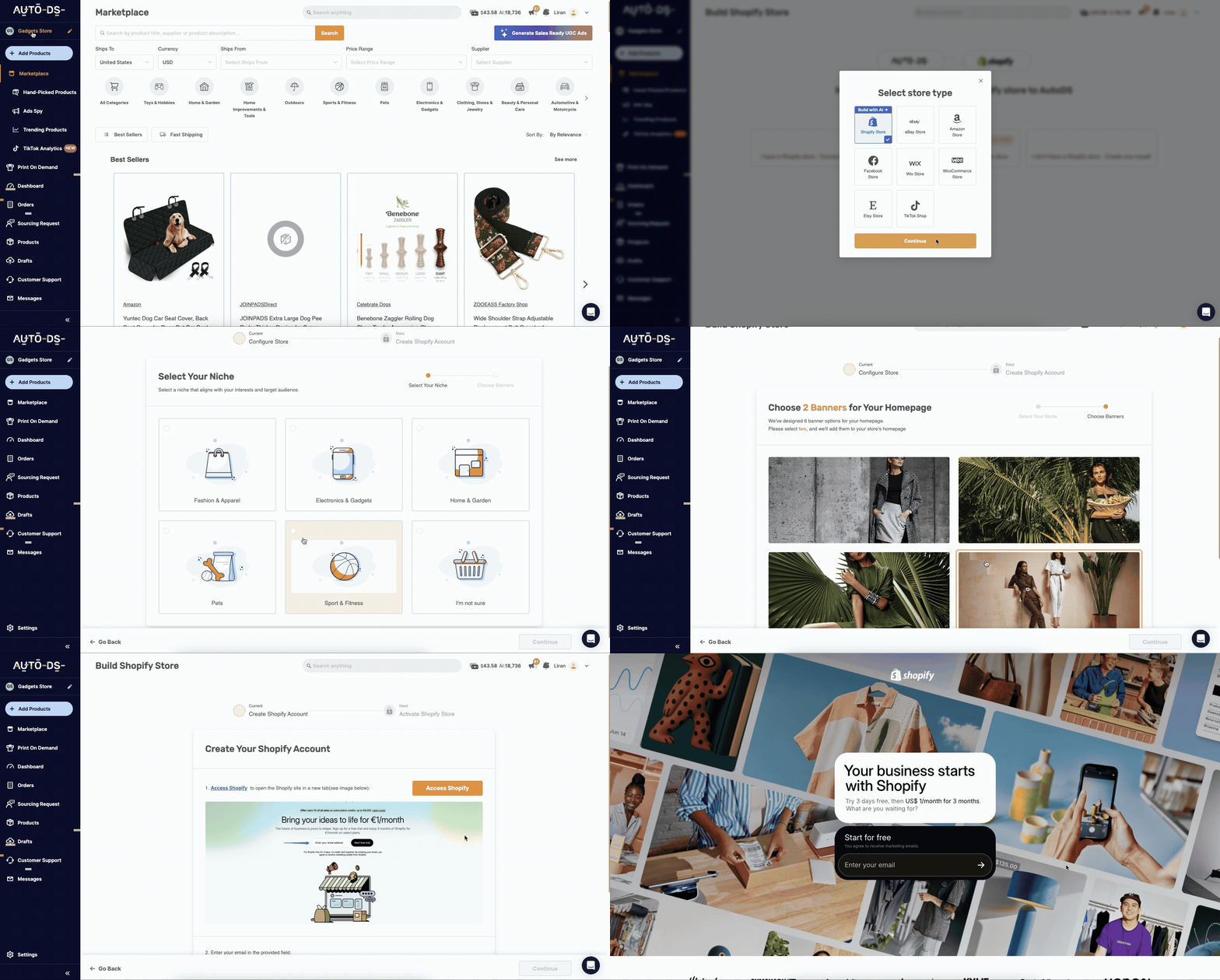
These are the steps you need to get started:
- Choose your niche. Pick the product category you want to sell in.
- Connect your Shopify account. Create one if you don’t have it yet. You’ll still need a Shopify plan to run the store.
- Let the AI build your store. It sets up a professional theme, store pages, and a starter set of products from AutoDS.
- Customize and launch. Adjust your branding, product descriptions, and pages, then connect AutoDS to automate importing and fulfillment.
🔍 For a deeper walkthrough, read our Shopify dropshipping guide.
Set Up a Store on eBay, Facebook Marketplace, or TikTok Shop
Marketplaces don’t need a store design, since your listings are the storefront.
- Register a seller account on your chosen marketplace.
- Connect it to AutoDS.
- Import your product listings and start selling.
🔍 Read our step-by-step guides for dropshipping on eBay and dropshipping on Facebook Marketplace.
Set Up a Store on Wix
- Register a Wix account.
- Import products to your store.
- Customize your homepage, product pages, theme, and logo.
- Launch your store to the public.
🔍 For more details, read our Wix dropshipping guide.
Step 6: Import Your Products
Once your store is ready, it’s time to fill it with products. AutoDS imports product details, images, and videos in a single click, so you don’t have to rebuild each listing by hand.
You can import one product at a time, with its description, images, and videos included, or import several products at once, which is the fastest way to build out a catalog.

AutoDS also optimizes listings as you import, and its AI Rewrite tool can improve product titles and descriptions. The importer also flags products from brands known for copyright issues, so you can avoid listing items that could put your account at risk.
Step 7: Market Your Store
Having products in your store isn’t enough, since customers have to find them. Marketing brings in traffic and sales, and the best approach depends on where you sell.
eBay Marketing
- Promoted Listings Standard: Your listings get extra visibility in search results, and you pay an ad fee only when a promoted item sells.
- Promoted Listings Advanced: A pay-per-click option that runs ad campaigns to push your products toward the top of search results. eBay charges you each time a buyer clicks your ad.
📢 Marketing Tip: Start with Promoted Listings Standard on your best sellers before paying for clicks with Advanced. You only pay when a sale happens, so the risk stays low.
Shopify and Wix Marketing
- PPC ads: Advertise on Facebook, Google, and YouTube and pay when someone clicks. The AutoDS Ads Spy tools show which ads competitors are running, so you can get ideas before you spend.
- Email marketing: Build an email list, for example, by offering a discount in exchange for an address, then use campaigns to drive repeat sales and loyalty.
- Influencer marketing: Pay creators with an established audience to review and promote your products.
Facebook Marketplace Marketing
- Promoted listings: Boosting an item helps it appear higher when shoppers search for similar products.
- Optimized titles: Clear, keyword-rich titles help you rank when customers search. The AI product title and description generator can write them for you.
- Buy and sell groups: Sharing your listings in relevant groups costs nothing and puts your products in front of more shoppers.
TikTok Shop Marketing
- Creator affiliates: Creators promote your products in their videos and earn a commission on each sale, and you set the commission rate.
- LIVE shopping: Show your products in a live stream, where viewers can buy without leaving TikTok.
- Shop Ads: Pay to boost your products or your best-performing videos to reach more shoppers.
Step 8: Fulfill Your Orders
Order fulfillment is one of the most important parts of running your store and of your relationship with your customers. Fast, reliable delivery keeps customers happy and encourages them to buy from you again.
Fulfilling orders manually means visiting the supplier’s website for each order, entering the customer’s details, and placing the order yourself. That is slow, and it doesn’t scale. AutoDS offers two ways to automate it.
Automatic Orders

AutoDS places the order with your supplier for you as soon as a customer buys. The order is charged to your buyer account with that supplier, which is linked to your preferred payment method, and tracking information is automatically sent back to your store.
Fulfilled by AutoDS
Fulfilled by AutoDS handles the whole process for you, including order processing, tracking updates, and returns. Instead of using your own buyer accounts, you load a balance into your AutoDS account, and AutoDS fulfills the orders from that balance.
Step 9: Offer Excellent Customer Service
After we fulfill orders quickly and accurately, we need to care for our customers. Excellent customer service lays the foundation for our business. By providing optimal customer service, we increase customer loyalty and, in turn, positively impact the long-term survival of our eCommerce business.
With this in mind, here are some tips on how to take care of our customers:
- Answer customer messages and inquiries daily.
- Manage returns & replacements and issue replacements & refunds on time.
- Make sure that no customer goes unanswered.
- Offer promotions when your customers reach out. It will improve their chances of buying again.
For eBay, we can use a customer support management system on AutoDS, where we can easily track, manage, and answer all of our customers’ messages. The best part is that we can manage multiple stores from a single dashboard.
Frequently Asked Questions
Can I start an online store without inventory?
Yes. With the dropshipping model, a supplier stores your products and ships them directly to your customers after they order, so you never hold stock. AutoDS connects your store with supported suppliers, so you can import products and sell them without buying anything upfront.
How much does it cost to start an online store without inventory?
You can start dropshipping for free or with a small budget because you don’t pay for products until a customer buys. Your main costs are your selling channel, marketing, and an automation tool.
Is dropshipping still profitable in 2027?
Yes, dropshipping can be profitable, but profit depends on your choices rather than the model itself. Products with real demand, margins that survive platform fees, and reliable suppliers make the difference, and there are no guarantees. AutoDS helps protect your margins with price and stock monitoring and automatic price optimization, which updates your listings when supplier prices change.
Which platform is best for an online store without inventory?
It depends on your goal. Shopify and Wix suit sellers who want their own branded store and are ready to drive traffic, while eBay, Facebook Marketplace, and TikTok Shop give you access to existing shoppers with less setup. AutoDS integrates with all of these channels, so you can start on one and add others as you grow.
Can AI build my online store?
Yes, for Shopify. The AutoDS AI Store Builder creates a ready-to-customize store tailored to your niche, featuring a theme and starter products from AutoDS. You should still review the pages, prices, and branding before launching.
Where can I find suppliers that ship without a minimum order quantity?
Look for suppliers that sell on a per-order basis, since a minimum order quantity (MOQ) would force you to hold stock. You can browse AutoDS’s supported suppliers and compare them using the criteria in Step 2 of this guide.
Launch Your Inventory-Free Store Faster With AutoDS
Starting an online store without inventory comes down to a clear sequence of steps: find products with real demand, choose reliable suppliers, pick the right sales channel, and automate the work that eats up your time. Do those well, and you can launch with a small budget and no stock to manage.
AutoDS automates product importing, price and stock monitoring, and order fulfillment, so you can spend your time on marketing and growth instead of manual tasks.
Ready to launch your store without holding inventory? Find products, import them, and automate your orders from one platform through the AutoDS trial for $1.
Here are a few useful reads for beginners:







