


TikTok ads for dropshipping give sellers a direct way to place products in front of highly engaged audiences, test different creatives, and generate sales without waiting for organic reach to build.
In 2026, however, running ads on TikTok can mean two different things: sending shoppers to an external store through TikTok Ads Manager or promoting products directly inside TikTok Shop using its native advertising tools.
In this guide, I’ll explain how TikTok ads work for dropshipping both ways, which campaign and ad formats are available, and how to build, budget, launch, and optimize your first campaign.
I’ll also share a few practical tips and tools for creating stronger ads. For example, AutoDS offers TikTok Ad Spy that helps you identify high-performing ads, spot trending products, and understand which creative approaches are already gaining traction.
Choose the right sales path: Use TikTok Ads Manager to send shoppers to an external store, or GMV Max to promote products directly through TikTok Shop. Prioritize native-looking creative: Product demos, creator-style videos, strong hooks, and Spark Ads usually fit TikTok better than polished traditional commercials. Combine organic and paid strategies: Organic content helps test products and creative angles, while paid ads can scale the posts and formats that already perform well. Evaluate campaigns by profitability: Focus on conversion rate, acquisition cost, return on ad spend, and profit rather than views, likes, or engagement alone. Use AutoDS to streamline research and operations: Its TikTok Ad Spy, TikTok Analytics, product research, importing, monitoring, and order automation tools can help you move from finding ideas to managing your store more efficiently.
What Are TikTok Ads?
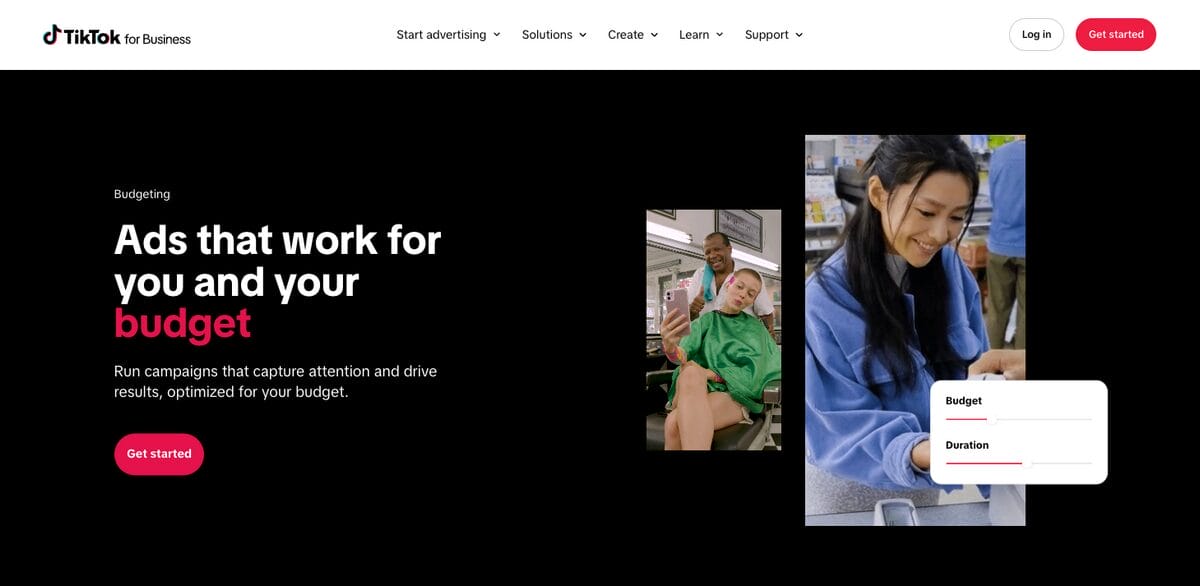
TikTok ads are paid placements that businesses use to promote products, services, or content across the TikTok app. Most appear alongside the videos users already watch, combining vertical visuals, music, captions, and a clear call to action. Depending on the campaign, that action might send viewers to:
- An external product page to complete a purchase (or any other action) outside of TikTok.
- A TikTok profile to see more content and follow an account.
- TikTok Shop to make a purchase directly within the app.
Advertisers can create and manage campaigns through TikTok Ads Manager, where they select an objective, audience, budget, placement, and creative format.
Available formats include video and carousel ads, along with native formats such as Spark Ads, which allow sellers to promote content published by their own TikTok account or an authorized creator (we’ll zoom in on this soon).
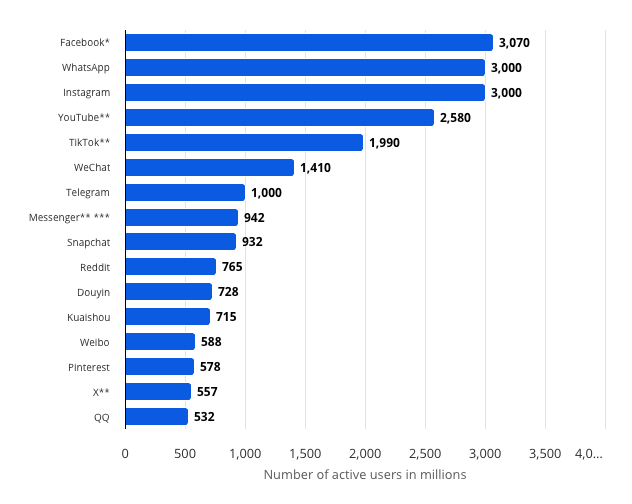
But mostly, why advertise on TikTok? Is it worth it? One simple answer: absolutely. TikTok’s large and highly engaged audience is one of the main reasons advertisers invest in the platform. Think about it: according to Statista, TikTok had approximately 1.99 billion monthly active users worldwide as of March 2026, making it one of the largest social networks globally.
EMARKETER also estimates that in 2026, U.S. TikTok users spend an average of 57 minutes per day on the app, highlighting how much attention sellers can potentially reach through the platform.
However, TikTok ads compete directly with entertainment, tutorials, reviews, creator recommendations, and other organic videos in the feed. Therefore, making your ad stand out is crucial.
The key? Matching the platform’s native style. Capture attention quickly, demonstrate the product clearly, and give viewers a reason to keep watching instead of immediately scrolling past.
How Do TikTok Ads Work For Dropshipping?
With such a massive audience, dropshipping on TikTok is a major opportunity. And that’s where TikTok ads come in, helping sellers reach target audiences through short-form videos and other native-looking formats.
As I’ve mentioned above, depending on your setup, you can direct shoppers to an external store, such as a Shopify or WooCommerce store, or let them discover and purchase products directly through TikTok Shop.
Here’s how the process generally works:
1. Promote Your Store and Products
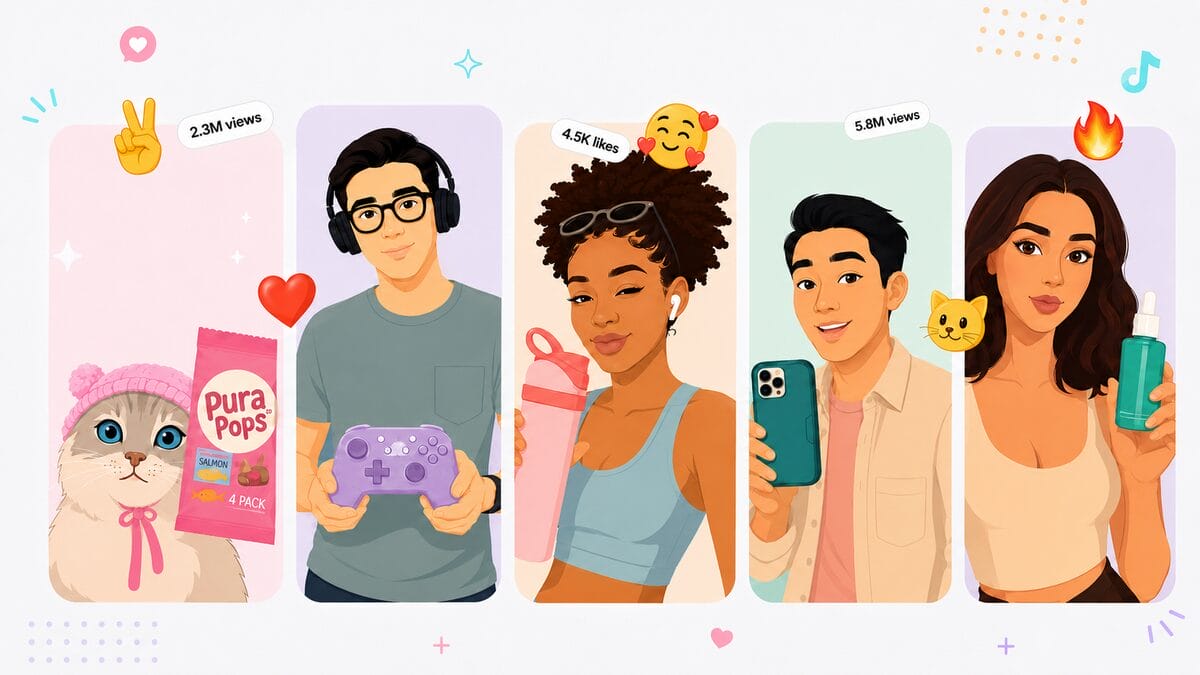
The first thing is the creative approach. Focus on creating ads that demonstrate your dropshipping products and give viewers a clear reason to take action. You have a bunch of creative structures to choose from. For example:
- Problem–Agitation–Solution (PAS): Start by highlighting a relatable pain point, intensify the frustration, then introduce the product as the simple fix.
- Before & After Transformation: Show a clear visual or emotional change after using the product to instantly communicate value.
- UGC/Testimonial Style: UGC ads for TikTok use creator-style footage or customer reactions to build trust and make the ad feel native to TikTok.
- Unboxing + First Impression: Capture curiosity with packaging, then reveal the product and immediate reactions or benefits.
- Fast Product Demo (Hook-First): Open with a strong visual hook in the first 1–2 seconds, then quickly demonstrate how the product works.
- Comparison Format: Position your product against a cheaper, slower, or less effective alternative to highlight superiority.
- POV / Lifestyle Integration: Show the product being used naturally in a daily routine or an aspirational lifestyle scenario.
With your creatives ready, you then place your ads in the TikTok Ads Manager (continue reading for the step by step process on this). The goal is to test as many hooks and structures as possible and understand which ones work best for your audience and product.
2. Customers Discover and Purchase the Product
Once the campaign is active, TikTok delivers the ad to users based on your campaign objective, targeting, budget, and the platform’s delivery system.
From there, the buying journey depends on the sales channel:
- External store: The ad directs shoppers to a product or landing page on your website, where they complete the purchase.
- TikTok Shop: The ad links to a product in your shop, allowing shoppers to browse and check out without leaving TikTok.
💡 Pro Tip: Keeping the TikTok Shop purchase journey inside the app can reduce the number of steps between seeing an ad and placing an order, resulting in higher conversion rates.
3. Collect the Payment
When a customer places an order through your external dropshipping store, your chosen payment provider processes the transaction, including the product price, taxes, and shipping charges where applicable.
For TikTok Shop orders, TikTok manages the in-app checkout and records the transaction in Seller Center. You can then review orders, payments, invoices, and other financial information from the platform’s seller tools.
4. Send the Order Information to Your Supplier
Once the order is confirmed, you need to pass the customer’s order details to your dropshipping supplier. This usually includes the product variation, quantity, delivery address, and any shipping requirements.
You can complete this step manually, but if you’re using ads, I would rather recommend using an automation software to forward orders and reduce repetitive data entry. The biggest advantage here isn’t automating two or three orders, but scaling your operations once ads start working. Unlike organic traffic, paid campaigns can increase order volume quickly, so you need systems that can keep up with demand.
For instance, AutoDS automates dropshipping by handling order processing, monitoring supplier stock and price changes, and using price optimization tools to protect your margins as costs fluctuate. That way, you’re less likely to keep advertising an out-of-stock product or continue selling at a price that no longer makes sense.
5. Package and Ship the Order
Finally, your supplier prepares and ships the product directly to the customer. However, the supplier handles only the physical fulfillment. You remain responsible for the overall customer experience, including accurate tracking, delivery expectations, refunds, and customer support.
For TikTok Shop orders, you’ll manage order and shipping activity through Seller Center and must follow the platform’s fulfillment requirements. Seller Center includes dedicated controls for orders, shipping, customer messages, payments, and related seller operations.
In practice, TikTok ads connect product discovery with the rest of the dropshipping workflow:
- The ad attracts the shopper.
- Your store or TikTok Shop processes the purchase.
- And your supplier fulfills the order.
💡 Pro Tip: The stronger the connection between your creative, product page, pricing, and fulfillment experience, the better your chances of turning views into profitable sales.
Pros & Cons of Dropshipping TikTok Ad Campaigns
Like any paid marketing channel, TikTok ads come with advantages and trade-offs. Understanding both sides can help you decide whether they fit your budget, product, and overall dropshipping strategy.
Pros
One of the main advantages of TikTok ads for dropshipping is that you can launch campaigns through a guided Ads Manager setup, even without extensive advertising experience. You can select an objective, define your audience, upload your creative, set a budget, and monitor results from one dashboard.
TikTok also offers several ways to reach relevant shoppers. Depending on your campaign and account, targeting options may include location, age, language, interests, behavior, and device.
Once you have enough customer or visitor data, you can also create lookalike audiences. These help you reach new users who share characteristics with an existing source audience, such as previous customers or website visitors. TikTok currently offers narrow, balanced, and broad lookalike audience options, giving you some control over similarity and potential reach.
Another advantage is scalability. When a product, creative, and audience combination generates profitable results, you can gradually increase the budget or test the campaign with broader audiences.
Still, scaling is not unlimited: your results will depend on audience size, creative performance, product demand, fulfillment capacity, and whether your profit margins can support higher advertising costs.
Cons
The most obvious drawback is cost. Unlike organic TikTok dropshipping, paid campaigns require you to spend money before knowing whether a product or creative will convert. You may need to test several videos, audiences, and offers before finding a profitable combination.
High engagement can also be misleading. An entertaining video may attract views, likes, and comments without generating enough clicks or purchases. For that reason, you should evaluate campaigns using business metrics such as customer acquisition cost and return on ad spend, not views or likes.
TikTok is also a creative-intensive platform. Ads can lose effectiveness as users see them repeatedly, so successful campaigns often require a steady supply of new hooks, demonstrations, angles, and user-generated-style videos. A strong product alone may not compensate for an ad that feels generic or fails to capture attention quickly.
Finally, TikTok reviews campaigns for compliance with its advertising policies. Misleading claims, restricted products, inconsistent landing pages, payment issues, and repeated violations may result in rejected ads, account restrictions, or suspension. TikTok’s Account Health tools can help advertisers identify policy issues before they escalate.
All in all, TikTok ads can give dropshippers faster and more predictable exposure than relying exclusively on organic content. That said, they work best when supported by a realistic testing budget, strong creative, reliable fulfillment, and careful tracking of profitability.
Types And Formats of TikTok Ads for Dropshipping
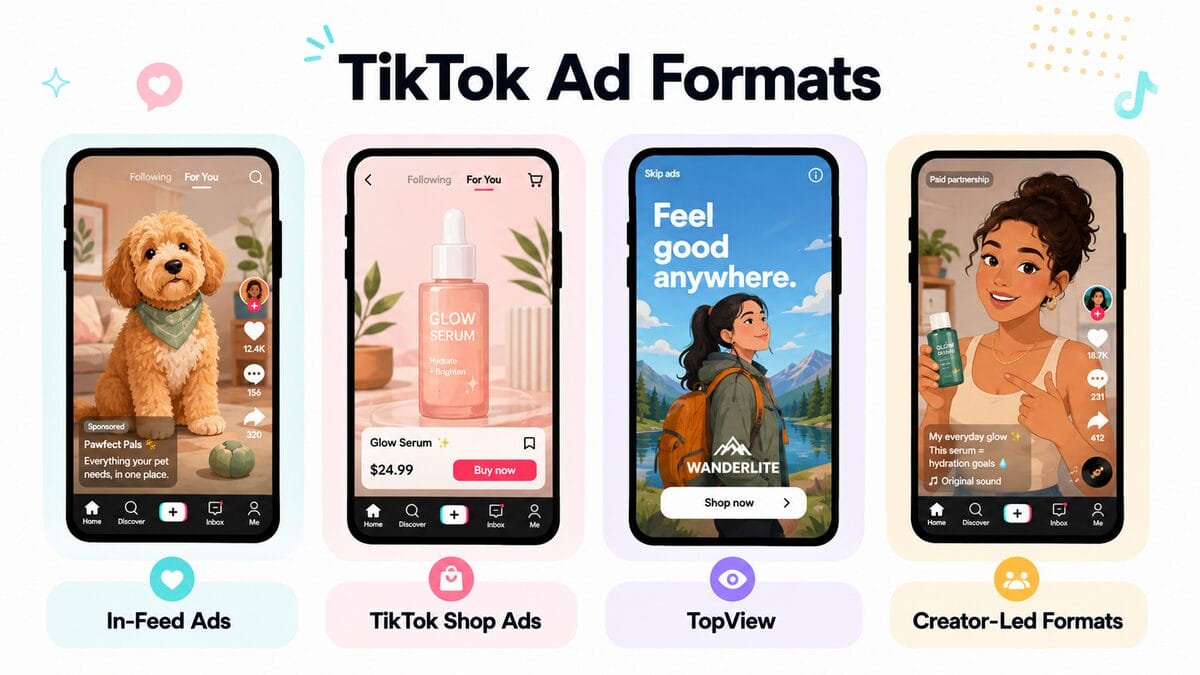
TikTok offers several ad formats, but they do not all serve the same purpose. Some describe how the creative is presented, while others refer to where the ad appears or how the campaign is purchased.
For most dropshippers, the most relevant options are in-feed ads and TikTok Shop campaigns, while premium placements and branded formats are generally better suited to larger awareness campaigns.
In-Feed Ads
In-feed ads appear alongside regular TikTok content as users scroll through the app. That’s literally their main trait. They usually include a video or carousel, a caption, and a call-to-action button that can lead to an external product page, app, profile, or another destination.
TikTok divides in-feed auction ads into two main creative types:
- Spark Ads: Promote an existing organic TikTok post from your account or an authorized creator’s account. The original post keeps the views, likes, comments, shares, and follows generated during the campaign.
- Non-Spark Ads: Use creative uploaded directly through Ads Manager. The video runs as an ad without needing to appear as an organic post on a public TikTok profile.
Spark Ads are especially useful when an organic product demonstration or creator video is already performing well organically. Meanwhile, non-Spark Ads give you more freedom to test dedicated advertising creatives without publishing them on your profile first.
TikTok Shop Ads
TikTok Shop Ads promote products that users can purchase without leaving the app. Instead of directing shoppers to an external store, the ad connects them to a TikTok Shop product page or LIVE shopping experience.
In 2026, new TikTok Shop advertising campaigns use GMV Max, TikTok’s automated campaign system. GMV Max combines eligible products, seller videos, organic posts, affiliate content, and paid distribution to optimize the overall return on investment for the shop.
There are two main versions:
- Product GMV Max: Promotes selected products using eligible videos and product information across TikTok Shop placements.
- LIVE GMV Max: Drives viewers to a LIVE session where they can watch demonstrations, interact with the host, and purchase linked products.
If you’ve been managing TikTok Ads for a while, here’s an important note: earlier formats, such as Video Shopping Ads, Product Shopping Ads, and LIVE Shopping Ads, have been migrated into the GMV Max system for TikTok Shop campaigns. TikTok began this transition in July 2025, although some legacy campaigns may continue running.
TopView and Premium Placements
TopView is a premium video placement shown when someone opens TikTok. It appears before other videos and uses a full-screen, sound-on format designed to generate broad visibility.
Other premium options include:
- Top Feed: Places an ad near the beginning of the For You feed.
- TopReach: TikTok’s premium reach solution that combines TopView and Top Feed inventory, helping advertisers maximize visibility across high-impact placements near the start of the user experience.
- TikTok Pulse: Positions in-feed ads immediately after selected trending or premium brand-safe content.
These formats focus primarily on reach and brand awareness. Because they often involve reserved inventory, higher spending, or direct coordination with TikTok, they are generally less practical for dropshippers who are still testing products and creatives.
Branded and Creator-Led Formats
TikTok also offers formats designed to encourage creator participation and broader brand engagement. These may include branded effects, sponsored creator campaigns, and other interactive activations.
For example, a business might create a custom filter or effect that users can include in their own videos, or invite creators to develop content around a campaign. These formats can produce significant visibility, but they normally require more planning and budget than a standard in-feed campaign.
📢 Marketing Tip: For most dropshipping stores, it makes sense to begin with Spark Ads, Non-Spark in-feed ads, or GMV Max for TikTok Shop. These formats are more closely connected to product discovery, testing, and direct sales than premium placements such as TopView.
Strategies to Advertise Your Dropshipping Business on TikTok
Now that we’ve covered the main TikTok ad formats, let’s look at the broader strategies you can use to promote a dropshipping business.
You might run paid campaigns that send shoppers to an external store, advertise products directly through TikTok Shop, collaborate with creators, or grow an audience through organic content.
Each method uses TikTok differently. The best option depends on where you sell, how much control you want over the buying journey, and whether you have a budget for ads or creator partnerships.
TikTok Ads for an External Store
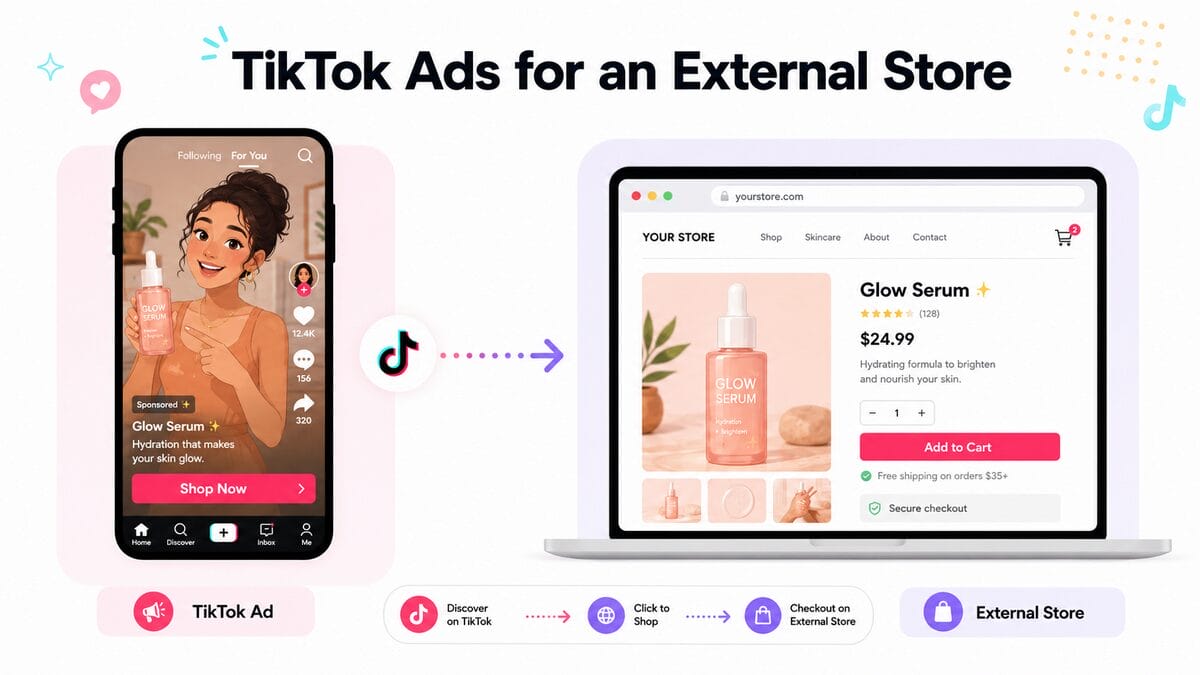
This is the traditional TikTok Ads Manager approach. You create a campaign that takes users to a product page or landing page on an external store, such as Shopify or WooCommerce.
Under TikTok’s Sales objective, you can choose Website as the destination and optimize the campaign for actions such as product views, add-to-cart events, purchases, or conversion value.
You’ll generally need to:
- Create a TikTok Ads Manager account.
- Connect the TikTok Pixel or Events API to your store.
- Choose a campaign objective and conversion event.
- Set your audience, placement, schedule, and budget.
- Upload your ad creative and link it to the relevant product page.
The best part? For most dropshippers, in-feed video ads and Spark Ads are more accessible than premium placements such as TopView.
Spark Ads are especially useful when you want to promote a post from your own profile or an authorized creator while retaining its native likes, comments, shares, and profile links.
This method gives you control over the store, checkout, product pages, and customer data. The tradeoff? Shoppers must leave TikTok to complete their purchase, so the landing page should load quickly, match the ad, and work smoothly on mobile.
TikTok Shop-Native Ads
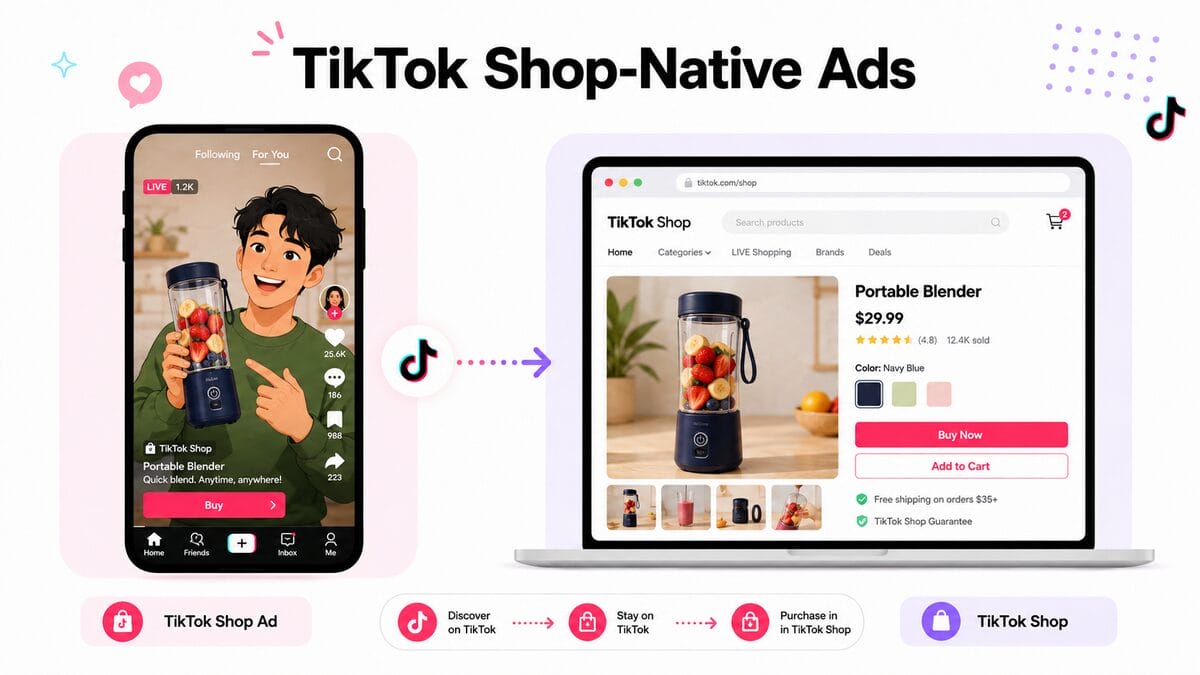
For TikTok Shop sellers, the main decision is not which ad format to choose, but how to connect advertising with the rest of the shop experience. Since shoppers can move from discovery to checkout without leaving TikTok, campaign performance depends on more than the creative alone.
Before launching ads, make sure your product listings are complete, prices are competitive, inventory is accurate, and shipping times are realistic. Reviews, seller performance, and fulfillment quality can also influence whether a shopper feels confident enough to complete the purchase.
You can manage TikTok Shop campaigns through Seller Center or a connected Ads Manager account. From there:
- Use GMV Max to promote products or LIVE sessions.
- Monitor sales performance.
- Adjust your budget based on profitability rather than views alone.
As I’ll explain in the next step-by-step section, this type of campaign is much simpler to implement because the system takes care of most of the process. That said, in contrast to advertising for an external store, you have less control.
All in all, this approach works best when the entire purchase journey is aligned: the ad captures attention, the product page answers key questions, and the fulfillment process meets the expectations set in the video.
TikTok Influencer Marketing
Influencer marketing involves working with TikTok creators to demonstrate or recommend your products. Instead of delivering a traditional brand message, the creator presents the item in a style their audience already recognizes.
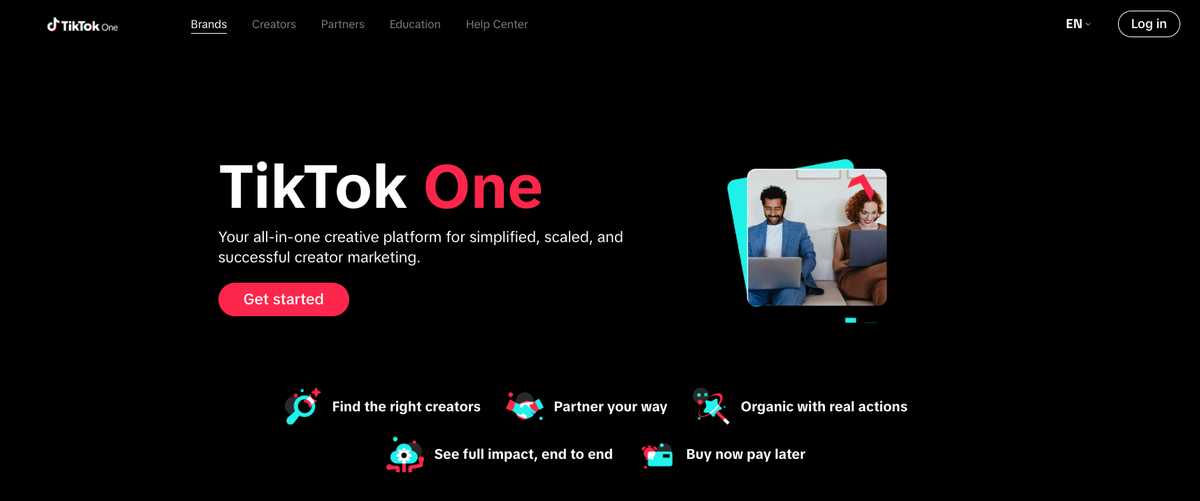
You might pay a creator a fixed fee, provide a free product, offer an affiliate commission, or combine these approaches. TikTok One’s Creator Marketplace can help businesses search for creators and manage collaborations based on factors such as content category, audience, and campaign goals.
Creator content can be used in several ways:
- Published organically on the creator’s account.
- Linked to a TikTok Shop product through the affiliate program.
- Authorized for use in Spark Ads.
- Added to a broader paid campaign as a UGC creative.
The creator’s audience may not perfectly match your ideal customer, so review their previous content, engagement quality, audience location, and brand fit before committing to a partnership.
💡 Pro Tip: A smaller niche creator with relevant followers can be more valuable than a larger account with a broad but poorly matched audience.
Organic TikTok Content
Organic content is not technically advertising because you do not pay TikTok to distribute it. Still, it is too important to ignore.
Combining organic and paid strategies can be one of the most effective approaches. On one hand, demos, comparisons, tutorials, unboxings, and customer-style videos can help you test products and creative angles before investing in paid campaigns.
On the other hand, high-performing organic posts can be turned into Spark Ads, giving you a clearer idea of which hooks, products, and formats are most likely to scale.
TikTok Ads For Dropshipping — Comparison Table
| Method | How It Works | Format | Budget | Control | Scalability | Best For |
|---|---|---|---|---|---|---|
| External Store Ads | Sends users to Shopify, WooCommerce, or another store | In-feed ads | Medium–high | High | High | Full control over checkout |
| TikTok Shop Ads | Promotes products to purchase inside TikTok Shop (user never leaves the app) | Product GMV Max or LIVE GMV Max | Medium–high | Moderate | High | In-app purchases |
| Influencer Marketing | Creators promote products through posts or affiliate content | UGC videos, affiliate posts, or Spark Ads | Low–high | Moderate | Moderate | Trust and product demos |
Create A TikTok Ad For A Dropshipping Store: Step-by-Step Guide
For standard TikTok Ads Manager campaigns, advertising is organized into three levels: the campaign, ad group, and ad. The campaign defines your objective, the ad group controls delivery and targeting, and the ad contains the creative viewers will see.
In contrast, TikTok Shop campaigns use GMV Max, which automates much of this structure and requires fewer manual settings.
The following steps are designed to take you through both processes: either taking the shopper to an external website or letting them purchase right inside TikTok Shop. As you’ll see throughout the setup, the main difference from an advertising perspective comes down to this:
- External store 👉 more manual control over budget, audience, and placements.
- TikTok Shop 👉 GMV Max automates most of those decisions.
So, for each step, I’ll first cover the settings for the external-store process, which typically involves more decision-making if you go the manual way. Then, I’ll clarify the difference for TikTok Shop advertising.
Ready? Let’s go.
Step 1: Create Your TikTok Ads Manager Account
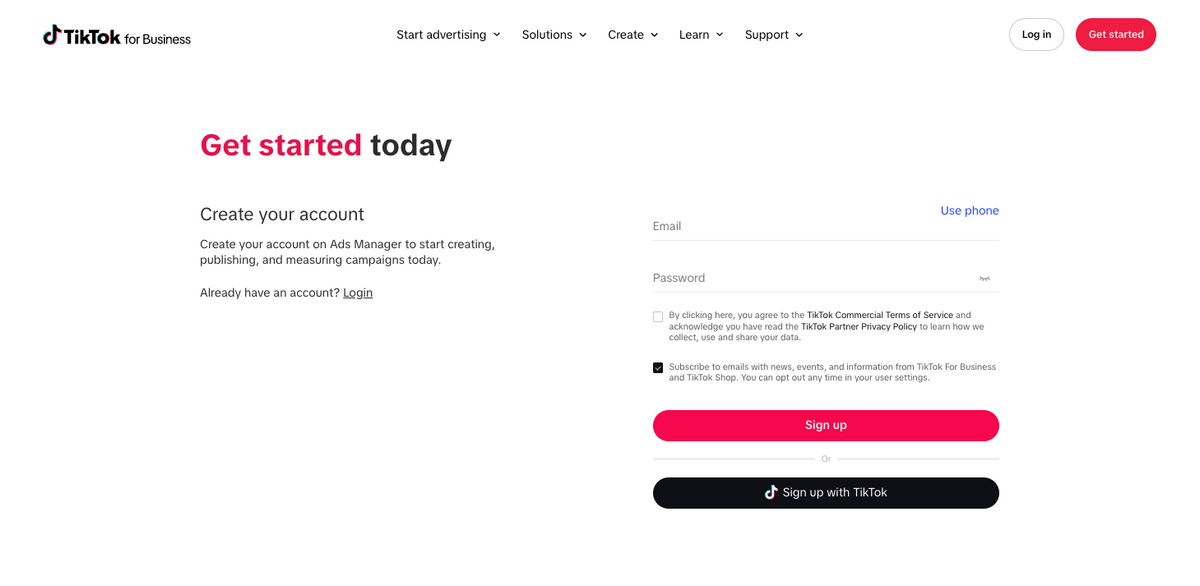
Go to TikTok Ads Manager and create your advertiser account using your email address or TikTok login. Enter your business details, including name, industry, location, currency, and time zone, and then add a valid payment method.
Choose these settings carefully, since your account region, billing currency, and time zone can affect reporting, payment options, and feature availability. Depending on your market and account, TikTok may offer automatic or manual payments.
Before launching your first campaign, set a testing budget you can afford while gathering data. Paid campaigns usually need time and creative testing before results become consistent.
Step 2: Connect Your Store and Tracking
This is the step where you connect your store with your Ads Manager.
If you’re sending shoppers to an external website, you can install the TikTok Pixel, use Events API, or combine both. The Pixel records browser-based actions such as:
- Viewing a product
- Adding an item to the cart
- Beginning checkout
- Completing a purchase
These will help the system measure the performance of your ads inside your website. TikTok recommends combining Events API with an existing Pixel integration to improve measurement and optimization.
Many e-commerce platforms offer partner integrations. You can also configure the connection manually through Tools → Events Manager → Connect Data Source → Web.
If you’re selling through TikTok Shop instead, connect your Shop to Business Center and make sure the advertiser account you’ll use has GMV Max authorization. You can manage or verify these connections through Seller Center.
Once connected, TikTok can use your Shop products, creative assets, and in-app sales data, so you don’t need a Pixel to track purchases completed inside TikTok Shop.
Step 3: Create a New Campaign
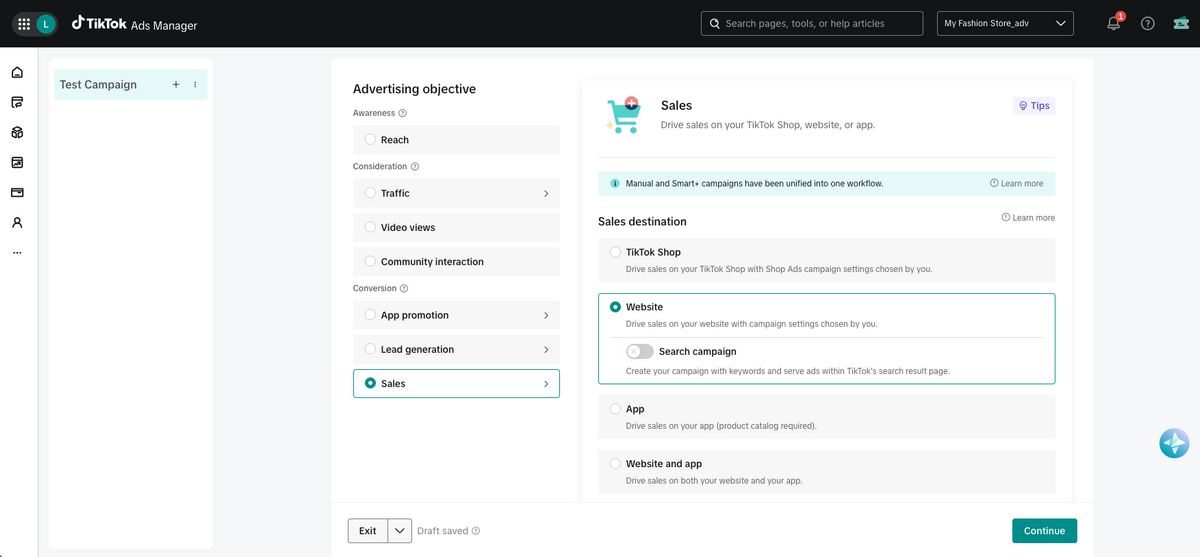
Open Ads Manager and click Create ad on the dashboard, or Create on the Campaign tab. TikTok will then ask you to choose the campaign objective.
When dropshipping, always select Sales and choose your preferred destination: Website if you have an external site, TikTok Shop if you want to drive sales in-app, App, or Website and App, depending on the options available in your account and market.
📢 Marketing Tip: Avoid choosing Reach simply because it is cheaper. A reach campaign is designed to maximize impressions, not purchases. If your goal is sales, optimize the campaign around the action you actually want shoppers to complete.
Step 4: Set Up Your Campaign
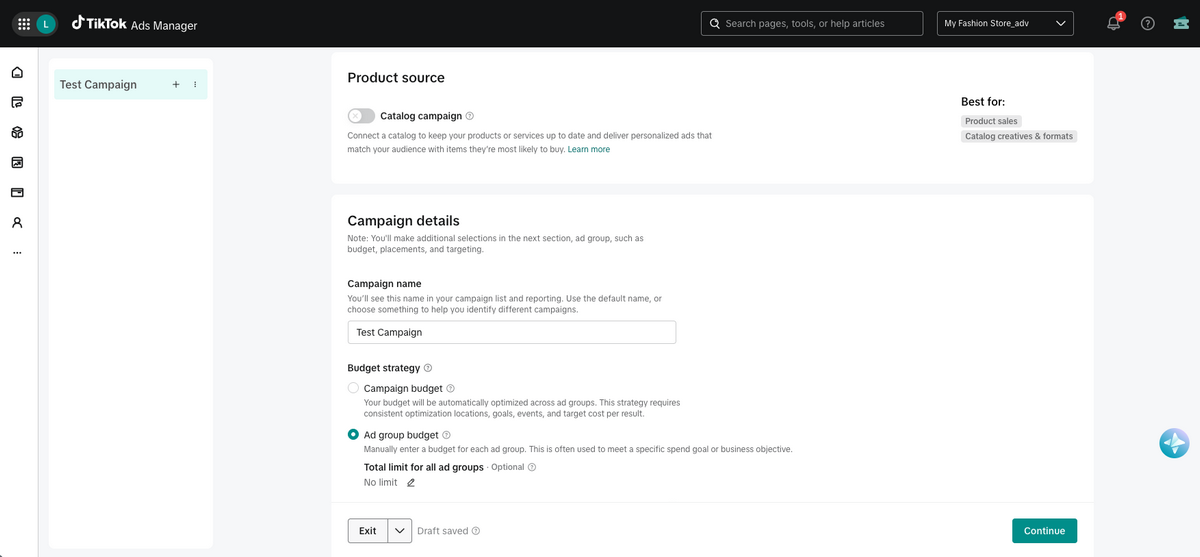
Your campaign setup depends on where you’re sending shoppers.
1. For an external-store campaign, TikTok may offer manual and automated campaign options. A Manual campaign gives you more control over targeting, placements, bidding, and creative testing, while automated options such as Smart+ handle more of these decisions for you.
If you have a connected product catalog, you may also be able to turn on Use catalog, allowing TikTok to use your catalog data to create personalized product ads.
In this step, it’s important you give the campaign a clear name that identifies the product, market, and objective. For example: Portable Fan | US | Website Sales | August.
2. For TikTok Shop campaigns, the setup is different. When you select Sales → TikTok Shop, TikTok uses GMV Max for new campaigns. Rather than choosing between Manual and Smart+, GMV Max automatically optimizes products, creatives, placements, and delivery based on your Shop data.
Campaign Budget
In this step, you’ll also choose how you want to spend your budget. For external-store campaigns, you can select a budget strategy:
- Campaign budget: TikTok automatically distributes the budget across your ad groups based on performance.
- Ad group budget: You set a separate budget for each ad group, giving you more control over individual audiences and tests.
🆕 Beginner’s Tip: For a first campaign, an ad group budget can make it easier to control how much you spend on each targeting or creative variation. You can also set an optional total spending limit across all ad groups before continuing to the next stage.
For TikTok Shop campaigns, GMV Max uses a different setup. Instead of choosing between campaign- and ad-group-level budgets, you set a daily campaign budget and an ROI target. You can use TikTok’s recommended values or enter your own. TikTok then automatically manages delivery based on those settings.
Step 5: Configure Delivery and Optimization
For an external-store campaign, most of these settings are configured at the ad-group level. With TikTok Shop, GMV Max automates many of the same decisions.
Ad Group Settings
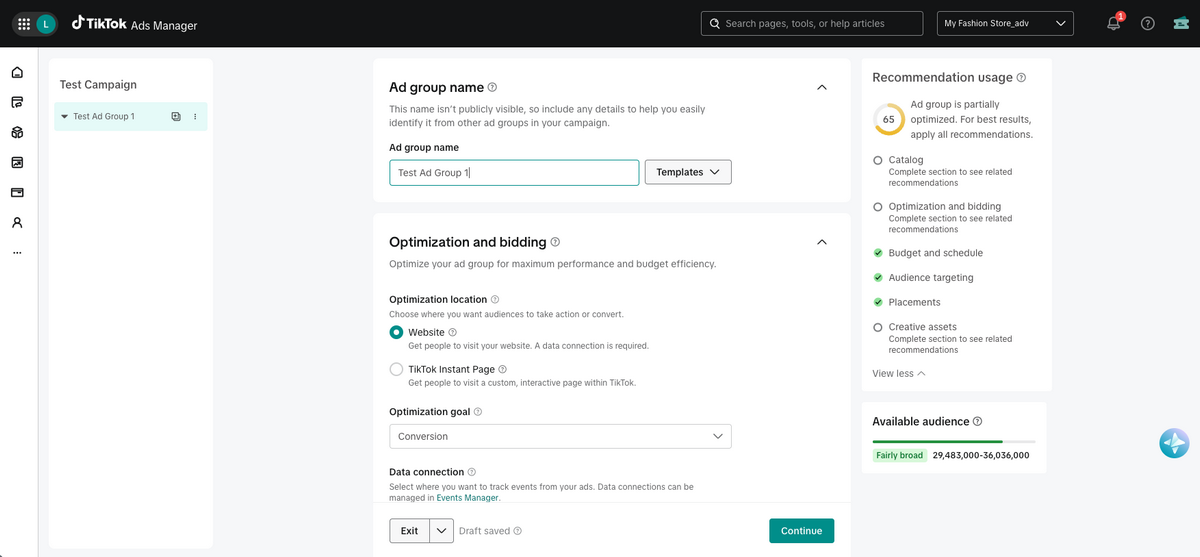
For external-store campaigns, start by giving the ad group a clear internal name so you can distinguish it from other audiences or tests in the same campaign. TikTok may also offer templates that apply saved ad-group configurations.
Then, select where you want users to take action under Optimization and bidding:
- Website: Sends users to your external store. A Pixel or another supported data connection is required for conversion optimization.
- TikTok Instant Page: Sends users to a custom interactive landing page that opens inside TikTok.
Next, choose the action you want TikTok to prioritize:
- Conversions: Targets users likely to complete a tracked website action, such as adding to cart or purchasing. This requires an active TikTok Pixel or another supported web data connection. You can create and manage these connections through TikTok Events Manager.
- Clicks: Targets users likely to click the ad, whether or not the page loads or they purchase. Without a connected tracking source, this may be the only available option.
For TikTok Shop campaigns, there’s no equivalent destination or website optimization setting at this stage. Your destination is already determined by the products or LIVE session selected when you set up GMV Max. TikTok then uses your Shop data and in-app purchase signals to automatically optimize delivery, rather than relying on Pixel-based website events.
Budget
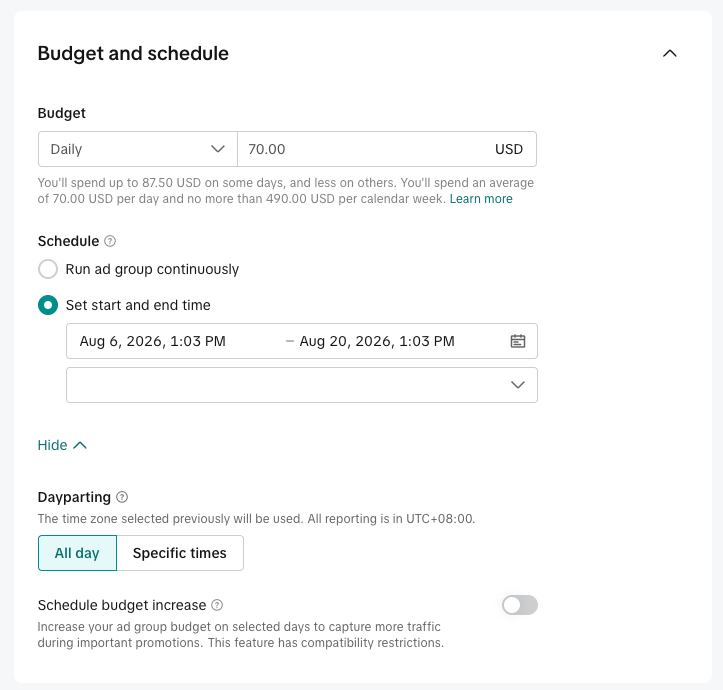
If you’re running an external-store campaign and you chose to spend your budget by ad group (instead of campaign), this is where all the setup happens.
You can choose between:
- Daily budget: The average amount TikTok can spend each day. This is usually the most practical option for ongoing campaigns and initial testing.
- Lifetime budget: The maximum amount TikTok can spend throughout an ad group with fixed start and end dates.
TikTok currently requires daily budgets to exceed $20. For an ad-group lifetime budget, the minimum is calculated by multiplying $20 by the number of scheduled days. Requirements may appear in your account’s local currency. You can also use dayparting to show ads only during selected hours or days.
💡 Pro Tip: Choose a budget you can maintain long enough to gather meaningful performance data without dividing it across too many ad groups. Also, review your budget type carefully before publishing, since TikTok does not let you switch between daily and lifetime budgets once the campaign is live.
For TikTok Shop advertisers: GMV Max uses a simpler budget setup. Instead of dividing spend between campaign and ad-group budgets, you set a daily budget for the GMV Max campaign along with an ROI target.
TikTok then automatically manages spending based on performance. Depending on your campaign, you may also have options such as Max Delivery or automatic budget increases to scale sales when performance allows.
Target Audience
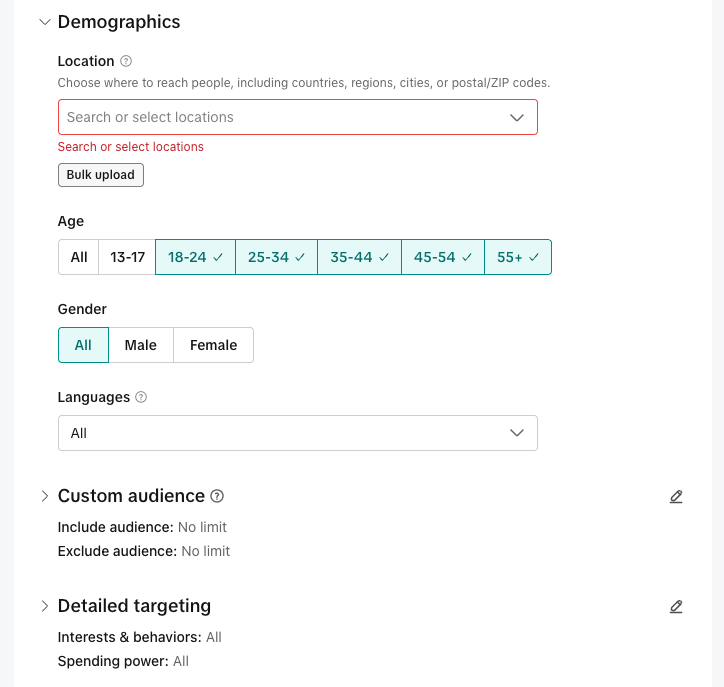
Next: choosing who you’re targeting with your ads. For external-store campaigns, you can either use automatic targeting or define the audience manually using settings such as…
- Location
- Age and gender
- Language
- Interests and behaviors
- Device type
- Custom audiences
- Lookalike audiences
🆕 Beginner’s Tip: Once you’ve manually built an audience you like, you can click on Save new audience to use it for future campaigns and skip the setup process.
But… when to use each method, exactly?
- Automatic targeting gives TikTok more freedom to identify likely buyers and becomes more informed as your campaign collects conversion signals.
- Manual targeting gives you more control, but avoid narrowing the audience based on assumptions alone. An extremely small audience can restrict delivery and make testing more expensive.
All in all, always target the person most likely to purchase the product, who may not always be its end user. For example, a children’s product should usually be marketed to parents or gift buyers rather than children.
Now, that changes a bit for TikTok Shop advertisers. GMV Max automates audience targeting using signals from your Shop, products, organic activity, and paid performance.
You generally won’t manually configure interests, devices, Custom Audiences, or Lookalike Audiences as you would in a Manual website campaign. TikTok automatically adjusts audience settings to find shoppers most likely to purchase.
Placements
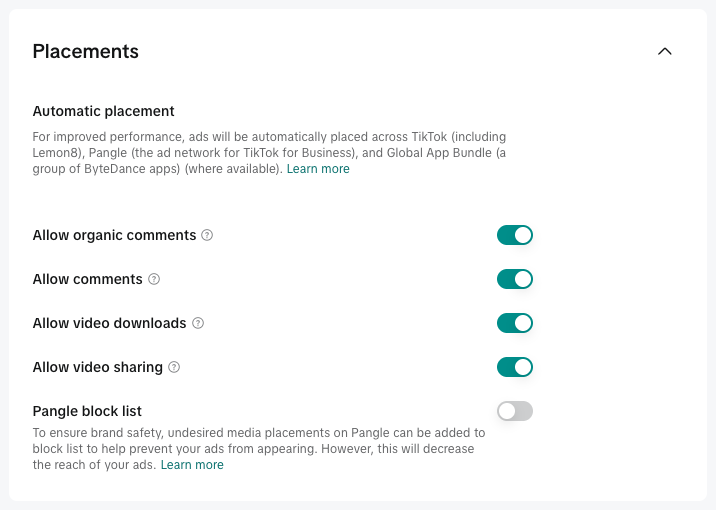
TikTok may use Automatic Placement by default, distributing your ads across eligible surfaces based on expected performance. Depending on your campaign type, account, and region, you may also see an option to select placements manually.
💡 Pro Tip: You may also have controls for interactions such as comments, sharing, or downloads. Keep relevant interactions enabled when possible to help the creative feel more native to TikTok.
For TikTok Shop advertisers, the logic remains the same as previous steps: GMV Max automatically selects eligible placements, so you don’t manually decide where each ad should appear. Product GMV Max can distribute ads across eligible shoppable surfaces such as the TikTok feed, Search, TikTok Shop Tab, and TikTok Pangle, where available, based on where it expects to generate the strongest results.
Step 6: Build Your Ad
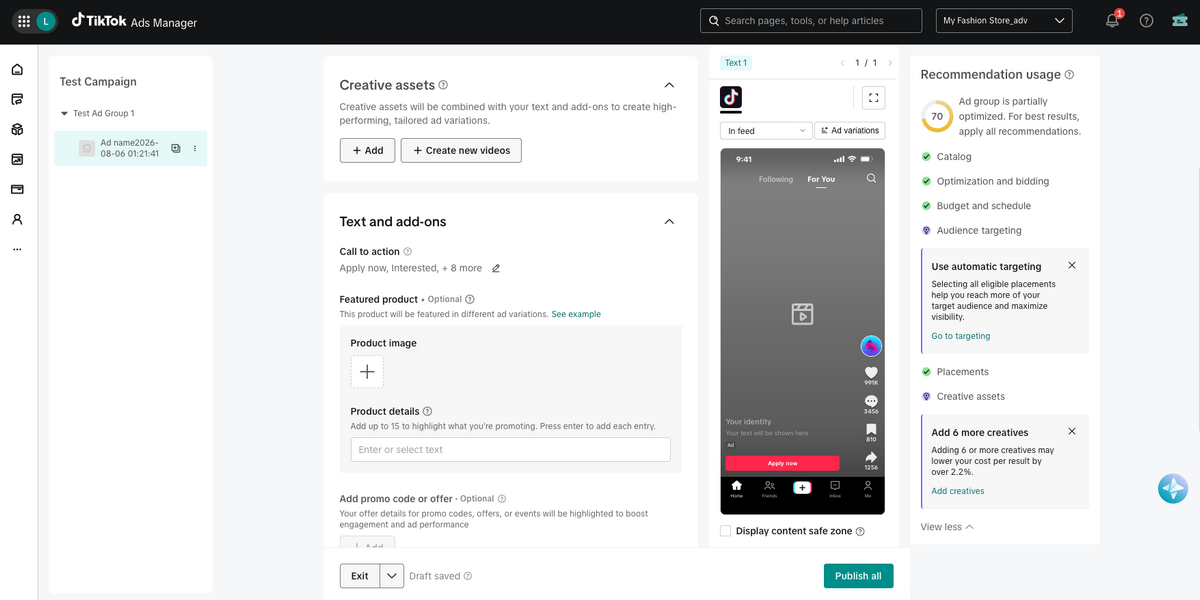
The creative setup depends on your campaign destination. With an external-store campaign, you configure individual ads directly. With TikTok Shop, GMV Max automatically uses eligible Shop and creator assets to build and optimize ads.
Destination
This only applies for external-store campaigns, as this is where you choose where shoppers should go after interacting with the ad.
Add the exact product-page URL from Shopify, WooCommerce, or another platform. You may also be able to use a TikTok Instant Page.
Whichever destination you use, make sure the product details, pricing, offer, and claims match the creative.
Upload or Choose Creative Assets
For an external-store campaign, start by giving each ad an internal name, and then you can:
- Upload a new video or image as a Non-Spark Ad.
- Select an existing post from your TikTok account.
- Use an authorized creator post as a Spark Ad.
For TikTok Shop campaigns, GMV Max automatically explores eligible seller-created videos, organic posts, authorized Spark Ads, affiliate content, and product assets. You can manage which creatives are available and properly authorized (including your own videos), but TikTok determines which ones receive delivery.
Text and Add-Ons
This is where you set up everything that surrounds and complements your creative. For external-store ads:
- Write a short caption that supports the creative instead of repeating everything shown on-screen. Focus on specific product details or benefits.
- Select a relevant call to action, such as Shop Now, Buy Now, or Learn More, depending on the campaign and destination.
- You may also be able to include interactive add-ons such as stickers, cards, or product elements. Use them only when they make the offer or the next step clearer.
With GMV Max, much of the ad assembly is automated using your eligible creative and product information, so focus on accurate product listings and a strong pool of creative assets.
Tracking
Tracking is the process of measuring what shoppers do after seeing or clicking your ad. It helps you understand whether the campaign is generating meaningful actions (not just views and clicks) and gives TikTok the data it needs to optimize delivery.
For external-store campaigns, select your TikTok Pixel, Events API connection, or another supported data source. This allows TikTok to record actions such as product views, cart additions, checkouts, and purchases.
TikTok Shop campaigns track in-app product and sales activity through Seller Center and GMV Max. Review metrics such as orders, revenue, advertising spend, and return on investment to evaluate performance.
Before publishing, confirm that the appropriate tracking setup is active and recording the events that matter for your campaign.
Step 7: Review and Publish
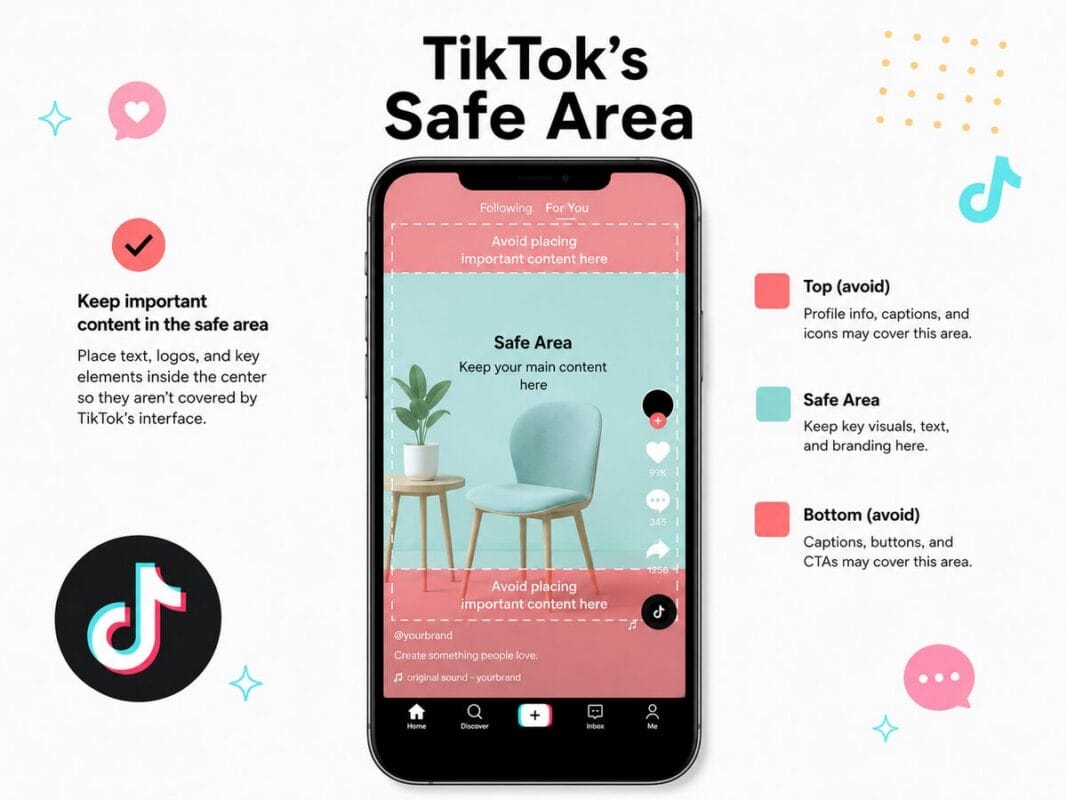
Preview the ad on mobile and check that important text, captions, and product details remain inside TikTok’s safe area. Also, confirm that the creative, copy, offer, product page, and checkout information comply with TikTok’s advertising policies.
Submit the campaign for review once everything is ready.
Step 8: Monitor Performance
Once your campaign is live, monitor performance regularly and make decisions based on business metrics, not just views, likes, or comments. Engagement can tell you whether the creative is attracting attention, but profitability tells you whether the campaign is actually working.
Focus on metrics such as:
- Conversion rate: Shows how many visitors complete the desired action, helping you judge whether the product page and offer are converting traffic effectively.
- Cost per acquisition (CPA): Measures how much you spend to generate one customer or purchase, which is essential for understanding whether your margins can support the campaign.
- Return on ad spend (ROAS): Compares revenue generated with ad spend, giving you a quick view of campaign efficiency.
- Average order value (AOV): Shows how much customers spend per order and can help you understand how much you can afford to pay to acquire them.
- Profit: Accounts for ad spend, product cost, shipping, fees, and other expenses, making it the most important measure of whether the campaign is actually sustainable.
You can still use metrics such as CTR, CPC, watch time, and engagement rate to diagnose creative performance, but treat them as supporting signals rather than the final measure of success.
Finally, test multiple hooks and creative variations, but avoid editing every setting at once. You need a clear view of what caused performance to improve or decline.
5 Best TikTok Ad Spy Tools for Dropshipping
A TikTok ad spy tool helps you research ads, products, creators, and creative trends that are already gaining attention on the platform.
Depending on the tool, you may be able to filter ads by keyword, country, engagement, CTA, product, or time active, and then study their hooks, visuals, copy, and landing pages.
However, these tools do not give you direct access to a competitor’s private Ads Manager data. Treat figures such as estimated impressions, engagement, time active, and potential ad spend as research signals, not proof that an ad is profitable.
📢 Marketing Tip: Downloaded ads should be used to study hooks, pacing, demonstrations, and creative angles. Do not republish another brand’s or creator’s content without permission.
Here are my top picks for spying TikTok ads.
AutoDS Ads Spy Tool
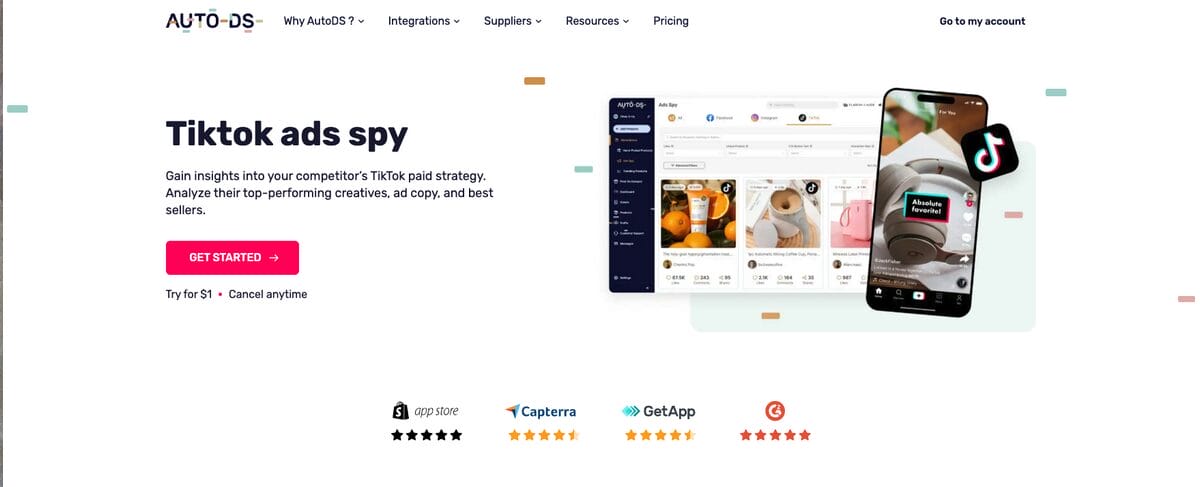
The AutoDS Ads Spy Tool combines TikTok, Facebook, and Instagram ad research in one dashboard.
You can search by keyword and use filters such as likes, linked products, CTA buttons, and platform to narrow the results. The tool also provides engagement analytics and lets you save or download videos for research and inspiration.
Useful features include:
- Keyword and engagement filters
- Linked product and CTA information
- Likes, views, and interaction metrics
- Saved filter combinations
- Cross-platform comparisons
- Video saving and downloading
Its main advantage for dropshippers is that ad research sits alongside AutoDS’ product-finding, sourcing, importing, and store-management tools, something other tools don’t offer at all.
You can check it out and access current ad data with the AutoDS $1 trial—sign up in minutes, no long-term commitment required.
Then, plans start at $26.99/month (paid monthly), and the Ad Spy tool comes with the Product Finding hub add-on at $14.97/month.
🏆 Best for: Dropshippers who want to connect creative research with product sourcing and store automation.
BigSpy
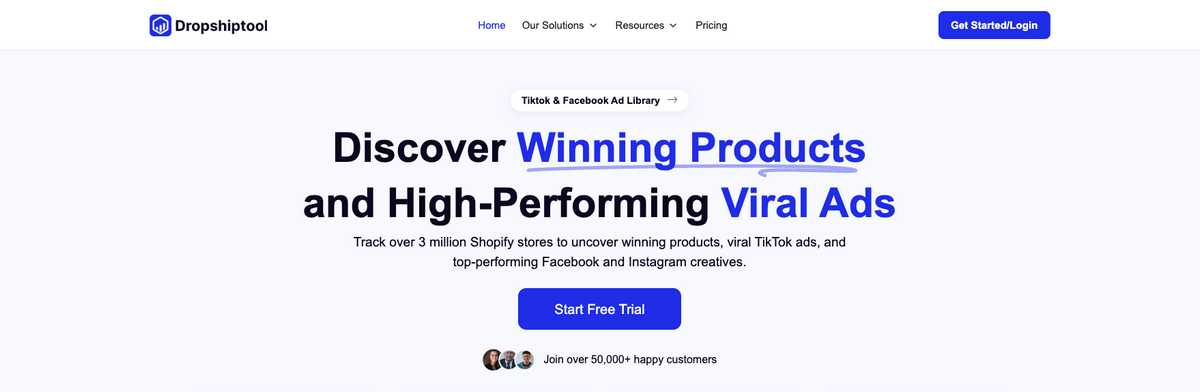
BigSpy is a multi-platform ad research tool covering TikTok and other advertising networks. It lets you search and filter creatives by platform, location, industry, CTA, creative type, engagement, and publication date.
BigSpy offers tiered plans based on monthly searches, starting at $39/month for the Basic plan, all the way to $299/month for the Unicorn plan.
🏆 Best for: Comparing advertising strategies across several social platforms.
PiPiAds
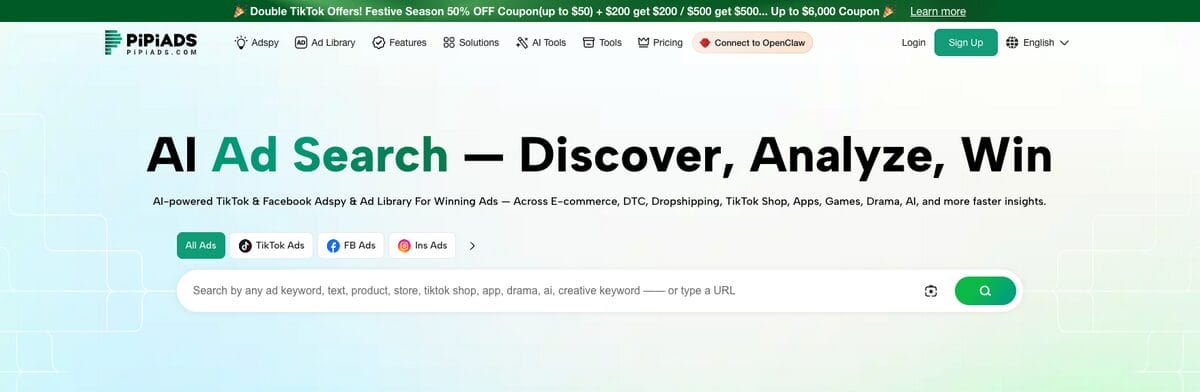
PiPiAds focuses heavily on TikTok advertising and e-commerce research. Its database lets you search TikTok creatives and filter them by details such as region, language, CTA, format, ecommerce platform, advertiser, product, and landing page. It also includes TikTok Shop, product-ranking, and influencer-research features.
PiPiAds currently lists a $69/month Starter plan, a $159/month Advanced plan, and a $1,999/month Enterprise plan. It also offers a Flexible plan starting at $180/month for monthly credits.
🏆 Best for: Sellers who want detailed TikTok and TikTok Shop research.
Minea
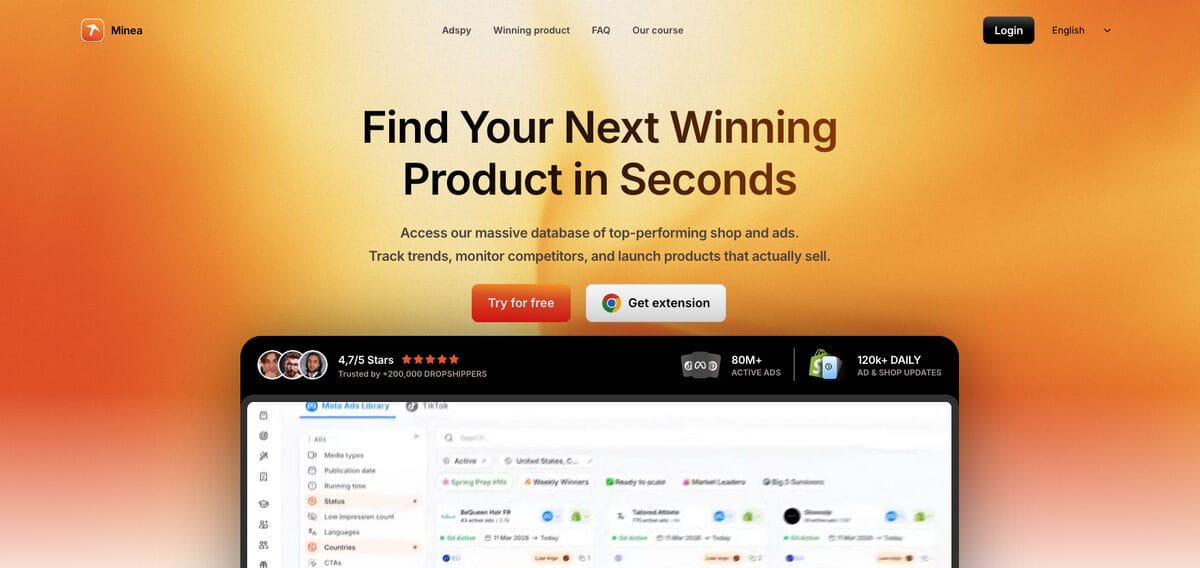
Minea combines ad research with e-commerce product and store analysis. Its TikTok tool can help you search creatives, track performance signals, identify repeated product angles, and connect ads with the stores or products behind them. It also covers other platforms, making it useful for sellers who research beyond TikTok.
Minea currently offers:
- Starter: $49 per month
- Premium: $99 per month
- Business: $199 per month
🏆 Best for: Combining TikTok ad research with product and competitor-store analysis.
TikTok Creative Center: Top Ads
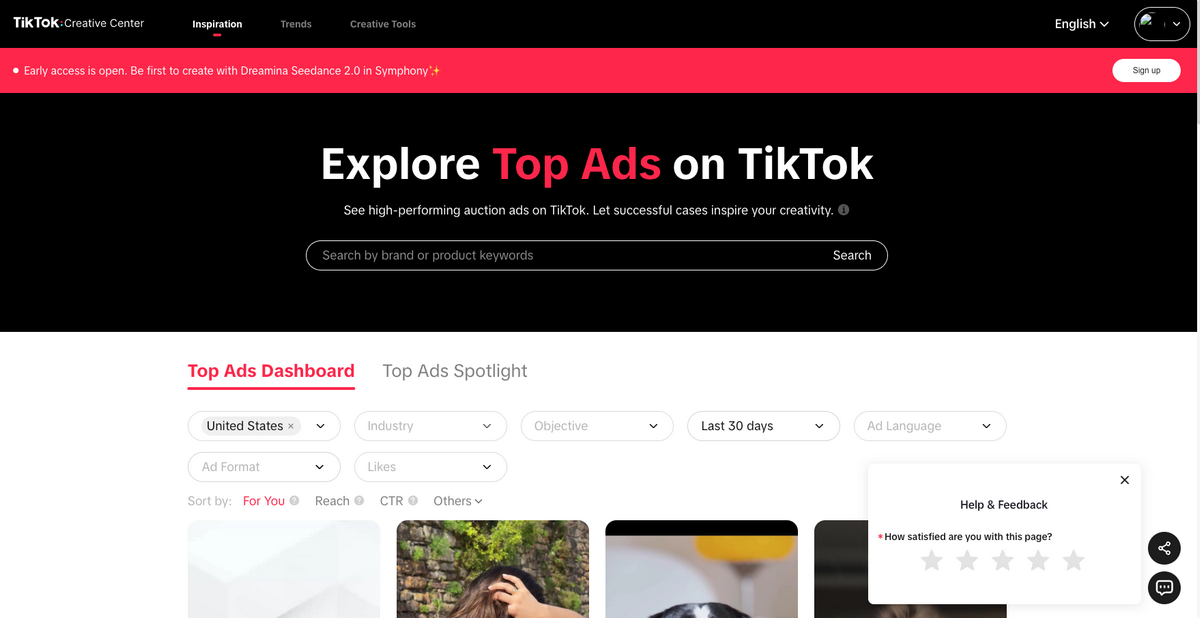
TikTok Creative Center is TikTok’s free, official creative-research platform. Its Top Ads section features auction ads that meet TikTok’s performance thresholds and have been authorized by their advertisers for inclusion. That means it provides selected high-performing examples rather than every ad currently running on TikTok.
You can filter Top Ads by factors such as:
- Region
- Campaign objective
- Language
- Ad format
- Likes
You can also sort examples using performance indicators such as reach and click-through rate. Some ads include frame-by-frame engagement analysis, which can help you identify where viewers responded most strongly to a creative.
Creative Center also provides trend research, creative guidance, and production tools, making it a helpful free starting point before paying for a third-party platform.
🏆 Best for: Free creative inspiration and examples selected directly by TikTok.
Tips for Dropshipping With TikTok Ads
TikTok ads require more than choosing a product and increasing the budget. Use these tips to improve your research, creative testing, and campaign decisions.
Use TikTok to Research Product Ideas
TikTok can help you spot products and creative angles that are already attracting attention, but strong engagement does not automatically make an item profitable.
Use resources such as TikTok Creative Center to explore trends and high-performing ads. AutoDS also offers Ads Spy, Trending Products, Hand-Picked Products, and TikTok Analytics tools for researching creatives and product demand. Before testing anything, verify its profit margin, shipping times, supplier reliability, competition, and policy eligibility.
Create Ads That Feel Native to TikTok
Avoid making your video look like a traditional commercial. Product demonstrations, creator-style reviews, unboxings, tutorials, and problem-and-solution videos usually fit the platform more naturally.
TikTok recommends creating vertical 9:16 videos with sound, using at least 720p resolution, and keeping important text and visuals inside the interface’s safe area. It also suggests featuring people and using a natural, less polished visual style.
Capture Attention Quickly
Introduce the product or main benefit immediately rather than saving it for the end. Start with a clear problem, surprising result, relatable situation, or visual demonstration. TikTok recommends communicating the content’s proposition within the first three seconds and establishing the hook within the first six.
Also, captions and text overlays can add context, but they should support the video rather than repeat everything already being said. Finish with a clear CTA that tells viewers what to do next.
Use Trends Selectively
Trending sounds, formats, memes, and challenges can make an ad feel more relevant, but only when they fit the product and audience. Forcing an unrelated trend into the creative can make the message confusing.
Use TikTok Creative Center to follow current hashtags, songs, videos, and broader platform trends. Then adapt the format to your product instead of simply copying another creator’s content.
Combine Organic and Paid Content
Organic content is useful for testing hooks, products, and video styles before putting money behind them. When a post performs well, you can promote it as a Spark Ad and preserve its native identity and engagement.
Paid and organic strategies can also support each other over time: organic content generates creative insights, while paid distribution helps successful ideas reach larger audiences.
Test Multiple Creatives and Follow Sales Metrics
Avoid judging an entire product from one video. Test different hooks, demonstrations, creators, captions, and offers while keeping enough variables consistent to understand what caused the results.
TikTok currently recommends having approximately three to five unique creatives per ad group to improve performance and reduce creative fatigue. Evaluate them using metrics connected to the campaign goal, such as conversion rate, cost per acquisition, return on ad spend, and profit, not views and likes alone.
Follow TikTok’s Policies and Recommendations
Check TikTok’s advertising policies before launching a new product or creative. Your ad and destination must present consistent information about the product, price, discount, and offer.
Avoid exaggerated results, unsupported claims, misleading buttons, and before-and-after comparisons that could create a false impression.
TikTok Ads Manager also provides personalized suggestions through its Recommendation Center, dashboard, and campaign views. These recommendations can highlight issues related to tracking, budgets, targeting, placements, learning status, and creative fatigue. Treat them as useful diagnostic guidance, but review each suggestion against your margins and campaign goals before applying it.
Frequently Asked Questions
Is TikTok worth it for a small business?
Yes, TikTok can be worthwhile when your target customers use the platform and your products translate well into short-form video. Small businesses can begin with organic content to test products and creative ideas, then use paid ads to scale the videos that generate meaningful results. However, paid campaigns still require a realistic testing budget. Track sales, customer acquisition cost, return on ad spend, and profit to determine whether TikTok makes sense for your particular business.
Can I find best-sellers on TikTok for my dropshipping store?
Yes, TikTok can help you find potential best-sellers by revealing products, ads, search topics, and creative formats that are attracting attention. You can use TikTok Creative Center, ad spy tools, and TikTok Shop research features to identify promising ideas. Still, views and engagement do not guarantee profitability. Before listing a product, check its costs, margins, competition, shipping times, supplier reliability, and policy requirements.
Can I Dropship on TikTok Shop?
Yes, you can totally dropship on TikTok Shop, as it supports third-party fulfillment arrangements. That said, your setup must comply with the Shop policies for your market. For instance, TikTok allows sellers to manage shipping through approved logistics providers, but you remain responsible for accurate listings, product quality, valid tracking, on-time delivery, returns, and customer service. Because requirements vary by country and product category, review the policies for the market where your shop is registered before choosing suppliers or listing products.
Does AutoDS Support TikTok Shop Automation?
Yes, AutoDS integrates directly with TikTok Shop and automates product uploads, stock and price monitoring, and order processing. It can also centralize TikTok Shop management alongside other selling channels.
Turn TikTok Attention Into Dropshipping Sales
TikTok ads for dropshipping work best when the entire strategy connects: the right product, native-looking creative, accurate targeting, a smooth purchase journey, and reliable fulfillment.
Whether you send shoppers to an external store, sell through TikTok Shop, collaborate with creators, or combine paid campaigns with organic content, keep testing your hooks and formats while measuring results through conversions and profit, not views alone.
AutoDS can help simplify the process by bringing product research, TikTok ad insights, importing, price and stock monitoring, and order automation into one platform. This gives you more time to focus on building stronger creatives and improving your campaigns instead of handling every store task manually.
Start your AutoDS $1 trial and begin building your TikTok dropshipping workflow today.
In the meantime, you can continue learning with these related articles:







