Wondering how to build a Shopify store from scratch? Well, good news: in 2026, you can go from idea to a live store faster than ever.
And if you’re ready to get started, you’re in the right place. In this guide, I’ll show you how to do it both manually and using automation, all broken down into clear steps. I’ll cover everything you need to know, from Shopify settings to best practices, costs, and timelines.
Moreover, I’ll show you how AutoDS helps users build Shopify dropshipping stores faster with its AI Shopify Store Builder (your next favorite tool ever) and automated workflows at every step.
Building a Shopify store is simpler than it looks. Follow a clear step-by-step process, and you can go from idea to live store faster than you expect.
Launch fast, then optimize. Your first store is an MVP. Get it live, collect real data, and improve based on what actually works.
Manual vs. automated setup is your biggest decision. Manual setup gives you full control, while automation tools speed things up and reduce repetitive work.
AutoDS helps users build Shopify dropshipping stores faster with its AI Shopify Store Builder, bulk importing feature, and built-in product research tools.
How to Build a Shopify Store Manually: Step-by-Step
Looking to start dropshipping on Shopify? You have two options: building your store manually or automatically. Let’s start with the first one: the old traditional manual setup.
Building your store manually gives you full control. The tradeoff? It’s a longer process with more repetitive tasks. This makes it a good alternative for those looking for in-depth customization and a hands-on approach to every tiny detail.
Let’s go through the step-by-step process on how to create a Shopify store, from idea to launch.
Step 1: Create Your Shopify Account
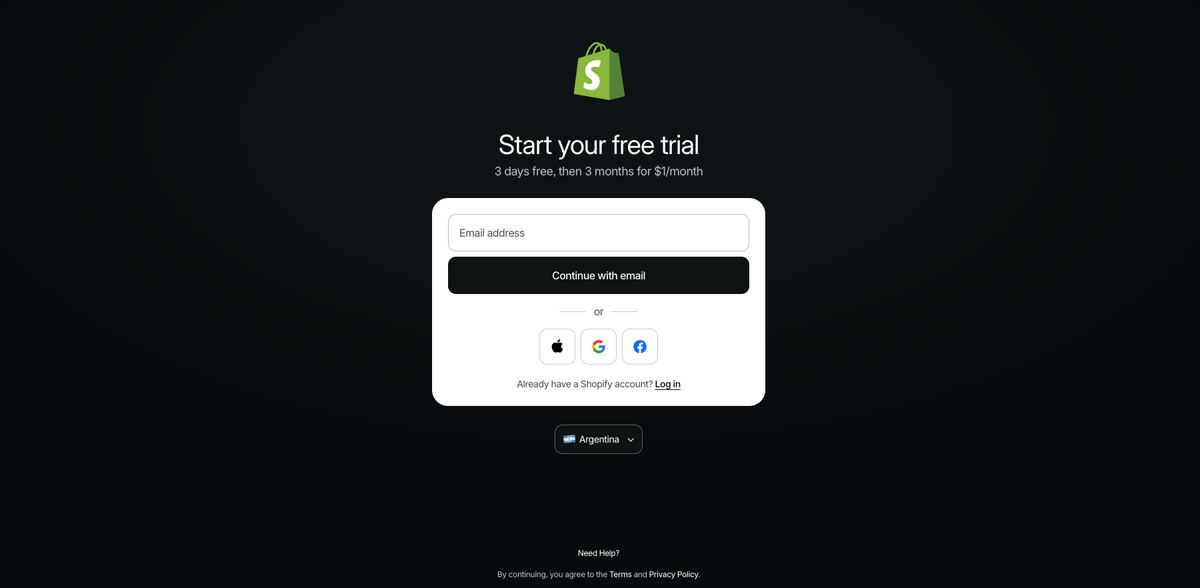
Start by signing up on Shopify and creating your account. You need to enter your email, password, and basic business details. Shopify guides you through a short onboarding process to define whether you are selling online, in person, or both.
Step 2: Choose Your Store Name
Your store name is one of the first things customers will associate with your brand. It should be simple, easy to remember, and relevant to your niche or product category.
Shopify automatically generates a temporary domain based on your store name. While you can change your display name later, choosing a strong name from the start helps you maintain consistent branding across your store, domain, and marketing channels.
💡 Pro Tip: Use the BuildYourStore AI Business Name Generator to find catchy and interesting names for your store that are sure to attract your customers’ attention.
Step 3: Select the Right Shopify Plan
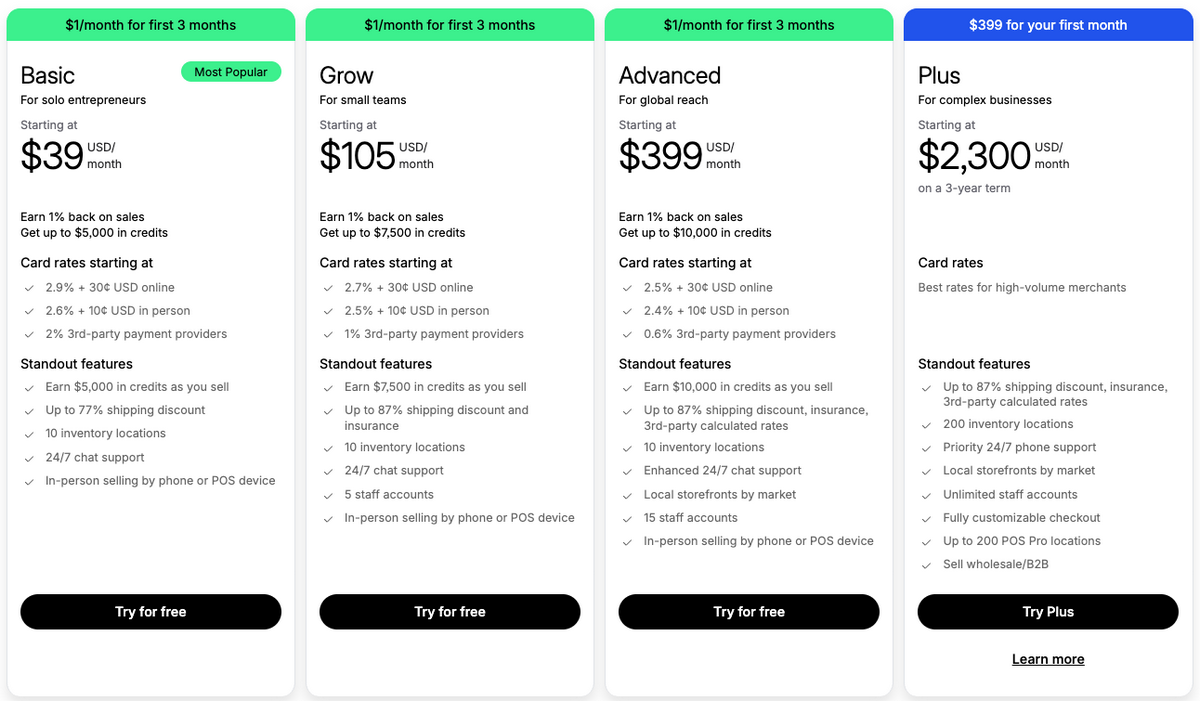
Shopify offers multiple pricing plans, each designed for different stages of business growth. When you are starting out, the basic plan at $39/month provides everything you need to build and launch your store.
Even better? You can get started with the trial for just $1/month for three months, a great opportunity for beginners looking to reduce costs.
As your store grows, you can upgrade to access advanced analytics, better reporting, and lower transaction fees. For beginners, the priority is to launch and validate your store before worrying about scaling features.
Step 4: Set Up Your Store Settings
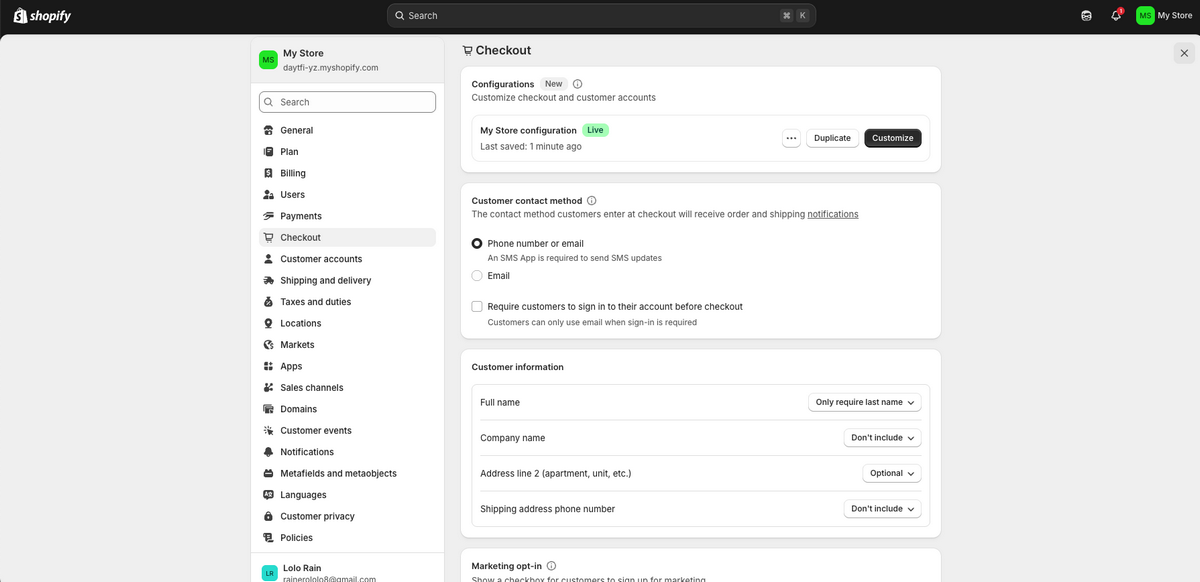
Before designing your store, you need to set up your core business settings. This includes adding your store address, setting your default currency, and choosing your time zone.
You will also define your checkout preferences, such as whether customers can create accounts, how order confirmations are sent, and what information is required at checkout.
These settings directly affect the customer experience, so it is important to get them right early. In addition, set up your tax settings based on your region and target market. This ensures compliance and avoids issues once you start receiving orders.
Step 5: Pick and Customize Your Shopify Theme
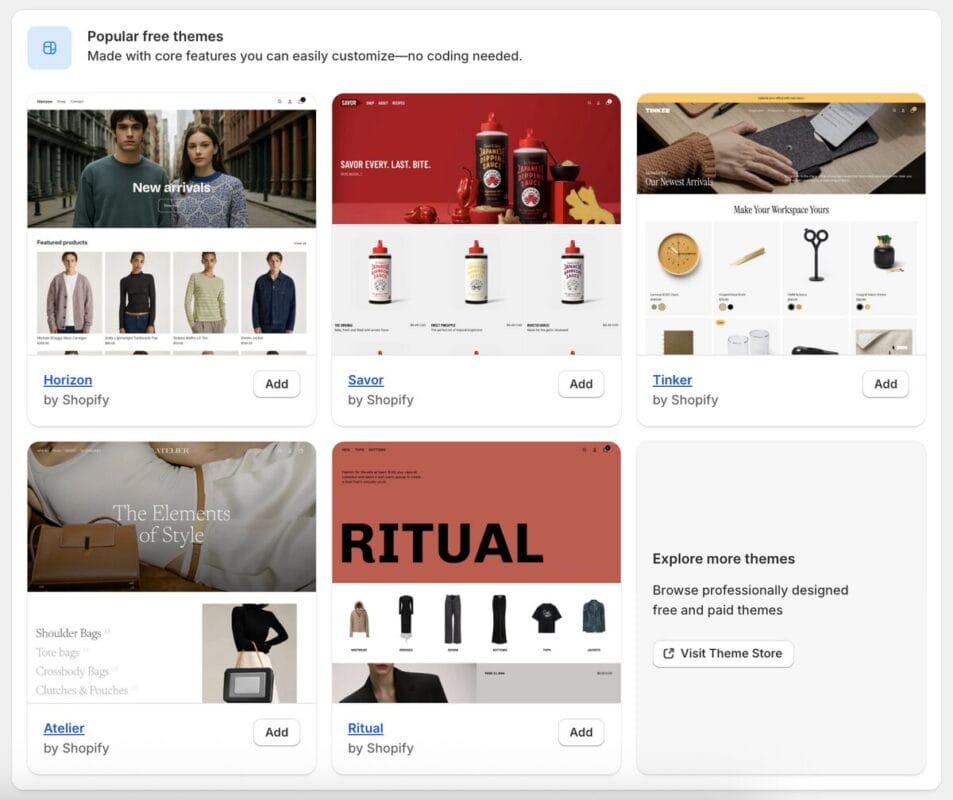
Your theme controls the visual layout and structure of your store. Shopify provides a range of free and paid themes that are optimized for e-commerce.
Choose a theme that fits your niche and focus on customization. Adjust your colors, typography, homepage sections, and product page layout to create a clean and professional look. Keep the design simple and prioritize usability, especially on mobile devices where most users will browse and shop.
Step 6: Create Your Essential Pages
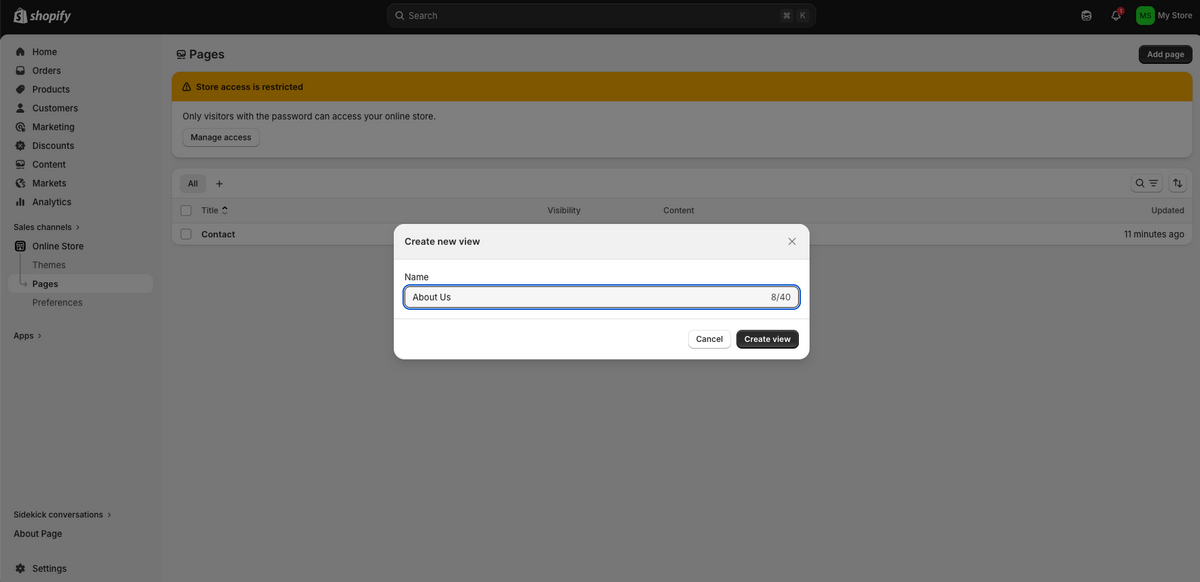
Every Shopify store needs a set of core pages that build trust and provide important information to your customers.
You should create an About Us page that explains your brand, a Contact page so customers can reach you, and policy pages such as Shipping, Returns, and Privacy.
These pages help establish credibility and transparency. Plus, lots of payment providers and advertising platforms also require these pages, so having them properly set up is essential for scaling later.
Step 7: Add Products to Your Store
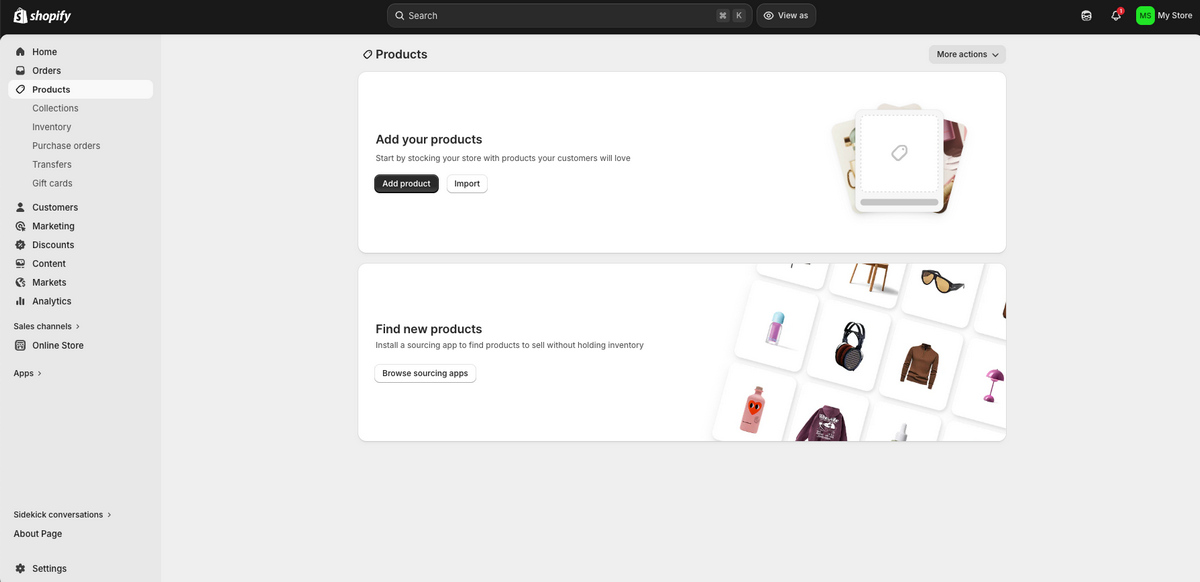
Adding products manually involves entering detailed information for each item. This includes product titles, descriptions, images, pricing, and variants such as size or color.
The main idea is this: your product pages should clearly communicate the value of the product. To do that, focus on benefits, use cases, and clear visuals rather than long technical descriptions.
To find proven best-sellers, you need to browse best-seller lists on supplier websites, spy on your competition, and follow changing trends.
Once you find the products you want to sell, you need to manually copy/paste each piece of product info and content into your product store catalog.
Step 8: Set Up Collections and Navigation
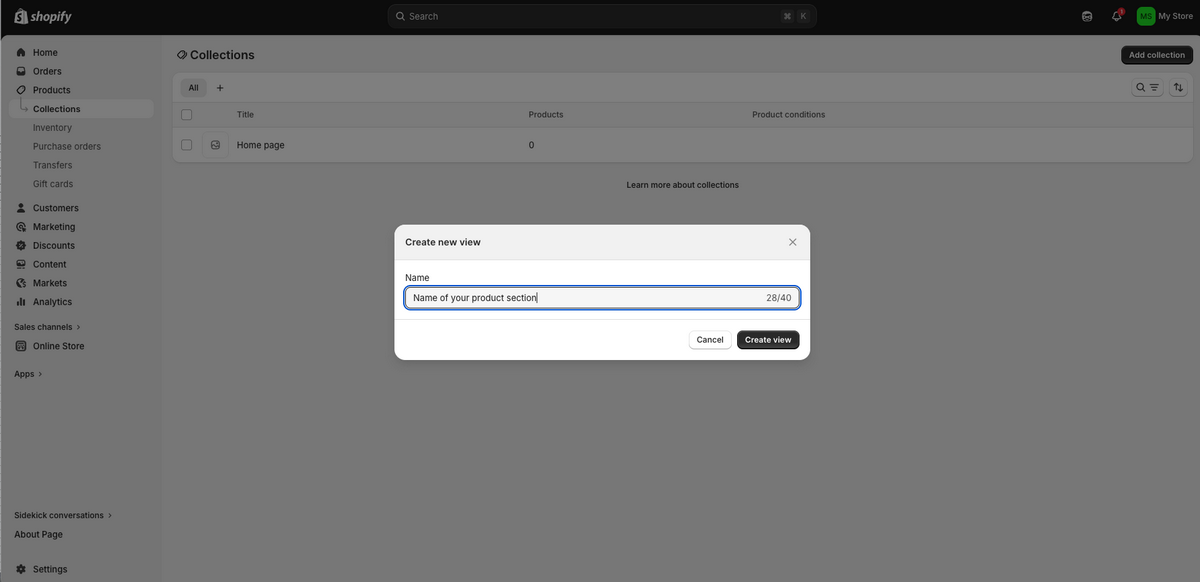
Collections help you organize your products into logical groups, making it easier for customers to browse your store. For example, you can group products by category, use case, or best sellers.
Once your collections are created, you will build your navigation menu. This includes your main menu, footer links, and category structure. A clear navigation system improves the shopping experience, helping customers find products quickly and directly impacting sales.
Step 9: Configure Payments
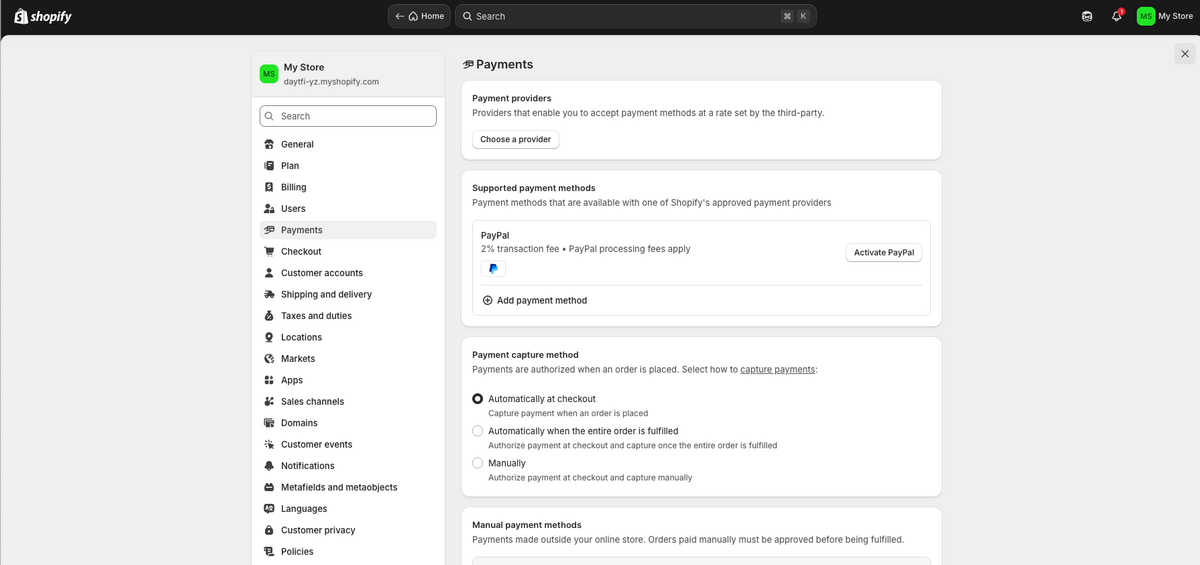
To start accepting orders, you need to set up your payment providers. Shopify allows you to use Shopify Payments or connect third-party providers like PayPal.
Offering multiple payment options increases checkout flexibility and reduces the number of abandoned carts. Make sure your payment setup is fully tested so customers can complete transactions without issues.
Step 10: Set Up Shipping
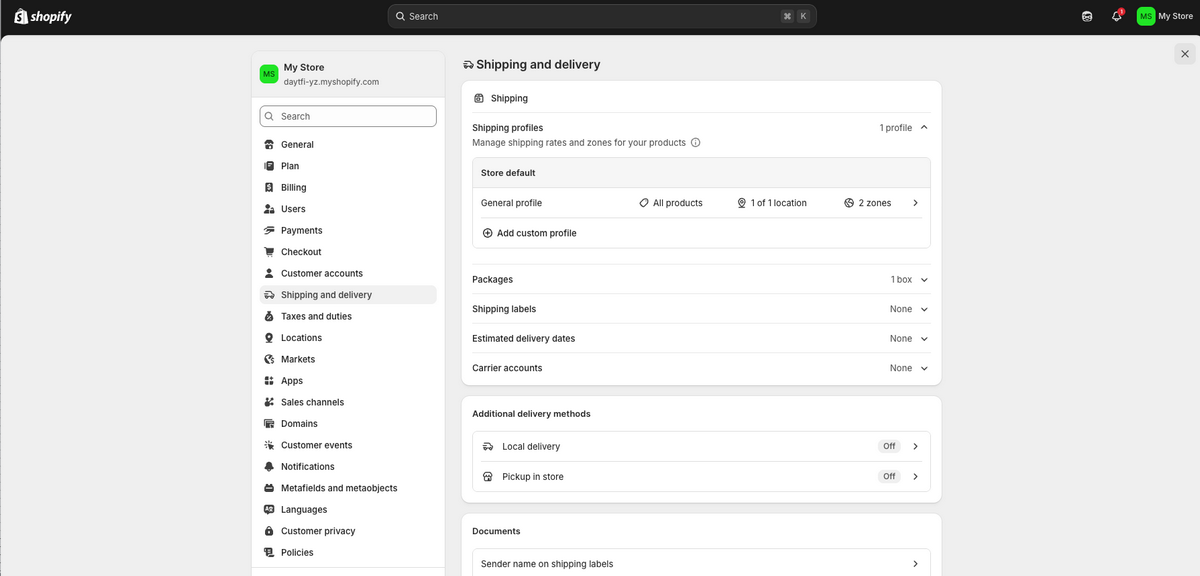
Shopify shipping rates and setup define how your products are delivered and how much customers pay for them. You can choose between free shipping, flat rate shipping, or calculated rates based on location.
It is important to clearly communicate delivery times and costs to avoid confusion and reduce refund requests. Your shipping strategy should align with your product type and target market.
Step 11: Connect a Custom Domain
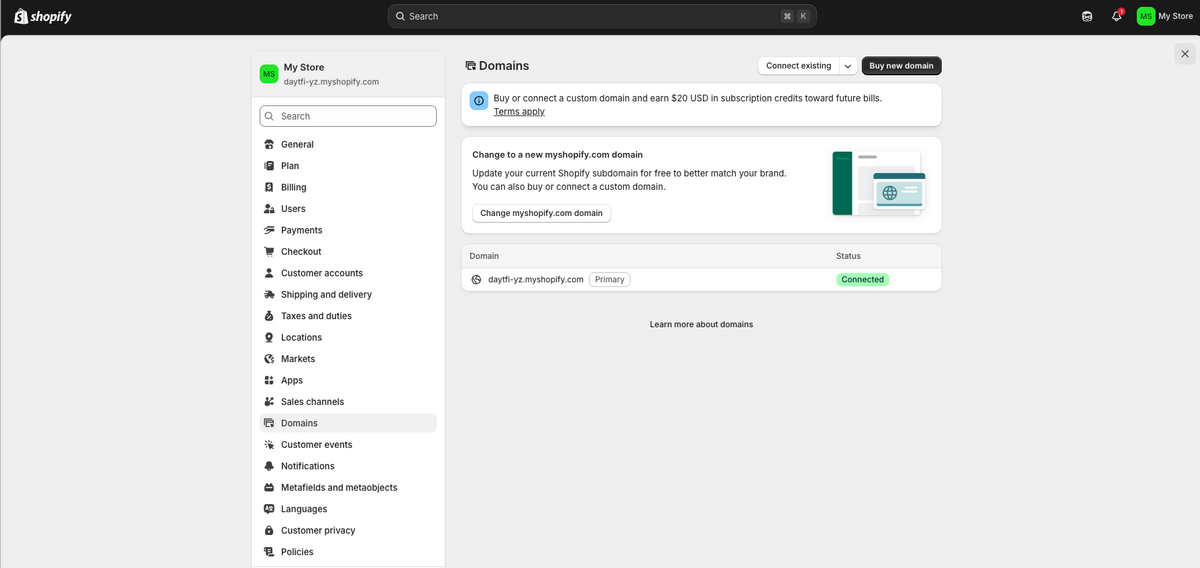
A custom domain replaces your default Shopify URL and gives your store a more professional, unique, and trustworthy appearance.
You can purchase a domain directly through Shopify or connect one you already own. Using a branded domain strengthens your identity and makes your store easier to remember.
Step 12: Review Your Store Before Launching
Before going live, take time to review every part of your store. Check your product pages, test your navigation, and go through the entire checkout process.
Place a test order to confirm that payments, shipping, and notifications are working correctly. This final review ensures your store delivers a smooth and reliable experience from the first customer interaction.
Step 13: Launch Your Shopify Store
Once everything is ready, remove the password protection from your store and make it publicly accessible. At this point, your focus shifts from setup to traffic and sales generation.
Launching is not the end of the process; it is the beginning of optimizing your store based on real customer behavior. To make this stage easier, AutoDS helps users build Shopify dropshipping stores faster by centralizing sourcing, pricing updates, and fulfillment, allowing you to focus on growth instead of manual operations.
How to Build a Shopify Store With Automation
As you can see, the manual road takes time. Luckily, you can take a shorter, more direct path: automation. Think of it this way: manual setup is like driving on a bumpy backroad, while automation is the express highway. Same destination, just different ways to get there.
Building a dropshipping store on Shopify with automation eliminates repetitive tasks. This saves time, reduces errors, and optimizes operations.
In fact, according to Rudys.ai, using AI during the website creation phase can reduce time by 70%. Moreover, according to JetBrains, even 85% of developers use some kind of AI when building a site. So, why stay behind when even professionals are using this technology?
I know: AI can sound intimidating. But don’t worry: you don’t have to do anything fancy. Next, I’ll take you step by step through the full Shopify store setup using full automation.
Step 1 – Create Your AutoDS Account
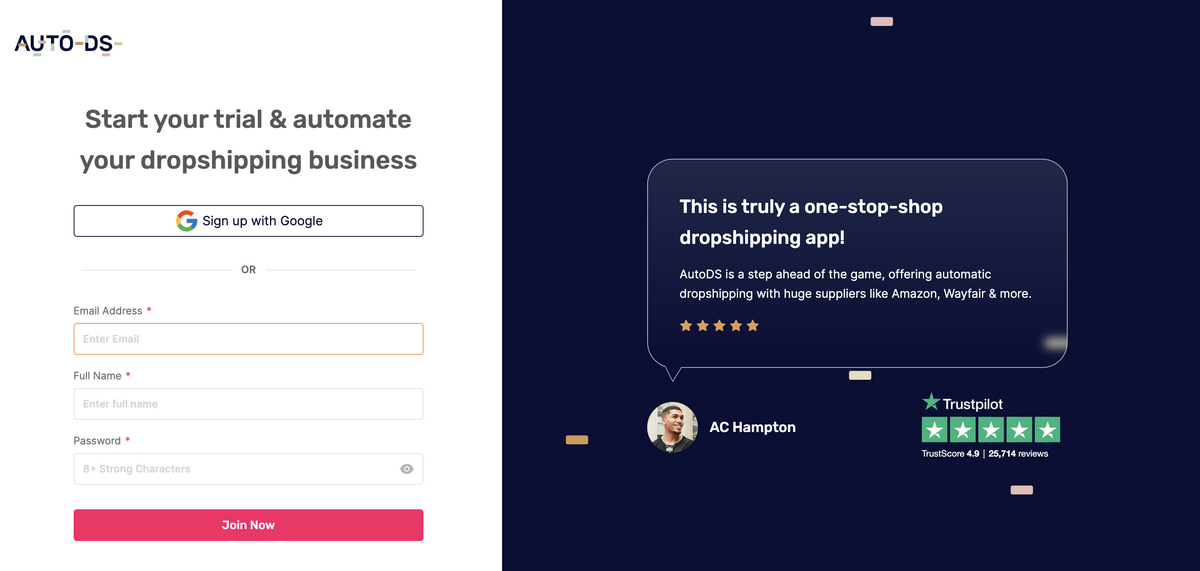
To automate each step of the process, you first need to sign up for AutoDS, the all-in-one dropshipping platform that integrates directly with Shopify.
Good news: you can get started with the AutoDS $1 trial to make the connection to Shopify, set up automation features, and test how the workflow fits your strategy.
Step 2 – Create Your Shopify Account
This part is just the same as doing it manually. You log in to Shopify, create your account, choose your plan, and fill in your basic business information.
Step 3 – Connect AutoDS to Shopify
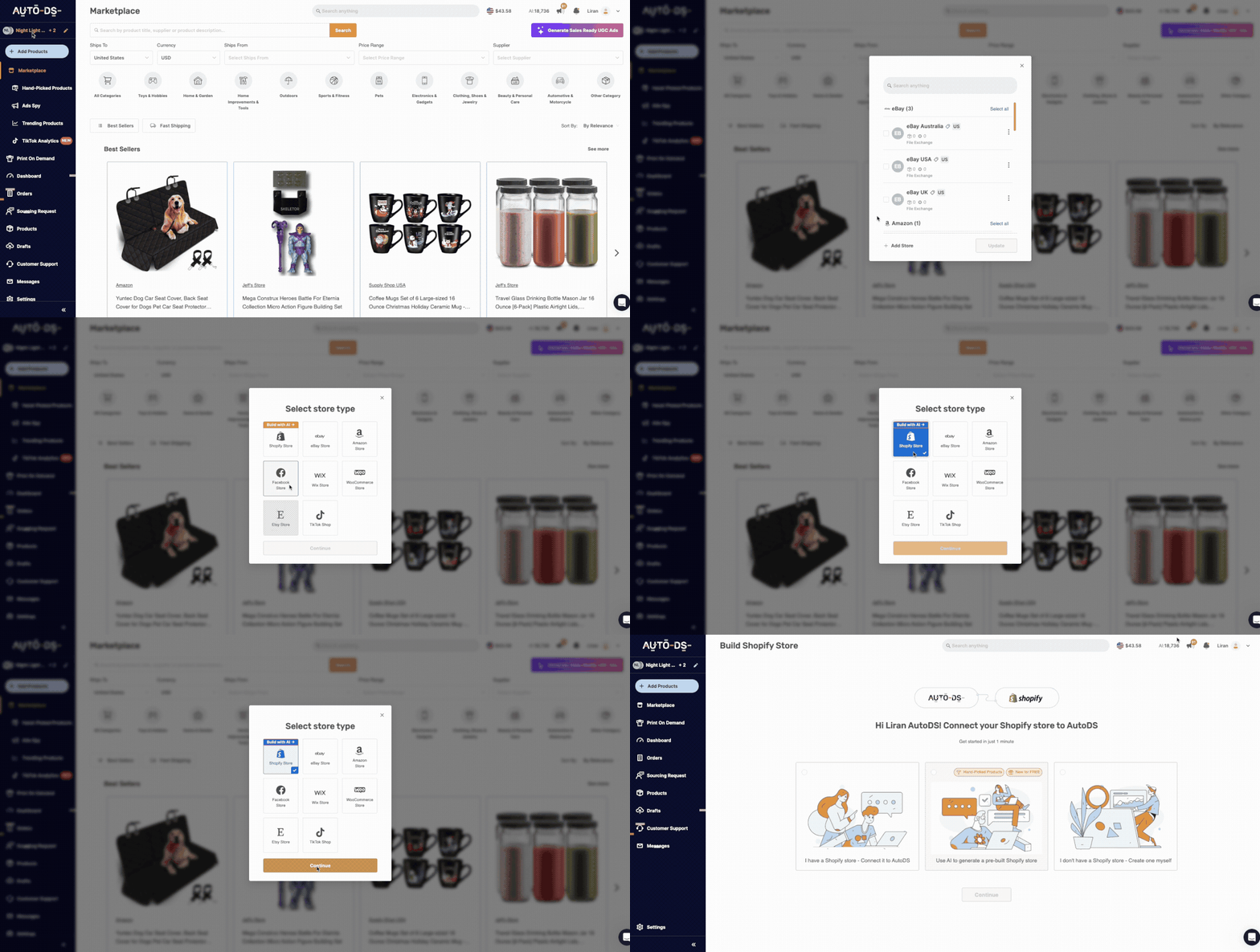
With both your AutoDS and Shopify accounts ready, the next step is connecting them. Don’t worry: no complex integrations or weird coding involved. Because AutoDS integrates directly with Shopify, the connection only takes a few clicks.
Just head to AutoDS, click “Add Store” in the top-left menu, choose Shopify, and continue.
There, you’ll encounter a few options. You can connect your AutoDS account to an existing Shopify store, create one manually, or create one with AI. Let’s zoom in on this in the next step.
Step 4 – Build Your Store With AI

This is where the whole 13-step manual process gets reduced into just a couple of clicks. AutoDS’s AI Shopify Store Builder creates a fully functional, ready-to-launch store for you, without having to manually design pages, import products, or set up every flow one by one.
Instead of starting from a blank canvas, the system builds your store based on your niche, automatically adding a clean, high-converting theme, pre-loaded winning products, and optimized product pages.
Moreover, it includes essential sections like Contact, FAQ, and policy pages, so your store has everything it needs to go live. Lastly, you also get a .store free domain included, so you don’t even have to worry about purchasing and setting up one separately.
All in all, AutoDS helps users build Shopify dropshipping stores faster. You skip the setup phase and jump straight into testing and selling.
Step 5 – Add Products to Your Store

Even though AutoDS’s AI-Built Shopify Store includes 10 pre-loaded items in your store, you can add more products to your catalog using AutoDS’s automatic importing tools.
Instead of manually copying product titles, images, and descriptions (which, honestly, no one enjoys), you can import products in one click from supported suppliers by simply pasting a product URL. You can even do this in bulk, pasting URLs from multiple suppliers at once.
AutoDS automatically pulls in all the key details (images, variants, descriptions, and pricing), saving you hours of setup time.
From there, you can optimize your listings with the AI Product Title and Description Generator, adjust pricing rules, and enable price and stock monitoring.
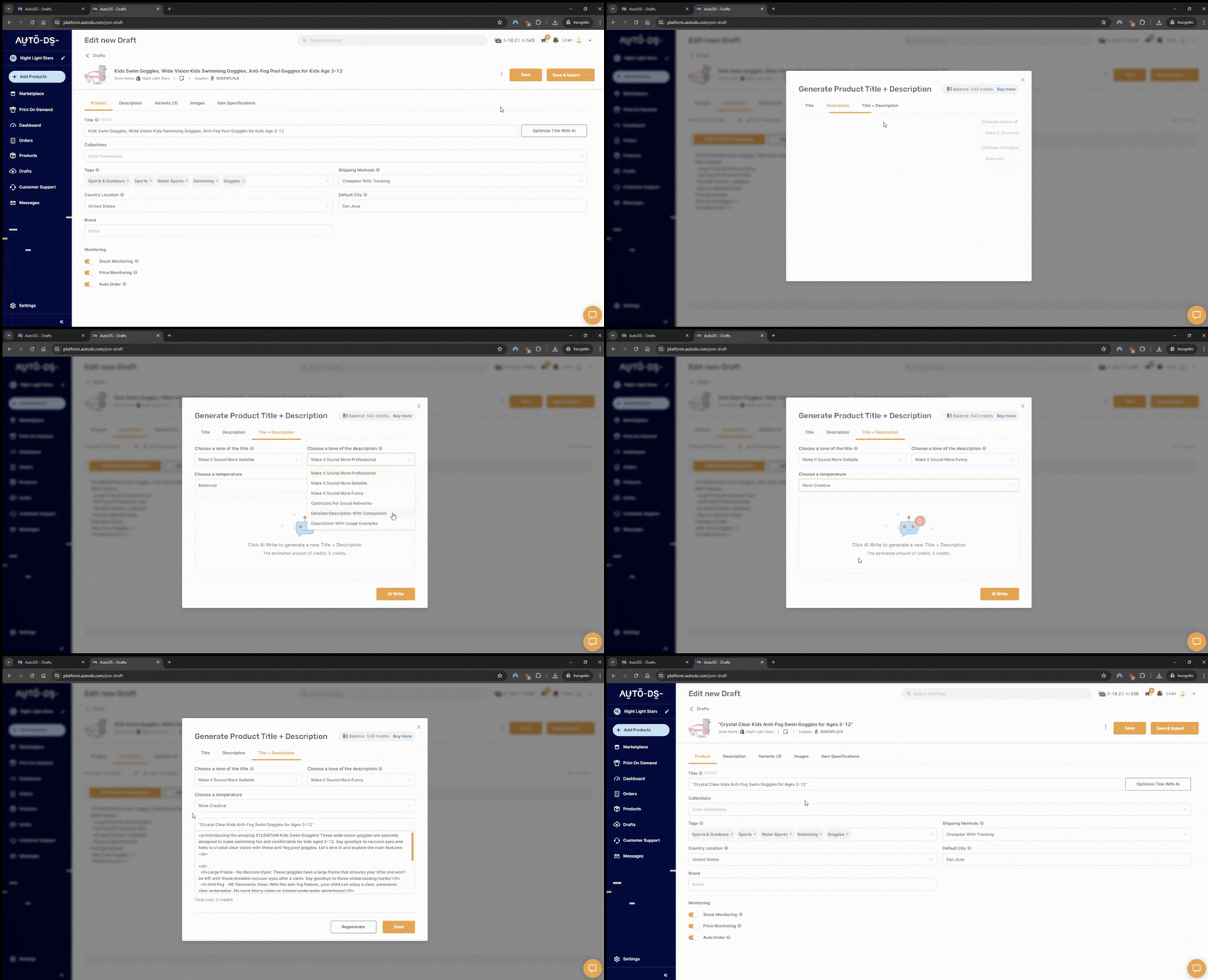
As a result, you get a scalable catalog that’s ready to grow without turning your workflow into a full-time data entry job.
Step 6 – Configure Payments And Shipping
One thing you do need to set up yourself is payments and shipping options directly on Shopify, based on your own preferences. You can do this directly in Shopify Settings, just as you would in the manual workflow.
Step 7 – Review And Launch
All ready to go live! Just take a moment to check everything: place a couple of test orders, review the checkout flow, and make sure your shipping, payments, and emails are working as expected.
🆕 Beginner’s Tip: Don’t obsess over every tiny detail. Your first version isn’t meant to be perfect; it’s meant to be live. At this stage, launch with an MVP (minimum viable product), which is a functional version that’s good enough to start selling.
How AutoDS Helps You Build a Shopify Store Faster
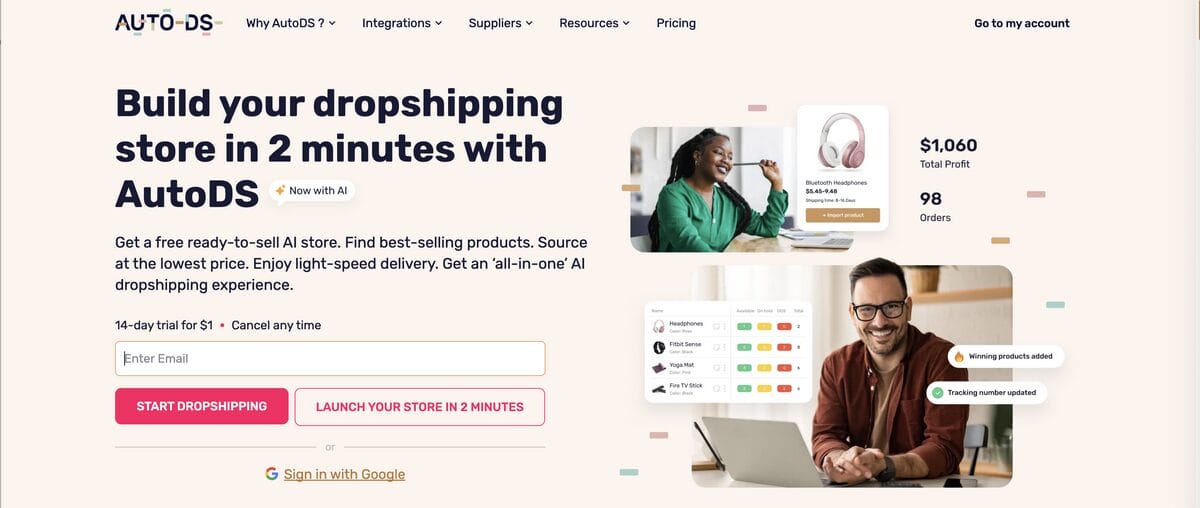
Building a Shopify store manually gives you control, but it also introduces a lot of repetitive work. From finding products to updating prices and fulfilling orders, each step can slow down your launch and limit how fast you scale. This is where automation becomes a competitive advantage, especially for beginners.
AutoDS helps users build Shopify dropshipping stores faster by centralizing the most time-consuming parts of the process into a single platform. Instead of switching between multiple tools and suppliers, you can manage everything from a single dashboard. It includes:
- Product sourcing from 25+ suppliers: AutoDS provides access to a wide network of global and private suppliers, so you can quickly find products that are available, reliable, and ready to sell.
- One-click product importing: Add products to your Shopify store in seconds, including images, variants, descriptions, and pricing.
- Automated price and stock monitoring: AutoDS lets you keep your listings accurate without manually checking suppliers every day, updating everything in real time.
- Order fulfillment automation: When you get a sale, AutoDS can process the order automatically, reducing errors and saving you hours of manual work.
- Built-in product research tools: AutoDS offers different tools to find winning products and validate demand, like Ad spy tools, a Hand-picked curation, a Trending products hub, and more.
All in all, AutoDS automates everything from product importing to order fulfillment, making it easier to go from idea to a fully operational Shopify store with less effort and fewer mistakes.
And here’s the most important part: for beginners, simplicity is key. AutoDS simplifies Shopify store setup for beginners by reducing the technical and operational barriers that often slow people down. Instead of focusing on manual tasks, you can spend more time on product selection, branding, and marketing.
“This is probably the most popular automated dropshipping product app for Shopify right now. It uses AI to automate a lot of the process. It tracks trending products, and it lets us one-click add them to our store. Plus, AutoDS also manages the entire fulfillment process for you.” – Wholesale Ted, pro dropshipper
Why Shopify Is a Popular Choice for Beginners

- All-in-one infrastructure
- Use-friendly interface
- Flexibility
- Payments and checkout
- Integration with AutoDS
Shopify is one of the most popular choices for beginners when it comes to dropshipping for one simple reason: it removes much of the complexity that usually comes with building an online store. For beginners, this means you can focus on launching and selling (no tech skills to get started!).
First, it offers an all-in-one infrastructure. Shopify handles hosting, security, and performance in the background, so you do not need to worry about servers or maintenance. This allows new store owners to get started quickly without prior technical experience.
The platform is also known for its user-friendly interface. Everything from adding products to managing orders is organized in a clear dashboard. This makes it easier to learn as you go, even if you have never built an online store before.
Another key reason beginners choose Shopify is its flexibility. You can start with a simple store and expand over time by adding apps, custom features, or new sales channels. Whether you are selling physical products, digital items, or running a dropshipping business, Shopify supports multiple business models.
Shopify also makes it easy to handle payments and checkout. You can enable built-in payment options or connect external providers, giving customers a smooth and secure buying experience. This reduces friction and helps improve conversion rates.
This makes it perfect for beginners, especially when paired with tools like AutoDS that add a layer of automation that makes everything easier and quicker.
Overall, Shopify is popular because it lowers the barrier to entry. It gives you the tools to launch quickly while still offering the flexibility to grow into a more advanced eCommerce business over time.
What You Need Before You Build a Shopify Store
Before you start the setup process, it is important to have a few foundational elements in place. This helps you avoid confusion later and allows you to move through the build process faster and with more clarity.
A Clear Product or Niche
The first thing you need is a clear idea of what you are going to sell. This can be a specific product, a category, or a niche audience you want to target. The goal is not perfection but direction.
If you are building a general store, you still need a central theme or angle, so your branding and product selection feel consistent. If you are starting a dropshipping store, focus on products with strong visual appeal and clear use cases.
A Basic Brand Direction
You do not need a fully developed brand, but you should have a name, tone, and visual direction in mind. This includes your store name, a simple logo, and a general idea of how you want your store to feel. Having this early makes it easier to choose a theme, design your pages, and create a cohesive customer experience from the start.
A Payment and Business Setup Plan
Before launching, you should know how you will accept payments and manage transactions. This includes setting up your payment provider, understanding your currency, and deciding where you will sell.
Depending on your location, you may also need to consider basic business requirements, such as taxes or legal policies. Even if you are just starting, having a simple structure in place prevents issues later.
A Fulfillment Strategy
You need a clear plan for how orders will be processed and delivered to customers. This includes where your products come from, how fast they ship, and how returns are handled.
If you are dropshipping, your focus shifts to supplier reliability and delivery consistency. AutoDS helps users build Shopify dropshipping stores faster by connecting them with global and reliable suppliers and managing fulfillment automatically in one place, reducing the need for manual coordination.
How Much Does It Cost to Build a Shopify Store?
Building a Shopify store can be done with a low upfront investment, especially for beginners. The main cost is your Shopify subscription, which typically starts at around $39/month. This includes hosting, store builder, and checkout. A custom domain usually costs about $10 to $20 per year.
For design, you can start with free themes, while premium themes range from $100 to $350 as a one-time cost. Apps can add $5 to $50 per month each, depending on the features you need, so it is important to only install tools that directly support your store.
If you add AutoDS to your workflow, costs can be lower. First, the AutoDS AI Shopify Builder gives you a free domain and a custom theme for no extra cost. Moreover, AutoDS combines sourcing, importing, and fulfillment in one tool, reducing the need for multiple paid apps. AutoDS plans start at $26.90/month, paying monthly.
In most cases, beginners can launch with roughly $50 to $100 to get started, then scale costs as the store begins generating revenue.
How Long Does It Take to Build a Shopify Store?
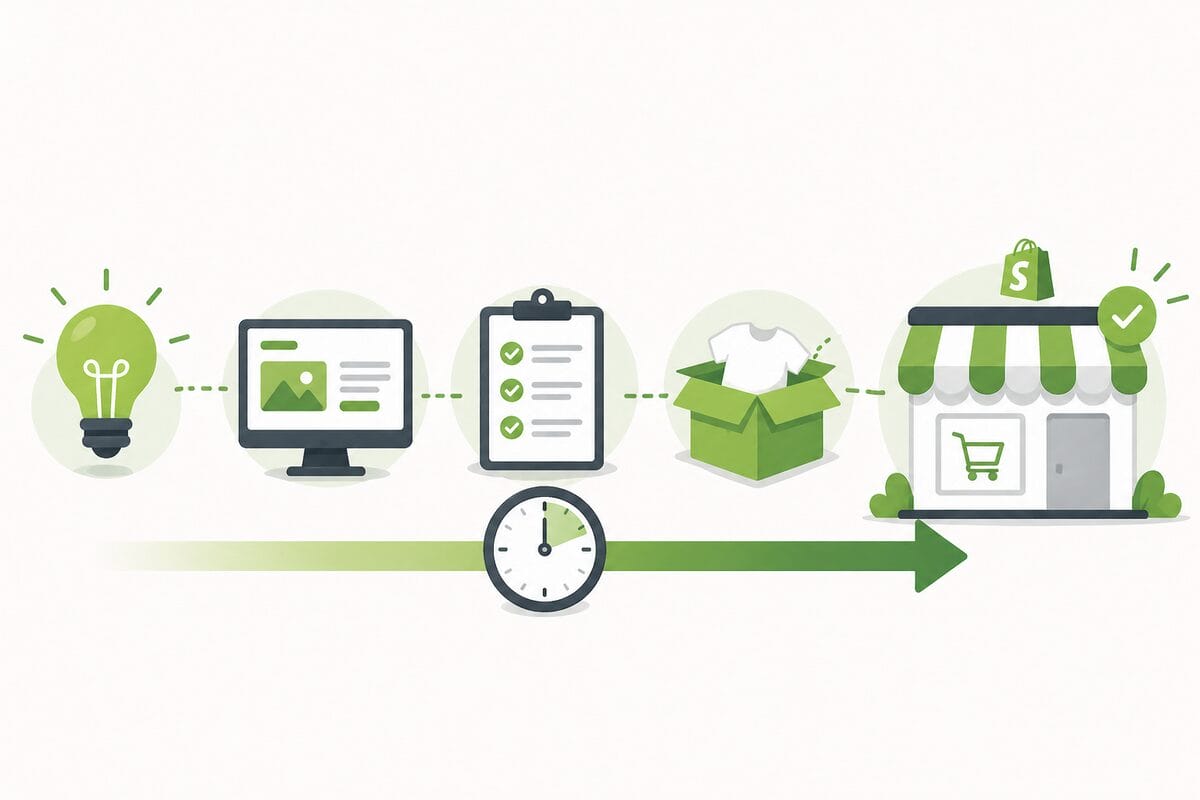
A basic store with a theme, a few products, and essential pages can be launched in one day. However, a more polished store with refined design, optimized product pages, and full settings usually takes two to five days.
The timeline depends on how quickly you handle key steps like product selection, content creation, and store configuration. These are often the most time-consuming parts, especially for beginners doing everything manually.
In practice, the fastest way to build a Shopify store is to launch a simple but functional version first, then improve it based on real data and customer behavior.
🆕 Beginner’s Tip: As we’ve already covered, don’t forget that the AutoDS AI Shopify Store Builder can speed up the Shopify store creation process, providing a nicely built and functional store in minutes.
Tips to Make Your Shopify Store Look More Professional
A professional store builds trust, credibility, and higher conversion rates. Even small improvements in design and structure can make a big difference in how customers perceive your brand.
- Keep Your Design Clean and Consistent
- Use High Quality Product Images
- Write Clear and Benefit-Focused Descriptions
- Build Trust With Essential Elements
- Optimize for Mobile Experience
- Improve Navigation and Structure
Focus on a simple and structured layout. Use a limited color palette, consistent fonts, and clear spacing between sections. Avoid clutter and unnecessary elements that distract from your products.
Your visuals directly influence buying decisions. So, you should use clear, high-resolution images that show the product from multiple angles and in real use.
Your product descriptions are also crucial and should explain what the product does and why it matters. Highlight benefits, use cases, and key features in a way that is easy to scan and understand.
Additionally, you can add customer reviews, clear policies, and visible contact information to build trust. These elements reassure visitors that your store is legitimate and reliable, especially for first-time buyers.
Most users will visit your store on their phones. So, it’s important to make sure your layout, images, and buttons are fully optimized for mobile navigation, with fast loading and easy scrolling.
And lastly, a well-organized store helps customers find products quickly. Use clear categories, simple menus, and logical collections to create a smooth browsing experience.
Frequently Asked Questions
How do I build a Shopify store from scratch?
To build a Shopify store from scratch, you can go manual or automated. Manually, you’ll choose a theme, design your store, set up payments and shipping, create key pages, and add products one by one. Or, you can use automation tools like AutoDS’s AI Shopify Store Builder, which turns most of that process into just a few simple steps.
How do I start a Shopify store as a beginner?
To start a Shopify store as a beginner, the goal is to keep it simple. Pick a niche, create your Shopify account, and use a pre-built theme to avoid overcomplicating design. Add a few products, set up payments, and launch as soon as your store is functional. To make it even easier and quicker, you can use AutoDS and automate each step of the process.
How much does it cost to build a Shopify store?
The cost to build a Shopify store varies depending on your setup, but typically includes a monthly Shopify subscription, a domain, and optional expenses like apps, themes, and marketing. You can start with a relatively low budget and scale as your store grows. This translates to around $50 – $100 to start.
How long does it take to build a Shopify store?
Building a Shopify store can take just a few hours if you use automation (like AutoDS’s AI Shopify Store Builder) or a few days if you do it manually, depending on how much customization you want.
Do I need products before building a Shopify store?
No, you don’t need products before building a Shopify store. In fact, if you choose dropshipping as your selling model, you don’t need to buy inventory at any step of the workflow, as you only purchase products after a customer places an order, and your supplier handles storage and shipping.
Can I build a Shopify store for dropshipping?
Yes, you can totally build a Shopify store for dropshipping. Shopify integrates easily with suppliers and automation tools, allowing you to sell products without holding inventory. You focus on marketing and sales, while suppliers handle storage and shipping.
What do I need before launching my Shopify store?
Before launching your Shopify store, you need a clear niche, a functional store design, products with titles and descriptions, payment and shipping options all set up, essential pages (About, Contact, policies), and a tested checkout process.
Is Shopify good for beginners in 2026?
Yes, Shopify is one of the best platforms for beginners in 2026. It’s easy to use, doesn’t require coding skills, and includes everything you need to run an online store, like hosting, payments, and shipping. Moreover, it lets you pair it with automation tools that make the entire operation easier and quicker to scale.
Start Your Dropshipping Journey With AutoDS
Building a dropshipping store on Shopify isn’t as complicated as it first seems. Once you break it down, it’s really just a series of clear steps: set up your store, customize your design, add products, choose payment and shipping options, and go live.
Now…the real difference between a store that stays stuck and one that grows? Speed of execution and the ability to adapt based on real data.
AutoDS helps users build Shopify dropshipping stores faster by streamlining sourcing, importing, pricing, and fulfillment in one place, so you can focus on scaling, branding, and marketing rather than manual work.
If you want to give it a try, you can start the $1 trial and build your Shopify store with AI in just a few clicks.
And if you’re not ready to start yet, you can keep learning with these articles:
- How To Build A Shopify Store Manually
- How To Build A Store With Automation
- Build Shopify Stores Faster With AutoDS
- Why Shopify Is A Popular Choice
- What You Need Before You Build A Store
- How Much Does It Cost To Build A Store?
- How Long Does It Take To Build A Store?
- Make Your Store Look Professional
- FAQ
- Conclusion